
Erlyc
Erlyc
Toggle sidebar
Log in Get started
Log in Get started
Report this showcase item

Tell us what is wrong — spam, offensive content, stolen work…

Shared artifacts

Supermarket and retail chain management

VS

Volodymyr Savchenko

published 1 month ago · 147 views

63 features

5.0 (2)

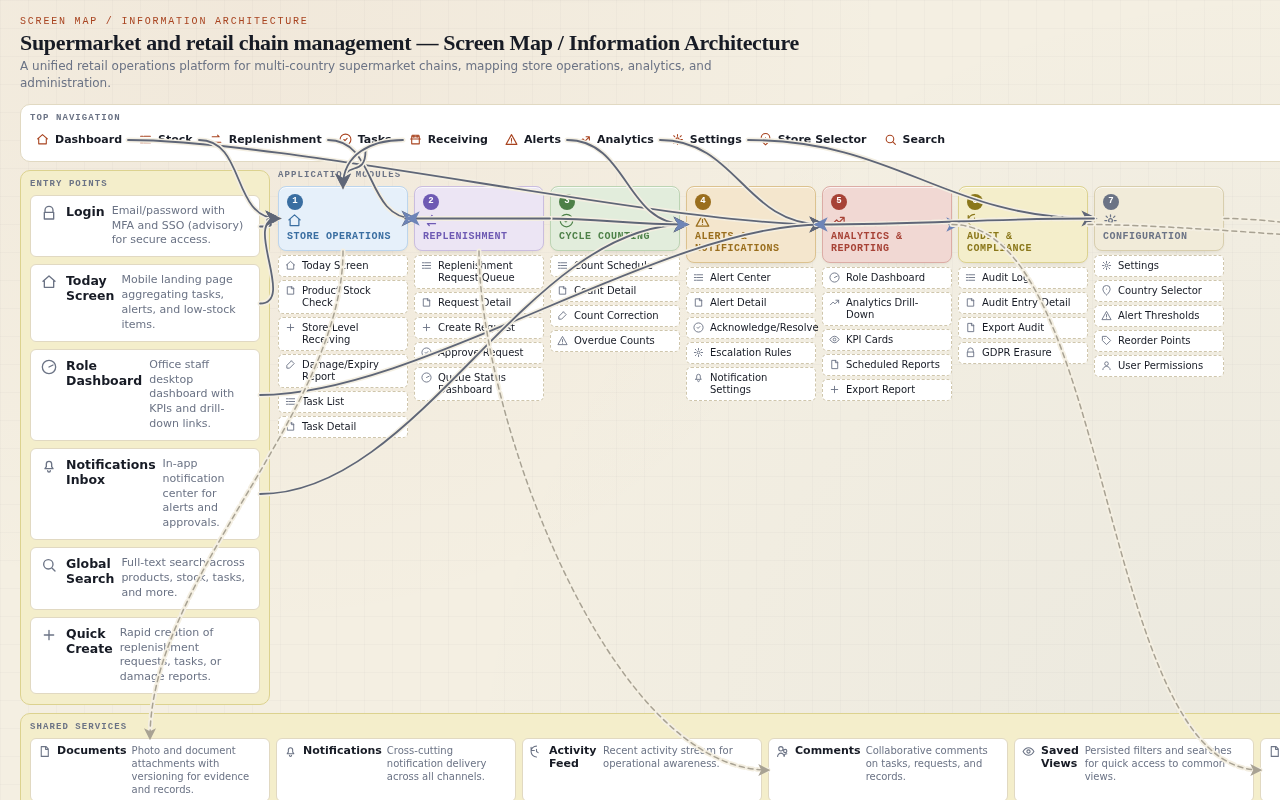
Supermarket and retail chain management — Screen map
Project anatomy
32
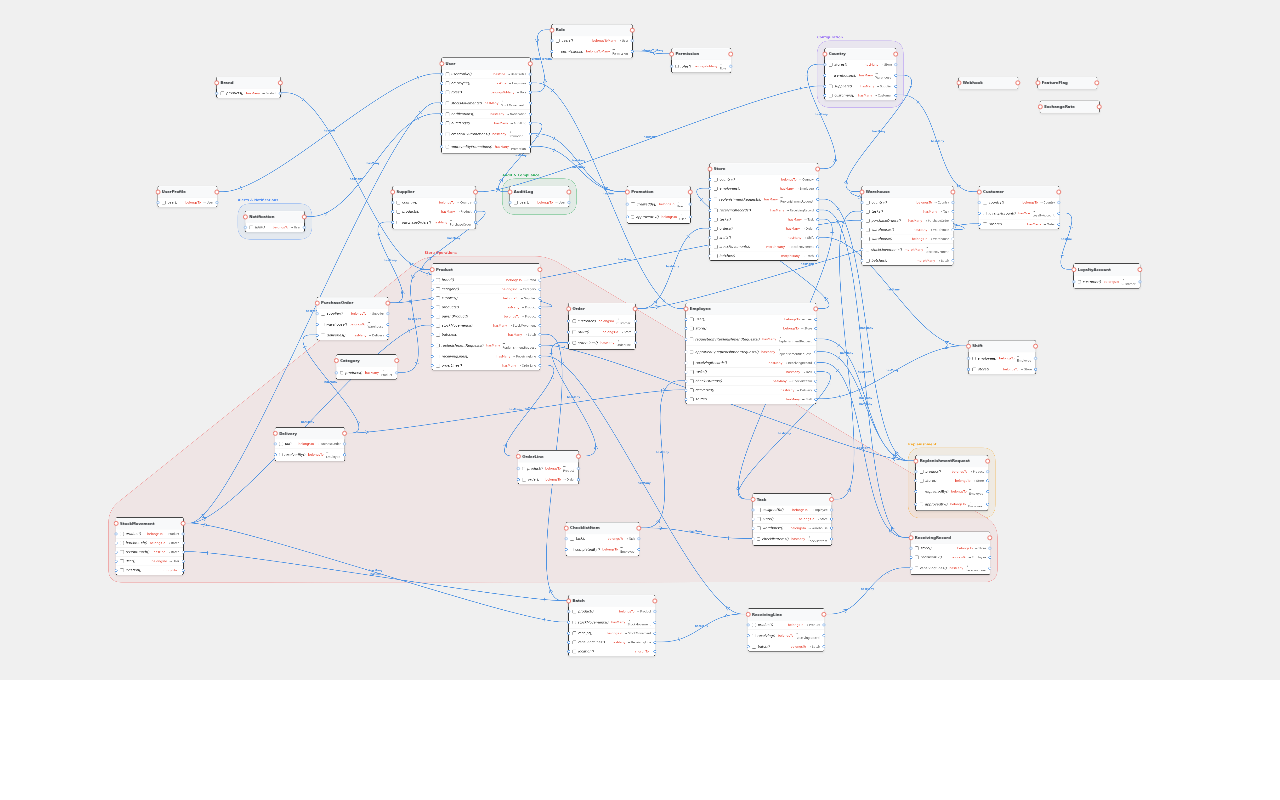
Entities
34
DB tables
34
Screens
7
Modules
32
Models
48
Relations
10
Roles
39
Requirements
10
Journeys

About this app

One place for store teams to run daily work and leaders to see it.

This is a single tool for people who run supermarkets and retail chains. It helps store teams do their daily work on a phone or handheld scanner, and it helps managers and executives see how every store is performing. Instead of paper checklists, phone calls, and separate spreadsheets, everyone works from the same live picture of stock, tasks, and problems.

Who uses it
  • Store Employee The person on the shop floor who checks stock, receives goods, completes daily tasks, and reports problems like damage or expired items.
  • Store Manager The person who oversees one store, approves requests for more stock, assigns work, and watches how the store is doing.
  • Regional Manager The person who compares several stores in one area and looks into stores that are struggling.
  • Executive The company leader who needs a clear view of the whole business and can trace a problem down to a single store, product, or transaction.
  • Warehouse Staff The person who receives goods into a warehouse, stores them, picks them, and sends them to stores.
  • Purchasing Team The person who manages suppliers, orders goods, and tracks whether deliveries arrive on time.
  • Marketing Team The person who creates promotions and loyalty campaigns and checks whether they actually increased sales.
  • Customer Service Agent The person who handles customer complaints, refunds, and delivery problems by looking up order history.
  • Finance Team The person who watches sales, margins, expenses, and payments, and makes sure the numbers match the accounting system.
  • Platform (Automation Engine) The automatic part of the system that watches thresholds, sends alerts, and keeps operational and analytical data in sync without a person doing it.
Problems it solves
  • Store and warehouse staff no longer need paper checklists or manual stock counts.
  • Expiring products are flagged before they become waste.
  • Managers and executives see the same comparable numbers across every country, region, and store.
  • Stockouts are easier to prevent because low stock is visible and replenishment requests are tracked.
  • Problems like damaged goods, missed deliveries, and suspicious refunds are traced to their source.
What you can do
  • See your tasks, alerts, and low-stock items in one glance at the start of a shift.
  • Scan a product barcode to see its stock level, photo, and expiry dates.
  • Ask for more stock when an item is running low.
  • Receive goods into a store or warehouse and record where they came from.
  • Report damaged or expired products with a photo.
  • Complete daily checklists and assigned tasks on a phone.
  • Approve or follow up on stock requests from your team.
  • Drill down from a company-wide number to a single store, product, or transaction.
  • Set up alerts so the right person is notified when something needs attention.
  • Export or schedule reports for regular review.

How people use it

Store Employee 2 tasks
Complete your daily store work

When: At the start of a shift, when you need to see what to do and handle stock tasks during the day.

  1. 1
    Log in with your email, password, and the extra security code. Login
    → You are signed in and your session begins.
  2. 2
    Look at the today screen to see your tasks, alerts, and low-stock items. Today (store staff mobile)
    → You see your work for the day in one place.
  3. 3
    Scan a product barcode to check its stock level, batches, and expiry dates. Product stock check (mobile)
    → The product name, photo, stock level, and batch list appear.
  4. 4
    Create a replenishment request for a low-stock item from the scan screen. Product stock check (mobile)
    → The request is submitted to the store queue with the status 'submitted, awaiting purchasing module'.
  5. 5
    Complete your assigned tasks and checklists, including opening or closing checklists. Task list and task detail (mobile)
    → Task statuses change to completed and completion times are recorded.
  6. 6
    Receive goods by scanning items, confirming quantities, and choosing the source. Store-level receiving (mobile)
    → Stock movement records of type receipt are created with the source recorded.
  7. 7
    Report damaged or expired goods and add a photo if needed. Damage/expiry report (mobile)
    → Stock movement records of type damage or expiry are created with an optional photo.
  8. 8
    Log out when your work is done.
    → All your work is recorded and synced, and your session ends.
Tips
  • If you lose connection while completing a task, the action is saved on your device and synced when you are back online.
  • If you scan a barcode the system does not know, you will see an error and can create a new product or retry the scan.
  • If a count correction would make stock negative, it is rejected and an alert is raised for investigation.
Complete a cycle count

When: When you receive a notification that cycle counts are due for your department.

  1. 1
    Wait for the system to generate the rolling cycle count schedule with ABC classification.
    → A-class items are scheduled weekly, B monthly, and C quarterly.
  2. 2
    Open the cycle count screen and view the count schedule. Cycle count (mobile)
    → You see the list of products to count.
  3. 3
    Scan a product barcode and enter the counted quantity. Cycle count (mobile)
    → The count is recorded for the product.
  4. 4
    Let the system compare the counted quantity to the expected stock level. Cycle count (mobile)
    → The difference is calculated.
  5. 5
    Submit the count correction. Cycle count (mobile)
    → A stock movement record of type count_correction is created with the difference.
  6. 6
    Check for overdue counts flagged by the system. Cycle count (mobile)
    → Overdue counts are flagged for follow-up.
Tips
  • For perishables, a batch-level correction is applied to the batch with the earliest expiry date.
  • If a correction would make stock negative, it is rejected and an alert is raised.
  • Use the undo button if you entered the wrong quantity.
Store Manager 2 tasks
Approve a replenishment request

When: When you receive a notification that someone has asked for more stock.

  1. 1
    Open the notification for the new replenishment request.
    → You see the in-app notification.
  2. 2
    Open the replenishment request queue. Replenishment request queue (store manager)
    → You see all pending requests for your store.
  3. 3
    Review the request details: product, quantity, who asked, and the low-stock flag. Replenishment request queue (store manager)
    → You understand what is being requested and why.
  4. 4
    Approve the request. Replenishment request queue (store manager)
    → The request status updates to approved and the decision is recorded.
  5. 5
    Check the queue and store-level KPIs on the dashboard. Role-specific dashboard (office staff desktop)
    → You see the current stockout rate, waste rate, task completion time, and queue status.
Tips
  • If you are not ready to approve, you can choose to follow up manually instead; the request stays in the queue with the status 'submitted, awaiting purchasing module'.
  • If you never approve a request, it remains visible in the queue for follow-up.
  • Approval decisions are recorded in the audit log for traceability.
Set up alert thresholds and escalation

When: When you want to change how alerts are triggered and who is notified.

  1. 1
    Open the Settings screen and select your store. Settings (desktop)
    → You see configuration options for your store.
  2. 2
    Adjust the expiry alert threshold, for example from 7 days to 5 days. Settings (desktop)
    → The new threshold is saved.
  3. 3
    Configure escalation rules for expiry alerts: in-app first, then email, then SMS. Settings (desktop)
    → Escalation rules are saved.
  4. 4
    Let the system apply the new thresholds and escalation rules to alert generation.
    → Future expiry alerts use the new threshold and escalation rules.
  5. 5
    Verify the configuration by viewing the Alert center. Alert center (mobile and desktop)
    → You see alerts with the new configuration applied.
Tips
  • You can also configure reorder points for low-stock alerts in the same Settings screen.
  • If you do not have permission to change thresholds, the system denies the action with a 403 error.
  • Escalation rules determine the order in which channels are used.
Executive 1 task
Trace a company-wide problem to its source

When: When you want to understand overall performance or investigate an unusual number.

  1. 1
    Log in on desktop and open the company-wide dashboard. Role-specific dashboard (office staff desktop)
    → You see company-wide KPIs.
  2. 2
    Look at the operational KPIs: stockout rate, waste rate, task completion time, and replenishment request queue status. Role-specific dashboard (office staff desktop)
    → You identify areas that need attention.
  3. 3
    Drill down from company to country to region to store to department to product to transaction. Analytics drill-down (desktop)
    → You trace a high waste rate to a specific store and product.
  4. 4
    Trace the alert or metric to the underlying operational record. Analytics drill-down (desktop)
    → You see the stock movement or task that caused the metric.
  5. 5
    Export or schedule a report for later review. Analytics drill-down (desktop)
    → A report is generated and delivered through the configured channel.
Tips
  • You can schedule a recurring report instead of exporting immediately.
  • If a dashboard query is slow, the system retries and shows a message while it recovers.
  • Drill-down breadcrumbs show you where you are at each level.
Regional Manager 1 task
Compare stores in your region

When: When you want to spot underperforming stores and understand why.

  1. 1
    Log in and open the regional dashboard. Role-specific dashboard (office staff desktop)
    → You see KPIs for all stores in your region.
  2. 2
    Compare store performance using KPI cards and tables. Role-specific dashboard (office staff desktop)
    → You identify stores with high waste rate or low task completion.
  3. 3
    Drill down to a specific store's dashboard. Analytics drill-down (desktop)
    → You see store-level KPIs and recent activity.
  4. 4
    Drill further to department and product level to find the root cause. Analytics drill-down (desktop)
    → You identify the specific department or product causing the issue.
  5. 5
    Export the comparison data for a report to the executive team. Analytics drill-down (desktop)
    → A report is exported with regional performance data.
Tips
  • You can open an alert from the dashboard alert list to see its details and the related record.
  • If a store has no synced data, you will see an empty state with a staleness indicator.
  • Use saved views to return to the same comparison later.
Warehouse Staff 1 task
Receive goods and process a transfer

When: When a supplier delivery arrives at the warehouse dock or you need to send goods to a store.

  1. 1
    Log in and open the receiving screen. Store-level receiving (mobile)
    → You see the receiving interface.
  2. 2
    Scan items from the supplier delivery and confirm quantities. Store-level receiving (mobile)
    → Receiving lines are created with product and quantity.
  3. 3
    Record batch expiry dates for perishables. Store-level receiving (mobile)
    → Batch records are created with expiry dates.
  4. 4
    Let the system create stock movement records of type receipt.
    → Stock levels are updated in the warehouse.
  5. 5
    Process a transfer to a store by picking items and confirming quantities.
    → Stock movement records of type transfer are created.
Tips
  • You can record a direct supplier delivery to a store instead of warehouse receiving.
  • If scanned items do not match the purchase order, the system shows a mismatch error and requires confirmation or correction.
  • Batch expiry dates are important for perishables so the system can use first-expired-first-out.
Purchasing Team 1 task
Create and track a purchase order

When: When a store needs more stock and you need to order from a supplier.

  1. 1
    Review replenishment requests from stores. Replenishment request queue (store manager)
    → You see pending requests awaiting the purchasing module.
  2. 2
    Create a purchase order for a supplier.
    → A purchase order is created with supplier, items, and quantities.
  3. 3
    Schedule the delivery with the supplier.
    → The expected delivery date is recorded.
  4. 4
    Let the system track delivery status and flag delays or missed deliveries.
    → Alerts are generated for delayed or missed deliveries.
  5. 5
    Review supplier performance and delivery history.
    → You see supplier performance data.
Tips
  • Supplier feeds can update product catalogs and price lists automatically.
  • If a delivery is missed, the system marks it as missed and generates an alert with escalation rules.
  • Use the queue to see which requests are still waiting for purchasing.
Marketing Team 1 task
Create and get approval for a promotion

When: When you want to launch a discount or campaign and need it approved before it goes live.

  1. 1
    Create a new promotion with name, dates, discount type, and value.
    → A promotion record is created with approval status pending.
  2. 2
    Let the system validate that the approver is not the same person who created the promotion.
    → The promotion is routed for approval.
  3. 3
    Wait for a store manager or other approver to review and approve the promotion.
    → Promotion approval status changes to approved.
  4. 4
    Let the system activate the promotion on the start date.
    → The promotion is live and applied to eligible orders.
  5. 5
    Measure promotion lift by comparing sales during and after the promotion. Analytics drill-down (desktop)
    → You see promotion lift data.
Tips
  • You can create a loyalty campaign instead of a promotion if that fits your goal.
  • If the approver rejects the promotion, the status changes to rejected and you are notified.
  • Promotion lift shows whether the campaign increased sales or just shifted them.
Customer Service Agent 1 task
Resolve a customer complaint and process a refund

When: When a customer calls about a missing delivery or a problem with an order.

  1. 1
    Search for the customer by name, email, or loyalty card number.
    → You find the customer record.
  2. 2
    View the customer's order history.
    → You see all orders and their statuses.
  3. 3
    Trace the specific order to identify the delivery problem.
    → You see the order status and delivery details.
  4. 4
    Process a refund if the order was not delivered.
    → A refund is recorded and the order status updates.
  5. 5
    Let the system generate a suspicious transaction alert if the refund exceeds the threshold. Alert center (mobile and desktop)
    → An alert is generated for investigation if the refund is suspicious.
Tips
  • You can contact the delivery partner to resolve a delivery problem; the status updates via webhook.
  • If you try to process a refund without a matching order, the system rejects it and generates a suspicious transaction alert.
  • Suspicious transactions are flagged for investigation.
Glossary (15)
Stockout
— When a product is out of stock and cannot be sold.
Waste rate
— The share of stock that is thrown away because it expired or was damaged.
Replenishment request
— A request from a store asking for more stock of a product.
Low-stock flag
— A warning that a product's stock level has fallen below its reorder point.
Reorder point
— The stock level at which the system suggests ordering more of a product.
Batch
— A specific group of a product received at the same time, often with the same expiry date.
Perishable
— A product that can spoil or expire, like dairy, meat, or produce.
Cycle count
— A scheduled count of a subset of stock to keep inventory accurate without closing the store.
ABC classification
— A way of ranking products by importance: A items are counted most often, C items least often.
Stock movement
— Any change in stock level, such as receiving, damage, expiry, or a count correction.
Drill-down
— Moving from a high-level number to the detailed records behind it.
KPI
— A key performance indicator, a number that shows how well a part of the business is doing.
Escalation
— Sending an alert to more people or through more channels when it is not handled.
Audit log
— A record of who changed what and when, kept for traceability and compliance.
Promotion lift
— The increase in sales that can be attributed to a promotion.
0 comments
Log in to like, rate, or join the conversation. Log in Create account
Original prompt

A large-scale supermarket and retail chain management application for a company operating hundreds of stores, warehouses, online shops, and delivery services across multiple countries, where store employees manage products, shelves, stock, prices, promotions, damaged goods, and daily tasks; warehouse teams control incoming goods, storage, picking, transfers, and replenishment; purchasing teams manage suppliers, orders, delivery schedules, and costs; marketing teams create promotions and loyalty campaigns; customer service handles complaints, refunds, and delivery problems; finance monitors sales, margins, expenses, and payments; regional managers compare store performance; and executives see the overall business. Connect products, brands, categories, suppliers, stores, warehouses, customers, loyalty accounts, purchases, orders, deliveries, promotions, employees, shifts, returns, complaints, and payments so users can easily follow everyday situations such as why milk is out of stock, which supplier caused a delayed delivery, whether a promotion increased sales, which stores waste the most food, or why an online order arrived incomplete. Include dashboards for daily sales, profit, stock levels, popular products, low-stock items, waste, delivery delays, customer satisfaction, employee workload, and store comparisons, with drill-down from company level to a country, region, store, department, product, or transaction. Support purchasing and replenishment workflows, stock transfers between locations, price and promotion approvals, supplier performance, expiry-date monitoring, inventory counts, returns and refunds, customer complaints, loyalty points and rewards, online orders, click-and-collect, home delivery, employee shifts and task assignments, equipment issues, and store opening and closing checklists. Provide automatic alerts for low stock, unusual sales changes, expired products, missed deliveries, pricing mistakes, excessive waste, suspicious transactions, unanswered complaints, and staffing shortages, together with configurable notifications and escalation rules. Add powerful search and filters, barcode and QR scanning, product and shelf photos, document attachments, comments, bulk updates, Excel/CSV imports and exports, scheduled reports, audit history, multilingual and multi-currency support, and detailed permissions so employees see only the stores and functions relevant to them while regional and corporate teams can access broader information. Include integrations with point-of-sale systems, e-commerce platforms, payment providers, warehouse systems, delivery partners, supplier feeds, and accounting systems, plus mobile-friendly screens for employees checking stock, scanning products, receiving deliveries, completing store tasks, handling customer requests, and approving actions while away from a computer.

Discovery boards
Project Brief
What I think you want to build
A concise interpretation of the product intent.
interpretation
critical

A unified retail operations platform that connects store, warehouse, purchasing, marketing, customer service, finance, and executive functions into a single source of truth for a multi-country supermarket chain.

The prompt describes a broad, cross-functional system with drill-down from company level to transaction level, suggesting the core intent is operational visibility and coordination across silos.

interpretation

A supply chain and inventory intelligence system focused on preventing stockouts, reducing waste, and tracing problems (e.g., why milk is out of stock, which supplier delayed delivery) across hundreds of locations.

The prompt repeatedly emphasizes out-of-stock, waste, delivery delays, expiry monitoring, and replenishment workflows, suggesting the underlying pain is supply chain visibility and exception management.

interpretation

A performance management and analytics platform for regional managers and executives to compare stores, monitor margins, and drill into operational metrics.

The prompt lists dashboards for sales, profit, waste, delivery delays, and store comparisons with drill-down, suggesting a strong analytics and performance management intent.

decision
critical

The primary intent is operational execution first, analytics second. The platform must enable daily work (stock checks, receiving, tasks, replenishment, approvals) as the foundation, with analytics and dashboards built on top of the operational data that execution generates.

User edited this decision to lock operational execution as the primary intent.

Likely target users
Proposed end-user groups.
interpretation

Store employees (cashiers, shelf stockers, department leads, store managers) who need mobile-friendly tools for stock checks, scanning, receiving, task completion, and customer requests.

The prompt explicitly lists store employees managing products, shelves, stock, prices, promotions, damaged goods, and daily tasks, with mobile screens for checking stock and scanning products.

interpretation

Warehouse teams (receivers, pickers, inventory controllers, warehouse managers) who manage incoming goods, storage, picking, transfers, and replenishment.

The prompt explicitly lists warehouse teams controlling incoming goods, storage, picking, transfers, and replenishment.

interpretation

Purchasing teams who manage suppliers, orders, delivery schedules, and costs, and need supplier performance tracking.

The prompt explicitly lists purchasing teams managing suppliers, orders, delivery schedules, and costs, plus supplier performance tracking.

interpretation

Marketing teams who create promotions and loyalty campaigns and need to measure whether promotions increased sales.

The prompt explicitly lists marketing teams creating promotions and loyalty campaigns, and asks whether a promotion increased sales.

interpretation

Customer service agents who handle complaints, refunds, and delivery problems, and need to trace order history and loyalty accounts.

The prompt explicitly lists customer service handling complaints, refunds, and delivery problems, and connects customers, loyalty accounts, orders, deliveries, and complaints.

interpretation

Finance teams who monitor sales, margins, expenses, and payments, and need reconciliation with accounting systems.

The prompt explicitly lists finance monitoring sales, margins, expenses, and payments, plus accounting system integrations.

interpretation

Regional managers who compare store performance across a region and need drill-down from region to store to department.

The prompt explicitly lists regional managers comparing store performance and drill-down from company to country, region, store, department.

interpretation

Executives (CEO, COO, CFO, CMO) who need a company-wide overview of sales, profit, waste, customer satisfaction, and delivery performance.

The prompt explicitly lists executives seeing the overall business and dashboards for company-level metrics.

decision

The system is strictly internal for the initial release. Customer and supplier self-service portals are out of scope for now; customer service agents and purchasing teams act on behalf of external parties. Revisit portals only after the internal platform is stable.

User edited this decision to lock internal-only access for the initial release.

Problems worth solving
Likely pains, inefficiencies, or opportunities.
interpretation

Stockouts and overstock are hard to predict and trace across hundreds of stores and warehouses, leading to lost sales and waste.

The prompt explicitly asks why milk is out of stock and which stores waste the most food, suggesting stockout and waste are top-of-mind pains.

interpretation

Supplier performance is opaque: delayed deliveries, missed orders, and cost issues are hard to attribute and act on.

The prompt explicitly asks which supplier caused a delayed delivery and lists supplier performance tracking.

interpretation

Promotions and loyalty campaigns are run without clear measurement of whether they increased sales or just cannibalized margin.

The prompt explicitly asks whether a promotion increased sales, suggesting attribution is a pain.

interpretation

Online order fulfillment is error-prone: incomplete orders, delivery problems, and refunds are hard to trace back to root cause.

The prompt explicitly asks why an online order arrived incomplete and lists delivery problems, returns, and refunds.

interpretation

Store and warehouse staff lack a single mobile tool for daily tasks, leading to paper checklists, manual stock counts, and missed expiry dates.

The prompt lists daily tasks, opening/closing checklists, inventory counts, expiry monitoring, and mobile screens, implying current processes are manual or fragmented.

interpretation

Regional managers and executives lack consistent, comparable metrics across countries, regions, and stores, making performance management subjective.

The prompt lists store comparisons and drill-downs, implying current reporting is inconsistent or siloed.

interpretation

Cross-border operations create currency, tax, language, and regulatory complexity that current tools likely do not handle consistently.

The prompt mentions multiple countries, multi-currency, and multilingual support, implying the underlying pain is operating across jurisdictions with inconsistent rules.

interpretation

Employee workload and staffing shortages are hard to see and manage, leading to understaffed shifts and burnout.

The prompt lists employee workload dashboards, staffing shortage alerts, and shift management, implying labor management is a pain.

risk

Risk: the problem space is so broad that the product may try to solve everything and excel at nothing, leading to shallow features across many domains.

The prompt spans retail, warehouse, purchasing, marketing, customer service, finance, HR, and analytics. This is a classic scope risk for large enterprise platforms.

Desired outcomes
What the application should enable.
interpretation

Store managers can see, in real time, which products are low or out of stock and why, and can trigger replenishment or transfers without calling around.

This is the observable end-state implied by the stockout tracing and replenishment workflows in the prompt.

interpretation

Purchasing teams can hold suppliers accountable with data: on-time delivery rates, order accuracy, cost trends, and delay attribution are visible per supplier.

This is the observable end-state implied by supplier performance tracking and delay attribution in the prompt.

interpretation

Marketing teams can measure promotion lift (sales increase attributable to a campaign) and loyalty program ROI, not just campaign execution.

This is the observable end-state implied by the question 'whether a promotion increased sales' in the prompt.

interpretation

Customer service agents can resolve a complaint or refund in one session by tracing the full order, delivery, payment, and loyalty history without switching systems.

This is the observable end-state implied by connecting orders, deliveries, payments, complaints, and loyalty accounts in the prompt.

interpretation

Executives can answer 'how is the business doing today?' with a single dashboard and drill down to any country, region, store, product, or transaction in seconds.

This is the observable end-state implied by the drill-down dashboards in the prompt.

interpretation

Store and warehouse staff complete daily tasks, stock counts, and checklists on mobile devices with barcode scanning, reducing paper and manual data entry.

This is the observable end-state implied by mobile screens, barcode scanning, and task checklists in the prompt.

decision

The primary success metric is operational efficiency first: fewer stockouts, less waste, faster task completion, and reliable replenishment. Financial performance is a lagging outcome that improves as operational execution improves, and is tracked as a secondary metric.

User edited this decision to lock operational efficiency as the primary success metric.

Usage context
When and how users likely use the app.
interpretation

Store and warehouse staff use the app on mobile devices (phones, handheld scanners, tablets) during shifts, often in low-connectivity areas like stockrooms or cold storage.

The prompt lists mobile-friendly screens for checking stock, scanning products, receiving deliveries, and completing tasks, implying on-the-floor mobile usage.

interpretation

Office-based teams (purchasing, marketing, finance, customer service, regional managers, executives) use the app on desktop during business hours for analysis, approvals, and reporting.

The prompt lists dashboards, approvals, reports, and comparisons, which are typically desktop workflows.

interpretation

Managers approve actions (price changes, promotions, transfers) while away from a computer, implying mobile approval workflows with push notifications.

The prompt explicitly lists 'approving actions while away from a computer' as a mobile use case.

risk

Risk: offline or low-connectivity usage is not addressed in the prompt, but store and warehouse environments often have poor connectivity, which could break mobile workflows.

Mobile stock checks and receiving in stockrooms or cold storage may fail without offline support or local caching.

decision

The mobile experience is a responsive web app with offline support for core store and warehouse workflows (stock checks, receiving, task completion). A native app is not required initially; revisit only if barcode scanning performance or push notification reliability demands it.

User edited this decision to lock responsive web with offline support.

Scope boundaries
What the product likely should not be.
constraint

This is NOT a point-of-sale (POS) system. The app integrates with existing POS systems but does not replace them.

The prompt lists POS integrations, not POS functionality, suggesting the POS remains external.

constraint

This is NOT an e-commerce platform. The app integrates with existing e-commerce platforms but does not host the online storefront.

The prompt lists e-commerce platform integrations, not e-commerce functionality, suggesting the storefront remains external.

constraint

This is NOT an accounting system. The app monitors sales, margins, and payments but integrates with existing accounting systems for ledger and compliance.

The prompt lists accounting system integrations, not accounting functionality, suggesting the ledger remains external.

constraint

This is NOT a warehouse management system (WMS) replacement. The app integrates with existing WMS but may add lightweight receiving, picking, and transfer workflows.

The prompt lists warehouse system integrations but also lists warehouse workflows, creating ambiguity about whether the app replaces or complements a WMS.

decision
critical

The app includes lightweight warehouse workflows (receiving, picking, transfers, replenishment) in-app, but does not replace a full WMS. Where a location already runs a mature WMS, the app integrates with it and uses its data; where no WMS exists, the lightweight workflows cover the basics.

User edited this decision to lock lightweight warehouse workflows in-app with WMS integration where applicable.

constraint

This is NOT a payroll or HR system. Employee shifts and task assignments are in scope, but payroll, benefits, and HR compliance are out of scope.

The prompt lists shifts and task assignments but not payroll or HR, suggesting labor management is operational, not administrative.

Blind spots and risks
Areas DTC believes require attention.
risk

Technical risk: integrating with hundreds of stores, warehouses, POS systems, e-commerce platforms, payment providers, delivery partners, supplier feeds, and accounting systems across multiple countries creates a massive integration surface with high failure potential.

The prompt lists at least seven integration categories, each with multiple vendors and regional variations. Integration complexity is a top technical risk.

risk

User-adoption risk: store and warehouse staff may resist a new system if it adds friction to their daily tasks, especially if mobile UX is not fast and simple.

Frontline retail staff have high task volume and low tolerance for slow or complex tools. Adoption depends on mobile UX quality.

risk
critical

Scope/feasibility risk: the prompt describes a platform that would take a large team years to build. Without phased delivery, the project may stall or deliver shallow features.

The scope spans retail, warehouse, purchasing, marketing, customer service, finance, HR, and analytics. This is a multi-year enterprise platform.

risk

Data quality risk: the system depends on accurate stock counts, sales data, and supplier feeds. If source data is inconsistent across countries, dashboards and alerts will be unreliable.

The prompt assumes drill-down from company to transaction, which requires consistent data models and quality across hundreds of locations.

risk

Regulatory risk: multi-country operations involve GDPR, local data residency, tax, and labor laws that vary by jurisdiction, complicating data storage and processing.

The prompt mentions multiple countries and customer data, which triggers GDPR and other privacy regulations.

decision

The system is a single global platform with country-specific configurations and regional data residency. One codebase, one deployment surface, but country-level configuration for currency, language, tax, and regulatory rules, with data stored in-region where required.

User edited this decision to lock single global platform with country-specific configurations and regional data residency.

High-impact decisions
Choices that change product direction.
decision
critical

Tenancy model: hybrid — a single shared platform with per-country/legal-entity data isolation. One codebase and operational surface, but country-level data residency and access boundaries enforced at the data layer to satisfy regulatory and legal-entity requirements.

User edited this decision to lock hybrid tenancy.

decision
critical

Integration strategy: hybrid — use an integration middleware (e.g., Workato, MuleSoft) for core, high-volume systems (POS, e-commerce, payment providers, accounting) and event-driven webhooks for edge systems and partner feeds (delivery partners, supplier feeds). Avoid building and maintaining a large library of bespoke native connectors.

User edited this decision to lock middleware-first integration strategy.

decision
critical

Data architecture: hybrid — an operational database for transactional workflows and real-time alerts, plus an analytics warehouse for dashboards, drill-downs, and scheduled reports. The operational DB feeds the warehouse through a defined ETL/CDC pipeline.

User edited this decision to lock hybrid data architecture.

decision

Mobile strategy: responsive web app with offline support for core store and warehouse workflows. Native apps are deferred unless barcode scanning or push reliability demands them later.

User edited this decision to lock responsive web with offline support.

decision
critical

Phased delivery: store operations first. Phase 1 covers store-level stock visibility, receiving, tasks, checklists, and replenishment requests, because it establishes the product data foundation and wins frontline adoption. Warehouse and purchasing follow, then analytics deepens as data accumulates.

User edited this decision to lock store operations as the first module.

decision

Alerting and notification architecture: all channels with escalation rules — in-app, email, SMS, and push — but configured per alert type. Low-urgency alerts default to in-app and email; critical alerts (stockouts, missed deliveries, staffing shortages) can escalate to SMS and push based on configurable rules.

User edited this decision to lock all-channel alerting with escalation rules.

decision

The hybrid tenancy model requires a Country/LegalEntity entity in the data model, with all operational data scoped to a country and access boundaries enforced at the data layer.

The user locked hybrid tenancy, which implies a Country/LegalEntity entity and data-scoping rules. User accepted this structural consequence explicitly.

decision

The middleware-first integration strategy implies a canonical integration layer with standardized message formats, retry policies, and error handling for all external systems. Phase 1 connectors are limited to the systems store operations actually touches, but the layer itself is built now as the foundation.

The user locked middleware-first integration, which implies a canonical integration layer. User accepted this structural consequence and clarified Phase 1 scope: build the layer now, implement connectors only for store-operations systems.

decision

The hybrid data architecture implies a defined ETL/CDC pipeline with data quality checks, schema versioning, and reconciliation between operational and analytical stores.

The user locked hybrid data architecture, which implies a defined ETL/CDC pipeline. User accepted this structural consequence explicitly.

decision

The responsive web with offline support decision implies a service worker architecture, local caching strategy, and conflict resolution for offline-first workflows.

The user locked responsive web with offline support, which implies a service worker architecture and offline conflict resolution. User accepted this structural consequence explicitly.

decision

The store-operations-first phased delivery implies that the product data model, store hierarchy, and stock visibility are the foundational data entities that all other modules depend on.

The user locked store operations as the first module, which implies that product, store, and stock entities are foundational. User accepted this structural consequence explicitly.

decision

The all-channel alerting decision implies a notification service with per-alert-type configuration, escalation rules, and delivery tracking across in-app, email, SMS, and push channels.

The user locked all-channel alerting with escalation rules, which implies a notification service. User accepted this structural consequence explicitly.

decision

The internal-only access decision implies that the identity model is User → Role → Permission, with no external-facing authentication surface for customers or suppliers in the initial release.

The user locked internal-only access, which implies a standard internal identity model. User accepted this structural consequence explicitly.

decision

The operational-efficiency-first success metric implies that Phase 1 KPIs should focus on stockout rate, waste rate, task completion time, and replenishment cycle time, not financial metrics.

The user locked operational efficiency as the primary success metric, which implies Phase 1 KPIs should be operational, not financial. User accepted this structural consequence explicitly.

decision

The canonical integration layer must define a connector interface contract and a message envelope standard before Phase 1 connectors are implemented, so store-operations connectors (POS, WMS where present) conform to the same contract as later connectors.

User locked the canonical layer now with Phase 1 connectors limited to store operations. This opens the follow-up question of which connector contract and message envelope standard to adopt before the first connector is built.

decision

The Country/LegalEntity entity must be present in the data model from Phase 1, even though Phase 1 is store operations only, because all operational data is scoped to a country and retrofitting tenancy later is costly.

User accepted the Country/LegalEntity entity, which opens the follow-up question of whether it must be enforced from Phase 1 or can be added later without rework.

Needs & Data
Core domain objects
What entities exist in the product world, with key attributes and relationships.
interpretation

Product: the central entity. Attributes: product_id (PK), parent_product_id (FK, nullable, for variant grouping), name, description, brand_id (FK), category_id (FK), supplier_id (FK), barcode (GTIN/EAN), unit_of_measure, is_perishable, is_active, created_at, updated_at, deleted_at. Relationships: belongs to Brand, Category, Supplier; has many StockLevels, OrderLines, Returns, Promotions.

Product is the foundational entity per the store-operations-first decision. User edited to add parent_product_id for variant grouping and is_perishable for batch tracking.

interpretation

Batch: batch_id (PK), product_id (FK), receipt_id (FK to StockMovement of type receipt), expiry_date, received_quantity, remaining_quantity, location_id (FK). Only created for perishable products (is_perishable = true). StockMovement references batch_id when the movement involves a perishable product.

User resolved batch tracking with batch-level tracking for perishables. This requires a Batch entity to track expiry dates and remaining quantities per receipt.

interpretation

StockLevel and StockMovement: StockLevel is a derived current count per product-location. StockMovement is the time-series record: movement_id (PK), product_id (FK), location_id (FK, polymorphic: store or warehouse), batch_id (FK, nullable, for perishables), movement_type (receipt, sale, transfer_in, transfer_out, damage, count_correction, expiry), quantity, timestamp, source (POS, manual, WMS), user_id (FK).

The traceability scenarios require per-transaction detail, not just a current count. User edited to add batch_id for perishable batch tracking.

interpretation

Store and Warehouse: Store has store_id (PK), name, country_id (FK), region, address, timezone, store_type (supermarket, convenience, online-only), phone_main, phone_mobile, phone_fax, phone_emergency, is_active. Warehouse has warehouse_id (PK), name, country_id (FK), address, timezone, storage_capacity, temperature_zones (frozen, chilled, ambient), is_active. Both are locations for StockMovement.

The store hierarchy is foundational, and multi-country operations require timezone and region attributes for correct reporting. User resolved contact phones with typed fields.

interpretation

Country/LegalEntity: country_id (PK), name, iso_code, currency_code, language_code, tax_rules (JSON or FK to TaxRule), data_residency_region, is_active. All operational entities carry country_id (FK).

The hybrid tenancy model requires this entity from Phase 1. Retrofitting tenancy later is costly.

interpretation

Employee: employee_id (PK), user_id (FK, unique), store_id (FK, nullable for warehouse/office staff), department, job_title, employment_type (full_time, part_time, contract), shift_schedule (FK to Shift), is_active. Employee is a profile of User, never holds role_id or permission enum.

The fixed identity pattern requires Employee to be a profile of User. Access is always via User → Role → Permission.

interpretation

Supplier: supplier_id (PK), name, contact_name, contact_email, phone_main, phone_mobile, phone_fax, phone_emergency, payment_terms, lead_time_days, country_id (FK), is_active, created_at, updated_at, deleted_at. Relationships: has many Products, PurchaseOrders, Deliveries.

The supplier accountability outcome requires supplier master data shared across purchasing, warehouse, and store modules. User resolved contact phones with typed fields.

interpretation

PurchaseOrder and Delivery: PurchaseOrder has po_id (PK), supplier_id (FK), warehouse_id (FK), order_date, expected_delivery_date, status (draft, submitted, confirmed, received, cancelled), total_cost, currency_code. Delivery has delivery_id (PK), po_id (FK), actual_delivery_date, received_by (FK to Employee), status (scheduled, in_transit, received, delayed, missed), notes.

The supplier delay attribution scenario requires PurchaseOrder and Delivery as separate entities with expected vs actual dates.

interpretation

Promotion: promotion_id (PK), name, start_date, end_date, discount_type (percentage, fixed_amount, bogo), discount_value, applicable_products (M2M to Product) or applicable_categories (M2M to Category), approval_status (draft, pending_approval, approved, rejected, active, ended), created_by (FK to User), approved_by (FK to User, nullable).

Promotion lift measurement requires structured promotion data with clear time boundaries and applicability rules.

interpretation

Customer and LoyaltyAccount: Customer has customer_id (PK), loyalty_card_number (unique, nullable), name, email, phone, country_id (FK), created_at, updated_at, deleted_at. LoyaltyAccount has loyalty_id (PK), customer_id (FK), points_balance, tier (bronze, silver, gold), joined_date, is_active. Loyalty card number is the primary identifier when present; email and phone are secondary. Anonymous in-store purchases have customer_id = null. Customer PII is subject to GDPR erasure.

User resolved customer identity with loyalty-card-first and anonymous fallback. GDPR requires careful PII handling.

interpretation

Order and OrderLine: Order has order_id (PK), customer_id (FK, nullable for in-store anonymous), store_id (FK, nullable for online), order_type (in_store, online, click_and_collect, home_delivery), order_date, status (placed, picking, packed, shipped, delivered, cancelled, refunded), total_amount, currency_code, payment_status. OrderLine has order_line_id (PK), order_id (FK), product_id (FK), quantity, unit_price, subtotal, status (picked, missing, substituted, returned).

The incomplete order traceability scenario requires OrderLine-level status to identify which items were missing or substituted. Anonymous purchases have customer_id = null.

interpretation

Task and ChecklistItem: Task has task_id (PK), title, description, assigned_to (FK to Employee), store_id (FK) or warehouse_id (FK), due_date, priority (low, medium, high, critical), status (open, in_progress, completed, overdue, cancelled), checklist (M2M to ChecklistItem), created_at, updated_at. ChecklistItem has checklist_item_id (PK), task_id (FK), description, is_completed, completed_at, completed_by (FK to Employee).

The mobile task completion outcome and staffing shortage alerts require structured task data with assignment and completion tracking.

interpretation

Notification: notification_id (PK), user_id (FK), alert_type (low_stock, expired_product, missed_delivery, pricing_error, excessive_waste, suspicious_transaction, unanswered_complaint, staffing_shortage), channel (in_app, email, sms, push), status (pending, sent, delivered, failed), escalation_level (1, 2, 3), related_entity_type, related_entity_id, created_at, sent_at, delivered_at.

The all-channel alerting decision requires a structured notification entity with delivery tracking and escalation levels.

User-provided inputs
Data the future app may ask from its users, with type and validation hints.
interpretation

Product name and description: text fields. Name is required, max 200 chars. Description is optional, max 2000 chars. Validation: name must be unique within a brand and category.

Product master data is entered by purchasing or catalog teams. Uniqueness prevents duplicate products.

interpretation

Barcode (GTIN/EAN): text field, 8-14 digits. Validation: must match GTIN/EAN checksum. Multiple barcodes per product allowed for multi-country variants. Scanned via mobile camera or handheld scanner.

Barcode scanning is a core mobile workflow. GTIN/EAN checksum validation prevents data entry errors.

interpretation

Stock count entry: integer quantity, product_id, location_id, batch_id (optional, for perishables), count_date, counted_by (FK to Employee). Validation: quantity must be non-negative. Count corrections create a StockMovement of type count_correction with the difference from the previous derived level. Cycle counting schedule is generated by ABC classification (A weekly, B monthly, C quarterly).

Manual stock counts are a core store workflow. User resolved count frequency with continuous cycle counting. The count correction pattern preserves the audit trail.

interpretation

Damage report: product_id, location_id, batch_id (optional, for perishables), quantity, damage_type (expired, damaged, spoiled, theft), photo (optional), reported_by (FK to Employee), report_date. Validation: quantity must be positive. Creates a StockMovement of type damage.

The waste tracking scenario requires structured damage reports with type classification. Batch-level tracking for perishables requires batch_id on damage reports.

interpretation

Purchase order entry: supplier_id, warehouse_id, order_date, expected_delivery_date, line items (product_id, quantity, unit_cost). Validation: expected_delivery_date must be after order_date. Line items must have at least one product. Total cost is derived, not entered.

Purchasing teams create purchase orders. Deriving total cost prevents manual calculation errors.

interpretation

Promotion entry: name, start_date, end_date, discount_type, discount_value, applicable products or categories. Validation: end_date must be after start_date. Discount value must be positive. For percentage discounts, value must be between 0 and 100. Requires approval workflow before activation.

Marketing teams create promotions. The approval workflow is required by the original prompt's price and promotion approvals.

interpretation

Complaint entry: customer_id (or anonymous), order_id (optional), complaint_type (product_quality, delivery_delay, missing_item, wrong_item, billing), description, severity (low, medium, high), status (open, investigating, resolved, escalated), assigned_to (FK to Employee). Validation: description is required, max 2000 chars.

Customer service agents handle complaints. The complaint type classification enables routing and SLA tracking.

interpretation

Shift entry: employee_id, store_id, start_time, end_time, role (cashier, stocker, department_lead, manager). Validation: end_time must be after start_time. Shifts cannot overlap for the same employee. Staffing shortage alerts trigger when scheduled hours fall below a threshold.

The staffing shortage alert requires structured shift data. Overlap validation prevents scheduling errors.

System-derived data
Data calculated or inferred by the app without asking.
interpretation

Current stock level: derived as sum(StockMovement.quantity) grouped by product_id and location_id, where movement_type is receipt, sale, transfer_in, transfer_out, damage, count_correction. For perishables, batch remaining_quantity is derived as sum(StockMovement.quantity) grouped by batch_id. Not stored as a mutable field; computed on read or materialized with CDC.

The time-series stock movement pattern requires the current level to be derived, not stored. Batch-level tracking adds batch remaining_quantity derivation.

interpretation

Low stock flag: derived by comparing current stock level to a reorder point per product-location. Reorder point is a configurable threshold, defaulting to a fixed quantity or days-of-supply based on recent sales velocity.

The low stock alert requires a derived comparison against a threshold. The threshold is configurable per product-location.

interpretation

Supplier performance score: derived in the analytics warehouse as a weighted composite of on-time delivery rate (actual_delivery_date <= expected_delivery_date), order accuracy (received quantity vs ordered quantity), cost trend (unit cost over time), and delay attribution (count of delayed deliveries). Refreshed daily via ETL.

The supplier accountability outcome requires a composite performance score. Computing it in the warehouse avoids operational DB load.

interpretation

Promotion lift: derived as (sales during promotion period - baseline sales) / baseline sales, where baseline is the average sales of the same products in the same stores over a comparable period before the promotion. Computed in the analytics warehouse.

The promotion lift measurement outcome requires a baseline comparison. The baseline period is configurable (e.g., 4 weeks before).

interpretation

Waste rate: derived as (sum of damage and expiry StockMovements) / (sum of all outgoing StockMovements) per store per period. Computed in the analytics warehouse and surfaced on the store comparison dashboard.

The waste rate is a Phase 1 KPI per the confirmed operational-efficiency-first metric.

interpretation

Stockout rate: derived as (number of product-location pairs with zero stock) / (total number of active product-location pairs) per store per day. Computed in the analytics warehouse.

The stockout rate is a Phase 1 KPI per the confirmed operational-efficiency-first metric.

interpretation

Task completion time: derived as (completed_at - created_at) for each task, aggregated per store per day as average and p95. Computed in the analytics warehouse.

The task completion time is a Phase 1 KPI per the confirmed operational-efficiency-first metric.

interpretation

Replenishment cycle time: derived as (time from replenishment request creation to stock arrival at store) for each replenishment request, aggregated per store per week. Computed in the analytics warehouse.

The replenishment cycle time is a Phase 1 KPI per the confirmed operational-efficiency-first metric.

Business rules and decision logic
Validations, calculations, scoring, gates that the system enforces.
constraint

Order total = sum(OrderLine.subtotal) - sum(OrderLine.discount) + tax + delivery_fee. OrderLine.subtotal = quantity * unit_price. Discounts are applied per line item, not at the order level, unless a promotion specifies order-level discount.

This is a machine-checkable assertion that prevents manual calculation errors and ensures consistent totals across the system.

constraint

Stock level must never be negative. Any StockMovement that would result in a negative derived level is rejected with an error. Count corrections that reveal negative stock trigger an alert for investigation.

Negative stock is a data integrity violation. Rejecting it prevents cascading errors in replenishment and reporting.

constraint

Expiry alert triggers when a batch has expiry_date within N days (configurable, default 7) and the batch's remaining quantity > 0. For non-perishables without batch tracking, no expiry alert is generated. The alert includes product, location, batch, quantity, and expiry date.

The expired product alert is explicitly requested. User edited to drive alerts by batch expiry_date for perishables only.

constraint

A promotion cannot become active until it has approval_status = approved. Approval requires a user with the approve_promotion permission. The approver cannot be the same user who created the promotion.

The price and promotion approval workflow is explicitly requested. Separation of duties prevents self-approval.

constraint

A delivery is marked as delayed when actual_delivery_date > expected_delivery_date. A delivery is marked as missed when actual_delivery_date is null and current_date > expected_delivery_date + grace_period (configurable, default 1 day). Both trigger alerts with escalation rules.

The missed delivery alert is explicitly requested. The grace period prevents false positives from minor delays.

constraint

Pricing error alert triggers when a price change exceeds X% (configurable, default 20%) from the previous price, or when a price is below cost. The alert includes product, old price, new price, and the user who made the change.

The pricing mistake alert is explicitly requested. The threshold prevents accidental large price changes.

constraint

Suspicious transaction alert triggers when a refund exceeds X (configurable, default 500 in local currency), or when a single employee processes more than Y refunds (configurable, default 10) in a day, or when a refund is processed without a matching order.

The suspicious transaction alert is explicitly requested. The thresholds are configurable per country.

constraint

Staffing shortage alert triggers when scheduled hours for a store on a given day fall below X% (configurable, default 80%) of the required hours for that store's expected workload. Required hours are derived from historical sales volume and task load.

The staffing shortage alert is explicitly requested. The threshold is configurable per store.

constraint

Batch consumption follows FEFO (first-expired-first-out) for perishables: when a sale or transfer reduces batch quantity, the system consumes from the batch with the earliest expiry_date first. This is enforced in the StockMovement creation logic.

Batch-level tracking for perishables requires a consumption rule to prevent expired stock from being sold. FEFO is the standard retail pattern for perishables. User accepted this rule explicitly.

constraint

Batch-level count corrections for perishables are applied to the batch with the earliest expiry_date. This preserves batch accuracy for the stock most likely to expire soon, avoids masking expiry issues, and does not require the counter to identify a specific batch.

User explicitly edited the batch count correction decision to lock earliest-expiry-date application. This balances accuracy with store staff workload.

constraint

Anonymous customer matching: the system links anonymous in-store purchases to known customers only on exact match of email or phone when captured at checkout. No fuzzy matching is performed. This recovers linkage where reliable while avoiding false matches.

User explicitly edited the anonymous customer matching decision to lock exact-match-only linkage. This avoids false matches while recovering reliable linkage.

Knowledge and data dependencies
External data, expert knowledge, integrations the system relies on.
constraint

POS integration: the app receives sales transactions from existing POS systems via the canonical integration layer. Each transaction includes store_id, product_id, quantity, unit_price, timestamp, and payment method. The app does not replace the POS.

The app is not a POS system (claim_035). Sales data is a critical input for stock levels, dashboards, and promotion lift.

constraint

WMS integration: where a location runs a mature WMS, the app receives stock movements (receipts, picks, transfers) from the WMS via the canonical integration layer. Where no WMS exists, the app's lightweight warehouse workflows generate these movements directly.

The hybrid warehouse workflow decision (claim_039) requires both WMS integration and in-app workflows.

constraint

E-commerce integration: the app receives online orders from existing e-commerce platforms via webhooks. Each order includes customer_id, order lines, delivery address, and order type (home_delivery, click_and_collect). The app does not host the online storefront.

The app is not an e-commerce platform (claim_036). Online order data is required for the incomplete order traceability scenario.

constraint

Supplier feeds: the app receives product catalogs, price lists, and delivery schedules from suppliers via the canonical integration layer or webhooks. Supplier feeds are validated against the app's product master data before import.

The supplier feed integration is explicitly requested. Validation prevents duplicate or inconsistent product data.

constraint

Accounting integration: the app sends sales summaries, margin calculations, and payment reconciliations to existing accounting systems via the canonical integration layer. The app does not maintain the ledger or handle tax compliance.

The app is not an accounting system (claim_037). Finance teams need reconciliation data, not a replacement ledger.

constraint

Delivery partner integration: the app receives delivery status updates (picked_up, in_transit, delivered, failed) from delivery partners via webhooks. Each update includes order_id, status, timestamp, and optional failure reason.

The delivery delay and incomplete order scenarios require real-time delivery status from partners.

constraint

Payment provider integration: the app receives payment confirmations and refund statuses from payment providers via webhooks. Each confirmation includes order_id, payment_id, amount, currency, and status (authorized, captured, refunded, failed).

The payment reconciliation and suspicious transaction scenarios require payment data from providers.

Data risks
Where data may be missing, unreliable, or sensitive.
risk

Privacy/PII risk: Customer data (name, email, phone, loyalty card number, purchase history) and Employee data (shift schedules, task assignments) are subject to GDPR and local data residency laws. The hybrid tenancy model requires PII to be stored in-region, and GDPR erasure requires hard delete of PII while preserving operational records.

The regulatory risk (claim_045) is confirmed. The data model must distinguish between PII (hard delete on erasure request) and operational records (soft delete). Loyalty card number is now a PII field subject to GDPR.

risk

Data quality risk: stock counts from manual entry, POS feeds, and WMS feeds may be inconsistent across countries. If source data is unreliable, low-stock alerts and dashboards will be wrong. Mitigation: data quality checks in the ETL pipeline, reconciliation reports, and count correction workflows.

The data quality risk (claim_044) is confirmed. The ETL pipeline decision (dec_013) includes data quality checks.

risk

Missing data fallback: when a POS or WMS feed is down, stock levels become stale. The app must show a 'last updated' timestamp on all stock displays and degrade gracefully: mark data as stale after X minutes (configurable, default 15), suppress low-stock alerts until fresh data arrives, and allow manual stock counts to override stale data.

The offline and low-connectivity usage context (claim_030) requires graceful degradation. Stale data must be visibly marked to prevent wrong decisions.

risk

User error scenario: a store employee scans the wrong product barcode during a stock count, creating a count correction for the wrong product. Mitigation: show product name and photo on the scan confirmation screen, require confirmation before saving, and allow undo of the last count correction within a time window (configurable, default 5 minutes).

The user-adoption risk (claim_042) includes friction from data entry errors. Confirmation screens and undo reduce error impact.

risk

Currency conversion risk: cross-country dashboards that compare store performance in a single currency require exchange rate snapshots. If rates are not captured at transaction time, historical comparisons become inaccurate. Mitigation: store exchange_rate at transaction time, and use a consistent rate source (e.g., central bank daily rates) for reporting.

The multi-currency complexity (claim_020) is confirmed. The price and currency storage decision (dec_018) addresses this risk.

risk

Barcode duplicate risk: the same GTIN/EAN may be used by different products in different countries, or a supplier may reuse a barcode. Mitigation: barcode uniqueness is scoped to country_id, not global. The product lookup by barcode includes country context. With separate Product records per variant, each variant has its own barcode, reducing ambiguity.

The multi-country operations (claim_020) and the product identifier decision (dec_017) require country-scoped barcode uniqueness. Variant modeling with separate barcodes reduces duplicate risk.

risk

Batch expiry data quality risk: batch-level tracking for perishables requires accurate expiry_date capture at receipt. If warehouse staff enter wrong expiry dates, FEFO consumption and expiry alerts will be wrong. Mitigation: scan expiry date from supplier barcode where available, validate expiry_date is in the future at receipt, and flag batches with expiry_date within N days of receipt for review.

Batch-level tracking adds a new data quality risk. Expiry date accuracy is critical for FEFO and expiry alerts. User accepted this risk explicitly.

risk

Anonymous customer gap risk: with loyalty-card-first identity and anonymous fallback, a significant portion of in-store purchases may have customer_id = null. This limits customer service tracing and loyalty analytics. Mitigation: encourage loyalty card scan at checkout, and link anonymous purchases to known customers only on exact match of email or phone when captured at checkout. No fuzzy matching.

The loyalty-card-first decision creates a data gap for anonymous purchases. User edited to lock exact-match-only linkage, avoiding false matches while recovering reliable linkage.

tradeoff

FEFO picking complexity tradeoff: FEFO consumption minimizes waste and prevents expired stock from being sold, but requires the system to track expiry dates accurately and may require more sophisticated picking logic in the warehouse. If expiry dates are wrong, FEFO will consume the wrong batches. This is a tradeoff between waste reduction and operational complexity.

User accepted FEFO consumption. This acceptance opens up a tradeoff: FEFO is the right choice for waste reduction, but it increases the operational burden on warehouse staff and the system's dependency on accurate expiry data.

tradeoff

Exact-match-only linkage tradeoff: exact-match-only linkage avoids false matches but may miss legitimate customer linkages when email or phone has typos, formatting differences, or when the customer uses a different email/phone at checkout. This is a tradeoff between data quality (no false matches) and linkage coverage (fewer recovered linkages).

User accepted exact-match-only linkage. This acceptance opens up a tradeoff: exact matching is safe but may leave more anonymous purchases unlinked than fuzzy matching would.

Open data decisions
High-impact data questions still open.
decision

Price and currency storage: should prices be stored in local currency with a currency_code field and exchange rate snapshots at transaction time, or in a single base currency converted on display? Local currency with snapshots preserves historical accuracy but requires more storage. Single base currency simplifies reporting but may be inaccurate for historical comparisons.

The multi-currency requirement and cross-country comparison dashboards require a consistent approach to currency. This decision is still open and high-impact.

decision

Supplier data scope: should supplier master data (name, contact, payment terms, lead times) be stored in the operational DB as a shared entity, or only in the purchasing module? Shared entity enables cross-module supplier accountability but requires more integration. Module-local storage is simpler but may create data silos.

The supplier accountability outcome requires supplier data to be shared across purchasing, warehouse, and store modules. This decision is still open.

Solution Shape
Recommended product concept
A concise product thesis the user can endorse or reject.
interpretation
critical

A unified retail operations platform that enables daily operational execution (stock, receiving, tasks, replenishment) as the foundation, with analytics and cross-functional traceability built on top of the operational data it generates.

Synthesizes the confirmed product intent (operational execution first, analytics second) and the traceability scenarios from the original prompt.

Main user journey
Recommended end-user flow.
interpretation

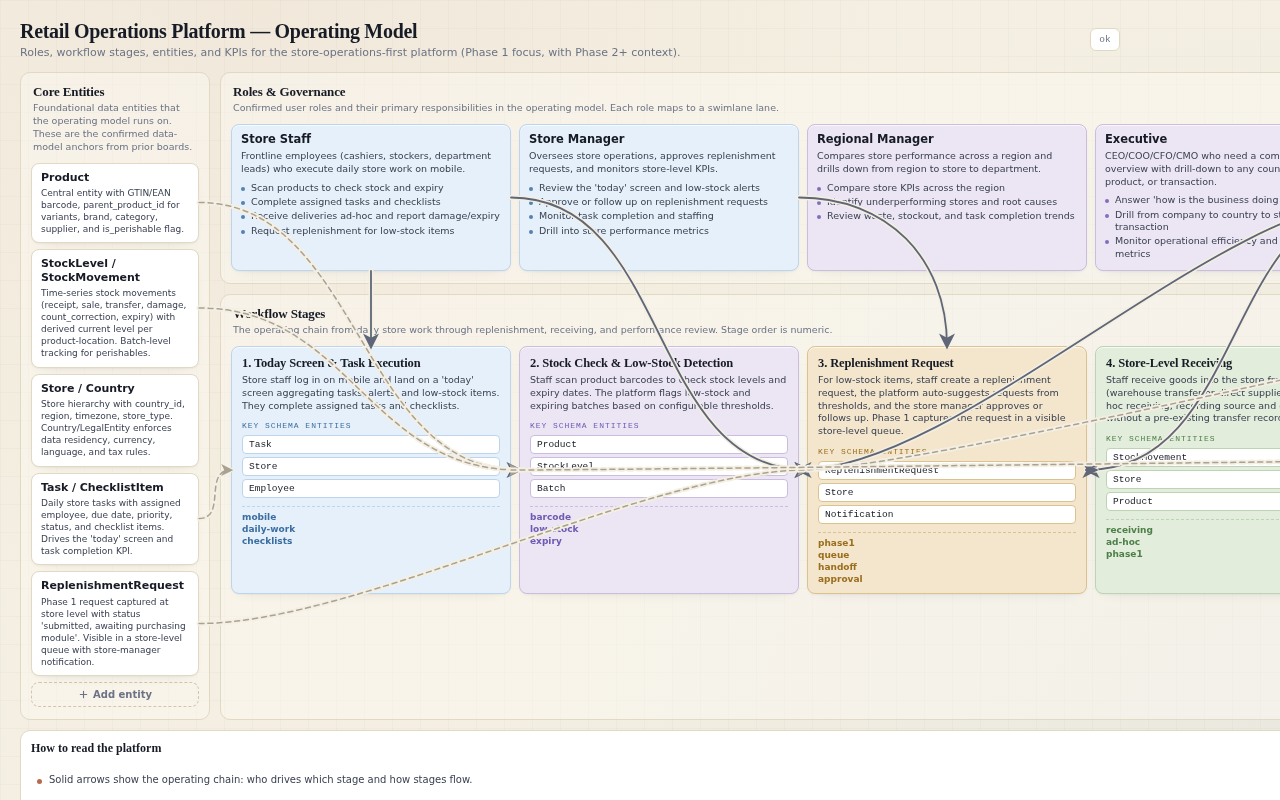
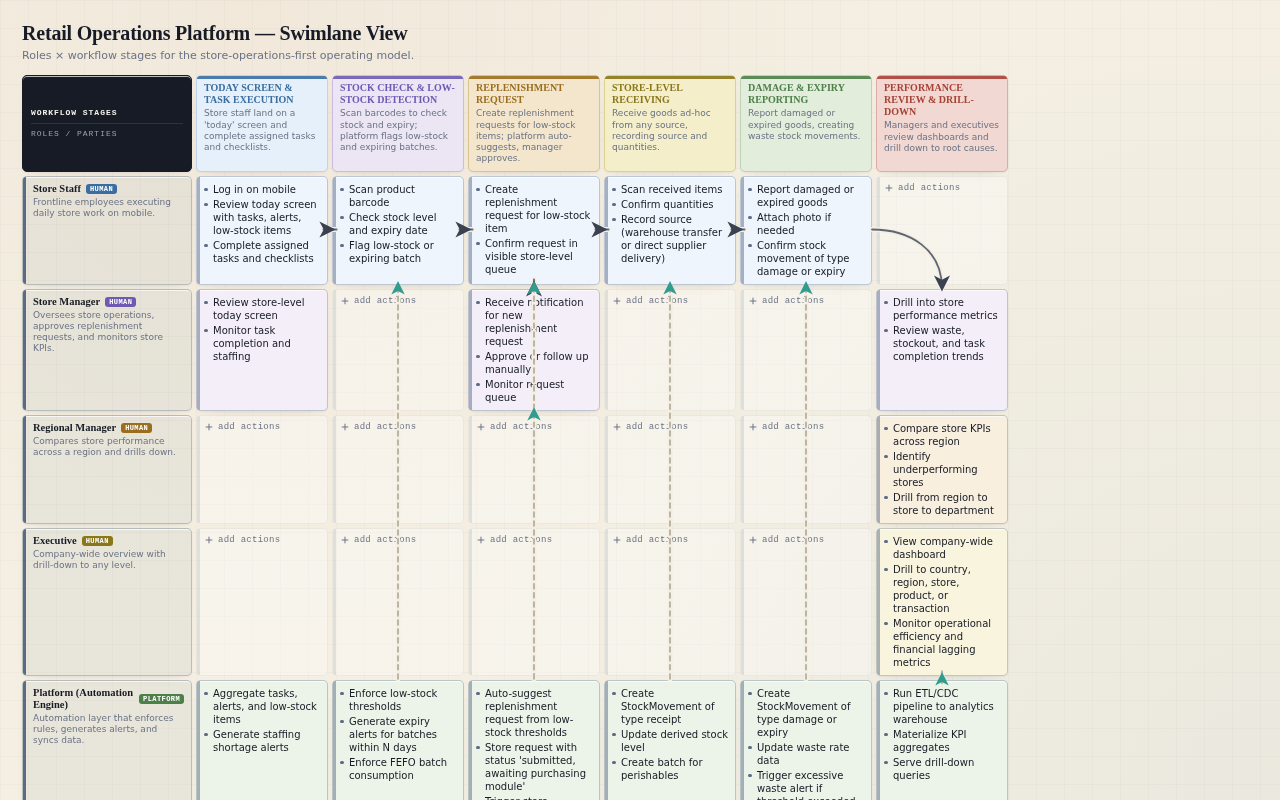
Store staff journey: (1) Log in on mobile → (2) Land on 'today' screen with tasks, alerts, and low-stock items → (3) Scan a product barcode to check stock → (4) Act on low stock (request replenishment or transfer) → (5) Complete assigned tasks and checklists → (6) Receive a delivery (scan items, confirm quantities) → (7) Report damage or expiry → (8) Log out with all work recorded.

Synthesizes the confirmed store-operations-first phased delivery and the mobile usage context. The 'today' screen is now confirmed by the user (elem_016).

interpretation

Office staff journey: (1) Log in on desktop → (2) Land on role-specific dashboard → (3) Drill into a metric or alert → (4) Trace the underlying operational record (order, delivery, promotion, complaint) → (5) Take an action (approve, reorder, refund, escalate) → (6) See the action reflected in dashboards.

Synthesizes the confirmed outcomes for purchasing, marketing, customer service, finance, regional managers, and executives. The role-specific dashboard is now confirmed by the user (elem_017).

decision

Store staff starting point: the main journey starts with a 'today' screen aggregating tasks, alerts, and low-stock items in one glance.

User explicitly accepted this option, stating it matches the mobile, one-handed, frontline context and drives daily adoption better than a stock-first or task-list-first screen.

decision

Office staff starting point: the main journey starts with a role-specific dashboard tailored to each office role's goals.

User explicitly accepted this option, stating it gives each office role immediate access to their goals and aligns with the role-aware dashboards design principle.

Capability groups
Feature clusters by user goal.
interpretation

Capability groups: (1) Store Operations — stock visibility, receiving, tasks, checklists, replenishment requests, damage/expiry reporting; (2) Warehouse Operations — lightweight receiving, picking, transfers, replenishment; (3) Purchasing & Supplier Management — suppliers, purchase orders, delivery schedules, supplier performance; (4) Marketing & Promotions — promotions, loyalty campaigns, promotion lift measurement; (5) Customer Service — complaints, refunds, order tracing; (6) Finance & Payments — sales, margins, expenses, payment reconciliation; (7) Analytics & Dashboards — company/region/store drill-downs, KPIs, scheduled reports; (8) Alerts & Notifications — configurable alerts, escalation rules, all-channel delivery; (9) Platform Foundation — identity (User→Role→Permission), tenancy (Country/LegalEntity), integration layer, data pipeline, offline architecture.

Maps directly to the confirmed target users and scope boundaries. The 9-group structure is now confirmed by the user (elem_018).

decision

Capability group granularity: the 9 proposed groups stand as proposed.

User explicitly accepted the 9-group structure, noting that merging Finance into Analytics would bury payment reconciliation and margin workflows, and splitting Store Ops further would fragment a coherent frontline workflow.

Optional phase-1 cut
Recommended phase-1 cut, ONLY when the user wants a staged rollout.
recommendation
critical

Phase 1 (MVP): Store Operations only — stock visibility, store-level receiving, tasks, checklists, replenishment requests (captured as requests only) — plus the Platform Foundation (identity, tenancy, integration layer, data pipeline, offline architecture). Warehouse receiving and purchasing fulfillment are Phase 2.

Directly follows the confirmed store-operations-first phased delivery (dec_009) and the user's explicit MVP boundary clarification (elem_019): store-level receiving in, warehouse receiving out, replenishment requests as requests only, purchasing fulfillment Phase 2.

decision
critical

MVP boundary: Phase 1 = Store Operations only. Store-level receiving is in scope (receiving goods into the store is a store workflow). Warehouse receiving is out of scope. Replenishment requests are captured in Phase 1 as requests only; purchasing fulfillment is Phase 2.

User explicitly accepted this boundary, stating it keeps the MVP tight while preserving the end-to-end store loop.

decision

Replenishment request handoff in Phase 1: replenishment requests are captured, stored in a visible store-level request queue, and trigger a notification to the store manager for manual follow-up. No purchasing workflow consumes them in Phase 1; the handoff to purchasing is a Phase 2 integration point.

User edited this element to confirm the handoff behavior: visible queue + store-manager notification, no purchasing consumption until Phase 2.

decision

Store-level receiving scope in Phase 1: store-level receiving covers receiving goods into the store from any source (warehouse transfers, direct supplier deliveries) as ad-hoc receiving without requiring a pre-existing transfer record. The warehouse-side workflow that initiates transfers is Phase 2.

User edited this element to confirm: any source, ad-hoc receiving, no pre-existing transfer record required.

decision

Replenishment request queue visibility and notification: Phase 1 replenishment requests are visible in a store-level queue and trigger a notification to the store manager for manual follow-up. The request status is 'submitted, awaiting purchasing module'.

User's blocker answer and elem_022 edit confirm both the queue and the notification. This shapes the notification architecture and the store-manager workflow in Phase 1.

decision

Ad-hoc receiving source recording: Phase 1 ad-hoc receiving records the source of goods (warehouse transfer or direct supplier delivery) at receive time, without requiring a pre-existing transfer record. Reconciliation with warehouse transfers is deferred to Phase 2.

User's elem_023 edit confirms source recording at receive time. This shapes the receiving data model and the Phase 2 reconciliation design.

Later extensions
Features valuable after MVP.
opportunity

Later extensions: customer self-service portal, supplier self-service portal, native mobile apps (if barcode scanning or push reliability demands), advanced predictive analytics (demand forecasting, ML-based replenishment), full WMS replacement for locations without mature WMS, warehouse receiving, and purchasing fulfillment.

Synthesizes the confirmed scope boundaries and phased delivery. The user's MVP boundary clarification adds warehouse receiving and purchasing fulfillment to the Phase 2 list.

Explicitly excluded scope
Things to not build now.
constraint

Explicitly excluded: POS system (integrate only), e-commerce platform (integrate only), accounting system (integrate only), payroll/HR system (out of scope), full WMS replacement (lightweight workflows only, integrate with mature WMS), external-facing portals for customers or suppliers in the initial release, warehouse receiving in Phase 1, and purchasing fulfillment in Phase 1.

Directly from the confirmed scope boundaries and the user's MVP boundary clarification. These are not built now, even if the original prompt mentions related functionality.

Trade-offs and tensions
Conflicts requiring resolution.
tradeoff

Breadth vs depth: the platform spans 7+ functional domains. Building all deeply is infeasible in one phase. Recommended position: go deep on store operations first, then expand breadth module by module, accepting that later modules will be shallower initially.

Directly addresses the confirmed scope/feasibility risk (claim 043).

tradeoff

Real-time accuracy vs system complexity: real-time stock visibility requires high-frequency data ingestion from POS and WMS, adding integration and infrastructure complexity. Recommended position: near-real-time (seconds to minutes) for operational workflows, with explicit staleness indicators, and batch ETL for analytics.

Synthesizes the confirmed hybrid data architecture (dec_008) and data quality risk (claim 044).

tradeoff

Offline support vs data consistency: offline-first mobile workflows (required for low-connectivity store/warehouse environments) create conflict resolution complexity. Recommended position: offline support for core read workflows (stock checks, task lists) and queued writes for simple actions (task completion, count corrections), with server-side conflict resolution for stock movements.

Synthesizes the confirmed offline architecture decision (dec_014) and low-connectivity risk (claim 033).

tradeoff

Replenishment request capture without fulfillment: Phase 1 captures replenishment requests but cannot fulfill them through purchasing. Mitigation: requests are visible in a store-level queue with status 'submitted, awaiting purchasing module', and a notification goes to the store manager for manual follow-up. The UI sets the expectation that purchasing action starts in Phase 2.

User edited this element to specify the mitigation: visible queue, explicit status, store-manager notification, and UI expectation-setting.

tradeoff

Store-level receiving without warehouse context: Phase 1 store-level receiving captures goods arriving at the store, but the warehouse-side workflow that initiates transfers is Phase 2. Ad-hoc receiving (scan items, confirm quantities, record source as warehouse transfer or direct supplier delivery) is allowed without requiring a pre-existing transfer record. Reconciliation with warehouse transfers happens when Phase 2 arrives.

User edited this element to specify: ad-hoc receiving records source at receive time, with reconciliation deferred to Phase 2.

risk

Store-manager notification overload: Phase 1 replenishment requests trigger a notification to the store manager for every request. With hundreds of stores and frequent low-stock events, store managers could face notification fatigue, reducing the effectiveness of the manual follow-up loop.

The user's blocker answer (visible queue + store-manager notification) opens a new risk: notification volume. This needs a mitigation strategy (e.g., batching, digest, or threshold-based notification) to keep the manual follow-up loop effective.

risk

Ad-hoc receiving data quality: Phase 1 ad-hoc receiving without a pre-existing transfer record means the system cannot validate received quantities against an expected quantity. This creates a risk of data entry errors (wrong product, wrong quantity) that will only be caught during Phase 2 reconciliation.

The user's elem_023 edit (ad-hoc receiving without pre-existing transfer record) opens a data quality risk: no expected-quantity validation. This needs a mitigation strategy (e.g., barcode validation against product catalog, quantity confirmation prompts, or supervisor review for large discrepancies).

Design principles
UX/product principles inferred.
recommendation

Mobile-first for frontline staff: store and warehouse workflows must be optimized for one-handed use on a phone, with large touch targets, barcode scanning as the primary input, and minimal typing.

Directly from the confirmed mobile usage context (claim 030) and user-adoption risk (claim 042).

recommendation

Traceability everywhere: every operational record (stock movement, order, delivery, promotion, complaint) must be traceable to its source and related entities, so users can answer 'why' questions (why is milk out of stock, which supplier delayed delivery).

Directly from the original prompt's traceability scenarios and confirmed outcomes 023, 024, 026.

recommendation

Role-aware dashboards: each user role lands on a dashboard tailored to their goals (store manager sees stock and tasks, purchasing sees supplier performance, executive sees company-wide KPIs), with drill-down from summary to detail.

Directly from the confirmed outcomes 023-027, the analytics-first decision (dec_001), and the user's explicit acceptance of role-specific dashboards as the office staff starting point.

recommendation

Offline-tolerant by default: all frontline mobile workflows must degrade gracefully when connectivity is lost, showing staleness indicators and queuing writes for later sync.

Directly from the confirmed usage context (claim 030, 033) and offline architecture decision (dec_014).

recommendation

Configurable over hardcoded: alert thresholds, escalation rules, reorder points, and country-specific settings (currency, language, tax) must be configurable per country or per store, not hardcoded, to support multi-country operations.

Synthesizes the confirmed tenancy model (dec_006), alerting architecture (dec_010), and cross-border complexity (claim 020).

Spec Map
Product overview
A concise summary of the product, its primary intent, and its phased delivery approach.
interpretation
critical

A unified retail operations platform that enables daily operational execution (stock, receiving, tasks, replenishment) as the foundation, with analytics and cross-functional traceability built on top of the operational data it generates. Delivered in phases: Phase 1 is store operations only, Phase 2 adds warehouse and purchasing, Phase 3 deepens analytics.

Synthesizes confirmed claims 001, 004, 082 and decisions dec_001, dec_009, dec_032.

constraint
critical

Phase 1 scope: store operations only — stock visibility, store-level receiving, tasks, checklists, replenishment requests (captured as requests only) — plus platform foundation (identity, tenancy, integration layer, data pipeline, offline architecture). Warehouse receiving and purchasing fulfillment are Phase 2.

Directly from confirmed decision dec_032 and claims 086, 099, 100.

constraint

The product spans 9 capability groups: (1) Store Operations, (2) Warehouse Operations, (3) Purchasing & Supplier Management, (4) Marketing & Promotions, (5) Customer Service, (6) Finance & Payments, (7) Analytics & Dashboards, (8) Alerts & Notifications, (9) Platform Foundation. Phase 1 functional requirements focus on Store Operations and Platform Foundation.

Synthesizes confirmed claim 085 and decision dec_031.

constraint

The product must support traceability scenarios: why milk is out of stock, which supplier caused a delayed delivery, whether a promotion increased sales, which stores waste the most food, why an online order arrived incomplete. A dedicated 'Traceability scenarios' subsection under product_overview maps each of these five questions to the entities and workflows that answer them.

User explicitly confirmed the traceability scenarios subsection, stating these five questions are a core differentiator and must be testable.

constraint

The spec map is internally consistent with the operating model board: every role, entity, stage, and KPI from the operating model appears in the corresponding spec map sections.

Operating-model alignment is a board-specific requirement; the operating model board was user-validated.

risk

Risk: the spec map may become too large to be useful if it tries to detail every phase at the same level. Mitigation: Phase 1 is detailed; later phases are summarized with clear extension points.

Directly addresses confirmed risk claim 043 (scope/feasibility).

decision

Decision: the spec map covers the full product vision, with Phase 1 functional requirements detailed and later phases described at a higher level. Alternative: Phase 1 only, defer later phases to a separate spec.

The spec map must be complete for the full product, but Phase 1 is the immediate build target.

interpretation

Traceability scenarios subsection: maps each of the five traceability questions to the entities and workflows that answer them. (1) Why milk is out of stock → StockMovement + StockLevel + ReplenishmentRequest + low-stock alert workflow. (2) Which supplier caused a delayed delivery → Supplier + PurchaseOrder + DeliverySchedule + missed-delivery alert workflow. (3) Whether a promotion increased sales → Promotion + Purchase + sales analytics workflow. (4) Which stores waste the most food → Store + StockMovement (type damage/expiry) + waste rate KPI. (5) Why an online order arrived incomplete → Order + OrderLine + Delivery + complaint workflow.

User confirmed the traceability scenarios subsection; this element makes the mapping explicit and testable.

User roles
All roles that interact with the system, aligned with the operating model board.
interpretation

All roles from the operating model board appear here: Store Employee (cashier, shelf stocker, department lead), Store Manager, Warehouse Staff (receiver, picker, inventory controller), Warehouse Manager, Purchasing Team, Marketing Team, Customer Service Agent, Finance Team, Regional Manager, Executive, Platform (Automation Engine).

Operating-model alignment: every role card in workflow_roles must appear in user_roles.

constraint

The identity model is User → Role → Permission. Employee is a profile of User, never holding role_id or permission enum. A role recorded on a domain entity authorises nothing; the app gates on the User's roles.

Directly from confirmed claim 064 and decision dec_059.

interpretation

Store Employee: mobile-first, one-handed use, barcode scanning as primary input. Store Manager: mobile approvals, task assignment, replenishment request follow-up. Warehouse Staff: mobile receiving, picking, transfers. Office roles (Purchasing, Marketing, Customer Service, Finance, Regional Manager, Executive): desktop dashboards and drill-downs.

Synthesizes confirmed usage context claims 030, 031, 032 and design principles 092, 094.

constraint

The system is strictly internal for the initial release. Customer and supplier self-service portals are out of scope; customer service agents and purchasing teams act on behalf of external parties.

Directly from confirmed claim 013 and decision dec_002.

risk

Risk: role proliferation. The operating model has 11+ roles. If each role gets a bespoke dashboard and permission set, configuration and maintenance become complex. Mitigation: role templates with inheritance (e.g., Store Manager inherits Store Employee permissions plus approvals).

Directly addresses the user-adoption risk (claim 042) and the configurable-over-hardcoded design principle (claim 096).

decision

Decision: the spec map uses the exact role set from the operating model board. No new roles are introduced without a decision element asking the user to extend the operating model first.

The operating model board was user-validated and is authoritative.

Primary workflows
The main user journeys and operational workflows, aligned with the operating model stages.
interpretation

Store staff main journey: log in on mobile → land on 'today' screen with tasks, alerts, and low-stock items → scan a product to check stock → act on low stock (request replenishment or transfer) → complete assigned tasks and checklists → receive a delivery (scan items, confirm quantities) → report damage or expiry → log out with all work recorded.

Directly from confirmed claim 083 and decision dec_029.

interpretation

Office staff main journey: log in on desktop → land on role-specific dashboard → drill into a metric or alert → trace the underlying operational record (order, delivery, promotion, complaint) → take an action (approve, reorder, refund, escalate) → see the action reflected in dashboards.

Directly from confirmed claim 084 and decision dec_030.

interpretation

Replenishment request workflow: store staff create requests from low-stock flags, platform auto-suggests requests from thresholds, store manager approves or follows up. Requests sit in a visible store-level queue with status 'submitted, awaiting purchasing module'. A notification goes to the store manager for manual follow-up. No purchasing workflow consumes them in Phase 1.

Directly from confirmed claims 099, 101, 103 and decisions dec_033, dec_035, dec_037.

interpretation

Store-level receiving workflow: ad-hoc receiving from any source (warehouse transfer or direct supplier delivery) without requiring a pre-existing transfer record. Source is recorded at receive time. Scan items, confirm quantities, create StockMovement records of type receipt. Reconciliation with warehouse transfers is deferred to Phase 2.

Directly from confirmed claims 100, 102 and decisions dec_034, dec_036.

interpretation

Cycle counting workflow: continuous cycle counting with ABC classification. A items (high-value/fast-moving) counted weekly, B items monthly, C items quarterly. The system generates a rolling count schedule and flags overdue counts. Count corrections create StockMovement records of type count_correction.

Directly from confirmed claim 078 and decision dec_025.

interpretation

Damage and expiry reporting workflow: store staff report damaged or expired products, creating StockMovement records of type damage or expiry. Photo attachments optional. For perishables, batch_id is referenced and FEFO consumption is applied.

Directly from the original prompt and confirmed data model elements.

interpretation

Task and checklist workflow: tasks assigned to employees, with due dates, priorities, statuses (open, in_progress, completed, overdue, cancelled), and checklist items. Store opening and closing checklists are supported as task templates.

Directly from confirmed claim 072 and the original prompt.

interpretation

Alerting workflow: low stock, expired products, missed deliveries, pricing errors, excessive waste, suspicious transactions, unanswered complaints, staffing shortages. Configurable thresholds and escalation rules. All channels (in-app, email, SMS, push) with per-alert-type configuration.

Directly from the original prompt and confirmed decision dec_010.

interpretation

Analytics and drill-down workflow: company → country → region → store → department → product → transaction. Role-specific dashboards for each office role. Phase 1 KPIs: stockout rate, waste rate, task completion time, replenishment request queue status.

Directly from the original prompt, confirmed claim 094, and decision dec_015.

risk

Risk: store-manager notification overload. Phase 1 replenishment requests trigger a notification to the store manager for every request. With hundreds of stores and frequent low-stock events, store managers could face notification fatigue. Mitigation: batch notifications (daily digest) or threshold-based notification (only notify when request count exceeds N).

Directly from the solution shape tradeoff element about store-manager notification overload.

risk

Risk: ad-hoc receiving data quality. Phase 1 ad-hoc receiving without a pre-existing transfer record means the system cannot validate received quantities against an expected quantity. Mitigation: show product name and photo on scan confirmation, require confirmation before saving, allow undo within a time window.

Directly from the solution shape tradeoff element about ad-hoc receiving data quality.

decision

Decision: every stage from the operating model swimlane drives at least one workflow element. The stages are: (1) Store Operations, (2) Warehouse Operations, (3) Purchasing & Supplier Management, (4) Marketing & Promotions, (5) Customer Service, (6) Finance & Payments, (7) Analytics & Dashboards, (8) Alerts & Notifications, (9) Platform Foundation, (10) Governance & Audit.

Operating-model alignment: every stage card must drive at least one workflow element.

Functional requirements
Testable, traceable requirements with IDs (FR-001, FR-002, etc.).
interpretation

FR-001: The system shall allow store staff to log in on mobile and land on a 'today' screen aggregating tasks, alerts, and low-stock items. Traceable to claim 097.

Directly from confirmed claim 097 and decision dec_029.

interpretation

FR-002: The system shall allow store staff to scan a product barcode (GTIN/EAN) to check current stock level, with product name and photo displayed on the scan confirmation screen. Traceable to claim 092.

Directly from confirmed claim 092 and the barcode scanning requirement.

interpretation

FR-003: The system shall allow store staff to create replenishment requests from low-stock flags, and the platform shall auto-suggest requests from thresholds. Store manager approves or follows up. Requests sit in a visible store-level queue with status 'submitted, awaiting purchasing module'. Traceable to claim 099, 101, 103.

Directly from confirmed claims 099, 101, 103 and decisions dec_033, dec_035, dec_037.

interpretation

FR-004: The system shall allow store staff to perform ad-hoc receiving from any source (warehouse transfer or direct supplier delivery) without requiring a pre-existing transfer record. Source is recorded at receive time. Traceable to claim 100, 102.

Directly from confirmed claims 100, 102 and decisions dec_034, dec_036.

interpretation

FR-005: The system shall generate a rolling cycle count schedule with ABC classification (A weekly, B monthly, C quarterly) and flag overdue counts. Count corrections create StockMovement records of type count_correction. Traceable to claim 078.

Directly from confirmed claim 078 and decision dec_025.

interpretation

FR-006: The system shall allow store staff to report damaged or expired products, creating StockMovement records of type damage or expiry, with optional photo attachments. Traceable to the original prompt.

Directly from the original prompt and confirmed data model elements.

interpretation

FR-007: The system shall allow store managers to assign tasks to employees, with due dates, priorities, statuses, and checklist items. Store opening and closing checklists are supported as task templates. Traceable to claim 072.

Directly from confirmed claim 072 and the original prompt.

interpretation

FR-008: The system shall generate alerts for low stock, expired products, missed deliveries, pricing errors, excessive waste, suspicious transactions, unanswered complaints, and staffing shortages, with configurable thresholds and escalation rules. Traceable to the original prompt and decision dec_010.

Directly from the original prompt and confirmed decision dec_010.

interpretation

FR-009: The system shall provide role-specific dashboards with drill-down from company → country → region → store → department → product → transaction. Phase 1 KPIs: stockout rate, waste rate, task completion time, replenishment request queue status. Traceable to claim 094 and decision dec_015.

Directly from confirmed claim 094 and decision dec_015.

interpretation

FR-010: The system shall maintain an audit log of all changes to regulated data (stock movements, replenishment requests, receiving records, user permissions), with user_id, timestamp, entity_type, entity_id, old_value, new_value. Traceable to the standard pattern for audit logging.

Standard pattern: any product handling regulated data, money, contracts, or sensitive PII gets an audit log entity and workflow.

interpretation

FR-011: The system shall support soft delete for user-facing entities (Product, Supplier, Customer, Task, Promotion), with deleted_at timestamp. Hard delete is reserved for GDPR erasure of PII. Traceable to the standard pattern for soft delete.

Standard pattern: user-facing entities use soft delete unless the domain explicitly forbids it.

interpretation

FR-012: The system shall apply rate limiting and consistent error responses on every public-ish endpoint. Traceable to the standard pattern for error handling and rate limiting.

Standard pattern: every public-ish endpoint has rate limiting and consistent error responses.

interpretation

FR-013: The system shall store all timestamps in UTC and display them in the user's local timezone. All user-facing text shall be localizable. Traceable to the standard pattern for i18n and timezone.

Standard pattern: timezone-aware storage and localization readiness.

interpretation

FR-014: The system shall enforce list view-level and field-level authorization. Users see only the stores and functions relevant to their roles. Traceable to the standard pattern for authorization surface.

Standard pattern: list view-level and field-level authorization concerns.

interpretation

FR-015: The system shall support GDPR controls: data residency (PII stored in-region), erasure (hard delete of PII while preserving operational records), and consent management. A dedicated 'Data residency & GDPR' subsection under non_functional details per-country data residency requirements and GDPR erasure workflows. Traceable to claim 045.

User explicitly confirmed the data residency & GDPR subsection, stating it is the right place to detail per-country residency requirements and erasure workflows without overloading the functional requirement list.

interpretation

FR-016: The system shall support multi-language UI and locale formats (date, time, number, currency) per country. Traceable to the original prompt and the multi-language UI scope hint.

Directly from the original prompt and the multi-language UI scope hint.

interpretation

FR-017: The system shall support full-text search, faceted filters, and saved searches/views across products, stock, tasks, and other entities. Traceable to the original prompt and the search scope hints.

Directly from the original prompt and the search scope hints.

interpretation

FR-018: The system shall support import/export (Excel/CSV) and bulk operations for products, stock counts, and other entities. Traceable to the original prompt and the import/export scope hint.

Directly from the original prompt and the import/export scope hint.

interpretation

FR-019: The system shall support scheduled reports (daily, weekly, monthly) delivered via email or in-app. Traceable to the original prompt and the scheduled reports scope hint.

Directly from the original prompt and the scheduled reports scope hint.

interpretation

FR-020: The system shall expose a REST API and webhooks for integration with external systems. Traceable to the integration strategy and the REST API/webhooks scope hints.

Directly from the integration strategy and the REST API/webhooks scope hints.

interpretation

FR-021: The system shall support a job queue and scheduled jobs for alerting, ETL/CDC, and scheduled reports. Traceable to the alerting architecture and the job queue scope hint.

Directly from the alerting architecture and the job queue scope hint.

interpretation

FR-022: The system shall support live updates (WebSockets/SSE) for real-time stock visibility and alert delivery. Traceable to the real-time stock visibility requirement and the live updates scope hint.

Directly from the real-time stock visibility requirement and the live updates scope hint.

interpretation

FR-023: The system shall define modular boundaries and API contracts for the 9 capability groups, with the canonical integration layer as the interface to external systems. Traceable to the capability groups and the modular boundaries scope hint.

Directly from the capability groups and the modular boundaries scope hint.

interpretation

FR-024: The system shall implement a caching strategy for near-real-time stock visibility and dashboard performance. Traceable to the caching strategy scope hint and the real-time accuracy tradeoff.

Directly from the caching strategy scope hint and the real-time accuracy tradeoff.

interpretation

FR-025: The system shall implement DB optimization, timeouts & retries, and graceful degradation for offline and integration scenarios. Traceable to the DB optimization, timeouts & retries, and graceful degradation scope hints.

Directly from the DB optimization, timeouts & retries, and graceful degradation scope hints.

interpretation

FR-026: The system shall implement automated testing (unit/integration/e2e), CI/CD pipelines, and feature flags & staged rollout. Traceable to the automated testing, CI/CD, and feature flags scope hints.

Directly from the automated testing, CI/CD, and feature flags scope hints.

interpretation

FR-027: The system shall support email/password login, MFA, password recovery, and SSO (OIDC/SAML) as advisory roadmap guidance. Traceable to the identity model and the authentication scope hints.

Directly from the identity model and the authentication scope hints.

interpretation

FR-028: The system shall support RBAC, ABAC, row-level security, and field-level security. Traceable to the permissions model and the RBAC/ABAC/row-level/field-level scope hints.

Directly from the permissions model and the RBAC/ABAC/row-level/field-level scope hints.

interpretation

FR-029: The system shall support keyboard navigation, contrast & typography, and screen reader support. Traceable to the accessibility scope hints.

Directly from the accessibility scope hints.

interpretation

FR-030: The system shall implement a design system and theming. Traceable to the design system scope hint.

Directly from the design system scope hint.

interpretation

FR-031: The system shall implement responsive layout for mobile-first frontline workflows. Traceable to the responsive layout scope hint and the mobile-first design principle.

Directly from the responsive layout scope hint and the mobile-first design principle.

interpretation

FR-032: The system shall implement onboarding, navigation, task completion, forms & validation UX, and empty & error states. Traceable to the UX scope hints.

Directly from the UX scope hints.

interpretation

FR-033: The system shall support email notifications, SMS notifications, in-app notifications, and push notifications, with per-alert-type configuration and escalation rules. Traceable to the all-channel alerting decision and the notification scope hints.

Directly from the all-channel alerting decision and the notification scope hints.

interpretation

FR-034: The system shall support CRUD screens, multi-step workflows, approvals, SLAs & escalations, validation rules, and auto-derivations. Traceable to the operational workflows and the corresponding scope hints.

Directly from the CRUD screens, multi-step workflows, approvals, SLAs & escalations, validation rules, and auto-derivations scope hints.

interpretation

FR-035: The system shall support uploads & storage and versioning for photo attachments and document attachments. Traceable to the uploads & storage and versioning scope hints.

Directly from the uploads & storage and versioning scope hints.

interpretation

FR-036: The system shall support dashboards & KPIs, with Phase 1 KPIs: stockout rate, waste rate, task completion time, replenishment request queue status. Traceable to the dashboards & KPIs scope hint and the analytics workflow.

Directly from the dashboards & KPIs scope hint and the analytics workflow.

interpretation

FR-037: The system shall support third-party connectors via the canonical integration layer. Traceable to the third-party connectors scope hint and the integration strategy.

Directly from the third-party connectors scope hint and the integration strategy.

interpretation

FR-038: The system shall implement logs, metrics, traces, SLOs & alerting as advisory roadmap guidance. Traceable to the logs, metrics, traces, SLOs & alerting scope hint (advisory).

Directly from the logs, metrics, traces, SLOs & alerting scope hint (advisory).

interpretation

FR-039: The system shall implement latency targets (p95/p99) as advisory roadmap guidance. Traceable to the latency targets scope hint (advisory).

Directly from the latency targets scope hint (advisory).

interpretation

FR-040: The system shall implement collaboration & presence as advisory roadmap guidance. Traceable to the collaboration & presence scope hint (advisory).

Directly from the collaboration & presence scope hint (advisory).

Screen / page inventory
Every screen needed for the user journeys, with purpose and key elements.
interpretation

Screen: Login (mobile and desktop). Purpose: authenticate user. Key elements: email/password fields, MFA prompt, password recovery link, SSO button (advisory).

Directly from the identity model and the authentication scope hints.

interpretation

Screen: Today (store staff mobile). Purpose: aggregate tasks, alerts, and low-stock items in one glance. Key elements: task list with due dates and priorities, alert list with severity, low-stock items with product name and current stock, barcode scan button.

Directly from confirmed claim 097 and decision dec_029.

interpretation

Screen: Role-specific dashboard (office staff desktop). Purpose: show KPIs and shortcuts tailored to each role. Key elements: KPI cards (stockout rate, waste rate, task completion time, replenishment request queue status for Phase 1), drill-down links, alert list, recent activity.

Directly from confirmed claim 098 and decision dec_030.

interpretation

Screen: Product stock check (mobile). Purpose: scan barcode and show current stock. Key elements: barcode scan input, product name and photo, current stock level, batch list (for perishables), low-stock flag, replenishment request button.

Directly from confirmed claim 092 and the barcode scanning requirement.

interpretation

Screen: Replenishment request queue (store manager mobile/desktop). Purpose: view and manage replenishment requests. Key elements: request list with status 'submitted, awaiting purchasing module', product name, quantity, requested by, approve/follow-up buttons, notification settings.

Directly from confirmed claims 099, 101, 103 and decisions dec_033, dec_035, dec_037.

interpretation

Screen: Store-level receiving (mobile). Purpose: receive goods into the store. Key elements: barcode scan input, product name and photo, quantity input, source selector (warehouse transfer or direct supplier delivery), batch expiry date input (for perishables), confirm button.

Directly from confirmed claims 100, 102 and decisions dec_034, dec_036.

interpretation

Screen: Cycle count (mobile). Purpose: perform stock counts. Key elements: count schedule list, product name and photo, quantity input, batch selector (for perishables), count correction confirmation, undo button.

Directly from confirmed claim 078 and decision dec_025.

interpretation

Screen: Damage/expiry report (mobile). Purpose: report damaged or expired products. Key elements: barcode scan input, product name and photo, quantity input, damage type selector (expired, damaged, spoiled, theft), photo attachment, confirm button.

Directly from the original prompt and confirmed data model elements.

interpretation

Screen: Task list and task detail (mobile). Purpose: view and complete tasks. Key elements: task list with due dates and priorities, task detail with checklist items, complete button, photo attachment, comment field.

Directly from confirmed claim 072 and the original prompt.

interpretation

Screen: Alert center (mobile and desktop). Purpose: view and manage alerts. Key elements: alert list with severity and type, alert detail with related entity, acknowledge/resolve buttons, escalation status, notification channel configuration.

Directly from the original prompt and confirmed decision dec_010.

interpretation

Screen: Analytics drill-down (desktop). Purpose: drill from company to country to region to store to department to product to transaction. Key elements: KPI cards, drill-down breadcrumbs, charts, tables, export button.

Directly from the original prompt, confirmed claim 094, and decision dec_015.

interpretation

Screen: Audit log (desktop). Purpose: view audit history. Key elements: filterable list of audit entries (user, timestamp, entity, old value, new value), export button.

Standard pattern: audit log entity and workflow.

interpretation

Screen: Settings (desktop). Purpose: configure country-specific settings, alert thresholds, escalation rules, reorder points, user permissions. Key elements: country selector, alert threshold configuration, escalation rule configuration, reorder point configuration, user/role/permission management.

Directly from the configurable-over-hardcoded design principle (claim 096).

risk

Risk: screen proliferation. The full product may require 50+ screens. Mitigation: Phase 1 screens are detailed; later-phase screens are summarized with clear extension points.

Directly addresses the scope/feasibility risk (claim 043).

decision

Decision: the screen inventory lists every screen needed for the user journeys, including Phase 1 screens in detail and later-phase screens at a summary level. Alternative: Phase 1 screens only.

The screen inventory must be complete for the full product, but Phase 1 screens are the immediate build target.

Data model
Every entity and field, with relationships and constraints.
interpretation

Entity: Country/LegalEntity. Fields: country_id (PK), name, iso_code, currency_code, language_code, tax_rules (JSON or FK to TaxRule), data_residency_region, is_active, created_at, updated_at. All operational entities carry country_id (FK).

Directly from confirmed claim 065 and decision dec_011.

interpretation

Entity: Product. Fields: product_id (PK), parent_product_id (FK, nullable, for variant grouping), name, description, brand_id (FK), category_id (FK), supplier_id (FK), barcode (GTIN/EAN), unit_of_measure, is_perishable, is_active, created_at, updated_at, deleted_at. Relationships: belongs to Brand, Category, Supplier; has many StockLevels, OrderLines, Returns, Promotions.

Directly from confirmed claim 062 and decision dec_017.

interpretation

Entity: Batch. Fields: batch_id (PK), product_id (FK), receipt_id (FK to StockMovement of type receipt), expiry_date, received_quantity, remaining_quantity, location_id (FK), created_at, updated_at. Only created for perishable products (is_perishable = true). StockMovement references batch_id when the movement involves a perishable product.

Directly from confirmed claim 073 and decisions dec_021, dec_026, dec_027.

interpretation

Entity: StockMovement. Fields: movement_id (PK), product_id (FK), location_id (FK, polymorphic: store or warehouse), batch_id (FK, nullable, for perishables), movement_type (receipt, sale, transfer_in, transfer_out, damage, count_correction, expiry), quantity, timestamp, source (POS, manual, WMS), user_id (FK), created_at, updated_at. Current stock level is derived from the sum of movements.

Directly from confirmed claim 063 and decision dec_016.

interpretation

Entity: StockLevel (derived view). Fields: product_id (FK), location_id (FK), current_quantity (derived), last_updated_at (derived). Not stored as a mutable count; computed on read or materialized with CDC.

Directly from confirmed claim 063 and decision dec_016.

interpretation

Entity: Store. Fields: store_id (PK), name, country_id (FK), region, address, timezone, store_type (supermarket, convenience, online-only), phone_main, phone_mobile, phone_fax, phone_emergency, is_active, created_at, updated_at, deleted_at.

Directly from confirmed claim 071.

interpretation

Entity: Warehouse. Fields: warehouse_id (PK), name, country_id (FK), address, timezone, storage_capacity, temperature_zones (frozen, chilled, ambient), is_active, created_at, updated_at, deleted_at.

Directly from confirmed claim 071.

interpretation

Entity: Employee. Fields: employee_id (PK), user_id (FK, unique), store_id (FK, nullable for warehouse/office staff), department, job_title, employment_type (full_time, part_time, contract), shift_schedule (FK to Shift), is_active, created_at, updated_at. Employee is a profile of User, never holds role_id or permission enum.

Directly from confirmed claim 064.

interpretation

Entity: User. Fields: user_id (PK), email, password_hash, mfa_enabled, is_active, created_at, updated_at, deleted_at. Relationships: has many Roles (M2M), has one Employee profile.

Directly from the identity model and the standard pattern.

interpretation

Entity: Role. Fields: role_id (PK), name, description, is_active, created_at, updated_at. Relationships: has many Permissions (M2M), has many Users (M2M).

Directly from the identity model and the standard pattern.

interpretation

Entity: Permission. Fields: permission_id (PK), name, description, is_active, created_at, updated_at. Relationships: has many Roles (M2M).

Directly from the identity model and the standard pattern.

interpretation

Entity: Notification. Fields: notification_id (PK), user_id (FK), alert_type (low_stock, expired_product, missed_delivery, pricing_error, excessive_waste, suspicious_transaction, unanswered_complaint, staffing_shortage), channel (in_app, email, sms, push), status (pending, sent, delivered, failed), escalation_level (1, 2, 3), related_entity_type, related_entity_id, created_at, sent_at, delivered_at.

Directly from confirmed claim 068 and decision dec_010.

interpretation

Entity: Task. Fields: task_id (PK), title, description, assigned_to (FK to Employee), store_id (FK) or warehouse_id (FK), due_date, priority (low, medium, high, critical), status (open, in_progress, completed, overdue, cancelled), checklist (M2M to ChecklistItem), created_at, updated_at, deleted_at.

Directly from confirmed claim 072.

interpretation

Entity: ChecklistItem. Fields: checklist_item_id (PK), task_id (FK), description, is_completed, completed_at, completed_by (FK to Employee), created_at, updated_at.

Directly from confirmed claim 072.

interpretation

Entity: ReplenishmentRequest. Fields: request_id (PK), product_id (FK), store_id (FK), quantity, status (submitted, awaiting_purchasing_module, approved, rejected), requested_by (FK to Employee), approved_by (FK to Employee, nullable), created_at, updated_at, deleted_at.

Directly from confirmed claims 099, 101, 103 and decisions dec_033, dec_035, dec_037.

interpretation

Entity: ReceivingRecord. Fields: receiving_id (PK), store_id (FK), source (warehouse_transfer, direct_supplier_delivery), received_by (FK to Employee), received_at, notes, created_at, updated_at. Relationships: has many ReceivingLine items.

Directly from confirmed claims 100, 102 and decisions dec_034, dec_036.

interpretation

Entity: ReceivingLine. Fields: receiving_line_id (PK), receiving_id (FK), product_id (FK), batch_id (FK, nullable, for perishables), quantity, expiry_date (nullable, for perishables), created_at, updated_at.

Directly from confirmed claims 100, 102 and decisions dec_034, dec_036.

interpretation

Entity: AuditLog. Fields: audit_id (PK), user_id (FK), timestamp, entity_type, entity_id, action (create, update, delete, approve, reject), old_value (JSON), new_value (JSON), created_at.

Standard pattern: audit log entity and workflow.

interpretation

All persisted entities carry created_at and updated_at. Soft-deleted entities also carry deleted_at. Foreign-key columns and frequently-filtered columns are indexed by default.

Standard patterns: timestamps, soft delete, indexing.

risk

Risk: data model completeness. The full product requires 20+ entities. If the spec map omits an entity, downstream implementation will be incomplete. Mitigation: the data model section enumerates every entity from the confirmed data model claims, with Phase 1 entities in detail and later-phase entities at a summary level.

Directly addresses the data model completeness requirement.

decision

Decision: the data model enumerates every entity and field from the confirmed data model claims, with Phase 1 entities in detail and later-phase entities at a summary level. Alternative: Phase 1 entities only.

The data model must be complete for the full product, but Phase 1 entities are the immediate build target.

Business rules
Validations, calculations, scoring, gates that the system enforces.
interpretation

Rule: Batch consumption follows FEFO (first-expired-first-out) for perishables. When a sale or transfer reduces batch quantity, the system consumes from the batch with the earliest expiry_date first. Enforced in StockMovement creation logic.

Directly from confirmed claim 079 and decision dec_026.

interpretation

Rule: Batch-level count corrections for perishables are applied to the batch with the earliest expiry_date. This preserves batch accuracy for the stock most likely to expire soon and does not require the counter to identify a specific batch.

Directly from confirmed claim 080 and decision dec_027.

interpretation

Rule: Stock level must never be negative. Any StockMovement that would result in a negative derived level is rejected with an error. Count corrections that reveal negative stock trigger an alert for investigation.

Directly from the needs_data board business rules.

interpretation

Rule: Expiry alert triggers when a batch has expiry_date within N days (configurable, default 7) and the batch's remaining quantity > 0. For non-perishables without batch tracking, no expiry alert is generated.

Directly from the needs_data board business rules.

interpretation

Rule: Low stock flag is derived by comparing current stock level to a reorder point per product-location. Reorder point is a configurable threshold, defaulting to a fixed quantity or days-of-supply based on recent sales velocity.

Directly from the needs_data board derived data.

interpretation

Rule: Pricing error alert triggers when a price change exceeds X% (configurable, default 20%) from the previous price, or when a price is below cost. The alert includes product, old price, new price, and the user who made the change.

Directly from the needs_data board business rules.

interpretation

Rule: Suspicious transaction alert triggers when a refund exceeds X (configurable, default 500 in local currency), or when a single employee processes more than Y refunds (configurable, default 10) in a day, or when a refund is processed without a matching order.

Directly from the needs_data board business rules.

interpretation

Rule: Staffing shortage alert triggers when scheduled hours for a store on a given day fall below X% (configurable, default 80%) of the required hours for that store's expected workload. Required hours are derived from historical sales volume and task load.

Directly from the needs_data board business rules.

interpretation

Rule: Replenishment requests are created by store staff from low-stock flags, auto-suggested by the platform based on thresholds, and approved or followed up by the store manager. Human approval step retained.

Directly from confirmed claim 103 and decision dec_037.

risk

Risk: alert threshold configuration complexity. With 8+ alert types, each with configurable thresholds and escalation rules, the configuration surface becomes large. Mitigation: sensible defaults per alert type, with country-level overrides.

Directly addresses the configurable-over-hardcoded design principle (claim 096) and the alerting architecture (dec_010).

decision

Decision: business rules are written at the rule level, each testable and traceable to a confirmed claim. Alternative: broader policy level.

The granularity determines how testable and traceable the business rules are.

Permissions / access model
What each role can do, at the action level per entity, with row-level and field-level security.
interpretation

Store Employee: can view stock levels, scan products, create replenishment requests, complete assigned tasks and checklists, perform ad-hoc receiving, report damage/expiry. Cannot approve replenishment requests, cannot view other stores' data.

Directly from the operating model role cards and the permissions model.

interpretation

Store Manager: inherits Store Employee permissions, plus can approve replenishment requests, assign tasks, view store-level dashboards, configure store-level alert thresholds. Cannot view other stores' data unless assigned to a region.

Directly from the operating model role cards and the permissions model.

interpretation

Warehouse Staff: can view stock levels, perform receiving, picking, transfers, replenishment. Cannot approve replenishment requests, cannot view store-level data unless assigned.

Directly from the operating model role cards and the permissions model.

interpretation

Warehouse Manager: inherits Warehouse Staff permissions, plus can approve transfers, view warehouse-level dashboards, configure warehouse-level alert thresholds.

Directly from the operating model role cards and the permissions model.

interpretation

Purchasing Team: can view supplier data, create purchase orders, view delivery schedules, view supplier performance. Cannot view store-level stock data unless assigned.

Directly from the operating model role cards and the permissions model.

interpretation

Marketing Team: can create promotions, view promotion lift, view loyalty campaign data. Cannot view supplier data or store-level stock data unless assigned.

Directly from the operating model role cards and the permissions model.

interpretation

Customer Service Agent: can view customer data, order history, complaints, refunds. Cannot view supplier data or store-level stock data unless assigned.

Directly from the operating model role cards and the permissions model.

interpretation

Finance Team: can view sales, margins, expenses, payments, reconciliation data. Cannot view store-level stock data or supplier data unless assigned.

Directly from the operating model role cards and the permissions model.

interpretation

Regional Manager: can view all stores in their region, compare store performance, drill down to store level. Cannot view stores outside their region.

Directly from the operating model role cards and the permissions model.

interpretation

Executive: can view company-wide data, all countries, all regions, all stores. Cannot modify operational data; read-only access to dashboards and drill-downs.

Directly from the operating model role cards and the permissions model.

interpretation

Platform (Automation Engine): system-level actor that enforces thresholds, generates alerts, syncs data. Has no user-facing permissions; operates with service-level access.

Directly from confirmed claim 107 and decision dec_041.

interpretation

Row-level security: users see only the stores and functions relevant to their roles. Store Employee sees only their assigned store. Regional Manager sees only their region. Executive sees all.

Directly from the standard pattern for authorization surface and the row-level security scope hint.

interpretation

Field-level security: sensitive fields (e.g., supplier cost, employee salary) are visible only to roles with the corresponding permission. Finance Team can see cost fields; Store Employee cannot.

Directly from the standard pattern for authorization surface and the field-level security scope hint.

risk

Risk: permission matrix complexity. With 11+ roles and 20+ entities, the permission matrix becomes large. Mitigation: role templates with inheritance, and a permission matrix document maintained alongside the spec.

Directly addresses the role proliferation risk and the configurable-over-hardcoded design principle.

decision

Decision: the permissions section specifies what each role can do at the action level (view, create, edit, approve, delete) per entity, with row-level and field-level security noted. Alternative: role-level summary only.

The permissions model must be specific enough to implement, not just role names.

Integrations
External systems the app connects to, with integration strategy.
interpretation

Integration: POS systems. The app receives sales transactions from existing POS systems via the canonical integration layer. Each transaction includes store_id, product_id, quantity, unit_price, timestamp, and payment method. The app does not replace the POS.

Directly from confirmed claim 035 and the needs_data board data dependencies.

interpretation

Integration: WMS systems. Where a location runs a mature WMS, the app receives stock movements (receipts, picks, transfers) from the WMS via the canonical integration layer. Where no WMS exists, the app's lightweight warehouse workflows generate these movements directly.

Directly from confirmed claim 039 and the needs_data board data dependencies.

interpretation

Integration: E-commerce platforms. The app receives online orders from existing e-commerce platforms via webhooks. Each order includes customer_id, order lines, delivery address, and order type (home_delivery, click_and_collect). The app does not host the online storefront.

Directly from confirmed claim 036 and the needs_data board data dependencies.

interpretation

Integration: Supplier feeds. The app receives product catalogs, price lists, and delivery schedules from suppliers via the canonical integration layer or webhooks. Supplier feeds are validated against the app's product master data before import.

Directly from the needs_data board data dependencies.

interpretation

Integration: Accounting systems. The app sends sales summaries, margin calculations, and payment reconciliations to existing accounting systems via the canonical integration layer. The app does not maintain the ledger or handle tax compliance.

Directly from confirmed claim 037 and the needs_data board data dependencies.

interpretation

Integration: Delivery partner systems. The app receives delivery status updates (picked_up, in_transit, delivered, failed) from delivery partners via webhooks. Each update includes order_id, status, timestamp, and optional failure reason.

Directly from the needs_data board data dependencies.

interpretation

Integration: Payment providers. The app receives payment confirmations and refund statuses from payment providers via webhooks. Each confirmation includes order_id, payment_id, amount, currency, and status (authorized, captured, refunded, failed).

Directly from the needs_data board data dependencies.

interpretation
critical

Integration strategy: hybrid — use an integration middleware for core, high-volume systems (POS, e-commerce, payment providers, accounting) and event-driven webhooks for edge systems and partner feeds (delivery partners, supplier feeds). Avoid building and maintaining a large library of bespoke native connectors.

Directly from confirmed claim 048 and decision dec_007.

interpretation

Canonical integration layer: standardized message formats, retry policies, and error handling for all external systems. Phase 1 connectors are limited to the systems store operations actually touches (POS, WMS where present), but the layer itself is built now as the foundation.

Directly from confirmed claim 054 and decision dec_012.

risk

Risk: integration surface complexity. Integrating with hundreds of stores, warehouses, POS systems, e-commerce platforms, payment providers, delivery partners, supplier feeds, and accounting systems across multiple countries creates a massive integration surface with high failure potential. Mitigation: middleware-first strategy, canonical integration layer, Phase 1 connectors limited to store-operations systems.

Directly from confirmed risk claim 041 and decision dec_007.

decision

Decision: the integrations section lists the external systems from the operating model board and the confirmed integration strategy. No new integrations are introduced without a decision element asking the user to extend the operating model first.

The operating model board was user-validated and is authoritative.

Non-functional requirements
Performance, security, accessibility, i18n, offline, and other cross-cutting requirements.
interpretation

Offline support: service worker architecture, local caching, queued writes for simple actions (task completion, count corrections), server-side conflict resolution for stock movements. Staleness indicators on all stock displays.

Directly from confirmed claim 056, 091, 095 and decision dec_014.

interpretation

ETL/CDC pipeline: data quality checks, schema versioning, and reconciliation between operational and analytical stores. Near-real-time (seconds to minutes) for operational workflows, batch ETL for analytics.

Directly from confirmed claim 055 and decision dec_013.

interpretation

Timezone-aware storage: all timestamps stored in UTC, displayed in the user's local timezone. Localization readiness for all user-facing text.

Standard pattern: i18n and timezone.

interpretation

Rate limiting and consistent error responses on every public-ish endpoint.

Standard pattern: error handling and rate limiting.

interpretation

Accessibility: keyboard navigation, contrast & typography, screen reader support. WCAG 2.1 AA compliance target.

Directly from the accessibility scope hints.

interpretation

Responsive layout: mobile-first for frontline staff, desktop for office staff. Large touch targets, barcode scanning as primary input, minimal typing on mobile.

Directly from the responsive layout scope hint and the mobile-first design principle.

interpretation

Caching strategy: near-real-time stock visibility with explicit staleness indicators. Cache invalidation on stock movement creation.

Directly from the caching strategy scope hint and the real-time accuracy tradeoff.

interpretation

DB optimization: indexed foreign-key columns and frequently-filtered columns. Timeouts & retries on integration calls. Graceful degradation when connectivity is lost.

Directly from the DB optimization, timeouts & retries, and graceful degradation scope hints.

interpretation

Automated testing (unit/integration/e2e), CI/CD pipelines, feature flags & staged rollout.

Directly from the automated testing, CI/CD, and feature flags scope hints.

interpretation

Latency targets (p95/p99) as advisory roadmap guidance: p95 < 200ms for API responses, p99 < 500ms for dashboard queries.

Directly from the latency targets scope hint (advisory).

interpretation

Logs, metrics, traces, SLOs & alerting as advisory roadmap guidance.

Directly from the logs, metrics, traces, SLOs & alerting scope hint (advisory).

risk

Risk: offline conflict resolution complexity. Offline-first mobile workflows create conflict resolution complexity for stock movements. Mitigation: server-side conflict resolution, last-write-wins for simple actions, explicit conflict detection for stock movements.

Directly from confirmed claim 091 and decision dec_014.

decision

Decision: Phase 1 KPIs (stockout rate, waste rate, task completion time, replenishment request queue status) are included in the acceptance criteria and non-functional sections. Supplier Performance Score and Replenishment Cycle Time are excluded from Phase 1 dashboards per confirmed decisions dec_042 and dec_043.

The spec map must reflect the confirmed KPI timing decisions to avoid misleading users.

interpretation

Data residency & GDPR subsection: details per-country data residency requirements (PII stored in-region per Country/LegalEntity.data_residency_region) and the GDPR erasure workflow (hard delete of PII while preserving operational records, with consent management).

User confirmed the data residency & GDPR subsection; this element makes the per-country residency requirements and erasure workflow explicit.

Acceptance criteria
Observable, testable criteria in Given/When/Then format.
interpretation

AC-001: Given a store employee logs in on mobile, when they land on the 'today' screen, then they see tasks, alerts, and low-stock items aggregated in one glance.

Directly from confirmed claim 097 and decision dec_029.

interpretation

AC-002: Given a store employee scans a product barcode, when the scan is confirmed, then the system shows product name, photo, current stock level, and batch list (for perishables).

Directly from confirmed claim 092 and the barcode scanning requirement.

interpretation

AC-003: Given a store employee creates a replenishment request from a low-stock flag, when the request is submitted, then it appears in the store-level queue with status 'submitted, awaiting purchasing module' and a notification goes to the store manager.

Directly from confirmed claims 099, 101, 103 and decisions dec_033, dec_035, dec_037.

interpretation

AC-004: Given a store employee performs ad-hoc receiving, when they scan items and confirm quantities, then StockMovement records of type receipt are created with source recorded as warehouse transfer or direct supplier delivery.

Directly from confirmed claims 100, 102 and decisions dec_034, dec_036.

interpretation

AC-005: Given a cycle count is performed, when a count correction is submitted, then a StockMovement record of type count_correction is created with the difference from the previous derived level.

Directly from confirmed claim 078 and decision dec_025.

interpretation

AC-006: Given a store employee reports a damaged or expired product, when the report is submitted, then a StockMovement record of type damage or expiry is created, with optional photo attachment.

Directly from the original prompt and confirmed data model elements.

interpretation

AC-007: Given a store manager assigns a task to an employee, when the employee completes the task and all checklist items, then the task status changes to completed and the completion time is recorded.

Directly from confirmed claim 072 and the original prompt.

interpretation

AC-008: Given a low stock condition is detected, when the stock level falls below the reorder point, then an alert is generated with the configured channel and escalation rules.

Directly from the original prompt and confirmed decision dec_010.

interpretation

AC-009: Given an executive views the company dashboard, when they drill down from company to country to region to store to department to product to transaction, then each level shows the relevant KPIs and data.

Directly from the original prompt, confirmed claim 094, and decision dec_015.

interpretation

AC-010: Given a user changes a regulated data record, when the change is saved, then an audit log entry is created with user_id, timestamp, entity_type, entity_id, old_value, and new_value.

Standard pattern: audit log entity and workflow.

interpretation

AC-011: Given a GDPR erasure request, when the request is processed, then PII is hard-deleted while operational records are preserved.

Directly from confirmed claim 045 and the GDPR scope hint.

interpretation

AC-012: Given a store employee is offline, when they complete a task or submit a count correction, then the action is queued locally and synced when connectivity is restored, with conflict resolution for stock movements.

Directly from confirmed claim 056, 091, 095 and decision dec_014.

risk

Risk: acceptance criteria may be too numerous to test manually. Mitigation: automated testing (unit/integration/e2e) covers the acceptance criteria, with CI/CD pipelines running tests on every commit.

Directly addresses the automated testing scope hint and the scope/feasibility risk.

decision

Decision: acceptance criteria are written in Given/When/Then format, observable and testable. Alternative: checklist format.

The format determines how testable the acceptance criteria are.

Out of scope
Explicitly rejected scope, mirrored from earlier boards.
constraint

Out of scope: POS system (integrate only), e-commerce platform (integrate only), accounting system (integrate only), payroll/HR system (out of scope), full WMS replacement (lightweight workflows only, integrate with mature WMS), external-facing portals for customers or suppliers in the initial release, warehouse receiving in Phase 1, and purchasing fulfillment in Phase 1.

Directly from confirmed scope boundaries (claims 035, 036, 037, 040, 013), decision dec_003, and the user's MVP boundary clarification.

constraint

Out of scope for Phase 1: warehouse receiving, purchasing fulfillment, supplier performance score (Phase 2 context only), replenishment cycle time (hidden from Phase 1 dashboards).

Directly from confirmed decisions dec_032, dec_042, dec_043.

constraint

Out of scope: customer self-service portal, supplier self-service portal, native mobile apps (deferred unless barcode scanning or push reliability demands), advanced predictive analytics (demand forecasting, ML-based replenishment).

Directly from confirmed claim 087 and decision dec_005.

risk

Risk: scope creep. The out of scope section must prevent reintroduction of rejected scope. Mitigation: every rejected scope item is explicitly listed here, and any proposal to reintroduce it requires a decision element.

Directly addresses the scope/feasibility risk (claim 043).

decision

Decision: the out of scope section explicitly mirrors what was rejected in earlier boards (POS, e-commerce, accounting, payroll/HR, full WMS replacement, external portals, warehouse receiving in Phase 1, purchasing fulfillment in Phase 1). Alternative: list only Phase 1 exclusions.

The out of scope section must prevent scope creep by explicitly recording what was rejected.

Remaining assumptions
Every claim that is NOT yet confirmed but is being relied on.
interpretation

Assumption: the user wants the spec map to cover the full product vision, with Phase 1 detailed and later phases summarized. This is now confirmed.

The spec map scope decision (dec_spec_001) was accepted by the user.

interpretation

Assumption: the user wants functional requirements at the user-story level (FR-001, FR-002, etc.), each testable and traceable. This is now confirmed.

The functional requirement granularity decision (dec_spec_002) was accepted by the user.

interpretation

Assumption: the user wants the permissions section at the action level per entity, not just role names. This is now confirmed.

The permissions model granularity decision (dec_spec_005) was accepted by the user.

interpretation

Assumption: the user wants acceptance criteria in Given/When/Then format. This is now confirmed.

The acceptance criteria format decision (dec_spec_006) was accepted by the user.

interpretation

Assumption: the user wants the out of scope section to mirror all rejected scope from earlier boards. This is now confirmed.

The out of scope mirroring decision (dec_spec_007) was accepted by the user.

interpretation

Assumption: the user wants the assumptions section to capture every unconfirmed claim being relied on. This is now confirmed.

The assumptions section honesty decision (dec_spec_008) was accepted by the user.

interpretation

Assumption: the user wants strict operating model alignment, with no new roles, entities, or stages introduced without a decision element. This is now confirmed.

The operating model alignment decision (dec_spec_009) was accepted by the user.

interpretation

Assumption: the user wants Phase 1 KPIs only (stockout rate, waste rate, task completion time, replenishment request queue status), with Supplier Performance Score and Replenishment Cycle Time excluded from Phase 1 dashboards. This is now confirmed.

The Phase 1 KPI inclusion decision (dec_spec_010) was accepted by the user.

risk

Risk: the assumptions section may hide unverified claims if not carefully maintained. Mitigation: every unconfirmed claim is explicitly listed here with priority and blockers where appropriate.

Directly addresses the assumptions section honesty requirement.

decision

Decision: the assumptions section captures every claim that is NOT yet confirmed but is being relied on, with priority and blockers where appropriate. Alternative: capture only high-impact unconfirmed claims.

The assumptions section must be honest about what is not yet confirmed to avoid building on unverified foundations.

Workflow / Roles
Sandbox
Swimlane workflow
Sandbox
Specification

Supermarket and retail chain management — Specification

Product overview

A unified retail operations platform for a multi-country supermarket chain that enables daily operational execution (stock, receiving, tasks, replenishment) as the foundation, with analytics and cross-functional traceability built on top of the operational data it generates. Phase 1 is store operations only; warehouse and purchasing follow in Phase 2, then analytics deepens.

Problem statement

Store and warehouse staff lack a single mobile tool for daily tasks, leading to paper checklists, manual stock counts, and missed expiry dates. Regional managers and executives lack consistent, comparable metrics across countries, regions, and stores. Cross-border operations create currency, tax, language, and regulatory complexity that current tools do not handle consistently.

Target users & roles

  • Store Employee — Frontline staff (cashiers, stockers, department leads) who execute daily store work on mobile with barcode scanning and minimal typing.
  • Store Manager — Oversees store operations, approves replenishment requests, assigns tasks, and monitors store-level KPIs.
  • Regional Manager — Compares store performance across a region and drills down from region to store to department.
  • Executive — CEO/COO/CFO/CMO who need a company-wide overview with drill-down to any country, region, store, product, or transaction.
  • Warehouse Staff — Receivers, pickers, and inventory controllers who manage incoming goods, storage, picking, and transfers (Phase 2).
  • Purchasing Team — Manages suppliers, purchase orders, delivery schedules, and supplier performance (Phase 2).
  • Marketing Team — Creates promotions and loyalty campaigns and measures promotion lift (Phase 2).
  • Customer Service Agent — Handles complaints, refunds, and delivery problems by tracing order history (Phase 2).
  • Finance Team — Monitors sales, margins, expenses, and payments, and reconciles with accounting systems (Phase 2).
  • Platform (Automation Engine) — System-level actor that enforces thresholds, generates alerts, and syncs operational and analytical data.

User journeys

Store staff daily operations

  1. Store employee logs in on mobile with email/password and MFA.
  2. Employee lands on the 'today' screen showing tasks, alerts, and low-stock items aggregated in one glance.
  3. Employee scans a product barcode to check current stock level, batch list (for perishables), and expiry dates.
  4. For a low-stock item, employee creates a replenishment request; the platform may auto-suggest the request from thresholds.
  5. Employee completes assigned tasks and checklists, including store opening/closing checklists.
  6. Employee performs ad-hoc receiving by scanning items, confirming quantities, and recording source (warehouse transfer or direct supplier delivery).
  7. Employee reports damaged or expired goods, creating stock movements of type damage or expiry with optional photo.
  8. Employee logs out with all work recorded and synced.

Store manager replenishment approval

  1. Store manager receives a notification for a new replenishment request.
  2. Manager opens the replenishment request queue on mobile or desktop.
  3. Manager reviews the request (product, quantity, requested by, low-stock flag).
  4. Manager approves or follows up manually; the request status updates accordingly.
  5. Manager monitors the queue and store-level KPIs on the dashboard.

Executive drill-down

  1. Executive logs in on desktop and lands on the company-wide dashboard.
  2. Executive views operational KPIs (stockout rate, waste rate, task completion time, replenishment request queue status).
  3. Executive drills from company to country to region to store to department to product to transaction.
  4. Executive traces an alert or metric to the underlying operational record.
  5. Executive exports or schedules a report for later review.

Functional requirements

FR-001: Mobile 'today' screen for store staff

Store staff log in on mobile and land on a 'today' screen aggregating tasks, alerts, and low-stock items in one glance, so they can start daily work without navigating to separate modules.

Acceptance criteria:

  • Given a store employee logs in on mobile, when they land on the 'today' screen, then they see tasks, alerts, and low-stock items aggregated in one glance.

FR-002: Barcode stock check

Store staff scan a product barcode (GTIN/EAN) to check current stock level, with product name and photo displayed on the scan confirmation screen, so they can verify stock without typing.

Acceptance criteria:

  • Given a store employee scans a product barcode, when the scan is confirmed, then the system shows product name, photo, current stock level, and batch list for perishables.

FR-003: Replenishment request workflow

Store staff create replenishment requests from low-stock flags, the platform auto-suggests requests from thresholds, and the store manager approves or follows up. Requests sit in a visible store-level queue with status 'submitted, awaiting purchasing module'.

Acceptance criteria:

  • Given a store employee creates a replenishment request from a low-stock flag, when the request is submitted, then it appears in the store-level queue with status 'submitted, awaiting purchasing module' and a notification goes to the store manager.

FR-004: Ad-hoc store-level receiving

Store staff perform ad-hoc receiving from any source (warehouse transfer or direct supplier delivery) without requiring a pre-existing transfer record, recording source at receive time, so goods can be received even before Phase 2 warehouse workflows exist.

Acceptance criteria:

  • Given a store employee performs ad-hoc receiving, when they scan items and confirm quantities, then StockMovement records of type receipt are created with source recorded as warehouse transfer or direct supplier delivery.

FR-005: Cycle counting with ABC classification

The system generates a rolling cycle count schedule with ABC classification (A items weekly, B monthly, C quarterly) and flags overdue counts, so stock accuracy is maintained continuously without full-store shutdowns.

Acceptance criteria:

  • Given a cycle count is performed, when a count correction is submitted, then a StockMovement record of type count_correction is created with the difference from the previous derived level.

FR-006: Damage and expiry reporting

Store staff report damaged or expired products, creating StockMovement records of type damage or expiry with optional photo attachments, so waste is tracked and traceable.

Acceptance criteria:

  • Given a store employee reports a damaged or expired product, when the report is submitted, then a StockMovement record of type damage or expiry is created with optional photo attachment.

FR-007: Task and checklist management

Store managers assign tasks to employees with due dates, priorities, statuses, and checklist items; store opening and closing checklists are supported as task templates, so daily work is structured and measurable.

Acceptance criteria:

  • Given a store manager assigns a task to an employee, when the employee completes the task and all checklist items, then the task status changes to completed and the completion time is recorded.

FR-008: Configurable alerts and escalation

The system generates alerts for low stock, expired products, missed deliveries, pricing errors, excessive waste, suspicious transactions, unanswered complaints, and staffing shortages, with configurable thresholds and escalation rules across in-app, email, SMS, and push channels.

Acceptance criteria:

  • Given a low stock condition is detected, when the stock level falls below the reorder point, then an alert is generated with the configured channel and escalation rules.

FR-009: Role-specific dashboards with drill-down

The system provides role-specific dashboards with drill-down from company to country to region to store to department to product to transaction, so each role sees the KPIs relevant to their goals.

Acceptance criteria:

  • Given an executive views the company dashboard, when they drill down from company to country to region to store to department to product to transaction, then each level shows the relevant KPIs and data.

FR-010: Audit logging

The system maintains an audit log of all changes to regulated data (stock movements, replenishment requests, receiving records, user permissions), with user_id, timestamp, entity_type, entity_id, old_value, and new_value, so changes are traceable and compliant.

Acceptance criteria:

  • Given a user changes a regulated data record, when the change is saved, then an audit log entry is created with user_id, timestamp, entity_type, entity_id, old_value, and new_value.

FR-011: Soft delete and GDPR erasure

The system supports soft delete for user-facing entities (Product, Supplier, Customer, Task, Promotion) with deleted_at timestamp, while GDPR erasure of PII uses hard delete, so operational records are preserved while privacy is respected.

Acceptance criteria:

  • Given a GDPR erasure request, when the request is processed, then PII is hard-deleted while operational records are preserved.

FR-012: Rate limiting and consistent errors

The system applies rate limiting and consistent error responses on every public-ish endpoint, so abuse is prevented and clients can handle failures predictably.

Acceptance criteria:

  • Given a client exceeds the rate limit, when the request is made, then the system returns a consistent 429 error response with retry-after header.

FR-013: Timezone-aware storage and localization

The system stores all timestamps in UTC and displays them in the user's local timezone, with all user-facing text localizable, so multi-country operations show correct times and languages.

Acceptance criteria:

  • Given a user in a different timezone views a timestamp, when the record is displayed, then the time is shown in the user's local timezone.

FR-014: List and field-level authorization

The system enforces list view-level and field-level authorization so users see only the stores and functions relevant to their roles, with sensitive fields (e.g., supplier cost) visible only to roles with the corresponding permission.

Acceptance criteria:

  • Given a store employee views a product list, when the list is rendered, then only products from their assigned store are visible and cost fields are hidden.

FR-015: Multi-language UI and locale formats

The system supports multi-language UI and locale formats (date, time, number, currency) per country, so users in different countries see familiar formats.

Acceptance criteria:

  • Given a user in a country with a different locale, when the UI is rendered, then dates, numbers, and currency are formatted according to that country's locale.

FR-016: Full-text search, faceted filters, saved views

The system supports full-text search, faceted filters, and saved searches/views across products, stock, tasks, and other entities, so users can find and return to relevant records quickly.

Acceptance criteria:

  • Given a user searches for a product by partial name, when the search is executed, then matching products are returned with faceted filters available.

FR-017: Import/export and bulk operations

The system supports import/export (Excel/CSV) and bulk operations for products, stock counts, and other entities, so large data changes can be made efficiently.

Acceptance criteria:

  • Given a user imports a CSV of products, when the import is processed, then valid rows are created and invalid rows are reported with errors.

FR-018: Scheduled reports

The system supports scheduled reports (daily, weekly, monthly) delivered via email or in-app, so stakeholders receive regular updates without manual effort.

Acceptance criteria:

  • Given a user schedules a weekly report, when the schedule fires, then the report is generated and delivered via the configured channel.

FR-019: REST API and webhooks

The system exposes a REST API and webhooks for integration with external systems, so POS, WMS, e-commerce, and other systems can exchange data through the canonical integration layer.

Acceptance criteria:

  • Given an external system sends a webhook, when the webhook is received, then the payload is validated and processed according to the integration contract.

FR-020: Job queue and scheduled jobs

The system supports a job queue and scheduled jobs for alerting, ETL/CDC, and scheduled reports, so background work is reliable and retryable.

Acceptance criteria:

  • Given a scheduled job fails, when the failure occurs, then the job is retried with backoff and the failure is logged.

FR-021: Live updates for stock visibility

The system supports live updates (WebSockets/SSE) for real-time stock visibility and alert delivery, so users see changes without manual refresh.

Acceptance criteria:

  • Given a stock movement is created, when the movement is committed, then connected clients receive a live update with the new stock level.

FR-022: Modular boundaries and API contracts

The system defines modular boundaries and API contracts for the 9 capability groups, with the canonical integration layer as the interface to external systems, so modules can evolve independently.

Acceptance criteria:

  • Given a capability group changes internally, when the change is deployed, then external API contracts remain stable.

FR-023: Caching strategy

The system implements a caching strategy for near-real-time stock visibility and dashboard performance, with cache invalidation on stock movement creation, so reads are fast while data stays fresh.

Acceptance criteria:

  • Given a stock movement is created, when the movement is committed, then the relevant cache entries are invalidated.

FR-024: DB optimization, timeouts, retries, graceful degradation

The system implements DB optimization (indexed FKs and frequently-filtered columns), timeouts and retries on integration calls, and graceful degradation when connectivity is lost, so the platform remains responsive and resilient.

Acceptance criteria:

  • Given an integration call times out, when the timeout occurs, then the call is retried with backoff and the user sees a graceful degradation message.

FR-025: Automated testing, CI/CD, feature flags

The system implements automated testing (unit/integration/e2e), CI/CD pipelines, and feature flags with staged rollout, so changes are verified and released safely.

Acceptance criteria:

  • Given a code change is committed, when the CI pipeline runs, then unit, integration, and e2e tests execute and block deployment on failure.

FR-026: Authentication and MFA

The system supports email/password login, MFA, password recovery, and SSO (OIDC/SAML) as advisory roadmap guidance, so internal users authenticate securely.

Acceptance criteria:

  • Given a user logs in with email/password, when MFA is enabled, then the user is prompted for a second factor before access is granted.

FR-027: RBAC, ABAC, row-level, field-level security

The system supports RBAC, ABAC, row-level security, and field-level security, so access is controlled at the action, row, and field level.

Acceptance criteria:

  • Given a user with a role lacking a permission, when they attempt the action, then the action is denied with a 403 error.

FR-028: Accessibility

The system supports keyboard navigation, contrast and typography, and screen reader support, targeting WCAG 2.1 AA compliance, so the platform is usable by all staff.

Acceptance criteria:

  • Given a user navigates with a keyboard, when they tab through the UI, then all interactive elements are reachable and focus is visible.

FR-029: Design system and theming

The system implements a design system and theming, so the UI is consistent across modules and can be branded per country or legal entity.

Acceptance criteria:

  • Given a theme is applied, when the UI is rendered, then colors, typography, and components follow the theme.

FR-030: Responsive layout for mobile-first workflows

The system implements responsive layout with mobile-first design for frontline staff and desktop for office staff, with large touch targets and barcode scanning as primary input on mobile.

Acceptance criteria:

  • Given a store employee uses the app on a phone, when they interact with the UI, then touch targets are large enough and the layout adapts to the screen.

FR-031: Onboarding, navigation, forms, empty/error states

The system implements onboarding, navigation, task completion UX, forms and validation UX, and empty and error states, so users can learn and use the platform effectively.

Acceptance criteria:

  • Given a new user logs in, when they complete onboarding, then they can navigate to their primary workflow.

FR-032: All-channel notifications with escalation

The system supports email, SMS, in-app, and push notifications with per-alert-type configuration and escalation rules, so critical alerts reach the right people on the right channel.

Acceptance criteria:

  • Given a critical alert is generated, when the escalation rules are evaluated, then the notification is delivered via the configured channels in order.

FR-033: CRUD screens, multi-step workflows, approvals, SLAs, validation, auto-derivations

The system supports CRUD screens, multi-step workflows, approvals, SLAs and escalations, validation rules, and auto-derivations, so operational workflows are structured and enforceable.

Acceptance criteria:

  • Given a multi-step workflow is started, when a step is completed, then the next step is enabled and the workflow state persists.

FR-034: Uploads, storage, and versioning

The system supports uploads and storage with versioning for photo attachments and document attachments, so evidence and records are retained with history.

Acceptance criteria:

  • Given a user uploads a photo attachment, when the upload completes, then the file is stored and versioned.

FR-035: Dashboards and KPIs

The system supports dashboards and KPIs, with Phase 1 KPIs: stockout rate, waste rate, task completion time, and replenishment request queue status, so operational efficiency is visible.

Acceptance criteria:

  • Given a store manager views the dashboard, when the page loads, then the Phase 1 KPIs are displayed with current values.

FR-036: Third-party connectors via canonical layer

The system supports third-party connectors via the canonical integration layer, so external systems integrate through a standardized contract.

Acceptance criteria:

  • Given a third-party connector is registered, when a message is sent, then the message conforms to the canonical envelope and is routed correctly.

FR-037: Observability (logs, metrics, traces, SLOs)

The system implements logs, metrics, traces, SLOs, and alerting as advisory roadmap guidance, so operations can monitor and debug the platform.

Acceptance criteria:

  • Given a request is processed, when the request completes, then logs, metrics, and traces are emitted.

FR-038: Latency targets

The system implements latency targets (p95/p99) as advisory roadmap guidance: p95 < 200ms for API responses, p99 < 500ms for dashboard queries.

Acceptance criteria:

  • Given a dashboard query is executed, when the query completes, then the p99 latency is below 500ms.

FR-039: Collaboration and presence (advisory)

The system implements collaboration and presence as advisory roadmap guidance, so future multi-user editing and presence features have a foundation.

Acceptance criteria:

  • Given collaboration features are enabled, when a user edits a record, then other users see presence indicators.

Screen / page inventory

  • Login — Authenticate internal users on mobile and desktop.
    • Elements: Email/password fields, MFA prompt, Password recovery link, SSO button (advisory)
  • Today (store staff mobile) — Aggregate tasks, alerts, and low-stock items in one glance.
    • Elements: Task list with due dates and priorities, Alert list with severity, Low-stock items with product name and current stock, Barcode scan button
  • Role-specific dashboard (office staff desktop) — Show KPIs and shortcuts tailored to each role.
    • Elements: KPI cards (stockout rate, waste rate, task completion time, replenishment request queue status), Drill-down links, Alert list, Recent activity
  • Product stock check (mobile) — Scan barcode and show current stock.
    • Elements: Barcode scan input, Product name and photo, Current stock level, Batch list (for perishables), Low-stock flag, Replenishment request button
  • Replenishment request queue (store manager) — View and manage replenishment requests.
    • Elements: Request list with status 'submitted, awaiting purchasing module', Product name and quantity, Requested by, Approve/follow-up buttons, Notification settings
  • Store-level receiving (mobile) — Receive goods into the store.
    • Elements: Barcode scan input, Product name and photo, Quantity input, Source selector (warehouse transfer or direct supplier delivery), Batch expiry date input (for perishables), Confirm button
  • Cycle count (mobile) — Perform stock counts.
    • Elements: Count schedule list, Product name and photo, Quantity input, Batch selector (for perishables), Count correction confirmation, Undo button
  • Damage/expiry report (mobile) — Report damaged or expired products.
    • Elements: Barcode scan input, Product name and photo, Quantity input, Damage type selector (expired, damaged, spoiled, theft), Photo attachment, Confirm button
  • Task list and task detail (mobile) — View and complete tasks.
    • Elements: Task list with due dates and priorities, Task detail with checklist items, Complete button, Photo attachment, Comment field
  • Alert center (mobile and desktop) — View and manage alerts.
    • Elements: Alert list with severity and type, Alert detail with related entity, Acknowledge/resolve buttons, Escalation status, Notification channel configuration
  • Analytics drill-down (desktop) — Drill from company to country to region to store to department to product to transaction.
    • Elements: KPI cards, Drill-down breadcrumbs, Charts, Tables, Export button
  • Audit log (desktop) — View audit history.
    • Elements: Filterable list of audit entries (user, timestamp, entity, old value, new value), Export button
  • Settings (desktop) — Configure country-specific settings, alert thresholds, escalation rules, reorder points, and user permissions.
    • Elements: Country selector, Alert threshold configuration, Escalation rule configuration, Reorder point configuration, User/role/permission management

Data model

User

Field Type Notes
user_id integer Primary key, auto-increment.
email string Unique, indexed, max 255 chars.
password_hash string Hashed password, never stored in plaintext.
mfa_enabled boolean Whether multi-factor authentication is enabled.
is_active boolean Soft disable flag.
created_at datetime UTC timestamp.
updated_at datetime UTC timestamp.
deleted_at datetime Nullable, soft delete timestamp.

Role

Field Type Notes
role_id integer Primary key, auto-increment.
name string Unique, indexed, max 100 chars.
description string Max 500 chars.
is_active boolean Soft disable flag.
created_at datetime UTC timestamp.
updated_at datetime UTC timestamp.

Permission

Field Type Notes
permission_id integer Primary key, auto-increment.
name string Unique, indexed, max 100 chars.
description string Max 500 chars.
is_active boolean Soft disable flag.
created_at datetime UTC timestamp.
updated_at datetime UTC timestamp.

UserRole

Field Type Notes
user_role_id integer Primary key, auto-increment.
user_id foreign_key->User Indexed, not null.
role_id foreign_key->Role Indexed, not null.
created_at datetime UTC timestamp.

RolePermission

Field Type Notes
role_permission_id integer Primary key, auto-increment.
role_id foreign_key->Role Indexed, not null.
permission_id foreign_key->Permission Indexed, not null.
created_at datetime UTC timestamp.

Employee

Field Type Notes
employee_id integer Primary key, auto-increment.
user_id foreign_key->User Unique, indexed, not null. Employee is a profile of User; never holds role_id or permission enum.
store_id foreign_key->Store Nullable for warehouse/office staff.
department string Max 100 chars.
job_title string Max 100 chars.
employment_type enum(full_time, part_time, contract) Valid values: full_time, part_time, contract.
is_active boolean Soft disable flag.
created_at datetime UTC timestamp.
updated_at datetime UTC timestamp.

Country

Field Type Notes
country_id integer Primary key, auto-increment.
name string Unique, indexed, max 100 chars.
iso_code string Unique, indexed, 2-3 chars (ISO 3166).
currency_code string 3 chars (ISO 4217).
language_code string 2-5 chars (BCP 47).
data_residency_region string Region where PII must be stored (e.g., EU, US).
is_active boolean Soft disable flag.
created_at datetime UTC timestamp.
updated_at datetime UTC timestamp.

Store

Field Type Notes
store_id integer Primary key, auto-increment.
name string Indexed, max 200 chars.
country_id foreign_key->Country Indexed, not null.
region string Max 100 chars.
address string Max 500 chars.
timezone string IANA timezone name (e.g., Europe/Paris).
store_type enum(supermarket, convenience, online_only) Valid values: supermarket, convenience, online_only.
phone_main string Max 30 chars.
phone_mobile string Max 30 chars.
phone_fax string Max 30 chars.
phone_emergency string Max 30 chars.
is_active boolean Soft disable flag.
created_at datetime UTC timestamp.
updated_at datetime UTC timestamp.
deleted_at datetime Nullable, soft delete timestamp.

Warehouse

Field Type Notes
warehouse_id integer Primary key, auto-increment.
name string Indexed, max 200 chars.
country_id foreign_key->Country Indexed, not null.
address string Max 500 chars.
timezone string IANA timezone name.
storage_capacity integer Capacity in cubic meters.
temperature_zones string Comma-separated list: frozen, chilled, ambient.
is_active boolean Soft disable flag.
created_at datetime UTC timestamp.
updated_at datetime UTC timestamp.
deleted_at datetime Nullable, soft delete timestamp.

Product

Field Type Notes
product_id integer Primary key, auto-increment.
parent_product_id foreign_key->Product Nullable, self-reference for variant grouping.
name string Indexed, max 200 chars.
description string Max 2000 chars.
brand_id foreign_key->Brand Indexed, not null.
category_id foreign_key->Category Indexed, not null.
supplier_id foreign_key->Supplier Indexed, not null.
barcode string GTIN/EAN, 8-14 digits, unique per country.
unit_of_measure string e.g., each, kg, liter.
is_perishable boolean Whether batch tracking applies.
is_active boolean Soft disable flag.
created_at datetime UTC timestamp.
updated_at datetime UTC timestamp.
deleted_at datetime Nullable, soft delete timestamp.

Brand

Field Type Notes
brand_id integer Primary key, auto-increment.
name string Unique, indexed, max 100 chars.
created_at datetime UTC timestamp.
updated_at datetime UTC timestamp.

Category

Field Type Notes
category_id integer Primary key, auto-increment.
name string Unique, indexed, max 100 chars.
created_at datetime UTC timestamp.
updated_at datetime UTC timestamp.

Supplier

Field Type Notes
supplier_id integer Primary key, auto-increment.
name string Indexed, max 200 chars.
contact_name string Max 100 chars.
contact_email string Max 255 chars.
phone_main string Max 30 chars.
phone_mobile string Max 30 chars.
phone_fax string Max 30 chars.
phone_emergency string Max 30 chars.
payment_terms string Max 200 chars.
lead_time_days integer Expected lead time in days.
country_id foreign_key->Country Indexed, not null.
is_active boolean Soft disable flag.
created_at datetime UTC timestamp.
updated_at datetime UTC timestamp.
deleted_at datetime Nullable, soft delete timestamp.

StockMovement

Field Type Notes
movement_id integer Primary key, auto-increment.
product_id foreign_key->Product Indexed, not null.
location_type enum(store, warehouse) Valid values: store, warehouse. Polymorphic pair with location_id.
location_id integer ID of Store or Warehouse depending on location_type.
batch_id foreign_key->Batch Nullable, for perishable products.
movement_type enum(receipt, sale, transfer_in, transfer_out, damage, count_correction, expiry) Valid values: receipt, sale, transfer_in, transfer_out, damage, count_correction, expiry.
quantity integer Signed quantity; positive for inflows, negative for outflows.
timestamp datetime UTC timestamp of the movement.
source enum(POS, manual, WMS) Valid values: POS, manual, WMS.
user_id foreign_key->User Nullable, user who recorded the movement.
created_at datetime UTC timestamp.
updated_at datetime UTC timestamp.

Batch

Field Type Notes
batch_id integer Primary key, auto-increment.
product_id foreign_key->Product Indexed, not null.
receipt_id foreign_key->StockMovement References the receipt StockMovement that created this batch.
expiry_date datetime Expiry date for perishable products.
received_quantity integer Quantity received in this batch.
remaining_quantity integer Derived from StockMovement sum for this batch.
location_type enum(store, warehouse) Valid values: store, warehouse. Polymorphic pair with location_id.
location_id integer ID of Store or Warehouse depending on location_type.
created_at datetime UTC timestamp.
updated_at datetime UTC timestamp.

ReplenishmentRequest

Field Type Notes
request_id integer Primary key, auto-increment.
product_id foreign_key->Product Indexed, not null.
store_id foreign_key->Store Indexed, not null.
quantity integer Requested quantity, positive.
status enum(submitted, awaiting_purchasing_module, approved, rejected) Valid values: submitted, awaiting_purchasing_module, approved, rejected.
requested_by foreign_key->Employee Indexed, not null.
approved_by foreign_key->Employee Nullable, set when approved.
created_at datetime UTC timestamp.
updated_at datetime UTC timestamp.
deleted_at datetime Nullable, soft delete timestamp.

ReceivingRecord

Field Type Notes
receiving_id integer Primary key, auto-increment.
store_id foreign_key->Store Indexed, not null.
source enum(warehouse_transfer, direct_supplier_delivery) Valid values: warehouse_transfer, direct_supplier_delivery.
received_by foreign_key->Employee Indexed, not null.
received_at datetime UTC timestamp.
notes string Max 2000 chars.
created_at datetime UTC timestamp.
updated_at datetime UTC timestamp.

ReceivingLine

Field Type Notes
receiving_line_id integer Primary key, auto-increment.
receiving_id foreign_key->ReceivingRecord Indexed, not null.
product_id foreign_key->Product Indexed, not null.
batch_id foreign_key->Batch Nullable, for perishable products.
quantity integer Received quantity, positive.
expiry_date datetime Nullable, for perishable products.
created_at datetime UTC timestamp.
updated_at datetime UTC timestamp.

Task

Field Type Notes
task_id integer Primary key, auto-increment.
title string Max 200 chars.
description string Max 2000 chars.
assigned_to foreign_key->Employee Indexed, not null.
store_id foreign_key->Store Nullable, for store tasks.
warehouse_id foreign_key->Warehouse Nullable, for warehouse tasks.
due_date datetime UTC timestamp.
priority enum(low, medium, high, critical) Valid values: low, medium, high, critical.
status enum(open, in_progress, completed, overdue, cancelled) Valid values: open, in_progress, completed, overdue, cancelled.
created_at datetime UTC timestamp.
updated_at datetime UTC timestamp.
deleted_at datetime Nullable, soft delete timestamp.

ChecklistItem

Field Type Notes
checklist_item_id integer Primary key, auto-increment.
task_id foreign_key->Task Indexed, not null.
description string Max 500 chars.
is_completed boolean Completion flag.
completed_at datetime Nullable, UTC timestamp.
completed_by foreign_key->Employee Nullable.
created_at datetime UTC timestamp.
updated_at datetime UTC timestamp.

Notification

Field Type Notes
notification_id integer Primary key, auto-increment.
user_id foreign_key->User Indexed, not null.
alert_type enum(low_stock, expired_product, missed_delivery, pricing_error, excessive_waste, suspicious_transaction, unanswered_complaint, staffing_shortage) Valid values: low_stock, expired_product, missed_delivery, pricing_error, excessive_waste, suspicious_transaction, unanswered_complaint, staffing_shortage.
channel enum(in_app, email, sms, push) Valid values: in_app, email, sms, push.
status enum(pending, sent, delivered, failed) Valid values: pending, sent, delivered, failed.
escalation_level integer 1, 2, or 3.
related_entity_type string Entity type this notification relates to.
related_entity_id integer ID of the related entity.
created_at datetime UTC timestamp.
sent_at datetime Nullable, UTC timestamp.
delivered_at datetime Nullable, UTC timestamp.

AuditLog

Field Type Notes
audit_id integer Primary key, auto-increment.
user_id foreign_key->User Indexed, not null.
timestamp datetime UTC timestamp.
entity_type string Entity type that was changed.
entity_id integer ID of the changed entity.
action enum(create, update, delete, approve, reject) Valid values: create, update, delete, approve, reject.
old_value json JSON snapshot of the previous state.
new_value json JSON snapshot of the new state.
created_at datetime UTC timestamp.

PurchaseOrder

Field Type Notes
po_id integer Primary key, auto-increment. Phase 2 entity.
supplier_id foreign_key->Supplier Indexed, not null.
warehouse_id foreign_key->Warehouse Indexed, not null.
order_date datetime UTC timestamp.
expected_delivery_date datetime UTC timestamp.
status enum(draft, submitted, confirmed, received, cancelled) Valid values: draft, submitted, confirmed, received, cancelled.
total_cost decimal Derived from line items.
currency_code string 3 chars (ISO 4217).
created_at datetime UTC timestamp.
updated_at datetime UTC timestamp.

Delivery

Field Type Notes
delivery_id integer Primary key, auto-increment. Phase 2 entity.
po_id foreign_key->PurchaseOrder Indexed, not null.
actual_delivery_date datetime Nullable, UTC timestamp.
received_by foreign_key->Employee Nullable.
status enum(scheduled, in_transit, received, delayed, missed) Valid values: scheduled, in_transit, received, delayed, missed.
notes string Max 2000 chars.
created_at datetime UTC timestamp.
updated_at datetime UTC timestamp.

Promotion

Field Type Notes
promotion_id integer Primary key, auto-increment. Phase 2 entity.
name string Max 200 chars.
start_date datetime UTC timestamp.
end_date datetime UTC timestamp.
discount_type enum(percentage, fixed_amount, bogo) Valid values: percentage, fixed_amount, bogo.
discount_value decimal Discount amount or percentage.
approval_status enum(draft, pending_approval, approved, rejected, active, ended) Valid values: draft, pending_approval, approved, rejected, active, ended.
created_by foreign_key->User Indexed, not null.
approved_by foreign_key->User Nullable.
created_at datetime UTC timestamp.
updated_at datetime UTC timestamp.
deleted_at datetime Nullable, soft delete timestamp.

Customer

Field Type Notes
customer_id integer Primary key, auto-increment. Phase 2 entity.
loyalty_card_number string Unique, nullable, indexed.
name string Max 200 chars.
email string Max 255 chars.
phone string Max 30 chars.
country_id foreign_key->Country Indexed, not null.
created_at datetime UTC timestamp.
updated_at datetime UTC timestamp.
deleted_at datetime Nullable, soft delete timestamp.

LoyaltyAccount

Field Type Notes
loyalty_id integer Primary key, auto-increment. Phase 2 entity.
customer_id foreign_key->Customer Indexed, not null.
points_balance integer Current loyalty points.
tier enum(bronze, silver, gold) Valid values: bronze, silver, gold.
joined_date datetime UTC timestamp.
is_active boolean Soft disable flag.
created_at datetime UTC timestamp.
updated_at datetime UTC timestamp.

Order

Field Type Notes
order_id integer Primary key, auto-increment. Phase 2 entity.
customer_id foreign_key->Customer Nullable for anonymous in-store purchases.
store_id foreign_key->Store Nullable for online orders.
order_type enum(in_store, online, click_and_collect, home_delivery) Valid values: in_store, online, click_and_collect, home_delivery.
order_date datetime UTC timestamp.
status enum(placed, picking, packed, shipped, delivered, cancelled, refunded) Valid values: placed, picking, packed, shipped, delivered, cancelled, refunded.
total_amount decimal Order total.
currency_code string 3 chars (ISO 4217).
payment_status string Payment status from provider.
created_at datetime UTC timestamp.
updated_at datetime UTC timestamp.

OrderLine

Field Type Notes
order_line_id integer Primary key, auto-increment. Phase 2 entity.
order_id foreign_key->Order Indexed, not null.
product_id foreign_key->Product Indexed, not null.
quantity integer Ordered quantity.
unit_price decimal Price per unit.
subtotal decimal quantity * unit_price.
status enum(picked, missing, substituted, returned) Valid values: picked, missing, substituted, returned.
created_at datetime UTC timestamp.
updated_at datetime UTC timestamp.

Shift

Field Type Notes
shift_id integer Primary key, auto-increment.
employee_id foreign_key->Employee Indexed, not null.
store_id foreign_key->Store Indexed, not null.
start_time datetime UTC timestamp.
end_time datetime UTC timestamp.
role enum(cashier, stocker, department_lead, manager) Valid values: cashier, stocker, department_lead, manager.
created_at datetime UTC timestamp.
updated_at datetime UTC timestamp.

ExchangeRate

Field Type Notes
exchange_rate_id integer Primary key, auto-increment.
from_currency string 3 chars (ISO 4217).
to_currency string 3 chars (ISO 4217).
rate decimal Exchange rate.
effective_date datetime UTC timestamp when the rate applies.
created_at datetime UTC timestamp.

Business rules

  • Batch consumption follows FEFO (first-expired-first-out) for perishables: when a sale or transfer reduces batch quantity, the system consumes from the batch with the earliest expiry_date first. Enforced in StockMovement creation logic.
  • Stock level must never be negative. Any StockMovement that would result in a negative derived level is rejected with an error. Count corrections that reveal negative stock trigger an alert for investigation.
  • Expiry alert triggers when a batch has expiry_date within N days (configurable, default 7) and the batch's remaining quantity > 0. For non-perishables without batch tracking, no expiry alert is generated.
  • Low stock flag is derived by comparing current stock level to a reorder point per product-location. Reorder point is a configurable threshold, defaulting to a fixed quantity or days-of-supply based on recent sales velocity.
  • Replenishment requests are created by store staff from low-stock flags, auto-suggested by the platform based on thresholds, and approved or followed up by the store manager. Human approval step retained.
  • Batch-level count corrections for perishables are applied to the batch with the earliest expiry_date. This preserves batch accuracy for the stock most likely to expire soon and does not require the counter to identify a specific batch.
  • Pricing error alert triggers when a price change exceeds X% (configurable, default 20%) from the previous price, or when a price is below cost. The alert includes product, old price, new price, and the user who made the change.
  • Suspicious transaction alert triggers when a refund exceeds X (configurable, default 500 in local currency), or when a single employee processes more than Y refunds (configurable, default 10) in a day, or when a refund is processed without a matching order.
  • Staffing shortage alert triggers when scheduled hours for a store on a given day fall below X% (configurable, default 80%) of the required hours for that store's expected workload. Required hours are derived from historical sales volume and task load.
  • A promotion cannot become active until it has approval_status = approved. Approval requires a user with the approve_promotion permission. The approver cannot be the same user who created the promotion.
  • A delivery is marked as delayed when actual_delivery_date > expected_delivery_date. A delivery is marked as missed when actual_delivery_date is null and current_date > expected_delivery_date + grace_period (configurable, default 1 day). Both trigger alerts with escalation rules.
  • Order total = sum(OrderLine.subtotal) - sum(OrderLine.discount) + tax + delivery_fee. OrderLine.subtotal = quantity * unit_price. Discounts are applied per line item, not at the order level, unless a promotion specifies order-level discount.

Permissions

Role Capabilities
Store Employee view stock levels; scan products; create replenishment requests; complete assigned tasks and checklists; perform ad-hoc receiving; report damage/expiry
Store Manager inherit Store Employee permissions; approve replenishment requests; assign tasks; view store-level dashboards; configure store-level alert thresholds
Warehouse Staff view stock levels; perform receiving; perform picking; perform transfers; perform replenishment
Warehouse Manager inherit Warehouse Staff permissions; approve transfers; view warehouse-level dashboards; configure warehouse-level alert thresholds
Purchasing Team view supplier data; create purchase orders; view delivery schedules; view supplier performance
Marketing Team create promotions; view promotion lift; view loyalty campaign data
Customer Service Agent view customer data; view order history; view complaints; view refunds
Finance Team view sales; view margins; view expenses; view payments; view reconciliation data
Regional Manager view all stores in their region; compare store performance; drill down to store level
Executive view company-wide data; view all countries; view all regions; view all stores; read-only access to dashboards and drill-downs
Platform (Automation Engine) enforce thresholds; generate alerts; sync data; service-level access only

Integrations

  • POS systems: receive sales transactions via canonical integration layer (store_id, product_id, quantity, unit_price, timestamp, payment method).
  • WMS systems: receive stock movements (receipts, picks, transfers) via canonical integration layer where a mature WMS exists.
  • E-commerce platforms: receive online orders via webhooks (customer_id, order lines, delivery address, order type).
  • Supplier feeds: receive product catalogs, price lists, and delivery schedules via canonical integration layer or webhooks.
  • Accounting systems: send sales summaries, margin calculations, and payment reconciliations via canonical integration layer.
  • Delivery partner systems: receive delivery status updates via webhooks (order_id, status, timestamp, failure reason).
  • Payment providers: receive payment confirmations and refund statuses via webhooks (order_id, payment_id, amount, currency, status).

Non-functional requirements

  • Offline support: service worker architecture, local caching, queued writes for simple actions, server-side conflict resolution for stock movements, staleness indicators on all stock displays.
  • ETL/CDC pipeline: data quality checks, schema versioning, reconciliation between operational and analytical stores, near-real-time for operational workflows, batch ETL for analytics.
  • Timezone-aware storage: all timestamps stored in UTC, displayed in user's local timezone, localization readiness for all user-facing text.
  • Rate limiting and consistent error responses on every public-ish endpoint.
  • Accessibility: keyboard navigation, contrast and typography, screen reader support, WCAG 2.1 AA compliance target.
  • Responsive layout: mobile-first for frontline staff, desktop for office staff, large touch targets, barcode scanning as primary input, minimal typing on mobile.
  • Caching strategy: near-real-time stock visibility with explicit staleness indicators, cache invalidation on stock movement creation.
  • DB optimization: indexed foreign-key columns and frequently-filtered columns, timeouts and retries on integration calls, graceful degradation when connectivity is lost.
  • Automated testing (unit/integration/e2e), CI/CD pipelines, feature flags and staged rollout.
  • Latency targets (advisory): p95 < 200ms for API responses, p99 < 500ms for dashboard queries.
  • Observability (advisory): logs, metrics, traces, SLOs and alerting.
  • Data residency and GDPR: PII stored in-region per Country.data_residency_region, GDPR erasure workflow with hard delete of PII while preserving operational records, consent management.

Edge cases

  • User imports CSV with 50,000 rows: the system must process the import asynchronously via the job queue, report invalid rows with errors, and not block the UI.
  • Store employee is offline when completing a task: the action is queued locally and synced when connectivity is restored, with conflict resolution for stock movements.
  • A batch has expiry_date within 7 days but remaining_quantity is 0: no expiry alert is generated because the batch is empty.
  • A replenishment request is created but the store manager never approves it: the request remains in the queue with status 'submitted, awaiting purchasing module' and is visible for follow-up.
  • A store employee scans a barcode that does not exist in the product catalog: the system shows an error and offers to create a new product or retry the scan.
  • A count correction would result in negative stock: the correction is rejected with an error and an alert is triggered for investigation.
  • A delivery is marked as missed but the supplier delivered late: the delivery status is 'missed' and a missed-delivery alert is generated with escalation rules.
  • A GDPR erasure request is received for a customer with purchase history: PII is hard-deleted while operational records (orders, stock movements) are preserved with anonymized customer reference.

Out of scope

  • POS system (integrate only, do not replace).
  • E-commerce platform (integrate only, do not host storefront).
  • Accounting system (integrate only, do not maintain ledger).
  • Payroll/HR system (out of scope).
  • Full WMS replacement (lightweight workflows only, integrate with mature WMS).
  • External-facing portals for customers or suppliers in the initial release.
  • Warehouse receiving in Phase 1.
  • Purchasing fulfillment in Phase 1.
  • Supplier performance score (Phase 2 context only).
  • Replenishment cycle time (hidden from Phase 1 dashboards).
  • Customer self-service portal.
  • Supplier self-service portal.
  • Native mobile apps (deferred unless barcode scanning or push reliability demands).
  • Advanced predictive analytics (demand forecasting, ML-based replenishment).

Assumptions & open items

Assumed:

  • The spec map covers the full product vision, with Phase 1 detailed and later phases summarized.
  • Functional requirements are written at the user-story level (FR-001, FR-002, etc.), each testable and traceable.
  • The permissions section specifies what each role can do at the action level per entity, with row-level and field-level security noted.
  • Acceptance criteria are written in Given/When/Then format, observable and testable.
  • The out of scope section mirrors all rejected scope from earlier boards.
  • The assumptions section captures every unconfirmed claim being relied on.
  • Strict operating model alignment, with no new roles, entities, or stages introduced without a decision element.
  • Phase 1 KPIs only (stockout rate, waste rate, task completion time, replenishment request queue status), with Supplier Performance Score and Replenishment Cycle Time excluded from Phase 1 dashboards.
  • Alert thresholds default to 7 days for expiry, 20% for pricing errors, 500 local currency for suspicious refunds, 10 refunds per employee per day, 80% for staffing shortage.
  • Latency targets are p95 < 200ms for API responses, p99 < 500ms for dashboard queries.
  • WCAG 2.1 AA compliance target for accessibility.
  • Exchange rates are stored as snapshots at transaction time for cross-country reporting.

Coverage notes

  • Functional requirements: 39 (with acceptance criteria: 39)
  • Open assumptions: 12 (unresolved/conflicted: 0)
  • Entities in data model: 31
  • Screens: 13, Roles: 10, Journeys: 3
Screen map
Sandbox
User journeys
Supermarket and retail chain management — User Journeys
Expanded operational narratives for validating the Phase 1 store operations platform and its Phase 2 extensions.
1 Store staff daily operations Store Employee critical many times a day

Ana, a stocker in the dairy department who spends most of her shift on the shop floor with a handheld scanner.

Goal: Complete her assigned daily tasks, check stock, and report issues without returning to a back office.

Trigger: Ana starts her shift and logs in on her mobile device.

Preconditions:
  • Ana has an active user account with Store Employee role.
  • Ana is assigned to a store and department.
  • The store's product catalog and stock levels are loaded.
  1. 1 Store Employee Logs in on mobile with email/password and MFA. → Ana is authenticated and her session begins. Login
  2. 2 System Loads the 'today' screen with tasks, alerts, and low-stock items aggregated for Ana's store and department. → Ana sees her work for the day in one glance. Today (store staff mobile)
  3. 3 Store Employee Scans a product barcode to check current stock level, batch list, and expiry dates. → Product name, photo, stock level, and batch list are displayed. Product stock check (mobile)
  4. 4 Store Employee Creates a replenishment request for a low-stock item from the scan screen. → A replenishment request is submitted to the store-level queue with status 'submitted, awaiting purchasing module'. Product stock check (mobile)
  5. 5 Store Employee Completes assigned tasks and checklists, including store opening/closing checklists. → Task statuses change to completed and completion times are recorded. Task list and task detail (mobile)
  6. 6 Store Employee Performs ad-hoc receiving by scanning items, confirming quantities, and recording source. → StockMovement records of type receipt are created with source recorded as warehouse transfer or direct supplier delivery. Store-level receiving (mobile)
  7. 7 Store Employee Reports damaged or expired goods with optional photo attachment. → StockMovement records of type damage or expiry are created with optional photo. Damage/expiry report (mobile)
  8. 8 Store Employee Logs out with all work recorded and synced. → All local changes are synced to the server and Ana's session ends.
Alternate path: Offline task completion at step 5
  1. Store Employee Completes a task while offline. → The action is queued locally.
  2. System Syncs queued actions when connectivity is restored. → Task completion is recorded with conflict resolution applied.
Alternate path: Unknown barcode scan at step 3
  1. Store Employee Scans a barcode that does not exist in the product catalog. → System shows an error and offers to create a new product or retry the scan.
Error path: MFA failure at step 1
  1. Store Employee Fails MFA challenge. → Access is denied and an error message is shown.
Error path: Negative stock correction at step 7
  1. Store Employee Submits a count correction that would result in negative stock. → The correction is rejected with an error and an alert is triggered for investigation.
After the main path:
  • All tasks and checklists are completed and recorded.
  • Stock movements for receiving, damage, and expiry are persisted.
  • Replenishment requests are in the store-level queue.
  • Audit log entries exist for all regulated data changes.
FR-001 FR-002 FR-003 FR-004 FR-006 FR-007 FR-010 FR-026 FR-030 FR-034 Login Today (store staff mobile) Product stock check (mobile) Task list and task detail (mobile) Store-level receiving (mobile) Damage/expiry report (mobile)
2 Store manager replenishment approval Store Manager critical daily

Carlos, a store manager overseeing 60 employees and responsible for keeping shelves stocked and waste low.

Goal: Review and approve replenishment requests quickly so stockouts are avoided.

Trigger: Carlos receives a notification for a new replenishment request.

Preconditions:
  • Carlos has an active user account with Store Manager role.
  • At least one replenishment request exists in the queue.
  • Carlos is assigned to the store where the request originated.
  1. 1 System Sends a notification for a new replenishment request. → Carlos receives an in-app notification.
  2. 2 Store Manager Opens the replenishment request queue on mobile or desktop. → Carlos sees all pending requests for his store. Replenishment request queue (store manager)
  3. 3 Store Manager Reviews the request details: product, quantity, requested by, low-stock flag. → Carlos understands the request context. Replenishment request queue (store manager)
  4. 4 Store Manager Approves the request. → Request status updates to approved and the approval is recorded. Replenishment request queue (store manager)
  5. 5 Store Manager Monitors the queue and store-level KPIs on the dashboard. → Carlos sees current stockout rate, waste rate, task completion time, and queue status. Role-specific dashboard (office staff desktop)
Alternate path: Follow up instead of approve at step 4
  1. Store Manager Chooses to follow up manually instead of approving. → Request status remains 'submitted, awaiting purchasing module' and is flagged for follow-up.
Error path: Request never approved at step 4
  1. Store Manager Does not approve the request. → The request remains in the queue with status 'submitted, awaiting purchasing module' and is visible for follow-up.
After the main path:
  • Replenishment requests are approved or flagged for follow-up.
  • Approval decisions are recorded in the audit log.
  • Store-level KPIs are visible on the dashboard.
FR-003 FR-008 FR-009 FR-010 FR-035 Replenishment request queue (store manager) Role-specific dashboard (office staff desktop)
3 Executive drill-down Executive high weekly

Elena, a COO responsible for operational efficiency across 12 countries and 400 stores.

Goal: Understand company-wide operational performance and trace anomalies to their source.

Trigger: Elena logs in on desktop to review weekly operational KPIs.

Preconditions:
  • Elena has an active user account with Executive role.
  • Operational data has been synced to the analytical store.
  • Dashboards are populated with current KPIs.
  1. 1 Executive Logs in on desktop and lands on the company-wide dashboard. → Elena sees company-wide KPIs. Role-specific dashboard (office staff desktop)
  2. 2 Executive Views operational KPIs: stockout rate, waste rate, task completion time, replenishment request queue status. → Elena identifies areas of concern. Role-specific dashboard (office staff desktop)
  3. 3 Executive Drills from company to country to region to store to department to product to transaction. → Elena traces a high waste rate to a specific store and product. Analytics drill-down (desktop)
  4. 4 Executive Traces the alert or metric to the underlying operational record. → Elena sees the stock movement or task that caused the metric. Analytics drill-down (desktop)
  5. 5 Executive Exports or schedules a report for later review. → A report is generated and delivered via the configured channel. Analytics drill-down (desktop)
Alternate path: Schedule recurring report at step 5
  1. Executive Schedules a weekly report instead of exporting immediately. → The report is scheduled and will be delivered via email or in-app.
Error path: Dashboard query timeout at step 2
  1. System Dashboard query exceeds latency target. → The system retries with backoff and shows a graceful degradation message.
After the main path:
  • Elena has a clear view of company-wide operational performance.
  • Anomalies are traced to their source.
  • Reports are exported or scheduled for delivery.
FR-009 FR-018 FR-035 FR-038 Role-specific dashboard (office staff desktop) Analytics drill-down (desktop)
4 Regional manager store comparison Regional Manager high weekly

Marco, a regional manager overseeing 35 stores across 3 countries who needs to spot underperformers quickly.

Goal: Compare store performance across his region and drill into problem stores.

Trigger: Marco opens his dashboard on Monday morning to review last week's performance.

Preconditions:
  • Marco has an active user account with Regional Manager role.
  • Marco is assigned to a region with multiple stores.
  • Analytical data is synced for all stores in his region.
  1. 1 Regional Manager Logs in and opens the regional dashboard. → Marco sees KPIs for all stores in his region. Role-specific dashboard (office staff desktop)
  2. 2 Regional Manager Compares store performance using KPI cards and tables. → Marco identifies stores with high waste rate or low task completion. Role-specific dashboard (office staff desktop)
  3. 3 Regional Manager Drills down to a specific store's dashboard. → Marco sees store-level KPIs and recent activity. Analytics drill-down (desktop)
  4. 4 Regional Manager Drills further to department and product level to find the root cause. → Marco identifies the specific department or product causing the issue. Analytics drill-down (desktop)
  5. 5 Regional Manager Exports the comparison data for a report to the executive team. → A report is exported with regional performance data. Analytics drill-down (desktop)
Alternate path: View alert details at step 2
  1. Regional Manager Opens an alert from the dashboard alert list. → Marco sees alert details and the related entity.
Error path: No data for a store at step 2
  1. Regional Manager Attempts to view a store with no synced data. → The system shows an empty state with a staleness indicator.
After the main path:
  • Marco has identified underperforming stores and their root causes.
  • Comparison data is exported for reporting.
FR-009 FR-016 FR-035 Role-specific dashboard (office staff desktop) Analytics drill-down (desktop) Alert center (mobile and desktop)
5 Cycle counting with ABC classification Store Employee high weekly

Luis, a department lead responsible for maintaining stock accuracy in the produce section.

Goal: Complete his assigned cycle counts accurately and efficiently.

Trigger: Luis receives a notification that cycle counts are due for A-class items.

Preconditions:
  • Luis has an active user account with Store Employee role.
  • The system has generated a cycle count schedule with ABC classification.
  • Luis is assigned to the department being counted.
  1. 1 System Generates a rolling cycle count schedule with ABC classification. → A-class items are scheduled weekly, B monthly, C quarterly.
  2. 2 Store Employee Opens the cycle count screen and views the count schedule. → Luis sees the list of products to count. Cycle count (mobile)
  3. 3 Store Employee Scans a product barcode and enters the counted quantity. → The count is recorded for the product. Cycle count (mobile)
  4. 4 System Compares the counted quantity to the derived stock level. → The difference is calculated. Cycle count (mobile)
  5. 5 Store Employee Submits the count correction. → A StockMovement record of type count_correction is created with the difference. Cycle count (mobile)
  6. 6 System Flags overdue counts and updates the schedule. → Overdue counts are flagged for follow-up. Cycle count (mobile)
Alternate path: Batch-level count correction at step 5
  1. Store Employee Submits a batch-level count correction for a perishable product. → The correction is applied to the batch with the earliest expiry date.
Error path: Negative stock correction at step 5
  1. Store Employee Submits a count correction that would result in negative stock. → The correction is rejected with an error and an alert is triggered for investigation.
After the main path:
  • Cycle counts are completed and recorded.
  • Stock levels are corrected with count_correction movements.
  • Overdue counts are flagged.
FR-005 FR-010 FR-021 Cycle count (mobile)
6 Alert configuration and escalation Store Manager normal monthly

Carlos, the store manager, who needs to ensure critical alerts reach the right people on the right channel.

Goal: Configure alert thresholds and escalation rules for his store.

Trigger: Carlos wants to adjust the expiry alert threshold from 7 days to 5 days for perishables.

Preconditions:
  • Carlos has an active user account with Store Manager role.
  • Carlos has permission to configure store-level alert thresholds.
  • The Settings screen is accessible.
  1. 1 Store Manager Opens the Settings screen and selects his store. → Carlos sees configuration options for his store. Settings (desktop)
  2. 2 Store Manager Adjusts the expiry alert threshold from 7 days to 5 days. → The new threshold is saved. Settings (desktop)
  3. 3 Store Manager Configures escalation rules for expiry alerts: in-app first, then email, then SMS. → Escalation rules are saved. Settings (desktop)
  4. 4 System Applies the new thresholds and escalation rules to alert generation. → Future expiry alerts use the new threshold and escalation rules.
  5. 5 Store Manager Verifies the configuration by viewing the Alert center. → Carlos sees alerts with the new configuration applied. Alert center (mobile and desktop)
Alternate path: Configure reorder points at step 2
  1. Store Manager Configures reorder points for low-stock alerts instead of expiry thresholds. → Reorder points are saved and applied to low-stock flag derivation.
Error path: Permission denied at step 1
  1. Store Manager Attempts to configure alert thresholds without permission. → The system denies the action with a 403 error.
After the main path:
  • Alert thresholds and escalation rules are configured for the store.
  • Future alerts use the new configuration.
FR-008 FR-027 FR-032 Settings (desktop) Alert center (mobile and desktop)
7 Warehouse receiving and transfers Warehouse Staff high daily

Piotr, a warehouse receiver who handles incoming goods from suppliers and transfers to stores.

Goal: Receive incoming goods and process transfers to stores accurately.

Trigger: A supplier delivery arrives at the warehouse dock.

Preconditions:
  • Piotr has an active user account with Warehouse Staff role.
  • Warehouse receiving workflows are available (Phase 2).
  • The delivery has a purchase order or transfer record.
  1. 1 Warehouse Staff Logs in and opens the receiving screen. → Piotr sees the receiving interface. Store-level receiving (mobile)
  2. 2 Warehouse Staff Scans items from the supplier delivery and confirms quantities. → Receiving lines are created with product and quantity. Store-level receiving (mobile)
  3. 3 Warehouse Staff Records batch expiry dates for perishables. → Batch records are created with expiry dates. Store-level receiving (mobile)
  4. 4 System Creates StockMovement records of type receipt. → Stock levels are updated in the warehouse.
  5. 5 Warehouse Staff Processes a transfer to a store by picking items and confirming quantities. → StockMovement records of type transfer are created.
Alternate path: Direct supplier delivery to store at step 2
  1. Warehouse Staff Records a direct supplier delivery to a store instead of warehouse receiving. → StockMovement records are created with source as direct supplier delivery.
Error path: Delivery mismatch at step 2
  1. Warehouse Staff Scans items that do not match the purchase order. → The system shows a mismatch error and requires confirmation or correction.
After the main path:
  • Incoming goods are received and stock levels updated.
  • Transfers to stores are recorded.
  • Batch records are created for perishables.
FR-004 FR-010 FR-021 Store-level receiving (mobile)
8 Purchasing order management Purchasing Team high daily

Sofia, a purchasing specialist who manages suppliers and purchase orders for multiple stores.

Goal: Create and track purchase orders to ensure stores are replenished on time.

Trigger: Sofia receives a replenishment request from a store.

Preconditions:
  • Sofia has an active user account with Purchasing Team role.
  • Purchasing workflows are available (Phase 2).
  • Supplier data is loaded.
  1. 1 Purchasing Team Reviews replenishment requests from stores. → Sofia sees pending requests awaiting purchasing module. Replenishment request queue (store manager)
  2. 2 Purchasing Team Creates a purchase order for a supplier. → A purchase order is created with supplier, items, and quantities.
  3. 3 Purchasing Team Schedules the delivery with the supplier. → Expected delivery date is recorded.
  4. 4 System Tracks delivery status and flags delays or missed deliveries. → Alerts are generated for delayed or missed deliveries.
  5. 5 Purchasing Team Reviews supplier performance and delivery history. → Sofia sees supplier performance data.
Alternate path: Supplier feed integration at step 2
  1. System Receives product catalog and price list from supplier feed. → Product and price data is updated via canonical integration layer.
Error path: Delivery missed at step 4
  1. System Marks a delivery as missed when actual_delivery_date is null and current_date > expected_delivery_date + grace_period. → A missed-delivery alert is generated with escalation rules.
After the main path:
  • Purchase orders are created and tracked.
  • Delivery statuses are monitored with alerts.
  • Supplier performance data is available.
FR-003 FR-008 FR-019 Replenishment request queue (store manager)
9 Marketing promotion creation and approval Marketing Team normal weekly

Julia, a marketing specialist who creates promotions and measures their impact on sales.

Goal: Create a promotion and get it approved so it can go live.

Trigger: Julia wants to launch a weekend discount on dairy products.

Preconditions:
  • Julia has an active user account with Marketing Team role.
  • Promotion workflows are available (Phase 2).
  • Product data is loaded.
  1. 1 Marketing Team Creates a new promotion with name, dates, discount type, and value. → A promotion record is created with approval_status = pending.
  2. 2 System Validates that the approver is not the same user who created the promotion. → The promotion is routed for approval.
  3. 3 Store Manager Reviews and approves the promotion. → Promotion approval_status changes to approved.
  4. 4 System Activates the promotion on the start date. → The promotion is live and applied to eligible orders.
  5. 5 Marketing Team Measures promotion lift by comparing sales during and after the promotion. → Julia sees promotion lift data. Analytics drill-down (desktop)
Alternate path: Loyalty campaign creation at step 1
  1. Marketing Team Creates a loyalty campaign instead of a promotion. → A loyalty campaign record is created.
Error path: Approval denied at step 3
  1. Store Manager Rejects the promotion. → Promotion approval_status changes to rejected and Julia is notified.
After the main path:
  • The promotion is approved and live.
  • Promotion lift is measured.
FR-009 FR-010 FR-033 Analytics drill-down (desktop)
10 Customer service order tracing Customer Service Agent high daily

Tomas, a customer service agent who handles complaints and refunds by tracing order history.

Goal: Resolve a customer complaint by tracing the order and processing a refund if needed.

Trigger: A customer calls to complain about a missing delivery.

Preconditions:
  • Tomas has an active user account with Customer Service Agent role.
  • Customer service workflows are available (Phase 2).
  • Order data is loaded.
  1. 1 Customer Service Agent Searches for the customer by name, email, or loyalty card number. → Tomas finds the customer record.
  2. 2 Customer Service Agent Views the customer's order history. → Tomas sees all orders and their statuses.
  3. 3 Customer Service Agent Traces the specific order to identify the delivery problem. → Tomas sees the order status and delivery details.
  4. 4 Customer Service Agent Processes a refund if the order was not delivered. → A refund is recorded and the order status updates.
  5. 5 System Generates a suspicious transaction alert if the refund exceeds the threshold. → An alert is generated for investigation if the refund is suspicious. Alert center (mobile and desktop)
Alternate path: Delivery problem resolution at step 3
  1. Customer Service Agent Contacts the delivery partner to resolve the delivery problem. → Delivery status is updated via webhook from the delivery partner system.
Error path: Refund without matching order at step 4
  1. Customer Service Agent Attempts to process a refund without a matching order. → The system rejects the refund and generates a suspicious transaction alert.
After the main path:
  • The customer complaint is resolved.
  • Refunds are recorded and order statuses updated.
  • Suspicious transactions are flagged for investigation.
FR-008 FR-016 FR-019 Alert center (mobile and desktop)
Coverage
Roles covered: Store Employee, Store Manager, Regional Manager, Executive, Warehouse Staff, Purchasing Team, Marketing Team, Customer Service Agent
Roles missing: Finance Team, Platform (Automation Engine)
FRs covered: FR-001, FR-002, FR-003, FR-004, FR-005, FR-006, FR-007, FR-008, FR-009, FR-010, FR-016, FR-018, FR-019, FR-021, FR-026, FR-027, FR-030, FR-032, FR-033, FR-034, FR-035, FR-038
FRs uncovered: FR-011, FR-012, FR-013, FR-014, FR-015, FR-017, FR-020, FR-022, FR-023, FR-024, FR-025, FR-028, FR-029, FR-031, FR-036, FR-037, FR-039
  • No journey follows the Finance Team through sales, margin, or reconciliation review — a Phase 2 role with no narrative yet.
  • No journey follows the Platform (Automation Engine) as a primary actor, though it appears as a step actor in several journeys.
  • No journey covers GDPR erasure or soft delete workflows, which are cross-cutting but operationally significant.
  • No journey covers import/export and bulk operations, which are implied by FR-017 and the 50,000-row CSV edge case.
  • No journey covers audit log review, though the Audit log screen exists and FR-010 requires traceability.
  • No journey covers scheduled report configuration by a non-executive role, though FR-018 applies to multiple stakeholders.
How to read
  • Journeys j1-j3 expand the spec's user_journeys section; j4-j10 add implied journeys for uncovered roles and Phase 2 workflows.
  • The Platform (Automation Engine) appears as a step actor in several journeys but never stars one — it is a system actor, not a human role.
  • Phase 2 roles (Warehouse Staff, Purchasing Team, Marketing Team, Customer Service Agent) are included as journeys but their screens are largely undefined in the spec.
  • Cross-cutting FRs (auth, audit, rate limiting, localization) are largely uncovered by journeys — they apply to all journeys rather than any single one.
  • The Finance Team role is missing from journeys entirely — worth a look before Phase 2 planning.
Entities diagram
Sandbox
DB schema
Sandbox
Data models
Sandbox
Entities & DB (text)

Entity-relationship model for Supermarket and retail chain management. Includes base User + UserProfile, identity and access management (Role, Permission), and the domain entities required by the specification for Phase 1 store operations and Phase 2 planning. The model covers organizational hierarchy (Country, Store, Warehouse), product catalog (Brand, Category, Supplier, Product), operational execution (StockMovement, Batch, ReplenishmentRequest, ReceivingRecord, ReceivingLine, Task, ChecklistItem), notifications, audit logging, and Phase 2 entities (PurchaseOrder, Delivery, Promotion, Customer, LoyaltyAccount, Order, OrderLine, Shift, ExchangeRate).

Entities (32)
User

Authentication identity for all internal users (store staff, managers, executives, etc.). Stores login credentials, MFA status, and activation state.

  • email string
    unique

    Unique email address used for login.

  • password_hash string

    Hashed password for email/password authentication.

  • mfa_enabled boolean

    Whether multi-factor authentication is enabled for this user.

  • is_active boolean

    Soft disable flag for the user account.

UserProfile

Profile information for a User, including personal details and preferences.

  • first_name string

    User's first name.

  • last_name string

    User's last name.

  • avatar_url string
    nullable

    URL to the user's avatar image.

  • bio text
    nullable

    Short biography or description.

  • timezone string
    nullable

    User's preferred IANA timezone.

Role

Named role for role-based access control (RBAC). Roles are assigned to Users and grant Permissions.

  • name string
    unique

    Unique role name (e.g., Store Manager, Executive).

  • description string
    nullable

    Description of the role's purpose.

  • is_active boolean

    Soft disable flag for the role.

Permission

A specific action or capability that can be granted to a Role.

  • name string
    unique

    Unique permission name (e.g., approve_replenishment).

  • description string
    nullable

    Description of what the permission allows.

  • is_active boolean

    Soft disable flag for the permission.

Employee

Profile of a User who is an employee of the supermarket chain. Links a User to a Store and holds employment details.

  • department string
    nullable

    Department the employee belongs to.

  • job_title string
    nullable

    Employee's job title.

  • employment_type string

    Type of employment.

  • is_active boolean

    Soft disable flag for the employee record.

Country

A country where the supermarket chain operates. Defines locale, currency, and data residency.

  • name string
    unique

    Full country name.

  • iso_code string
    unique

    ISO 3166 country code.

  • currency_code string

    ISO 4217 currency code.

  • language_code string

    BCP 47 language code.

  • data_residency_region string
    nullable

    Region where PII must be stored (e.g., EU, US).

  • is_active boolean

    Soft disable flag for the country.

Store

A physical supermarket or convenience store location.

  • name string

    Store name.

  • region string
    nullable

    Region within the country.

  • address string
    nullable

    Street address of the store.

  • timezone string

    IANA timezone name for the store.

  • store_type string

    Type of store.

  • phone_main string
    nullable

    Main phone number.

  • phone_mobile string
    nullable

    Mobile phone number.

  • phone_fax string
    nullable

    Fax number.

  • phone_emergency string
    nullable

    Emergency contact number.

  • is_active boolean

    Soft disable flag for the store.

Warehouse

A distribution center or warehouse (Phase 2).

  • name string

    Warehouse name.

  • address string
    nullable

    Street address of the warehouse.

  • timezone string

    IANA timezone name for the warehouse.

  • storage_capacity integer
    nullable

    Capacity in cubic meters.

  • temperature_zones string
    nullable

    Comma-separated list of temperature zones.

  • is_active boolean

    Soft disable flag for the warehouse.

Brand

Product brand.

  • name string
    unique

    Brand name.

Category

Product category for classification and filtering.

  • name string
    unique

    Category name.

Supplier

A supplier of products to the supermarket chain.

  • name string

    Supplier name.

  • contact_name string
    nullable

    Primary contact person.

  • contact_email string
    nullable

    Contact email address.

  • phone_main string
    nullable

    Main phone number.

  • phone_mobile string
    nullable

    Mobile phone number.

  • phone_fax string
    nullable

    Fax number.

  • phone_emergency string
    nullable

    Emergency contact number.

  • payment_terms string
    nullable

    Payment terms agreed with the supplier.

  • lead_time_days integer
    nullable

    Expected lead time in days.

  • is_active boolean

    Soft disable flag for the supplier.

Product

A sellable product in the catalog. Supports variant grouping via parent_product_id.

  • name string

    Product name.

  • description string
    nullable

    Product description.

  • barcode string
    unique

    GTIN/EAN barcode.

  • unit_of_measure string

    Unit of measure (e.g., each, kg, liter).

  • is_perishable boolean

    Whether batch tracking applies.

  • is_active boolean

    Soft disable flag for the product.

StockMovement

A record of any stock change (receipt, sale, transfer, damage, count correction, expiry).

  • location_type string

    Type of location for the movement (store or warehouse).

  • location_id integer

    ID of the Store or Warehouse depending on location_type.

  • movement_type string

    Type of stock movement.

  • quantity integer

    Signed quantity; positive for inflows, negative for outflows.

  • timestamp datetime

    UTC timestamp of the movement.

  • source string

    Source of the movement.

Batch

A specific batch of a perishable product, tracked for expiry and FEFO consumption.

  • expiry_date datetime

    Expiry date for the batch.

  • received_quantity integer

    Quantity received in this batch.

  • remaining_quantity integer

    Derived quantity remaining in this batch.

  • location_type string

    Type of location for the batch (store or warehouse).

  • location_id integer

    ID of the Store or Warehouse depending on location_type.

ReplenishmentRequest

A request to replenish stock for a product at a store.

  • quantity integer

    Requested quantity.

  • status string

    Current status of the request.

ReceivingRecord

A record of an ad-hoc receiving event at a store.

  • source string

    Source of the received goods.

  • received_at datetime

    UTC timestamp of the receiving event.

  • notes string
    nullable

    Additional notes.

ReceivingLine

A line item within a ReceivingRecord, detailing a specific product and quantity received.

  • quantity integer

    Received quantity.

  • expiry_date datetime
    nullable

    Expiry date for perishable products.

Task

A task assigned to an employee, potentially with a checklist.

  • title string

    Task title.

  • description string
    nullable

    Task description.

  • due_date datetime
    nullable

    Due date for the task.

  • priority string

    Task priority.

  • status string

    Task status.

ChecklistItem

An item within a task's checklist.

  • description string

    Checklist item description.

  • is_completed boolean

    Completion flag.

  • completed_at datetime
    nullable

    Timestamp when the item was completed.

Notification

A notification delivered to a user via a specific channel.

  • alert_type string

    Type of alert that triggered the notification.

  • channel string

    Delivery channel.

  • status string

    Delivery status.

  • escalation_level integer

    Escalation level (1, 2, or 3).

  • related_entity_type string
    nullable

    Entity type this notification relates to.

  • related_entity_id integer
    nullable

    ID of the related entity.

  • sent_at datetime
    nullable

    Timestamp when the notification was sent.

  • delivered_at datetime
    nullable

    Timestamp when the notification was delivered.

AuditLog

Immutable audit trail for sensitive actions and regulated data changes.

  • timestamp datetime

    UTC timestamp of the audited action.

  • entity_type string

    Entity type that was changed.

  • entity_id integer

    ID of the changed entity.

  • action string

    Action performed.

  • old_value json
    nullable

    JSON snapshot of the previous state.

  • new_value json
    nullable

    JSON snapshot of the new state.

PurchaseOrder

A purchase order to a supplier (Phase 2).

  • order_date datetime

    Date the order was placed.

  • expected_delivery_date datetime
    nullable

    Expected delivery date.

  • status string

    Purchase order status.

  • total_cost decimal
    nullable

    Total cost of the order.

  • currency_code string

    ISO 4217 currency code.

Delivery

A delivery associated with a purchase order (Phase 2).

  • actual_delivery_date datetime
    nullable

    Actual delivery date.

  • status string

    Delivery status.

  • notes string
    nullable

    Delivery notes.

Promotion

A marketing promotion (Phase 2).

  • name string

    Promotion name.

  • start_date datetime

    Promotion start date.

  • end_date datetime

    Promotion end date.

  • discount_type string

    Type of discount.

  • discount_value decimal

    Discount amount or percentage.

  • approval_status string

    Approval status of the promotion.

Customer

A customer of the supermarket chain (Phase 2).

  • loyalty_card_number string
    unique
    nullable

    Loyalty card number.

  • name string

    Customer name.

  • email string
    nullable

    Customer email address.

  • phone string
    nullable

    Customer phone number.

LoyaltyAccount

Loyalty account for a customer (Phase 2).

  • points_balance integer

    Current loyalty points balance.

  • tier string

    Loyalty tier.

  • joined_date datetime

    Date the customer joined the loyalty program.

  • is_active boolean

    Soft disable flag for the loyalty account.

Order

A customer order (Phase 2).

  • order_type string

    Type of order.

  • order_date datetime

    Date the order was placed.

  • status string

    Order status.

  • total_amount decimal

    Total order amount.

  • currency_code string

    ISO 4217 currency code.

  • payment_status string
    nullable

    Payment status from provider.

OrderLine

A line item within an order (Phase 2).

  • quantity integer

    Ordered quantity.

  • unit_price decimal

    Price per unit.

  • subtotal decimal

    Line subtotal (quantity * unit_price).

  • status string

    Line item status.

Shift

A work shift for an employee at a store.

  • start_time datetime

    Shift start time.

  • end_time datetime

    Shift end time.

  • role string

    Role during the shift.

ExchangeRate

Snapshot of an exchange rate between two currencies.

  • from_currency string

    Source currency code (ISO 4217).

  • to_currency string

    Target currency code (ISO 4217).

  • rate decimal

    Exchange rate.

  • effective_date datetime

    Date the rate becomes effective.

Webhook

Auto-added from feature tags.

  • url string
    nullable
  • event_types_json json
    nullable
  • secret string
    nullable
  • last_sent_at datetime
    nullable
  • enabled boolean
    nullable
FeatureFlag

Auto-added from feature tags.

  • key string
    unique
  • enabled boolean
  • rolled_out_to_json json
    nullable
  • description text
    nullable
Relationships (48)
From Type To Description
user
one-to-one
user_profile Each User has one UserProfile with personal details.
user
one-to-one
employee Each User can be an Employee with employment details.
user
many-to-many
role A User can have many Roles, and a Role can be assigned to many Users.
role
many-to-many
permission A Role grants many Permissions, and a Permission can be assigned to many Roles.
country
one-to-many
store A Country has many Stores.
country
one-to-many
warehouse A Country has many Warehouses.
country
one-to-many
supplier A Country has many Suppliers.
country
one-to-many
customer A Country has many Customers.
store
one-to-many
employee A Store employs many Employees.
brand
one-to-many
product A Brand has many Products.
category
one-to-many
product A Category contains many Products.
supplier
one-to-many
product A Supplier provides many Products.
product
one-to-many
product A Product can be a parent to many variant Products.
product
one-to-many
stock_movement A Product has many StockMovements.
product
one-to-many
batch A Product has many Batches.
product
one-to-many
replenishment_request A Product can be requested in many ReplenishmentRequests.
product
one-to-many
receiving_line A Product appears in many ReceivingLines.
product
one-to-many
order_line A Product appears in many OrderLines.
batch
one-to-many
stock_movement A Batch can be affected by many StockMovements.
stock_movement
one-to-one
batch A receipt StockMovement creates a Batch.
user
one-to-many
stock_movement A User can record many StockMovements.
store
one-to-many
replenishment_request A Store has many ReplenishmentRequests.
employee
one-to-many
replenishment_request An Employee can create many ReplenishmentRequests.
employee
one-to-many
replenishment_request An Employee can approve many ReplenishmentRequests.
store
one-to-many
receiving_record A Store has many ReceivingRecords.
employee
one-to-many
receiving_record An Employee can receive many ReceivingRecords.
receiving_record
one-to-many
receiving_line A ReceivingRecord has many ReceivingLines.
batch
one-to-many
receiving_line A Batch can be referenced by many ReceivingLines.
employee
one-to-many
task An Employee is assigned many Tasks.
store
one-to-many
task A Store can have many Tasks.
warehouse
one-to-many
task A Warehouse can have many Tasks.
task
one-to-many
checklist_item A Task has many ChecklistItems.
employee
one-to-many
checklist_item An Employee can complete many ChecklistItems.
user
one-to-many
notification A User receives many Notifications.
user
one-to-many
audit_log A User can perform many audited actions.
supplier
one-to-many
purchase_order A Supplier receives many PurchaseOrders.
warehouse
one-to-many
purchase_order A Warehouse is the destination for many PurchaseOrders.
purchase_order
one-to-many
delivery A PurchaseOrder has many Deliveries.
employee
one-to-many
delivery An Employee can receive many Deliveries.
user
one-to-many
promotion A User can create many Promotions.
user
one-to-many
promotion A User can approve many Promotions.
customer
one-to-one
loyalty_account A Customer has one LoyaltyAccount.
customer
one-to-many
order A Customer places many Orders.
store
one-to-many
order A Store processes many Orders.
order
one-to-many
order_line An Order has many OrderLines.
employee
one-to-many
shift An Employee works many Shifts.
store
one-to-many
shift A Store has many Shifts.
warehouse
one-to-many
warehouse Derived from spec data_model: data_model[Warehouse].warehouse_id.
Database tables (34)
users
  • id bigInteger
    unique
  • email string
    unique
  • password_hash string
  • mfa_enabled boolean
  • is_active boolean
  • created_at timestamp
    nullable
  • updated_at timestamp
    nullable
user_profiles
  • id bigInteger
    unique
  • first_name string
  • last_name string
  • avatar_url string
    nullable
  • bio text
    nullable
  • timezone string
    nullable
  • user_id bigInteger
    unique
  • created_at timestamp
    nullable
  • updated_at timestamp
    nullable
roles
  • id bigInteger
    unique
  • name string
    unique
  • description string
    nullable
  • is_active boolean
  • created_at timestamp
    nullable
  • updated_at timestamp
    nullable
permissions
  • id bigInteger
    unique
  • name string
    unique
  • description string
    nullable
  • is_active boolean
  • created_at timestamp
    nullable
  • updated_at timestamp
    nullable
employees
  • id bigInteger
    unique
  • department string
    nullable
  • job_title string
    nullable
  • employment_type string
  • is_active boolean
  • user_id bigInteger
    unique
  • store_id bigInteger
    nullable
  • created_at timestamp
    nullable
  • updated_at timestamp
    nullable
countries
  • id bigInteger
    unique
  • name string
    unique
  • iso_code string
    unique
  • currency_code string
  • language_code string
  • data_residency_region string
    nullable
  • is_active boolean
  • created_at timestamp
    nullable
  • updated_at timestamp
    nullable
stores
  • id bigInteger
    unique
  • name string
  • region string
    nullable
  • address string
    nullable
  • timezone string
  • store_type string
  • phone_main string
    nullable
  • phone_mobile string
    nullable
  • phone_fax string
    nullable
  • phone_emergency string
    nullable
  • is_active boolean
  • country_id bigInteger
    nullable
  • created_at timestamp
    nullable
  • updated_at timestamp
    nullable
warehouses
  • id bigInteger
    unique
  • name string
  • address string
    nullable
  • timezone string
  • storage_capacity integer
    nullable
  • temperature_zones string
    nullable
  • is_active boolean
  • country_id bigInteger
    nullable
  • warehouse_id bigInteger
    nullable
  • created_at timestamp
    nullable
  • updated_at timestamp
    nullable
brands
  • id bigInteger
    unique
  • name string
    unique
  • created_at timestamp
    nullable
  • updated_at timestamp
    nullable
categories
  • id bigInteger
    unique
  • name string
    unique
  • created_at timestamp
    nullable
  • updated_at timestamp
    nullable
suppliers
  • id bigInteger
    unique
  • name string
  • contact_name string
    nullable
  • contact_email string
    nullable
  • phone_main string
    nullable
  • phone_mobile string
    nullable
  • phone_fax string
    nullable
  • phone_emergency string
    nullable
  • payment_terms string
    nullable
  • lead_time_days integer
    nullable
  • is_active boolean
  • country_id bigInteger
    nullable
  • created_at timestamp
    nullable
  • updated_at timestamp
    nullable
products
  • id bigInteger
    unique
  • name string
  • description string
    nullable
  • barcode string
    unique
  • unit_of_measure string
  • is_perishable boolean
  • is_active boolean
  • brand_id bigInteger
    nullable
  • category_id bigInteger
    nullable
  • supplier_id bigInteger
    nullable
  • parent_product_id bigInteger
    nullable
  • created_at timestamp
    nullable
  • updated_at timestamp
    nullable
stock_movements
  • id bigInteger
    unique
  • location_type string
  • location_id integer
  • movement_type string
  • quantity integer
  • timestamp datetime
  • source string
  • product_id bigInteger
    nullable
  • batch_id bigInteger
    nullable
  • user_id bigInteger
    nullable
  • created_at timestamp
    nullable
  • updated_at timestamp
    nullable
batches
  • id bigInteger
    unique
  • expiry_date datetime
  • received_quantity integer
  • remaining_quantity integer
  • location_type string
  • location_id integer
  • product_id bigInteger
    nullable
  • receipt_id bigInteger
    unique
  • created_at timestamp
    nullable
  • updated_at timestamp
    nullable
replenishment_requests
  • id bigInteger
    unique
  • quantity integer
  • status string
  • product_id bigInteger
    nullable
  • store_id bigInteger
    nullable
  • requested_by_id bigInteger
    nullable
  • approved_by_id bigInteger
    nullable
  • created_at timestamp
    nullable
  • updated_at timestamp
    nullable
receiving_records
  • id bigInteger
    unique
  • source string
  • received_at datetime
  • notes string
    nullable
  • store_id bigInteger
    nullable
  • received_by_id bigInteger
    nullable
  • created_at timestamp
    nullable
  • updated_at timestamp
    nullable
receiving_lines
  • id bigInteger
    unique
  • quantity integer
  • expiry_date datetime
    nullable
  • product_id bigInteger
    nullable
  • receiving_id bigInteger
    nullable
  • batch_id bigInteger
    nullable
  • created_at timestamp
    nullable
  • updated_at timestamp
    nullable
tasks
  • id bigInteger
    unique
  • title string
  • description string
    nullable
  • due_date datetime
    nullable
  • priority string
  • status string
  • assigned_to_id bigInteger
    nullable
  • store_id bigInteger
    nullable
  • warehouse_id bigInteger
    nullable
  • created_at timestamp
    nullable
  • updated_at timestamp
    nullable
checklist_items
  • id bigInteger
    unique
  • description string
  • is_completed boolean
  • completed_at datetime
    nullable
  • task_id bigInteger
    nullable
  • completed_by_id bigInteger
    nullable
  • created_at timestamp
    nullable
  • updated_at timestamp
    nullable
notifications
  • id bigInteger
    unique
  • alert_type string
  • channel string
  • status string
  • escalation_level integer
  • related_entity_type string
    nullable
  • related_entity_id integer
    nullable
  • sent_at datetime
    nullable
  • delivered_at datetime
    nullable
  • user_id bigInteger
    nullable
  • created_at timestamp
    nullable
  • updated_at timestamp
    nullable
audit_logs
  • id bigInteger
    unique
  • timestamp datetime
  • entity_type string
  • entity_id integer
  • action string
  • old_value json
    nullable
  • new_value json
    nullable
  • user_id bigInteger
    nullable
  • created_at timestamp
    nullable
  • updated_at timestamp
    nullable
purchase_orders
  • id bigInteger
    unique
  • order_date datetime
  • expected_delivery_date datetime
    nullable
  • status string
  • total_cost decimal
    nullable
  • currency_code string
  • supplier_id bigInteger
    nullable
  • warehouse_id bigInteger
    nullable
  • created_at timestamp
    nullable
  • updated_at timestamp
    nullable
deliveries
  • id bigInteger
    unique
  • actual_delivery_date datetime
    nullable
  • status string
  • notes string
    nullable
  • po_id bigInteger
    nullable
  • received_by_id bigInteger
    nullable
  • created_at timestamp
    nullable
  • updated_at timestamp
    nullable
promotions
  • id bigInteger
    unique
  • name string
  • start_date datetime
  • end_date datetime
  • discount_type string
  • discount_value decimal
  • approval_status string
  • created_by_id bigInteger
    nullable
  • approved_by_id bigInteger
    nullable
  • created_at timestamp
    nullable
  • updated_at timestamp
    nullable
customers
  • id bigInteger
    unique
  • loyalty_card_number string
    unique
    nullable
  • name string
  • email string
    nullable
  • phone string
    nullable
  • country_id bigInteger
    nullable
  • created_at timestamp
    nullable
  • updated_at timestamp
    nullable
loyalty_accounts
  • id bigInteger
    unique
  • points_balance integer
  • tier string
  • joined_date datetime
  • is_active boolean
  • customer_id bigInteger
    unique
  • created_at timestamp
    nullable
  • updated_at timestamp
    nullable
orders
  • id bigInteger
    unique
  • order_type string
  • order_date datetime
  • status string
  • total_amount decimal
  • currency_code string
  • payment_status string
    nullable
  • customer_id bigInteger
    nullable
  • store_id bigInteger
    nullable
  • created_at timestamp
    nullable
  • updated_at timestamp
    nullable
order_lines
  • id bigInteger
    unique
  • quantity integer
  • unit_price decimal
  • subtotal decimal
  • status string
  • product_id bigInteger
    nullable
  • order_id bigInteger
    nullable
  • created_at timestamp
    nullable
  • updated_at timestamp
    nullable
shifts
  • id bigInteger
    unique
  • start_time datetime
  • end_time datetime
  • role string
  • employee_id bigInteger
    nullable
  • store_id bigInteger
    nullable
  • created_at timestamp
    nullable
  • updated_at timestamp
    nullable
exchange_rates
  • id bigInteger
    unique
  • from_currency string
  • to_currency string
  • rate decimal
  • effective_date datetime
  • created_at timestamp
    nullable
  • updated_at timestamp
    nullable
webhooks
  • id bigInteger
    unique
  • url string
    nullable
  • event_types_json json
    nullable
  • secret string
    nullable
  • last_sent_at datetime
    nullable
  • enabled boolean
    nullable
  • created_at timestamp
    nullable
  • updated_at timestamp
    nullable
feature_flags
  • id bigInteger
    unique
  • key string
    unique
  • enabled boolean
  • rolled_out_to_json json
    nullable
  • description text
    nullable
  • created_at timestamp
    nullable
  • updated_at timestamp
    nullable
role_user
  • id bigInteger
    unique
  • user_id bigInteger
  • role_id bigInteger
  • created_at timestamp
    nullable
  • updated_at timestamp
    nullable
permission_role
  • id bigInteger
    unique
  • role_id bigInteger
  • permission_id bigInteger
  • created_at timestamp
    nullable
  • updated_at timestamp
    nullable