
Erlyc
Erlyc
Toggle sidebar
Log in Get started
Log in Get started
Report this showcase item

Tell us what is wrong — spam, offensive content, stolen work…

Shared artifacts

SAP SuccessFactors Release and Change Governance

OS

Olena Snovedska

published 3 weeks ago · 427 views

24 features

5.0 (2)

Your plan does not include showcase imports.

Multi-client governance solution to assess relevant changes, coordinate communication and testing, track implementation, and give each client a clear, configuration-specific view of progress.

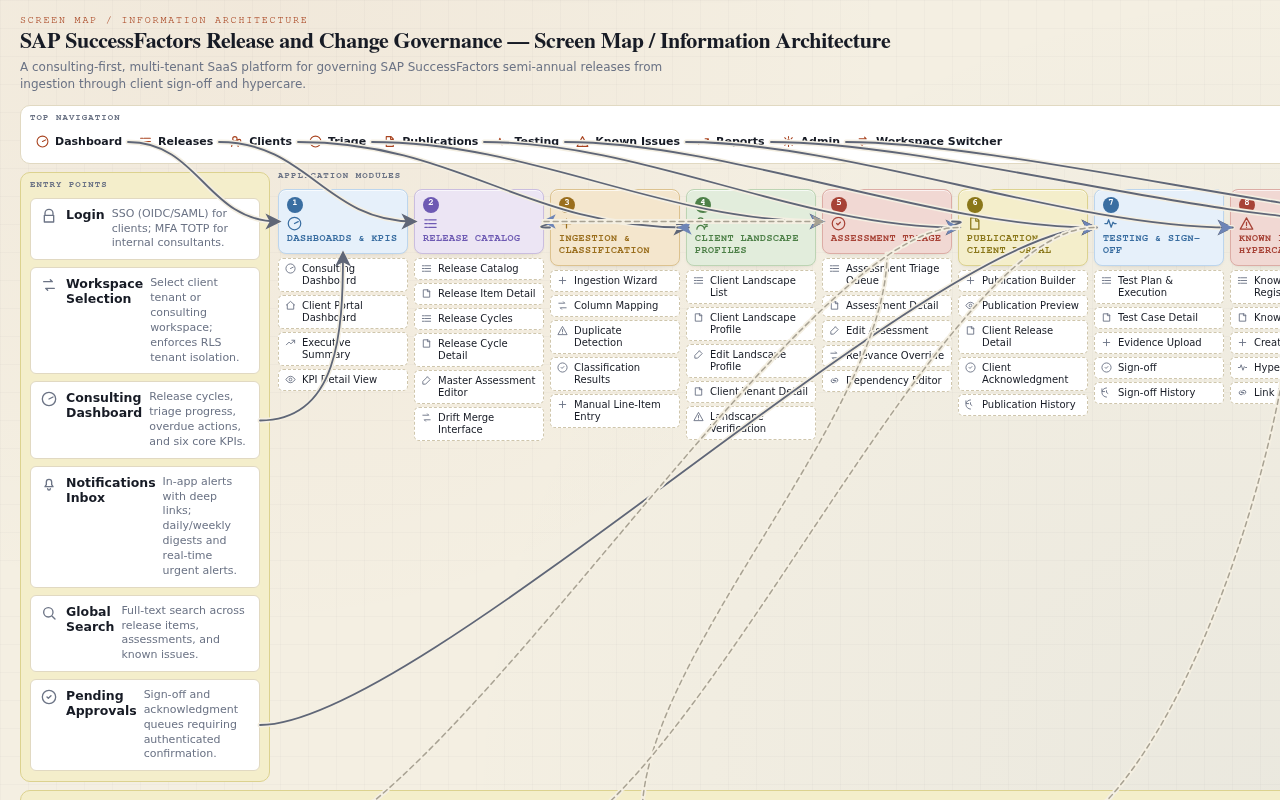
SAP SuccessFactors Release and Change Governance — Screen map
Project anatomy
21
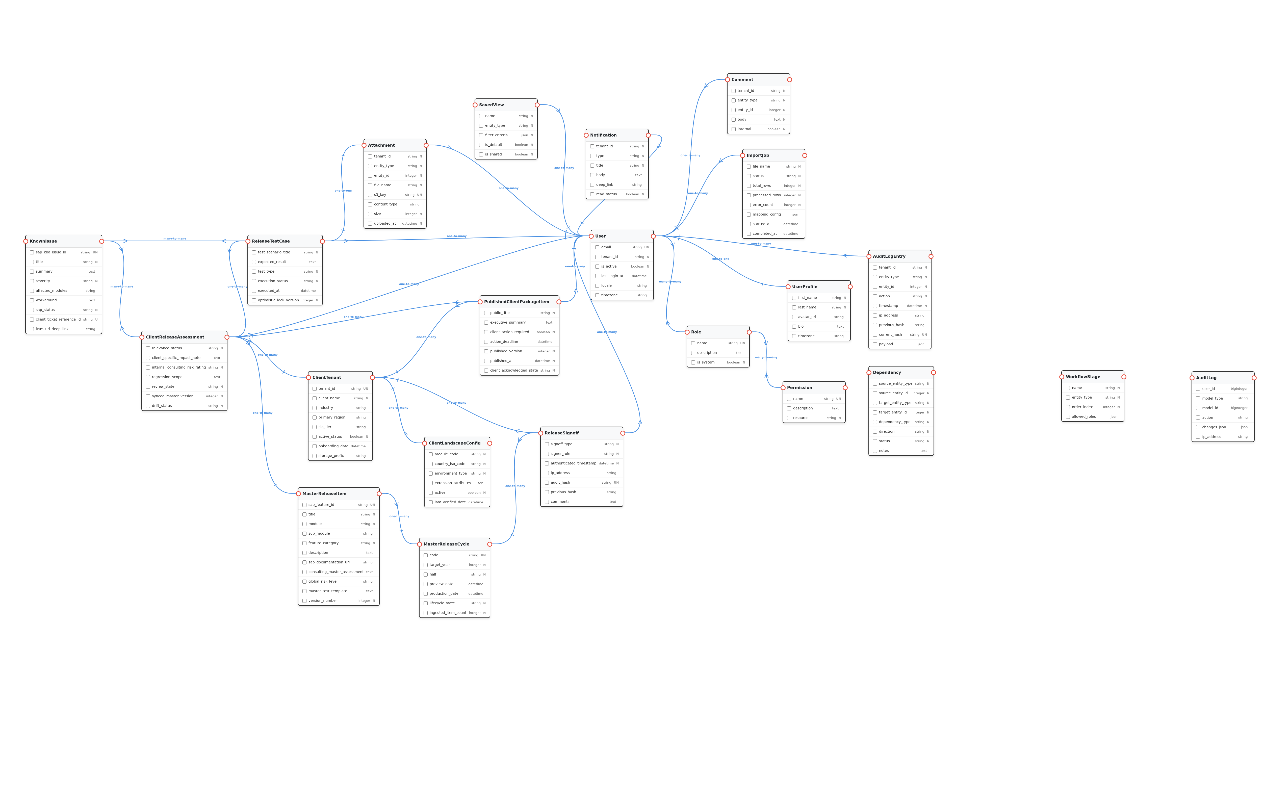
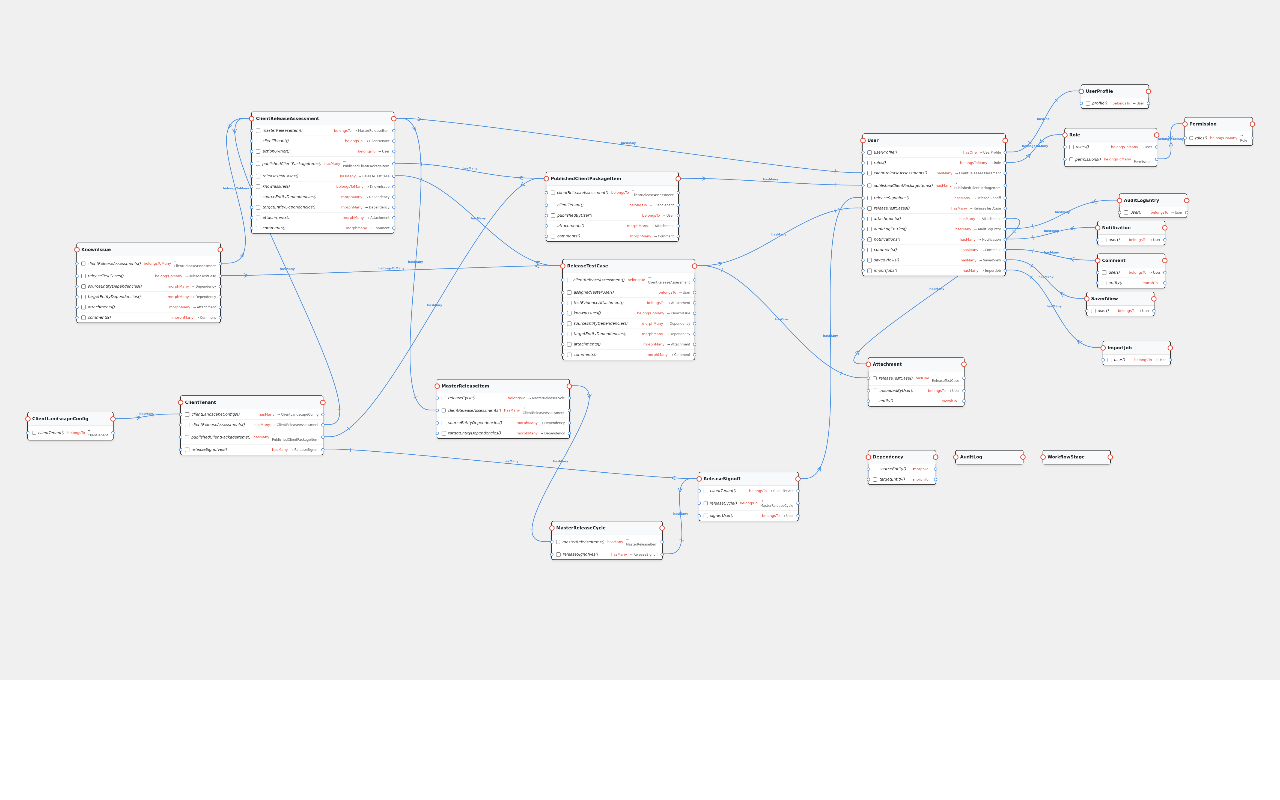
Entities
23
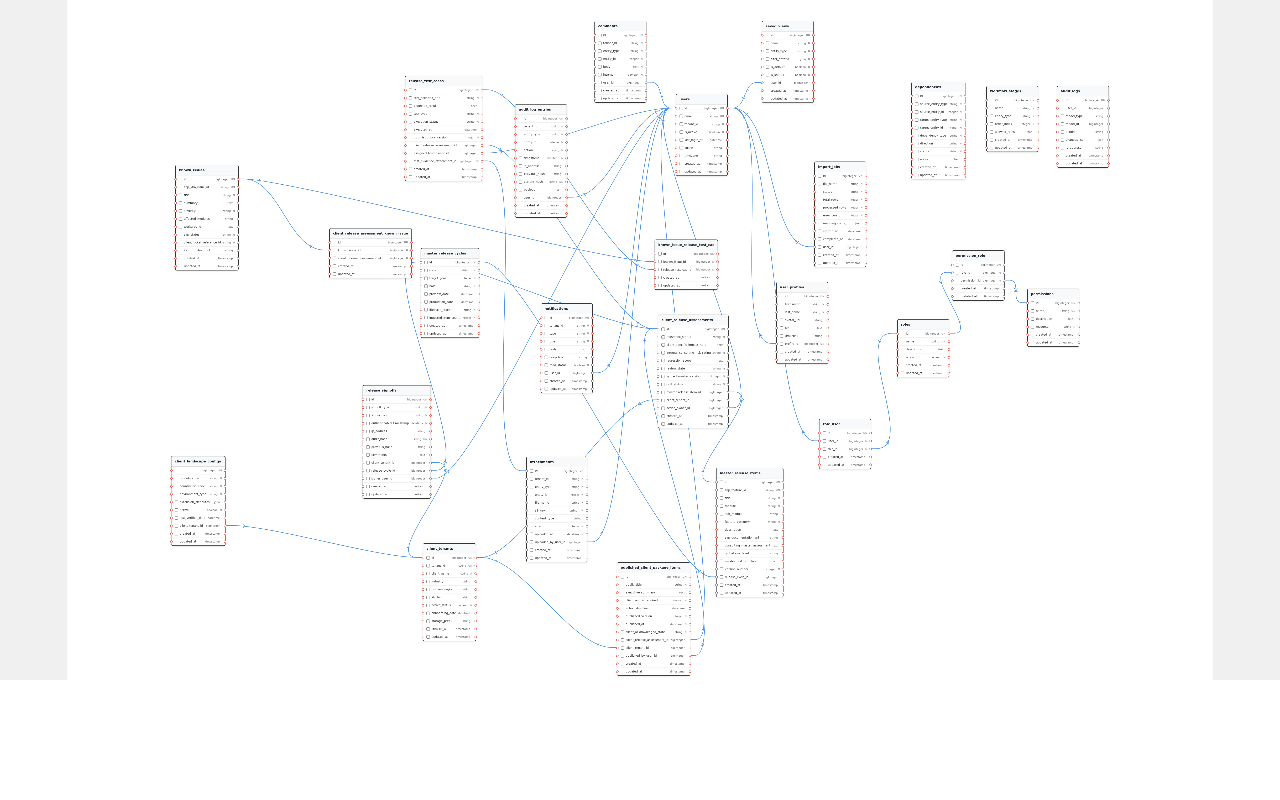
DB tables
53
Screens
9
Modules
21
Models
28
Relations
9
Roles
24
Requirements
10
Journeys

About this app

Govern SAP releases once, then tailor and track them for every client.

A shared workspace where consulting teams turn each SAP SuccessFactors release into a clear, client-specific plan. It keeps internal analysis private while giving each client a secure portal to see only what matters to them. The result is a complete, auditable trail from the first SAP announcement through testing, sign-off, and post-go-live support.

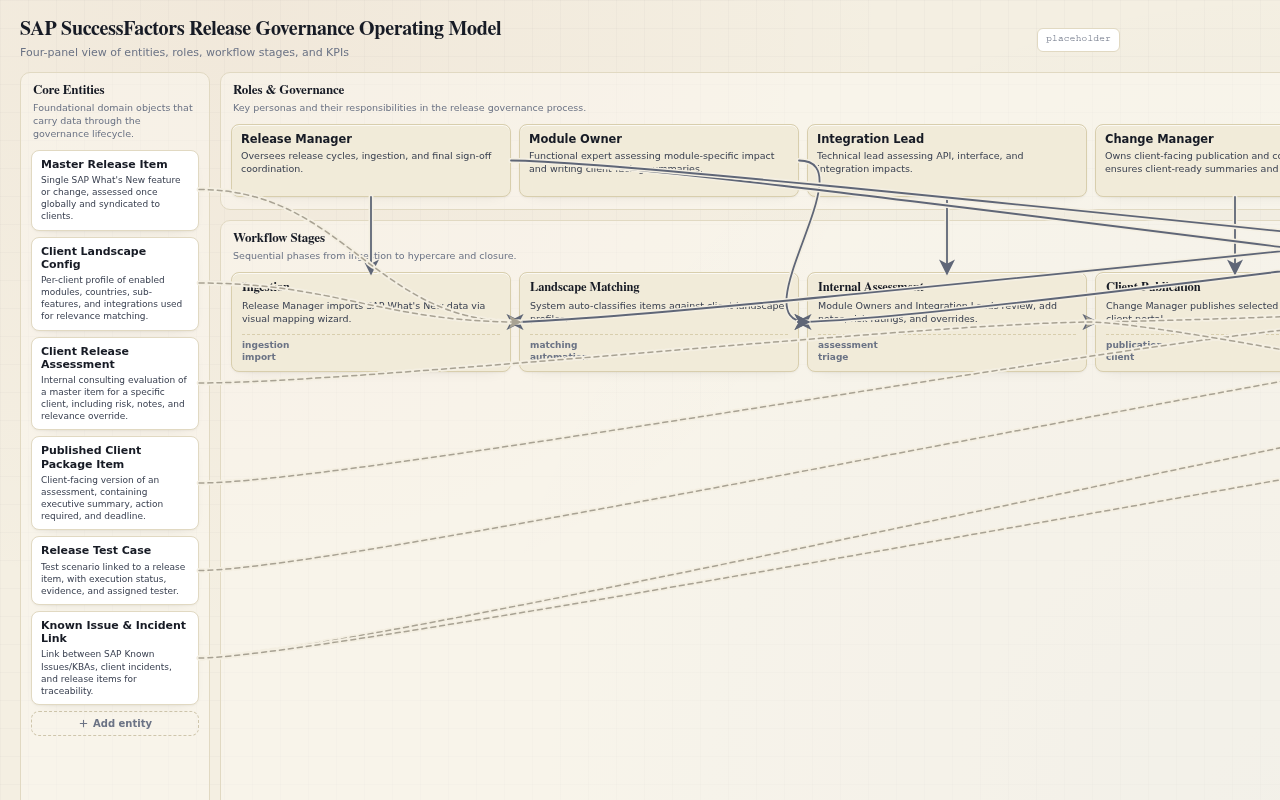
Who uses it
  • Release Manager The person who oversees the whole release process across all clients, from importing SAP announcements to reporting on overall readiness.
  • Module Owner The person who understands a specific business area, like Employee Central, and judges how a change will affect each client's setup.
  • Integration Lead The person who looks after the technical connections between systems and assesses how a change might break or alter those interfaces.
  • Change Manager The person who turns technical assessments into clear, client-friendly communications and manages the acknowledgment process.
  • Support Analyst The person who tracks known problems, prevents duplicate issues, and helps resolve incidents after a release goes live.
  • Tester The person who runs the regression tests, records the results, and uploads proof that each test was completed.
  • Client Administrator The person on the client side who reviews published changes, acknowledges them, assigns internal tasks, and gives final approval.
  • Client Viewer The person on the client side who can read published information and acknowledge it, but cannot make changes or assign work.
  • Platform Administrator The person who manages the application itself, including user accounts, permissions, and the audit trail.
Problems it solves
  • It removes the chaos of managing SAP releases for many clients with spreadsheets and email.
  • It prevents the same analysis from being done twice for different clients.
  • It keeps internal, confidential notes separate from what clients can see.
  • It provides a single, trustworthy record of every decision, test, and approval.
  • It makes sure known problems are not missed or created twice.
What you can do
  • Import each SAP release once and reuse it for every client.
  • See which changes are relevant for each client based on their specific setup.
  • Assign assessment work to the right experts and track deadlines.
  • Write client-ready summaries and publish them as a permanent, unchangeable package.
  • Give each client a secure portal to review and acknowledge their changes.
  • Run and record regression tests with evidence.
  • Track known issues and link them to releases, clients, and support tickets.
  • Monitor readiness with dashboards and key performance indicators.
  • Complete formal sign-offs with a tamper-proof audit trail.

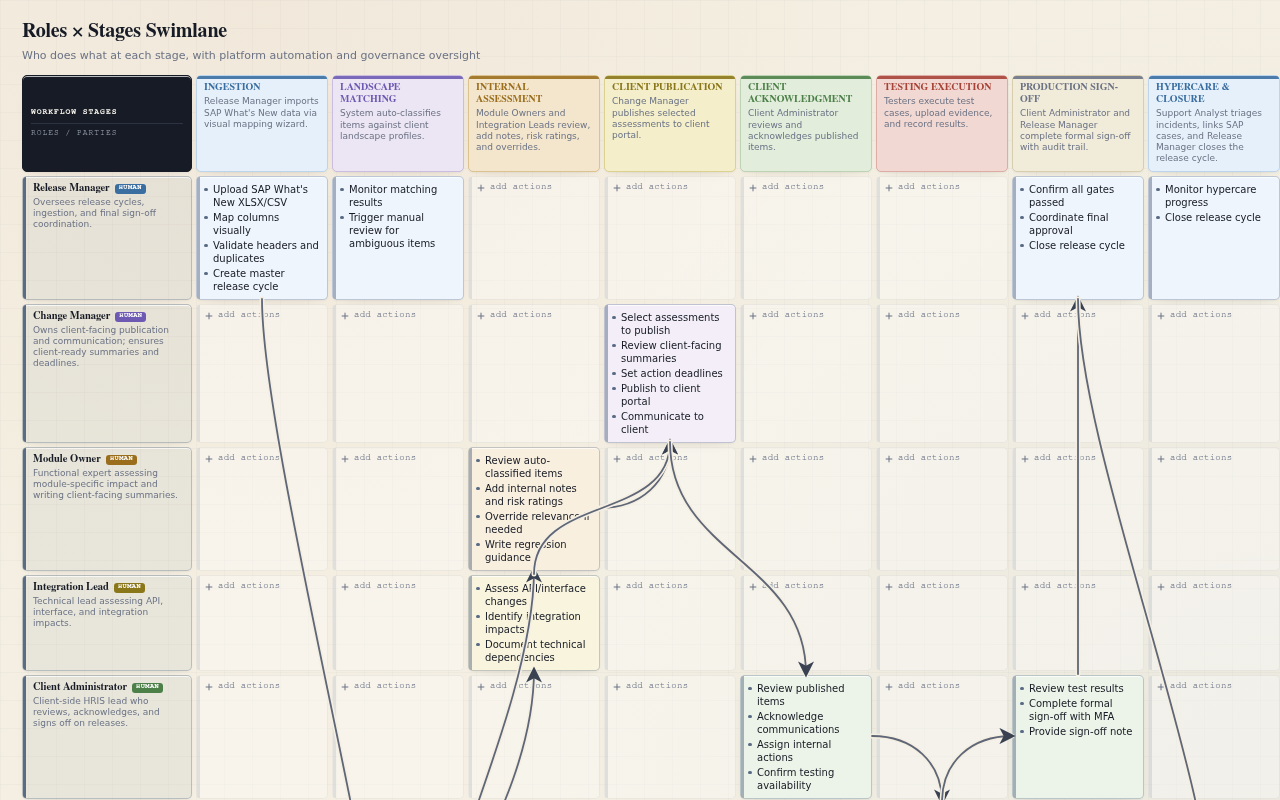
How people use it

Release Manager 2 tasks
Import a new SAP release and publish client packages

When: When SAP publishes a new What's New file for an upcoming release.

  1. 1
    Open the Import Wizard and upload the SAP What's New XLSX file. Import Wizard
    → The file is ready for column mapping.
  2. 2
    Map the SAP columns to the platform's fields using the visual mapping interface. Import Wizard
    → The field mapping is confirmed and validated.
  3. 3
    Review the auto-classification results for each client. Relevance Matching Review
    → Each item is marked as Auto-Applicable, Auto-Excluded, or Manual Review Needed.
  4. 4
    Resolve ambiguous matches and assign manual review items to Module Owners and Integration Leads. Relevance Matching Review
    → Assessments are assigned to the correct owners.
  5. 5
    Select approved assessments, write client-facing summaries, and set action deadlines. Publication Builder
    → The client package is ready for publication.
  6. 6
    Publish the client package. Publication Builder
    → An immutable snapshot is created and visible in the client workspace.
Tips
  • If the import fails, check that the file headers match the current template.
  • A stale client profile will force an item into Manual Review; update the profile to get accurate auto-classification.
  • Publication will be blocked if the assessment is incomplete; ensure the summary and risk rating are filled in.
Monitor portfolio readiness and report status

When: When a release cycle is in progress and leadership requests a readiness update.

  1. 1
    Open the Release Dashboard and review the portfolio-level KPIs. Release Dashboard
    → All seven KPIs are displayed.
  2. 2
    Filter by client, module, priority, impact, and readiness. Release Dashboard
    → A filtered view shows specific client or module readiness.
  3. 3
    Review the Release Health Score with its dimension scores. Release Dashboard
    → The overall status and the scores for testing, dependencies, approvals, and issues are visible.
  4. 4
    Identify overdue actions and unresolved dependencies. Release Dashboard
    → Overdue actions and dependencies are highlighted for follow-up.
  5. 5
    Export readiness reports for leadership. Release Dashboard
    → A readiness report is exported for stakeholder communication.
Tips
  • You can trigger a manual refresh of the dashboard KPIs if you need the most current data.
  • The overall health status is determined by the worst-performing dimension; check the dimension scores to understand the cause.
Tester 1 task
Execute tests and close out hypercare

When: When test cases are assigned and linked to client release assessments.

  1. 1
    Open the Test Plan & Execution screen and select your assigned test cases. Test Plan & Execution
    → Your assigned test cases are displayed with their current status.
  2. 2
    Execute each test case and upload evidence. Test Plan & Execution
    → Evidence is attached and linked to the test case.
  3. 3
    Record the status as Passed, Failed, or Blocked for each case. Test Plan & Execution
    → The execution status is updated.
  4. 4
    Complete formal production sign-off with authenticated confirmation. Client Workspace Dashboard
    → Sign-off is recorded in the immutable audit log.
  5. 5
    Triage hypercare incidents, link SAP cases, and record workarounds. Known Issue Register
    → Hypercare incidents are tracked and closed with full traceability.
Tips
  • A High/Critical test case that is Failed or Blocked will prevent production sign-off unless an override is approved.
  • If you see a conflict when saving, another user may have updated the same test case; review the diff before proceeding.
  • Link any failed test to a Known Issue to maintain traceability.
Module Owner 1 task
Assess a change and reconcile master updates

When: When a Manual Review Needed item is assigned to you in the Assessment Queue.

  1. 1
    Open the Assessment Queue and filter by your assigned items. Assessment Queue
    → Your assigned assessments are displayed.
  2. 2
    Open a Client Release Assessment Detail and review the master item snapshot. Client Release Assessment Detail
    → The master item details and relevance classification are visible.
  3. 3
    Set the relevance status, write client-specific impact notes, and assign an internal risk rating. Client Release Assessment Detail
    → The assessment fields are updated and saved.
  4. 4
    Define the regression scope and action owner. Client Release Assessment Detail
    → Regression scope and ownership are recorded.
  5. 5
    If an 'Update Available' flag appears, open the three-way diff merge view. Client Release Assessment Detail
    → The master update is shown alongside your client-tailored notes.
  6. 6
    Accept or reject the master update. Client Release Assessment Detail
    → The assessment is updated and the drift status is cleared.
Tips
  • Your client-specific notes are never overwritten automatically; you must explicitly accept or reject master updates.
  • Use the faceted filters to quickly find items by client, module, or overdue status.
  • If you get a conflict error, another user may have edited the same assessment; review the visual diff before saving.
Integration Lead 1 task
Assess technical and integration impacts

When: When a Manual Review Needed item with integration impact is assigned to you.

  1. 1
    Open the Assessment Queue and filter by integration-impacting items. Assessment Queue
    → Your assigned integration assessments are displayed.
  2. 2
    Open a Client Release Assessment Detail and review the technical description. Client Release Assessment Detail
    → Technical details and the SAP documentation link are visible.
  3. 3
    Assess the API, interface, middleware, and integration impacts. Client Release Assessment Detail
    → Integration impact notes are recorded.
  4. 4
    Set the relevance status and internal risk rating. Client Release Assessment Detail
    → Relevance and risk are recorded.
  5. 5
    Define the regression scope for integration testing. Client Release Assessment Detail
    → Regression scope is recorded and linked to test planning.
Tips
  • If the client's landscape profile lacks integration details, the item will be flagged for manual review; request a profile update first.
  • Create a Dependency record if the change affects an external system or interface.
Change Manager 1 task
Publish a client package and manage acknowledgment

When: When assessments are approved and ready for publication.

  1. 1
    Open the Publication Builder and select the approved assessments. Publication Builder
    → Selected assessments are staged for publication.
  2. 2
    Write the public title, executive summary, and client action required. Publication Builder
    → Client-facing content is drafted.
  3. 3
    Set the action deadline and review the publication gate validation. Publication Builder
    → The publication gate checks pass.
  4. 4
    Publish the client package. Publication Builder
    → An immutable snapshot is created and visible in the client workspace.
  5. 5
    Monitor the acknowledgment SLA on the Release Dashboard. Release Dashboard
    → You are alerted if a client's acknowledgment is overdue.
Tips
  • High/Critical items are automatically flagged for per-item acknowledgment; you can override this if needed.
  • If publication is blocked, check that the relevance status is 'Applicable', the summary is not empty, and the risk is categorized.
  • An SLA breach will trigger a real-time alert to you and the Release Manager.
Support Analyst 1 task
Manage known issues and triage hypercare incidents

When: When a new known issue is discovered or a hypercare incident is reported.

  1. 1
    Open the Known Issue Register and search for existing records. Known Issue Register
    → Existing known issues are displayed.
  2. 2
    Create a new Known Issue with the SAP KBA/Issue ID, title, summary, severity, and affected modules. Known Issue Register
    → The Known Issue is created with duplicate detection applied.
  3. 3
    Link the Known Issue to releases, clients, modules, and environments. Known Issue Register
    → Traceability links are established.
  4. 4
    Link a support ticket with the Client Ticket Reference ID and ITSM deep link. Known Issue Register
    → The support ticket is linked with duplicate detection applied.
  5. 5
    Record the workaround and SAP status. Known Issue Register
    → The workaround and status are recorded.
  6. 6
    Triage hypercare incidents and confirm closure. Known Issue Register
    → Hypercare incidents are closed with full traceability.
Tips
  • If you try to create a duplicate, the system will block it and show you the existing record.
  • An invalid SAP Case Reference ID will prevent submission; check the format.
  • A severity change on a linked issue will trigger a re-notification to the client.
Client Administrator 1 task
Review, acknowledge, and sign off on a release

When: When a new client package is published to your workspace.

  1. 1
    Open the Client Workspace Dashboard and review the published changes. Client Workspace Dashboard
    → Published packages with executive summaries and action items are displayed.
  2. 2
    Review high-impact items flagged for per-item acknowledgment. Client Workspace Dashboard
    → High-impact items are identified for individual acknowledgment.
  3. 3
    Acknowledge the package or individual items. Client Workspace Dashboard
    → Your acknowledgment is recorded in the immutable audit log.
  4. 4
    Assign internal actions to your team members. Client Workspace Dashboard
    → Internal actions are assigned and tracked.
  5. 5
    Confirm testing availability. Client Workspace Dashboard
    → Testing availability is recorded.
  6. 6
    Complete formal production sign-off with authenticated confirmation. Client Workspace Dashboard
    → Sign-off is recorded in the immutable audit log.
Tips
  • You can acknowledge from a tablet or mobile device; the layout is responsive.
  • Sign-off will be blocked if a High/Critical test case is still Failed or Blocked.
  • If you miss the acknowledgment deadline, the consulting team will be alerted.
Client Viewer 1 task
Review and acknowledge published content

When: When a new client package is published to the workspace.

  1. 1
    Open the Client Workspace Dashboard and review the published changes. Client Workspace Dashboard
    → Published packages with executive summaries are displayed in read-only mode.
  2. 2
    Drill down into the technical details of a published item. Client Workspace Dashboard
    → Technical details are displayed without edit controls.
  3. 3
    Acknowledge the communication. Client Workspace Dashboard
    → Your acknowledgment is recorded in the immutable audit log.
Tips
  • You cannot edit or assign actions; if you try, you will see a read-only notice.
  • The layout is responsive, so you can review content on a tablet.
Platform Administrator 1 task
Configure the platform and review audit logs

When: When a new client tenant is onboarded or an audit review is requested.

  1. 1
    Open the Administration Console and provision a new client tenant. Administration Console
    → The client tenant is created with tenant isolation settings.
  2. 2
    Create users and assign roles and permissions. Administration Console
    → Users are provisioned with appropriate role assignments.
  3. 3
    Configure tenant settings, including notification preferences and SLA defaults. Administration Console
    → Tenant settings are applied.
  4. 4
    Review the audit log for compliance events. Administration Console
    → Audit log entries are displayed with hash chaining verification.
  5. 5
    Retrieve cold-storage field-level diffs for compliance review. Administration Console
    → Archived diffs are retrieved as read-only with export capability.
Tips
  • A seat-increase request that is not actioned within 48 business hours will be escalated to you.
  • Any attempt to violate tenant isolation will be blocked and logged.
Glossary (15)
Master Release Item
— A single change or feature from an SAP release, stored once and used as the basis for all client-specific assessments.
Client Landscape Profile
— A description of a client's setup, including the modules, countries, and integrations they use, which helps determine if a change is relevant to them.
Auto-Applicable
— A classification that means a change is automatically considered relevant to a client based on their profile.
Auto-Excluded
— A classification that means a change is automatically considered not relevant to a client because they do not use the affected module.
Manual Review Needed
— A classification that means the system could not decide if a change is relevant, so a person must review it.
Client Release Assessment
— An internal evaluation of how a single SAP change affects one specific client, including impact notes and risk ratings.
Published Client Package
— A permanent, unchangeable snapshot of client-facing information about a release, created after internal review is complete.
Publication Gate
— A set of checks that must pass before a client package can be published, ensuring the information is complete and appropriate.
Client Acknowledgment SLA
— The agreed number of business days a client has to acknowledge a published package before an alert is raised.
Production Sign-off
— The formal approval from both the client and the consulting team that a release is ready for production.
Hypercare
— The period of heightened support immediately after a release goes live, during which incidents are closely monitored.
Cycle Time
— The total time it takes for a release item to go from initial ingestion to final closure.
Release Health Score
— A summary of a release's readiness, shown as separate scores for testing, dependencies, approvals, and issues, with an overall status based on the worst dimension.
Known Issue
— A problem with SAP software that has been identified and documented, often with a workaround.
Three-Way Diff Merge
— A view that shows the original assessment, your client-specific changes, and a new master update, allowing you to accept or reject the update without losing your notes.
0 comments
Log in to like, rate, or join the conversation. Log in Create account
Original prompt

Create a multi-client SAP SuccessFactors Release and Change Governance application that helps consulting and support teams review changes, new features, deprecations, and universal updates from SAP What’s New (import per SAP release), decide internally which items are relevant for each client, and then publish only the selected items to that client’s secure workspace. Each client must see a configuration-specific view based on their enabled modules, countries, processes, integrations, environments, and previous decisions. Support roles such as platform administrator, release manager, module owner, integration lead, change manager, tester, support analyst, client administrator, and client viewer, with granular permissions for internal notes, client-visible information, approvals, comments, and evidence. Track every item from initial assessment through relevance decision, priority, cross-module impact, client communication, implementation planning, dependencies, interface or API changes, regression scope, test preparation, execution, deployment, hypercare, and closure, with owners, deadlines, status history, risks, decisions, attachments, related user guides, communication materials, and audit history. Provide release dashboards by client, module, priority, impact, readiness, overdue actions, testing progress, and unresolved dependencies, plus configurable notifications, reminders, approval workflows, search, filters, saved views, bulk updates, and Excel import/export for offline assessment and testing plans. Include a client follow-up area where clients can review published changes, acknowledge communications, comment, assign actions, confirm testing availability, access updated guides, and monitor progress without seeing internal evaluations. Add a Known Issues register where users can link records to subscribed SAP SuccessFactors Known Issues, associate issues with releases, clients, modules, environments, support tickets, workarounds, regression tests, and affected integrations, and record when a newly discovered issue has been raised in the SAP Support Portal. Integrate support ticketing system, prevent duplicate issue creation, maintain traceability between changes, incidents, SAP cases, tests, documents, and deployment decisions, and provide management reports, client-ready summaries, PDF or Excel exports, multilingual content, and a responsive mobile-friendly interface.

Discovery boards
Project Brief
What I think you want to build
A concise interpretation of the product intent.
interpretation

A shared release control tower where an internal team imports each SAP release once, assesses common source items, and creates client-specific decisions and delivery work.

This interpretation maximizes reuse across clients while preserving source provenance.

interpretation

A collection of secure client workspaces, each presenting its own release plan, decisions, tests, documents, issues, and actions while internal users operate across the portfolio.

This interpretation prioritizes client separation and a simple client-facing experience.

interpretation

An end-to-end change-delivery governance system that continues beyond release review into implementation, regression testing, deployment, hypercare, and closure.

The requested lifecycle is materially broader than a release-note portal.

opportunity

Create an organizational memory that carries prior relevance decisions, risks, tests, workarounds, and communications into later SAP releases.

Historical reasoning can reduce repeated analysis and reveal recurring risk patterns.

recommendation

Represent each global SAP release item separately from its client-specific assessments, publications, implementation plans, and outcomes.

This prevents source duplication and supports dependable cross-client reporting.

tradeoff
critical

A unified control tower maximizes cross-client reuse, while client-first organization simplifies collaboration but can obscure common release analysis.

Resolved in favor of shared control tower with client overlays: internal users work from the control tower, clients see secure workspace projections. This preserves reuse while keeping client-facing separation.

decision
critical

Use a single application with separate navigation contexts: internal users enter the control tower, client users enter their workspace. Both share one backend, with tenant keys, row-level security, and field-level security preventing client exposure of internal analysis.

The user explicitly resolved the navigation architecture in favor of the mainstream shared-backend pattern with role-based projection.

risk

A single shared backend with separate navigation contexts concentrates authorization risk: a single field-level security defect could expose internal analysis to client users.

The user accepted this as a real residual risk of the confirmed shared-backend architecture. Mitigation is already covered by el_risks_002 and el_scope_004; no further scope change required.

Likely target users
Proposed end-user groups.
interpretation

Release Manager: an internal portfolio operator who imports releases, assigns assessments, monitors deadlines, approves publication, and reports readiness across clients; the likely current workaround is Excel, email, and meetings.

This role needs cross-client dashboards, bulk operations, saved views, and exception management.

interpretation

Module Owner or Integration Lead: a specialist who assesses SAP items against assigned modules, interfaces, countries, and processes; the likely workaround is spreadsheets, tickets, and shared documents.

This archetype needs filtered queues, prior decisions, dependencies, evidence, and protected internal analysis.

interpretation

Change Manager: a coordinator who converts technical assessments into stakeholder communications, guides, acknowledgements, and readiness actions.

This role bridges internal technical analysis and approved client-facing information.

interpretation

Tester or Test Lead: a delivery user who defines regression scope, prepares plans, records execution evidence, and connects failures to Known Issues, tickets, integrations, and deployment decisions.

This user needs task-focused queues and traceability rather than only release-note browsing.

interpretation

Support Analyst: an operational user who searches for matching Known Issues, links incidents and SAP cases, records workarounds, and avoids duplicate issue creation.

Fast search and integration are central to this role's workflow.

interpretation
critical

Client Administrator or Viewer: a client-side user who sees only published content, acknowledges communications, comments, accepts actions, confirms testing availability, and monitors progress.

This user needs a concise secure workspace without internal evaluations.

recommendation
critical

Authenticate every person as a User and authorize through many-to-many User, Role, and Permission relationships; keep job title, client membership, and professional profile data separate.

This prevents domain labels from conflicting with authorization enforced in the UI and REST API.

risk

The named roles may create an unmanageable permission matrix if job titles become fixed access packages instead of composable permissions and client assignments.

Authorization should distinguish platform scope, client membership, workflow authority, and field visibility.

decision

Client administrators may invite, edit, and deactivate users within their own client tenant only. Internal platform administrators retain visibility and override authority, and all provisioning changes are audit-logged.

The user explicitly resolved delegated client user administration with internal audit.

decision

Client administrators may assign only a limited, pre-approved subset of client-side roles within their own tenant. Internal platform administrators define the assignable role subset per client, retain override authority, and all provisioning and role-assignment changes are audit-logged.

The user resolved the open role-assignment scope question by constraining delegated authority to a limited, pre-approved role subset.

decision

Should the assignable role subset be defined once globally for all clients, or configured per client by internal platform administrators?

The limited role subset is confirmed, but whether it is a global policy or a per-client configuration remains open. Per-client configuration supports different client maturity levels but adds administrative overhead.

Problems worth solving
Likely pains, inefficiencies, or opportunities.
interpretation

SAP release information is broad and difficult to convert into a defensible client-specific list of relevant changes.

The process requires filtering source content against detailed configuration and operating context.

hypothesis
critical

The underlying job is to decide, with evidence, what each client must know, test, change, approve, or monitor before a release is operationally safe.

This captures the assurance outcome beneath the requested tracking capabilities.

interpretation
critical

Internal evaluations and client communications are fragmented across spreadsheets, email, documents, and tickets, creating confidentiality and version-control risks.

A multi-client process needs a dependable boundary between working analysis and approved publication.

interpretation

Ownership, deadlines, approvals, dependencies, testing, deployment evidence, and hypercare are fragmented, preventing a trustworthy readiness view.

Status labels cannot establish readiness unless unresolved work and evidence are traceable.

hypothesis

Prior relevance decisions are not consistently reused, causing repeated analysis and contradictory conclusions for similar client configurations.

This implied problem supports configuration snapshots and searchable decision history.

interpretation

Known Issues, incidents, SAP cases, tests, integrations, workarounds, documents, and deployment decisions lack a dependable traceability chain.

Fragmentation increases duplicate investigation and weakens risk-based deployment decisions.

risk
critical

Stale client configuration can produce an incorrect relevance recommendation that still appears precise and authoritative.

Every relevance result needs a visible configuration effective date, reasoning, and accountable reviewer.

tradeoff

Structured assessment fields improve reporting and automation, while narrative assessments better capture novel SAP changes and client context.

The assessment model should combine required structured decisions with controlled narrative and evidence.

decision

Configuration snapshots are refreshed automatically at the start of each release cycle. Mid-release changes to modules, countries, or integrations require a manual refresh by an internal administrator, which creates a new effective-dated snapshot without altering prior assessments.

The user explicitly resolved snapshot refresh cadence at release boundaries with manual mid-release refresh.

risk

Release-boundary snapshot refresh means a mid-release configuration change can remain unrepresented in relevance assessments until an internal admin manually triggers a refresh.

Accepted as a known operational risk of the confirmed release-boundary refresh cadence. Mitigate with a dashboard indicator showing snapshot age and an optional reminder to internal admins when configuration changes are recorded mid-release.

decision

Should the snapshot-age dashboard indicator trigger a blocking warning when the snapshot exceeds a configurable age threshold, or remain informational only?

The user accepted the snapshot-age indicator as mitigation, but whether it escalates to a blocking state or remains informational is not yet defined. A blocking threshold could prevent stale assessments from being published.

Desired outcomes
What the application should enable.
hypothesis
critical

For every imported SAP item, stakeholders can identify which clients were assessed, the decision for each client, who made it, the evidence used, and whether it was published.

This is a directly observable traceability outcome.

hypothesis
critical

Each client sees only approved changes and actions relevant to its configuration, with no leakage of another client's data or internal analysis.

Secure selective publication is the defining client outcome.

hypothesis

Release managers can distinguish ready, at-risk, blocked, overdue, and unassessed client-release combinations and drill into their causes.

Management needs actionable exceptions rather than aggregate status counts alone.

hypothesis

A tester can move from a relevant change to regression scope, test plan, evidence, defects or Known Issues, and the resulting deployment decision without losing context.

This demonstrates end-to-end delivery traceability.

hypothesis

A support analyst can identify a likely duplicate before creating a new issue or SAP case and can find existing workarounds and affected clients.

This outcome reduces duplicate effort and accelerates triage.

hypothesis

Client administrators can acknowledge communications, complete permitted actions, confirm testing availability, and access the current approved guide in their language and locale.

This turns publication into verifiable client follow-through.

recommendation

Measure cycle time, assessment coverage, overdue-action rate, acknowledgement rate, test completion, unresolved dependencies, and duplicate-issue avoidance.

These metrics connect governance activity to timeliness, completeness, and operational assurance.

tradeoff

Relevance automation can reduce assessment effort, but high-impact, universal, deprecated, and integration-affecting changes still need explicit human accountability.

Automation should accelerate triage without weakening consequential decisions.

decision

Release health is shown as dimension scores for testing, dependencies, approvals, and issues, plus an overall status derived from those dimensions. A single composite number is not used because it obscures the cause of at-risk or blocked states.

The user explicitly resolved the scoring model in favor of dimensioned readiness scoring.

decision

Overall status is derived by a deterministic worst-dimension-wins rule: if any dimension is blocked, overall is blocked; otherwise if any is at-risk, overall is at-risk; otherwise ready. Dimension scores remain visible alongside the overall status so the cause is never obscured.

The user resolved the derivation rule explicitly with deterministic worst-dimension-wins.

decision

Should the worst-dimension-wins rule treat 'at-risk' as a single level, or should there be sub-levels within at-risk (e.g. 'at-risk - dependency' vs 'at-risk - testing') to help release managers prioritize?

The deterministic rule is confirmed, but whether at-risk carries sub-level detail for prioritization remains open. Sub-levels would improve drill-down without changing the overall status derivation.

Usage context
When and how users likely use the app.
interpretation

At the start of each SAP release cycle, a release manager ingests source items, reviews validation exceptions, assigns assessment ownership, and establishes deadlines.

This is a high-volume setup moment requiring safe import and bulk assignment.

interpretation

Module and integration specialists work from saved, faceted queues filtered by release, client, module, country, owner, priority, decision state, and overdue status.

Focused queues reduce the cost of assessing a large release across many clients.

interpretation
critical

Internal approvers review rationale, client-visible wording, cross-module impact, risks, dependencies, and evidence before an explicit publication action.

Publication crosses a confidentiality boundary and needs a clear approval history.

interpretation

Client users periodically visit a responsive workspace from desktop, tablet, or mobile to review published changes and complete follow-up actions.

Responsive access is most valuable for review and action completion rather than complex bulk assessment.

interpretation

Testing teams prepare and execute plans in the application or exchange controlled XLSX files, then upload evidence and connect failures to issues or tickets.

Excel compatibility is required, but imports need validation previews, stable identifiers, and row-level error reporting.

recommendation

Store timestamps in UTC, display them in each user's time zone and locale, and capture an explicit time zone for deadlines whose calendar-day meaning matters.

Distributed approvals and testing deadlines otherwise appear inconsistent.

recommendation

Use email and in-app notifications for assignments, approvals, publication, mentions, deadlines, and material issue changes, with preferences and client-safe templates.

Notifications must link back to authoritative records without exposing internal content.

tradeoff

Offline Excel work improves adoption and high-volume editing, while concurrent copies increase conflicts, stale decisions, and accidental overwrites.

Imports need version checks, conflict reporting, and idempotent stable identifiers.

decision

Excel import/export uses a single canonical template per record type. Role- or client-specific templates are not supported initially; saved views and filters provide role-specific presentation without fragmenting the import format.

The user explicitly resolved template governance in favor of canonical templates.

decision

Canonical templates include a version field. Imports reject files with an older template version and show a clear error directing the user to download the current template; files with a newer version are also rejected to prevent unsupported forward compatibility.

The user resolved template versioning explicitly: version field required, older and newer versions rejected.

decision

Should the template version field be a simple integer that increments with each template change, or a semantic version (major.minor) where major changes require re-download and minor changes are backward-compatible?

Version enforcement is confirmed, but the versioning scheme is not yet defined. Semantic versioning could allow backward-compatible minor changes without forcing re-download.

Scope boundaries
What the product likely should not be.
constraint

This is not a replacement for SAP SuccessFactors configuration, transport, or deployment tooling; it governs decisions and evidence around those activities.

Direct configuration execution would turn the product into an HRIS administration platform.

constraint

This is not a general-purpose IT service-management replacement; it links relevant tickets and SAP cases while ticket operations remain in the authoritative system.

Replicating complete ticketing capability would create conflicting status ownership and uncontrolled scope.

constraint

This is not a complete test-management suite; it governs release-linked regression scope, plans, status, evidence, defects, and traceability.

Advanced test automation and laboratory management are not required for the stated governance outcome.

constraint
critical

The product must not expose internal notes, unpublished assessments, other clients' records, or protected fields through pages, search, exports, notifications, files, dashboards, or REST endpoints.

Row-level and field-level authorization must cover every delivery surface.

recommendation

Use soft deletion for user-managed records, immutable history for sensitive actions, and created_at and updated_at timestamps on every persisted entity, plus deleted_at where applicable.

Governance records need recovery, chronology, and auditable change history.

recommendation

Paginate every list and index endpoint, index foreign keys and frequently filtered fields, and apply consistent errors and rate limits to externally reachable REST endpoints.

Large client-release combinations and integration traffic require predictable and protected access patterns.

tradeoff

Client-specific configuration improves fit, but unrestricted custom workflows, fields, and statuses would weaken portfolio reporting and increase support cost.

Controlled templates are safer than unlimited customization.

decision

Treat automatic SAP configuration discovery and deployment execution as excluded while allowing imported or manually maintained configuration context.

Configuration-specific views are required, but reliable technical access to every client landscape is not established.

decision

SSO is the default and required for enterprise clients with an IdP. Email/password authentication is available as a controlled fallback for smaller clients without an IdP, with MFA required and the fallback configurable per client.

The user explicitly resolved SSO-first with controlled fallback.

decision

Should the email/password fallback be available to internal consulting users as well as client users, or restricted to client users only?

The fallback default state is confirmed, but whether internal users can also use email/password when SSO is unavailable is not yet defined. Internal users may need a break-glass path if their IdP is unavailable.

Blind spots and risks
Areas DTC believes require attention.
risk
critical

Technical risk: SAP What's New and Known Issues sources may lack stable, complete, or contractually usable interfaces, causing schema drift, duplicates, and failed incremental imports.

Source provenance, stable identifiers, reconciliation, and reviewable exceptions are essential.

risk
critical

Security risk: a defect in tenant, field, file, export, notification, search-index, dashboard, or API authorization could expose protected client information.

Authorization must be enforced consistently beyond record pages.

risk

User-adoption risk: specialists may remain in Excel and email if forms are slow, bulk editing is weak, or the application duplicates work performed in ticketing tools.

Task completion speed and clear system ownership determine whether the platform becomes authoritative.

risk
critical

Scope risk: combining release intelligence, client collaboration, change management, testing, issue management, documents, integrations, and reporting can produce an incoherent product.

The complete scope requires explicit entity ownership and lifecycle boundaries around a shared traceability model.

risk
critical

Decision-quality risk: automated relevance may create false confidence when client configuration is incomplete, stale, or unable to represent custom processes.

Recommendations should expose their configuration snapshot and reasoning and retain human accountability.

risk

Governance risk: editing published wording or files after acknowledgement can make it unclear which version the client reviewed.

Acknowledgements should reference immutable publication versions.

tradeoff

Aggressive duplicate detection reduces redundant issues but may incorrectly merge distinct failures that share similar text.

The system should propose contextual matches while a user confirms linkage or merge.

risk

SSO integration risk: supporting multiple client IdPs with different OIDC/SAML configurations can create onboarding friction and support burden.

Accepted as a real operational risk; mitigate with standard IdP configuration templates and documented onboarding.

risk

Connector risk: third-party connector availability and API limits for the target ticketing system may constrain synchronization frequency and data completeness.

Accepted as a real integration risk; mitigate with queued synchronization, retry/backoff, and visible sync status.

risk

Delegated client user administration risk: a client admin could provision excessive users within their tenant. Mitigate with per-client seat limits, a limited assignable role subset defined by internal platform administrators, and full audit logging of provisioning changes.

The user resolved the delegated administration risk by adding seat limits, a limited role subset, and audit logging as mitigations.

risk

Seat limit enforcement risk: if seat limits are too rigid, legitimate client growth may be blocked, causing support friction and client dissatisfaction.

Per-client seat limits are confirmed as a mitigation, but the request-seat-increase flow must be responsive enough to avoid blocking legitimate provisioning.

High-impact decisions
Choices that change product direction.
decision
critical

Primary organization: shared release control tower with client overlays. Internal users operate from the control tower for cross-client release analysis, while each client sees a secure workspace projection limited to published content relevant to that client.

This governs information architecture, cross-client reuse, dashboards, and data ownership.

decision
critical

SAP ingestion: hybrid ingestion. Use an official API or feed where available and contractually usable, with controlled Excel import as a fallback and for review, reconciliation, and exception handling.

The source mechanism determines update cadence, provenance, reconciliation, and operational effort.

decision
critical

Relevance determination: rules propose and humans approve. Automated rules generate relevance recommendations with visible configuration snapshots and reasoning; a responsible human approves or overrides every consequential client-item decision.

This sets the balance between efficiency, explainability, and accountable decision quality.

decision
critical

Client publication: immutable publication snapshots. Each publication creates a versioned, immutable snapshot of approved client-visible content; corrections require a new snapshot so acknowledgements always reference a specific version.

The model determines confidentiality, version acknowledgement, corrections, and audit evidence.

decision
critical

Tenant isolation: shared database with enforced tenant keys. Use a single database with mandatory tenant keys enforced at the data-access layer, plus row-level and field-level security across all delivery surfaces.

This affects security assurance, operating cost, cross-client analytics, and breach impact.

decision

Record architecture: distinct linked records for changes, issues, tickets, and tests. Each domain keeps its own lifecycle and fields, connected through explicit traceability links rather than one overloaded generalized record.

Distinct records preserve lifecycle meaning, while generalization can simplify reporting but overload statuses and fields.

decision
critical

Ticket status ownership: ticketing system authoritative. The external ticketing system owns ticket status and operational fields; the governance application stores a synchronized reference and traceability links without overriding source status.

Undefined ownership creates loops, stale status, and duplicate work.

decision

Workflow strategy: one standard lifecycle with controlled exceptions. Use a single canonical lifecycle for release items and client assessments, with a small set of approved exception paths rather than per-client or fully configurable workflows.

This balances consistent portfolio reporting with differing client delivery obligations.

decision

Configuration history: effective-dated snapshots refreshed at release boundaries, with manual internal-admin refresh for mid-release changes. Dashboard indicator shows snapshot age with optional reminders to internal admins when mid-release configuration changes are recorded.

Past relevance decisions cannot be reproduced unless the assessed configuration state is known. The staleness mitigation makes the risk visible.

decision

Client participation: actions, comments, and acknowledgements. Clients can review published snapshots, acknowledge communications, comment, accept actions, and confirm testing availability, but cannot edit internal assessments or published content.

This defines whether the workspace is a collaboration surface or primarily a controlled communication channel.

decision
critical

SSO enablement: SSO-first with email/password fallback disabled by default for new clients and enabled only on explicit internal platform administrator request; MFA required whenever fallback is enabled.

Enterprise clients require tenant-specific identity providers for secure workspace access; the fallback default state affects security posture.

decision

Third-party connectors: enable third-party connectors for support-ticket integration and SAP source ingestion.

Managed synchronization beyond a generic REST API is required for the target ticketing system and SAP sources.

decision
critical

Navigation architecture: single application with separate navigation contexts for internal control tower and client workspace, sharing one backend with tenant keys and field-level security.

The user explicitly resolved the navigation architecture in favor of the mainstream shared-backend pattern.

decision

Client user administration: delegated client user administration with internal platform administrator oversight and full audit logging. Client admins may assign only a limited, pre-approved subset of client-side roles defined by internal platform administrators per client. Per-client seat limits are enforced.

The user explicitly resolved delegated client user administration with internal audit, limited role subset, and seat limits.

decision

Release health scoring: dimension scores for testing, dependencies, approvals, and issues, plus an overall derived status using deterministic worst-dimension-wins. Dimension scores remain visible alongside the overall status.

The user resolved both the scoring model and the derivation rule explicitly.

decision

Excel template governance: single canonical template per record type with a version field. Imports reject files with an older or newer template version and show a clear error directing the user to download the current template.

The user resolved template versioning explicitly: version field required, older and newer versions rejected.

Needs & Data
Core domain objects
What entities exist in the product world.
interpretation
critical

Master Release Cycle: represents one SAP release (e.g., 2025 1H). Fields: ID, Code, Target Year, Half, Preview Date, Production Date, Lifecycle State, Ingested Item Count, created_at, updated_at.

The release cycle is the top-level container for all release items and drives the semi-annual crunch window.

interpretation
critical

Master Release Item: represents one SAP What's New entry. Fields: ID, Release Cycle ID, SAP Feature ID, Title, Module, Sub-Module, Feature Category, Description, SAP Documentation URL, Consulting Master Assessment RichText, Global Risk Level, Master Test Template, Version Number, created_at, updated_at.

The master item is the global source of truth assessed once and syndicated to all clients.

interpretation
critical

Client Tenant & Profile: represents one consulting client. Fields: Tenant ID, Client Name, Industry, Primary Region, SLA Tier, Active Status, Onboarding Date, Storage Prefix, created_at, updated_at.

The tenant is the isolation boundary for all client-specific data.

interpretation

Client Landscape Config: represents the client's enabled modules, countries, processes, integrations, and environments. Fields: ID, Client Tenant ID, Module Code, Country ISO Code, Environment Type, JSONB Extension Attributes, Contact Phones JSON (typed entries: mobile/office/emergency), Custom Processes Free-Text, Active Boolean, Last Verified Date, created_at, updated_at.

This is the input to the relevance engine; its completeness and freshness directly determine matching accuracy. User resolved phone storage as typed JSON and added a free-text custom processes field.

interpretation
critical

Client Release Assessment: represents the internal consulting evaluation of one master item for one client. Fields: ID, Client Tenant ID, Master Release Item ID, Master Item Snapshot JSON (critical fields plus version metadata copied at assessment time), Synced Master Version, Relevance Status, Client-Specific Impact Note, Internal Consulting Risk Rating, Regression Scope, Action Owner ID, Review State, Drift Status, created_at, updated_at.

This is the internal layer that must never leak to clients; it holds sensitive notes and risk ratings. User resolved open_data_decisions_007 by choosing critical fields plus version metadata (Master Release Item Version Number and SAP Feature ID) for the snapshot, excluding bulky consulting RichText and test templates.

interpretation
critical

Published Client Package Item: represents the client-visible version of an assessment. Fields: ID, Client Release Assessment ID, Client Tenant ID, Public Title, Executive Summary, Client Action Required, Action Deadline, Published Version, Published At, Published By User ID, Client Acknowledged State, Client Re-Notification Flag, created_at, updated_at.

This is the immutable snapshot that clients see; corrections require a new snapshot. User resolved business_rules_015 by adding a Client Re-Notification Flag to surface severity updates on linked Known Issues without exposing internal evaluation detail.

interpretation
critical

User, Role, Permission: identity and access model. User has email, password hash (internal), SSO subject (client), MFA settings. Role and Permission are many-to-many with User. Domain actors (Module Owner, Client Admin) are profiles of User with domain fields only.

The identity model is fixed: no role_id or is_admin on domain entities.

interpretation

Release Sign-off & Acknowledgment: records formal sign-offs and client acknowledgments. Fields: ID, Client Tenant ID, Release Cycle ID, Sign-off Type, Signer User ID, Signer Role, Authenticated Timestamp, IP Address, Audit Hash, Previous Hash, Comments, created_at.

Immutable append-only record for compliance and non-repudiation.

interpretation

Known Issue & Incident Link: represents SAP Known Issues and linked incidents. Fields: ID, SAP KBA/Issue ID, Title, Summary, Severity (4-level enum, current value), Affected Modules, Workaround RichText, SAP Status, Client Ticket Reference ID, ITSM URL Deep Link, created_at, updated_at. Severity changes are recorded in the immutable audit log and restricted to Release Manager or Platform Administrator.

Supports duplicate prevention and traceability between changes, incidents, SAP cases, tests, and documents. User resolved the severity blocker by choosing role-restricted changes with mandatory audit logging.

interpretation

Release Test Case: represents a test case linked to a client release assessment. Fields: ID, Client Release Assessment ID, Test Scenario Title, Expected Result, Test Type, Assigned Tester User ID, Execution Status, Test Evidence Attachment ID, Executed At, Optimistic Lock Version, created_at, updated_at.

Supports regression scope, test execution tracking, and sign-off gates.

interpretation

Dependency: represents directional links between entities. Fields: ID, Source Entity Type, Source Entity ID, Target Entity Type, Target Entity ID, Dependency Type, Direction, Status, Notes, created_at, updated_at.

Hybrid model: first-class entity for critical dependencies, tags for informational.

interpretation

Attachment: represents uploaded files. Fields: ID, Tenant ID, Entity Type, Entity ID, File Name, S3 Key, Content Type, Size, Uploaded By, Uploaded At, created_at.

Tenant-scoped S3 storage with pre-signed URLs; no database BLOB storage.

interpretation

Audit Log Entry: append-only record of all state changes and sign-offs. Fields: ID, Tenant ID, Entity Type, Entity ID, Action, User ID, Timestamp, IP Address, Previous Hash, Current Hash, Payload, created_at.

PostgreSQL trigger-based append-only table with 7-year retention and cold storage archival. Also records Known Issue severity changes.

interpretation

Notification: represents in-app and email notifications. Fields: ID, Tenant ID, User ID, Type, Title, Body, Deep Link, Read Status, Created At, created_at.

Supports hybrid notification strategy: batched digests plus real-time urgent alerts.

User-provided inputs
Data the future app may ask from its users.
interpretation

Client Landscape Config inputs: Module Code (enum from SAP module list), Country ISO Code (ISO 3166-1 alpha-2), Environment Type (Production/Preview/Sandbox), JSONB Extension Attributes (custom sub-features, integration endpoints), Contact Phones JSON (typed entries: mobile/office/emergency, validated per entry), Custom Processes Free-Text, Active Boolean, Last Verified Date.

These inputs drive the relevance engine; validation must ensure module codes match the SAP taxonomy, country codes are valid ISO, and phone entries are validated per type.

interpretation

Master Release Item inputs during ingestion: SAP Feature ID (string), Title (string, required), Module (enum), Sub-Module (string), Feature Category (enum: New Feature/Enhancement/Deprecation/Universal Update), Description (rich text), SAP Documentation URL (valid URL).

These fields come from SAP What's New import; validation includes duplicate detection on SAP Feature ID and required Title.

interpretation

Client Release Assessment inputs: Relevance Status (enum: Auto-Applicable/Auto-Excluded/Manual Review Needed/Applicable/Not Applicable), Client-Specific Impact Note (rich text, internal only), Internal Consulting Risk Rating (enum: Low/Medium/High/Critical), Regression Scope (rich text), Action Owner ID (User reference).

These are the core consulting inputs; field-level security must prevent client visibility of internal notes and risk ratings.

interpretation

Published Client Package Item inputs: Public Title (string, required), Executive Summary (rich text, required), Client Action Required (string), Action Deadline (date with timezone), Published Version (integer).

Publication gate requires non-empty Client-Facing Summary and categorized Internal Risk before publishing.

interpretation

Known Issue inputs: SAP KBA/Issue ID (string, required, unique), Title (string, required), Summary (rich text), Severity (enum: Low/Medium/High/Critical, current value, changeable only by Release Manager or Platform Administrator), Affected Modules (multi-select), Workaround RichText, SAP Status (enum), Client Ticket Reference ID (string), ITSM URL Deep Link (valid URL).

Duplicate prevention checks SAP KBA/Issue ID and Client Ticket Reference ID before creation. Severity changes are recorded in the audit log and restricted to Release Manager or Platform Administrator.

interpretation

Release Test Case inputs: Test Scenario Title (string, required), Expected Result (rich text), Test Type (enum: Functional/Regression/Integration/UAT), Assigned Tester User ID (User reference), Execution Status (enum: Not Started/In Progress/Passed/Failed/Blocked), Test Evidence Attachment ID (Attachment reference).

Execution status drives sign-off gates; High/Critical test cases in Failed/Blocked block Production Sign-off without override.

interpretation

User provisioning inputs: Email (string, required, unique), Password (string, internal only, with MFA), SSO Subject (string, client users), Role assignments (multi-select from Role), Client Tenant ID (for client users).

Internal consultants use email/password + MFA; client users use SSO with magic link fallback.

interpretation

Excel import inputs: canonical template per record type with version field. Import wizard validates column mapping, header names, and template version; rejects older or newer versions.

Single canonical template per record type; role- or client-specific templates not supported initially.

System-derived data
Data calculated or inferred by the app.
interpretation

Relevance Status: derived by the matching engine from Client Landscape Config and Master Release Item taxonomy. Produces Auto-Applicable, Auto-Excluded, or Manual Review Needed.

The engine evaluates module, country, and custom attributes; universal items cannot be Auto-Excluded unless the client does not own the parent module.

interpretation

Impact Score: composite score with sub-scores for module match strength, risk rating, and cross-module impact, plus a derived overall 0-100 numeric value. Categorical labels are derived from fixed numeric thresholds: 0-25 Low, 26-50 Medium, 51-75 High, 76-100 Critical. Thresholds are constant across release cycles.

User edited derived_data_009 to choose fixed numeric thresholds for predictable, comparable labels across release cycles. Composite structure with sub-scores and derived overall numeric value supports explainability.

interpretation

Drift Status: derived by comparing Synced Master Version on Client Release Assessment with current Master Release Item Version. Produces 'Up to Date' or 'Update Available'.

Supports the three-way diff merge workflow; downstream assessments are flagged without auto-overwriting.

interpretation

Release Health Score: weighted percentage score derived from Test Pass Rate (40%), Open Blocker Ratio (30%), Sign-off Progress (20%), Dependency Resolution Rate (10%). Stored as a snapshot at each calculation (daily and on-demand) for historical trend reporting; current values also computed on-the-fly for real-time dashboards with max 5-minute lag. Daily snapshots retained for 90 days, then aggregated to monthly values for 7 years; on-demand snapshots retained for 7 years without aggregation.

Confirmed formula from dec_data_003; user resolved open_data_decisions_004 and open_data_decisions_008 by choosing hybrid snapshot plus on-demand computation with 90-day daily retention plus monthly aggregation. Drives executive dashboards and readiness alerts.

interpretation

Overall Release Status: derived by deterministic worst-dimension-wins rule: blocked if any dimension is blocked, at-risk if any is at-risk, otherwise ready. Dimension scores remain visible.

Confirmed in claim_019 and dec_024; prevents ambiguity in go/no-go decisions.

interpretation

Known Issue Duplicate Flag: derived by checking SAP KBA/Issue ID and Client Ticket Reference ID against existing records before creation; blocks duplicates with a link to the existing record.

Confirmed in claim_spec_041; prevents duplicate issue creation.

interpretation

Dashboard KPIs: Client Acknowledgment Rate, Test Execution Rate, Overdue Actions, Unresolved Dependencies, Release Readiness, Client Acknowledgment SLA. Derived from assessment, test case, dependency, and acknowledgment data.

Confirmed KPI set from claim_new_kpis; refreshed near real-time with max 5-minute lag.

interpretation

Optimistic Lock Version: derived timestamp or integer version on each mutable entity; used to detect concurrent edits and trigger visual diff reconciliation.

Confirmed in claim_data_002; prevents lost updates during simultaneous consultant reviews.

decision

Impact Score categorical label derivation: The categorical label (Low/Medium/High/Critical) is derived from fixed numeric thresholds: 0-25 Low, 26-50 Medium, 51-75 High, 76-100 Critical. Thresholds are constant across release cycles to keep dashboard comparisons stable.

User edited this element to choose fixed numeric thresholds for predictable, comparable labels across release cycles.

risk

Release Health Score snapshot storage growth: Daily snapshots are retained for 90 days. Snapshots older than 90 days are aggregated to monthly values and retained for the full 7-year retention period. On-demand snapshots are retained for 7 years without aggregation.

User edited this element to adopt the 90-day daily plus monthly aggregation policy to bound storage while retaining useful trend history.

decision

Release Health Score snapshot aggregation granularity: Monthly aggregation stores a single monthly average per release per client, plus min and max values for the month. Percentile values are not stored; min/max preserve trend fidelity for post-incident review and compliance audits without adding significant storage overhead.

User edited this element to choose monthly average plus min/max aggregation, rejecting percentile storage. This resolves the aggregation granularity question while bounding storage and preserving extremes for trend fidelity.

Business rules and decision logic
Validations, calculations, scoring, gates.
constraint
critical

Tenant Isolation: All SELECT, UPDATE, DELETE queries on client workspaces MUST evaluate PostgreSQL RLS policy `tenant_id = current_setting('app.current_tenant_id')`.

Confirmed in claim_spec_021; this is the foundational security rule.

constraint
critical

Publication Gate: A Client Release Assessment cannot be published unless Relevance Status is 'Applicable', Client-Facing Summary is non-empty, and Internal Risk is categorized.

Confirmed in claim_spec_013; prevents incomplete or inappropriate content from reaching clients.

constraint

Universal Item Rule: Universal SAP release items cannot be marked as Auto-Excluded unless the client does not own the parent module.

Confirmed in claim_spec_019; ensures universal updates are always considered.

constraint

Sign-off Gate: Production Sign-off cannot transition to 'Approved' while any associated High/Critical Test Case remains in 'Failed' or 'Blocked' state without an approved override.

Confirmed in claim_spec_020; enforces testing completeness before deployment.

constraint

Optimistic Concurrency: When saving test executions or assessment edits (via Web or Excel re-import), if `updated_at` on DB > submitted `base_version_timestamp`, reject write and open visual diff reconciliation.

Confirmed in claim_data_002; prevents lost updates.

constraint

Immutable Audit: Records in `release_sign_offs` and `audit_log_entries` are append-only; hard DELETE and UPDATE operations are prohibited by PostgreSQL database triggers.

Confirmed in claim_data_nd_009 and dec_data_nd_004; provides non-repudiation.

constraint

Duplicate Prevention: Before creating a Known Issue or linking a support ticket, the system must check for existing records with matching SAP KBA/Issue ID or Client Ticket Reference ID and block duplicates with a link to the existing record.

Confirmed in claim_spec_041; prevents duplicate issue creation.

constraint

Relevance Classification Thresholds: Auto-Applicable if item module and country match client profile; Auto-Excluded if module not owned; Manual Review Needed if partial match or custom attributes present.

Confirmed in claim_spec_012; defines the matching engine's decision boundaries.

constraint

Acknowledgment SLA: Client Acknowledgment must be completed within N business days of publication; default N=5, configurable per client. SLA breach triggers automatic escalation to Change Manager and Release Manager with real-time alert.

Confirmed in claim_spec_040 and claim_spec_059; ensures timely client response.

constraint

Master Update Propagation: When a master release item is updated, downstream client assessments are flagged as 'Update Available' without auto-overwriting. Consultants review a three-way diff before accepting or rejecting changes.

Confirmed in dec_data_nd_002; preserves client-tailored notes.

constraint

Soft Delete: User-managed records use soft delete (deleted_at timestamp) unless the domain explicitly forbids it. Historical records are immutable with version snapshots.

Confirmed in claim_data_nd_002; preserves audit trail and prevents accidental data loss.

constraint

Excel Template Versioning: Imports reject files with an older or newer template version and show a clear error directing the user to download the current template.

Confirmed in claim_020 and dec_025; prevents stale offline copies from corrupting data.

constraint

Master Item Snapshot Immutability: Once a Client Release Assessment is created, the Master Item Snapshot JSON is immutable. Updates to the master item only affect the Synced Master Version and Drift Status, never the snapshot.

User accepted this element, confirming that immutability of the assessment snapshot aligns with publication integrity requirements.

constraint

Known Issue Severity Change Rule: Only Release Manager or Platform Administrator may change Known Issue severity. Every severity change must record the old value, new value, user ID, and timestamp in the immutable audit log. The current severity enum field is updated in place.

User edited this element to restrict severity changes to Release Manager or Platform Administrator with mandatory audit logging; no separate approval workflow required.

decision

Severity change authorization edge case: A Release Manager or Platform Administrator may change severity on a Known Issue that is already linked to a published client package. The change applies to the current Known Issue record and is recorded in the immutable audit log. No new publication snapshot is required, but the change triggers a client re-notification flag on the linked Published Client Package Item so the client workspace can surface the updated severity without exposing internal evaluation detail.

User edited this element to resolve the severity change edge case: role-restricted change applies in place, audit-logged, and flags the linked published package for client re-notification without a new snapshot. This preserves client-facing consistency without adding speculative publication overhead.

decision

Client Re-Notification Flag lifecycle: When a severity change on a linked Known Issue sets the Client Re-Notification Flag on a Published Client Package Item, who clears the flag? Options: (a) auto-clear when the client acknowledges the re-notification, (b) manual clear by Release Manager after confirming client visibility, (c) auto-clear after a fixed time window (e.g., 7 days).

The user accepted the re-notification flag mechanism; this follow-up probes the flag lifecycle to prevent stale flags from cluttering the client workspace or causing repeated notifications.

Knowledge and data dependencies
External data, expert knowledge, integrations.
interpretation

SAP What's New Source: The platform depends on SAP's release documentation (XLSX/CSV exports or official API/feed) for Master Release Item ingestion. Schema may change between releases.

Confirmed hybrid ingestion strategy; requires visual column mapping and manual fallback.

interpretation

SAP Support Portal / Known Issues: The platform depends on SAP KBA/Issue IDs and status from the SAP Support Portal. Phase 1 uses reference IDs and deep links; Phase 2 may use read-only OAuth tokens scoped to Help Portal content.

Confirmed in claim_spec_023 and dec_021; no direct SAP credential storage.

interpretation

ITSM Ticketing System: The platform depends on ServiceNow/Jira for ticket status and operational fields. The ticketing system is authoritative; the governance app stores synchronized reference IDs and deep links.

Confirmed in claim_008 and claim_spec_030; no bidirectional sync in Phase 1.

interpretation

S3 Object Storage: The platform depends on tenant-scoped S3 bucket prefixes for attachments, with 15-minute expiring pre-signed URLs.

Confirmed in claim_spec_024 and dec_data_nd_008; prevents cross-tenant file bleed.

interpretation

Transactional Email Service: The platform depends on Amazon SES (primary) with SendGrid fallback for email notifications and digests.

Confirmed in claim_spec_045 and claim_spec_051; includes bounce monitoring and in-app fallback.

interpretation

Identity Providers: The platform depends on client IdPs for SSO (OIDC/SAML 2.0). Internal consultants use email/password + MFA (TOTP).

Confirmed in claim_spec_031 and claim_spec_043; SSO-first for enterprise clients.

interpretation

SAP Module Taxonomy: The platform depends on a standardized hierarchical taxonomy of SuccessFactors modules (EC, PMGM, RCM, EC Payroll, LMS, etc.), sub-features, localized countries, and integration endpoints.

Confirmed in claim_spec_012 and dec_data_nd_001; the taxonomy is the matching engine's vocabulary.

interpretation

Localization Data: The platform depends on locale data (date formats, number formats, timezone rules) and translation content for multi-language UI and client-facing notes.

Confirmed in claim_spec_026 and claim_spec_034; AI-assisted machine draft with human review.

Data risks
Where data may be missing, unreliable, or sensitive.
risk
critical

Privacy/PII Risk: Internal consulting notes, client landscape details, and assessment rationale are sensitive confidential data. A field-level security defect could expose internal analysis to client users.

Confirmed in claim_sol_005; mitigation: separate entities, RLS, field-level security, and automated permission tests.

risk

Data Quality Risk: SAP What's New source data may have missing, inconsistent, or changing fields (e.g., module codes, feature categories) between releases, causing ingestion failures or misclassification.

Confirmed in project_brief risks; mitigation: visual column mapping, header validation, manual fallback, and data quality reports.

risk

Missing Data Fallback: If Client Landscape Config is incomplete or stale, the relevance engine may produce false negatives (Auto-Excluded when actually applicable) or false positives (Auto-Applicable when not relevant).

Confirmed in claim_spec_039; mitigation: periodic landscape verification, manual override with audit, and snapshot-age dashboard indicator.

risk

User Error Scenario: A consultant may accidentally publish an assessment with incomplete or incorrect client-facing summary, or select the wrong client tenant during bulk operations.

Publication gate and confirmation dialogs mitigate but do not eliminate; audit trail enables correction via new snapshot.

risk

Synchronization Risk: Master catalog updates may overwrite client-tailored notes if the three-way diff merge is not carefully implemented, causing loss of client-specific context.

Confirmed in claim_data_004; mitigation: never auto-overwrite, flag 'Update Available', require manual merge.

risk

Duplicate Detection Risk: Aggressive duplicate detection on Known Issues may incorrectly merge distinct failures that share similar text, while lenient detection may miss true duplicates.

Confirmed in project_brief risks; mitigation: match on SAP KBA/Issue ID and Client Ticket Reference ID first, then fuzzy text matching with human review.

risk

Excel Import Risk: Offline Excel edits may conflict with server state, leading to stale decisions or accidental overwrites if optimistic concurrency is not enforced.

Confirmed in usage_context; mitigation: optimistic locking with visual diff merge, row-level and cell-level granularity.

risk

Localization Risk: Timezone and locale misconfiguration could cause deadlines to be misinterpreted across regions, leading to missed acknowledgments or sign-offs.

Confirmed in claim_spec_026; mitigation: store UTC, display in user timezone, capture explicit timezone for calendar-day deadlines.

risk

Snapshot Storage Overhead Risk: Full snapshot of all master item fields at assessment time would increase storage per assessment, especially for large clients with many items. Mitigation: snapshot only critical fields (Title, Module, Sub-Module, Feature Category, Description, SAP Documentation URL, Global Risk Level) plus Master Release Item Version Number and SAP Feature ID, not the full master record.

User edited this element to align the risk mitigation with the chosen critical-fields-plus-version-metadata snapshot scope.

risk

Severity History Granularity Risk: Using the audit log for severity change history means querying severity trends requires filtering audit log entries by entity type and action, which may be slower than a dedicated severity history table. Mitigation: index audit log on (entity_type, entity_id, action, timestamp).

User accepted this element, confirming the audit-log index mitigation is sufficient for severity trend queries; no separate history table is needed.

risk

Monthly Aggregation Fidelity Risk: Aggregating daily Release Health Score snapshots to monthly values after 90 days may obscure short-lived dips or spikes that could be relevant for post-incident review or compliance audits. Mitigation: monthly aggregation stores average plus min and max values, preserving extremes while bounding storage. Daily snapshots remain available for the first 90 days for detailed investigation.

User edited this element to choose monthly average plus min/max aggregation, rejecting percentile storage. This resolves the aggregation granularity question while preserving extremes for trend fidelity.

risk

Client Re-Notification Flag Staleness Risk: If the Client Re-Notification Flag on a Published Client Package Item is not cleared after the client acknowledges the updated severity, the client workspace may show a persistent stale alert, causing confusion or alert fatigue.

The user accepted the re-notification flag mechanism; this risk surfaces the need for a clear flag lifecycle to prevent stale flags from cluttering the client workspace.

Open data decisions
High-impact data questions still open.
decision

Client Landscape Config stores contact phones as a JSON object with typed phone entries (mobile/office/emergency), validated per entry. This supports multiple contact channels without over-normalizing a low-cardinality field.

User explicitly resolved this decision by choosing typed JSON phone entries; the decision is now confirmed and reflected in core_objects_004 and user_inputs_001.

decision

Client Landscape Config includes a free-text 'custom processes' field in addition to structured module/country data and JSONB extension attributes. This captures client-specific nuances that do not fit the SAP taxonomy, while JSONB remains for machine-readable extensions.

User explicitly resolved this decision by choosing free-text plus JSONB; the decision is now confirmed and reflected in core_objects_004 and user_inputs_001.

decision

Release Health Score is stored as a snapshot at each calculation (daily and on-demand), enabling historical trend reporting and auditability. Current values are also computed on-the-fly for real-time dashboards with a max 5-minute lag.

User explicitly resolved this decision by choosing hybrid snapshot plus on-demand computation; the decision is now confirmed and reflected in derived_data_004.

decision

Known Issue severity is stored as a single enum field (current value) plus an audit log entry on every change. Only Release Manager or Platform Administrator may change severity; every change records old value, new value, user ID, and timestamp in the immutable audit log.

User explicitly resolved this decision by choosing enum plus audit history with role-restricted changes; the decision is now confirmed and reflected in core_objects_009, user_inputs_005, and business_rules_014.

decision

Client Release Assessment stores a copy of the master item fields at assessment time (snapshot), plus a reference to the master item and a Synced Master Version for drift detection. This preserves historical accuracy for published client packages and supports three-way diff merge without losing client-specific context.

User explicitly resolved this decision by choosing snapshot plus reference and version tracking; the decision is now confirmed and reflected in core_objects_005.

decision

Snapshot field scope: The Client Release Assessment snapshot includes critical fields only (Title, Module, Sub-Module, Feature Category, Description, SAP Documentation URL, Global Risk Level) plus Master Release Item Version Number and SAP Feature ID for traceability. Consulting Master Assessment RichText and Master Test Template are not copied into the snapshot.

User edited this element to choose critical fields plus version metadata, excluding bulky consulting RichText and test templates to control storage while preserving client-package integrity.

decision

Severity change on published items: A Release Manager or Platform Administrator may change severity on a Known Issue already linked to a published client package. The change applies to the current Known Issue record, is recorded in the immutable audit log, and triggers a client re-notification flag on the linked Published Client Package Item. No new publication snapshot is required.

User edited business_rules_015 to resolve this decision; the choice preserves client-facing consistency by surfacing updated severity without exposing internal evaluation detail and avoids speculative publication snapshot overhead.

Solution Shape
Recommended product concept
A concise product thesis the user can endorse or reject.
interpretation
critical

A consulting-first release governance control tower that ingests SAP SuccessFactors release content once, matches it against per-client landscape profiles, and publishes only approved, client-specific change packages into segregated client workspaces for acknowledgment, testing, and sign-off.

This is the single thesis that unifies all confirmed claims across prior boards: the two-sided architecture, the master catalog syndication, the per-client relevance matching, and the full lifecycle governance.

risk

Risk: The product concept may be perceived as too consulting-centric, causing client stakeholders to view the portal as an administrative burden rather than a value-add. Mitigation: invest equally in client portal UX, use progressive disclosure, and provide weekly digest emails with deep links.

Surfaced in prior boards as a client adoption risk; the consulting-first positioning inherently risks client disengagement if the portal experience is not compelling.

opportunity

Opportunity: The platform can become the system of record for release governance across all SAP products (S/4HANA, Ariba, Fieldglass) if the data model remains extensible beyond SuccessFactors.

Confirmed in prior boards as a low-priority opportunity; the extensible taxonomy and master catalog architecture support this expansion without Phase 1 commitment.

Main user journey
Recommended end-user flow from release ingestion through hypercare closure.
interpretation
critical

Step 1: Release Manager ingests SAP What's New content via XLSX/CSV Import Wizard with visual column mapping, header validation, and duplicate detection. Step 2: System matches items against client landscape profiles, producing Auto-Applicable, Auto-Excluded, or Manual Review Needed states. Step 3: Module Owners and Integration Leads assess relevance, impact, dependencies, and regression scope. Step 4: Change Manager publishes approved client-visible packages with executive summaries and action deadlines. Step 5: Client Administrator acknowledges the release, with per-item exceptions for high-impact changes. Step 6: Testers execute regression plans and record evidence. Step 7: Stakeholders complete production sign-off with audit capture. Step 8: Support Analyst manages hypercare, incident triage, SAP case linking, and formal closure.

This is the confirmed eight-phase journey with the specific actions and roles for each step, derived from claim_sol_002, claim_spec_008, and the confirmed role responsibilities.

risk

Risk: The eight-phase journey may be too linear for real-world parallel work; consultants often assess new release items while clients test earlier releases. Mitigation: allow concurrent phases with clear status indicators and no hard sequential gates except where explicitly required (publication gate, sign-off gate).

Confirmed in spec_map workflows risk element; the user accepted allowing concurrent phases.

decision

The main journey is presented as a kanban board with phase columns and status indicators, allowing parallel work. No hybrid linear overview is needed; the kanban itself provides the overview and drill-down.

The user explicitly accepted kanban presentation and rejected the hybrid alternative, confirming that the kanban board provides sufficient overview and drill-down capability.

decision

The kanban board supports configurable swimlanes with client as the default grouping, allowing consultants to see all phases for a single client in one row. Module- or priority-based views remain available as alternate groupings.

The user explicitly accepted configurable swimlanes with client as the default grouping, matching the consulting-first workflow without preventing alternative views.

decision

The kanban board supports per-user saved swimlane configurations with client as the default grouping, allowing consultants to switch between client, module, and priority views without reconfiguring each time. No shared or global saved configurations are introduced.

The user explicitly accepted per-user saved swimlane configurations with client as default, citing alignment with the confirmed saved-views capability and reduced friction for consultants managing multiple clients without shared-configuration governance overhead.

decision

Should per-user saved swimlane configurations persist across sessions and devices, or reset to the default client grouping on each login? Current proposal: persist across sessions and devices via the user's profile, consistent with the confirmed saved-views capability.

The acceptance of per-user saved swimlane configurations opens a follow-up question about persistence scope; cross-device persistence aligns with the saved-views capability but requires storing view state in the user profile.

Capability groups
Feature clusters organized by user goal, not technical layer.
interpretation

Release Catalog Management: SAP What's New ingestion, master release cycles, master release items, versioning, drift detection, three-way diff merge, and master catalog search.

This group covers the source-of-truth management for all release content, confirmed across prior boards.

interpretation

Client Landscape & Relevance: client tenant profiles, landscape configuration (modules, countries, processes, integrations, environments), effective-dated snapshots, relevance matching engine, and impact scoring.

This group covers the per-client configuration and the automated matching that drives relevance determination.

interpretation

Assessment & Triage: internal client release assessments, relevance overrides, risk ratings, cross-module impact, dependencies, interface/API change tracking, implementation planning, and assessment queues.

This group covers the consulting-side evaluation work, including the expanded lifecycle completeness states confirmed by the user.

interpretation

Client Publication & Portal: publication builder, immutable publication snapshots, client-facing summaries, acknowledgment workflows, client comments, action assignment, and testing availability confirmation.

This group covers the client-facing side of the product, including the publication gate and acknowledgment SLA.

interpretation

Testing & Execution: test plans, test cases, execution status tracking, evidence upload, regression scope, and test result linkage to known issues and dependencies.

This group covers the testing lifecycle, including the expanded coverage confirmed by the user.

interpretation

Deployment & Closure: production sign-off, deployment tracking, hypercare monitoring, incident triage, SAP case linking, and formal closure workflow.

This group covers the post-testing lifecycle, including the Hypercare & Closure stage confirmed by the user.

interpretation

Known Issues & Support: SAP Known Issues register, duplicate prevention, workaround documentation, support ticket reference IDs, SAP case linking, and affected client/module/environment associations.

This group covers the Known Issues register and support integration, confirmed as a separate group in dec_sol_003.

interpretation

Dashboards & Reporting: release dashboards by client, module, priority, impact, readiness, overdue actions, testing progress, and unresolved dependencies; executive PDF/Excel dossiers; management reports.

This group covers the analytics and reporting surface, including the confirmed KPI set.

interpretation

Administration & Security: user and role management, RBAC, row-level security, field-level security, audit logging, tenant isolation, authentication (email/password + MFA for internal, SSO for clients), and notification configuration.

This group covers the cross-cutting security and administration capabilities required by the confirmed permissions model.

risk

Risk: Nine capability groups may create module boundaries that are too rigid, causing features that span groups (e.g., dependency tracking across assessment and testing) to be awkwardly placed. Mitigation: treat capability groups as user-goal clusters, not technical modules; cross-cutting entities like dependencies, audit trails, and known-issue links are first-class and referenced across groups without duplication.

The user explicitly accepted the mitigation and specified that cross-cutting entities must be first-class, confirming the resolution of this risk.

decision

The first-class cross-cutting entities are exactly five: Dependency, AuditLogEntry, KnownIssueLink, Attachment, and Comment. Risk and Decision remain attributes on lifecycle records, not separate first-class entities, to keep the data model lean.

The user explicitly accepted the five proposed entities and rejected adding Risk and Decision as first-class entities, confirming the lean data model approach.

decision

Risk and Decision attributes on lifecycle records use structured enums for severity and status: Risk severity (Low/Medium/High/Critical) and Decision status (Proposed/Accepted/Rejected/Deferred), with free-text rationale fields alongside.

The user explicitly accepted structured enums for risk severity and decision status with free-text rationale, citing dashboard filtering and reporting enablement while preserving the lean data model.

decision

Should the risk severity enum be tenant-configurable (e.g., add a 'Watch' level between Low and Medium) or fixed at four levels? Current proposal: fixed four-level enum (Low/Medium/High/Critical) to keep dashboards and reporting consistent across clients.

The acceptance of structured enums opens a follow-up question about enum extensibility; a fixed enum ensures consistent cross-client reporting, while tenant-configurable levels allow tailoring to client risk frameworks.

Optional phase-1 cut
Recommended phase-1 cut, ONLY when the user wants a staged rollout. Empty otherwise.
decision

No MVP cut is recommended at this time; the specification covers the full intended product. A phase-1 cut description is retained as contingency guidance, not a commitment: if the user later requests a staged rollout, a phase-1 cut would likely focus on ingestion, matching, assessment, and publication, deferring testing execution, deployment, and hypercare.

The user explicitly accepted no MVP cut and requested the phase-1 cut description be retained as guidance only.

Later extensions
Features valuable after the full product, not MVP-trimming.
interpretation

Bidirectional REST/webhook sync with ITSM systems (ServiceNow, Jira) for ticket status and operational fields.

Confirmed in claim_spec_023; Phase 1 uses reference IDs and deep links only.

interpretation

Read-only OAuth tokens scoped to SAP Help Portal content for automated synchronization of release documentation.

Confirmed in dec_021; Phase 2 token scope is defined now to prevent scope creep later.

interpretation

Client self-service user management: client administrators can invite, edit, and deactivate users within their own tenant without consulting admin approval for routine changes.

Confirmed in claim_spec_032; Phase 1 uses consulting admin provisioning.

interpretation

Elasticsearch/OpenSearch for advanced full-text search and relevance ranking, replacing PostgreSQL full-text search if scale demands it.

Confirmed in claim_spec_055; PostgreSQL full-text search with trigram indexes is Phase 1.

opportunity

Opportunity: Multi-ERP support (Workday, Oracle Cloud HCM, S/4HANA, Ariba, Fieldglass) if the data model remains extensible beyond SuccessFactors.

Confirmed as an opportunity in prior boards; the extensible taxonomy supports this without Phase 1 commitment.

Explicitly excluded scope
Things to not build now.
constraint
critical

The platform does not execute automated UI/API regression tests against SAP tenants; it only manages test plans, cases, and sign-offs.

Explicitly excluded in scope_boundaries across prior boards.

constraint

The platform is not a full ITSM replacement; it links to ServiceNow/Jira tickets via reference IDs and deep links only.

Explicitly excluded in scope_boundaries across prior boards.

constraint
critical

The platform does not deploy MDF XML or Provisioning settings into SAP; it governs the decision to deploy and tracks checklist completion.

Explicitly excluded in scope_boundaries across prior boards.

constraint

The platform does not host custom LMS video content; it links out to existing learning management systems or secure cloud storage.

Explicitly excluded in scope_boundaries across prior boards.

constraint

The platform does not support other ERP ecosystems (Workday, Oracle Cloud HCM) in Phase 1; it is scoped to SAP SuccessFactors only.

Explicitly excluded in scope_boundaries across prior boards.

constraint

The platform does not store SAP S-User passwords, Provisioning credentials, or API secret keys in Phase 1.

Explicitly excluded in scope_boundaries across prior boards.

constraint

Out-of-scope capabilities from scope hints: Onboarding, Navigation, Empty & error states, Design system, Theming, Keyboard navigation, Contrast & typography, Screen reader support, SMS notifications, Push notifications, Policy-based access (ABAC), GDPR controls, CRUD screens, SLAs & escalations, Validation rules, Auto-derivations, Scheduled reports, Webhooks, Job queue, Scheduled jobs, Live updates (WebSockets/SSE), Collaboration & presence, Modular boundaries, API contracts, Caching strategy, Latency targets (p95/p99), DB optimization, Timeouts & retries, Graceful degradation, Logs, metrics, traces, SLOs & alerting, Automated testing (unit/integration/e2e), CI/CD pipelines, Feature flags & staged rollout.

These capabilities are out of scope by default per the scope hints; they are not silently added.

Trade-offs and tensions
Conflicts requiring resolution with recommended positions.
tradeoff

Governance strictness vs release crunch speed: strict gates ensure compliance but risk missing the 4-6 week SAP release window. Recommended position: severity-based bypass with configurable thresholds and full audit logging.

Confirmed in claim_sol_004 and dec_sol_004; the user explicitly endorsed this tradeoff resolution.

tradeoff

Automated matching speed vs decision quality: strict matching is fast but may produce false negatives when client landscape profiles are incomplete or stale. Recommended position: strict matching with periodic landscape verification and manual override with audit.

Confirmed in claim_spec_039 and claim_spec_060; the user accepted the false-negative risk with mitigation.

tradeoff

Breadth of governance coverage vs depth of automation: covering all eight lifecycle phases ensures traceability but may result in shallow automation in some phases. Recommended position: cover all phases with moderate depth, prioritizing automation in ingestion, matching, and publication where the labor savings are highest.

The user explicitly accepted moderate depth across all phases with automation prioritized in ingestion, matching, and publication.

tradeoff

Granular permissions vs administrative overhead: too many roles and permissions complicate management; too few risk data leakage. Recommended position: preset permission bundles for the nine confirmed roles, with tenant-configurable customization where needed.

Confirmed in spec_map permissions tradeoff element; the user accepted preset bundles with customization.

tradeoff

Offline Excel flexibility vs data consistency: Excel import/export improves adoption and high-volume editing, but concurrent copies increase conflicts and stale decisions. Recommended position: optimistic concurrency with visual diff merge, defaulting to row-level granularity for large imports and cell-level for small or high-risk changes.

Confirmed in dec_019 and claim_spec_015; the user accepted the diff merge approach.

tradeoff

Kanban flexibility vs governance traceability: a kanban board allows parallel work but may obscure the required sequence of gates (publication, sign-off). Recommended position: kanban with explicit gate columns that cannot be bypassed without audit-logged severity-based override.

The user explicitly accepted kanban with explicit gate columns and audit-logged severity-based override, preserving governance traceability while allowing parallel work.

tradeoff

Lean data model vs rich risk/decision analytics: keeping Risk and Decision as attributes on lifecycle records avoids permission-model bloat but may limit cross-record risk aggregation and decision trend analysis. Recommended position: structured enums for risk severity and decision status with free-text rationale, enabling dashboard filtering without first-class entity overhead.

The user explicitly confirmed structured enums provide the analytics middle ground without first-class entity overhead, preserving the lean data model while enabling cross-record filtering.

tradeoff

Structured enum consistency vs tenant-specific risk frameworks: fixed enums ensure consistent cross-client dashboards and reporting, but may not match every client's internal risk taxonomy. Recommended position: fixed four-level severity enum with a free-text 'custom label' field for client-specific terminology, avoiding tenant-configurable enum proliferation.

The acceptance of structured enums opens a follow-up tradeoff about enum extensibility; a fixed enum with a custom label field preserves cross-client reporting consistency while accommodating client terminology.

Design principles
UX/product principles inferred from confirmed context.
interpretation
critical

Architectural separation: internal consulting views and client-facing views must be physically separated through distinct entities, tenant-scoped storage, and field-level security, never relying on a single boolean flag.

Confirmed in claim_sol_005 and claim_spec_016; this is the foundational security principle.

interpretation

Progressive disclosure: client portal shows only executive summaries and action items by default, with drill-down for technical details.

Confirmed in dec_sol_005; reduces client overwhelm and increases portal adoption.

interpretation

Offline-first Excel workflows: Excel import/export is a first-class operating mode, not an afterthought, with optimistic concurrency and visual diff merge for conflict resolution.

Confirmed in claim_011 and claim_spec_015; the user explicitly requested Excel import/export for offline assessment and testing plans.

interpretation

Timezone and locale awareness: every user-facing timestamp is stored in UTC and displayed in the user's timezone and locale; deadlines whose calendar-day meaning matters carry an explicit timezone.

Confirmed in claim_spec_026 and claim_data_nd_010; essential for distributed consulting and client teams.

interpretation

Auditability by default: every consequential action (publication, acknowledgment, sign-off, severity change, bypass) must be captured in an immutable audit trail with user identity, timestamp, IP address, and role.

Confirmed in claim_spec_014 and claim_006; audit logging is a core requirement, not an add-on.

interpretation

Responsive and mobile-friendly: the client portal and executive dashboards must work well on tablet and smartphone, especially for acknowledgment and progress monitoring during transit.

Confirmed in claim_spec_026 and usage_context; mobile acknowledgment is an explicit use case.

risk

Risk: The design principles may conflict in practice—progressive disclosure for clients vs comprehensive detail for consultants, offline Excel flexibility vs data consistency. Mitigation: apply principles contextually by user role and view, not uniformly across the entire product. Progressive disclosure applies to client-facing views; comprehensive detail applies to internal consulting views. Offline Excel flexibility applies to bulk assessment workflows; data consistency applies to publication and sign-off gates.

The user explicitly accepted the mitigation and provided specific mappings for each principle, confirming the contextual application approach.

decision

Only the critical design principles (architectural separation and auditability) are encoded as explicit role-to-principle mappings in the permission model. All other principles remain design guidance to avoid over-constraining the permission model.

The user explicitly accepted encoding only the critical principles as permission-model mappings, confirming the balanced approach to permission-model complexity.

decision

Architectural separation is enforced as a hard permission check at both API and UI layers to prevent data leakage. Auditability is enforced at the API layer with UI-level indicators for completeness, avoiding over-constraining the UI while keeping the security boundary at the API.

The user explicitly accepted the enforcement split: architectural separation at API and UI layers, auditability at API layer with UI indicators for completeness.

decision

Should the UI-level completeness indicators for auditability be visible to all internal roles, or only to platform administrators and release managers? Current proposal: visible to all internal roles as read-only indicators, with drill-down access restricted to platform administrators and release managers.

The acceptance of UI-level auditability indicators opens a follow-up question about indicator visibility; broad visibility reinforces auditability awareness, while restricted drill-down preserves audit log confidentiality.

Spec Map
Product overview
A concise summary of the product, its value proposition, and its core architecture.
interpretation
critical

The product is a consulting-first, multi-tenant SaaS platform for SAP SuccessFactors release governance. It ingests SAP What's New content once, matches it against per-client landscape profiles, and publishes only approved, client-specific change packages into segregated client workspaces for acknowledgment, testing, and sign-off.

Consolidates the confirmed product concept from claim_solshape_001 and claim_spec_001 into the formal specification.

interpretation

The platform reduces per-client release analysis labor by up to 60% through automated rule-based client matching (module + country tags).

Confirmed in project_brief product_intention and claim_spec_002.

interpretation

The platform supports semi-annual SAP release cycles with a compressed 4-6 week crunch window between Preview and Production.

Confirmed in usage_context and claim_spec_003.

tradeoff

The platform must balance strict governance gates against release crunch speed, using severity-based bypass with configurable thresholds and full audit logging.

Confirmed in dec_sol_004 and claim_spec_004.

constraint
critical

Internal consulting views and client-facing views must be architecturally separated through distinct entities, tenant-scoped storage, and field-level security, never relying on a single boolean flag.

Confirmed in claim_solshape_005 and claim_spec_016; this is a critical design constraint.

opportunity

The platform can become the system of record for release governance across all SAP products (S/4HANA, Ariba, Fieldglass) if the data model remains extensible beyond SuccessFactors.

Confirmed in solution_shape product_concept as a low-priority opportunity.

risk

The product concept may be perceived as too consulting-centric, causing client stakeholders to view the portal as an administrative burden rather than a value-add.

Confirmed in solution_shape product_concept; mitigation is equal investment in client portal UX, progressive disclosure, and weekly digest emails.

User roles
All roles that interact with the product, their responsibilities, and their relationship to the identity model.
interpretation
critical

The platform defines nine distinct roles: Platform Administrator, Release Manager, Module Owner, Integration Lead, Change Manager, Tester, Support Analyst, Client Administrator, and Client Viewer.

Confirmed in claim_spec_005 and claim_om_003; the operating model board validated these roles.

interpretation

Change Manager is a separate role from Release Manager, owning client-facing publication and communication, while Release Manager retains release cycle oversight and final sign-off coordination.

Confirmed in dec_new_change_manager and claim_spec_006.

interpretation

Support Analyst participates in Production Sign-off to confirm known issues/workarounds and in Hypercare & Closure to triage incidents and link SAP cases.

Confirmed in claim_new_support_analyst and claim_spec_007.

constraint
critical

Every person authenticates as a User; authorization follows User → Role → Permission; domain actors (Module Owner, Client Admin, etc.) are profiles of Users and never hold private access flags.

Confirmed in claim_013 and claim_data_nd_005; this is a critical identity model constraint.

interpretation

The Release Manager drives the Landscape Matching stage with platform support: the platform runs the relevance engine and proposes classifications, but the Release Manager reviews results, resolves ambiguous matches, and assigns manual review items.

Confirmed in claim_om_006 and dec_om_002; this role-stage link is validated in the operating model.

interpretation

The Support Analyst has a lightweight review node at the Assessment stage to flag known issues early, with full ownership at Sign-off and Hypercare.

Confirmed in claim_om_009 and dec_om_005; this role-stage link is validated in the operating model.

constraint

The Change Manager has no node at the Testing stage; testing execution and readiness monitoring belong to testers and the Release Manager's sign-off coordination.

Confirmed in claim_om_007 and dec_om_003; this role-stage exclusion is validated in the operating model.

interpretation

Client administrators may manage users within their own tenant, with internal platform administrator oversight and full audit logging. Role assignment is limited to a pre-approved subset of client-side roles defined by internal platform administrators per client.

Confirmed in claim_017 and dec_023; delegated client user administration is validated.

decision

The assignable role subset is configured per client by internal platform administrators. This preserves client-specific governance and aligns with the confirmed delegated client administration model.

User edited this element to resolve the open decision; per-client configuration is now confirmed.

Primary workflows
The end-to-end user journeys and stage transitions that define how work moves through the product.
interpretation
critical

The core end-to-end journey spans eight phases: Release Ingestion, Landscape Matching, Internal Assessment, Client Publication, Client Acknowledgment, Testing Execution, Production Sign-off, and Hypercare & Closure.

Confirmed in claim_om_001 and claim_spec_008; the operating model board validated the stage sequence.

interpretation

Client Acknowledgment remains a distinct stage before testing with its own owner, SLA, audit trail, and testing-window trigger.

Confirmed in claim_new_ack_stage and claim_spec_009.

interpretation

A Hypercare & Closure stage follows Production Sign-off for incident triage, SAP case linking, and formal closure.

Confirmed in claim_new_hypercare_stage and claim_spec_010.

interpretation

The swimlane diagram has a direct primary link from Release Manager's Matching node to Module Owner's Assessment node, labeled 'assigns assessment'.

Confirmed in claim_om_013 and dec_om_009; this handoff is validated in the operating model.

interpretation

The Known Issue Register has a traceability link to the Assessment stage, labeled 'flags known issues early', mirroring the Support Analyst's Assessment-stage node.

Confirmed in claim_om_012 and dec_om_008; this traceability link is validated in the operating model.

interpretation

The main journey is presented as a kanban board with phase columns and status indicators, allowing parallel work; no hybrid linear overview is needed.

Confirmed in claim_solshape_016 and dec_solshape_009.

interpretation

The kanban board supports configurable swimlanes with client as the default grouping, allowing module- or priority-based views without preventing the consulting-first workflow.

Confirmed in claim_solshape_019 and dec_solshape_014.

tradeoff

The kanban board includes explicit gate columns that cannot be bypassed without audit-logged severity-based override, preserving governance traceability while allowing parallel work.

Confirmed in claim_solshape_020 and dec_solshape_015.

interpretation

The kanban board supports per-user saved swimlane configurations with client as the default grouping, allowing consultants to switch between client, module, and priority views without reconfiguring each time.

Confirmed in claim_solshape_021 and dec_solshape_016.

decision

Per-user saved swimlane configurations persist across sessions and devices via the user's profile, with client as the default grouping when no saved configuration exists.

User edited this element to resolve the open decision; persistence across sessions is now confirmed.

Functional requirements
Testable capabilities the product must provide, traceable to confirmed claims.
recommendation

FR-001: The platform must provide an XLSX/CSV Import Wizard with visual column mapping, header validation, automated duplicate detection, and manual line-item entry fallback.

Confirmed in dec_002 and claim_spec_011; this is a testable functional requirement.

recommendation

FR-002: The platform must auto-classify release items against client landscape profiles using a hybrid relational/JSONB matching engine, producing Auto-Applicable, Auto-Excluded, or Manual Review Needed states.

Confirmed in claim_data_003 and claim_spec_012; this is a testable functional requirement.

recommendation
critical

FR-003: The platform must enforce a publication gate: a Client Release Assessment cannot be published unless Relevance Status is 'Applicable', Client-Facing Summary is non-empty, and Internal Risk is categorized.

Confirmed in needs_data business_rules and claim_spec_013; this is a testable functional requirement.

recommendation

FR-004: The platform must provide immutable audit logging with SHA-256 hash chaining for all sign-offs and publication events, capturing user identity, timestamp, IP address, and role.

Confirmed in dec_004 and claim_spec_014; this is a testable functional requirement.

recommendation

FR-005: The platform must support bulk updates, Excel import/export for offline assessment and testing plans, and optimistic concurrency with visual diff merge.

Confirmed in multiple prior elements and claim_spec_015; this is a testable functional requirement.

recommendation

FR-006: Before creating a Known Issue or linking a support ticket, the system must check for existing records with matching SAP KBA/Issue ID or Client Ticket Reference ID and block duplicates with a link to the existing record.

Confirmed in claim_spec_041; this is a testable functional requirement.

recommendation

FR-007: Real-time urgent alerts should be triggered by SLA breaches, failed sign-off gates, high-impact publication events, and overdue actions.

Confirmed in claim_spec_038 and claim_spec_058; this is a testable functional requirement.

recommendation

FR-008: High-impact items should be flagged for per-item acknowledgment automatically based on Internal Risk rating (High/Critical) with manual override by Change Manager.

Confirmed in claim_spec_037 and claim_spec_057; this is a testable functional requirement.

recommendation

FR-009: When Client Acknowledgment SLA is breached, automatic escalation to Change Manager and Release Manager with real-time alert should occur.

Confirmed in claim_spec_040 and claim_spec_059; this is a testable functional requirement.

recommendation

FR-010: Master catalog updates propagate to downstream client assessments via three-way diff merge, never silently overwriting client-tailored notes.

Confirmed in claim_data_004 and claim_data_nd_004; this is a testable functional requirement.

Screen / page inventory
Every screen needed for the user journeys, with purpose and key elements.
interpretation

Screen: Release Catalog Dashboard — purpose: overview of all master release cycles and items. Key elements: release cycle list, item count, ingestion status, drift indicators, search and filter controls.

Derived from claim_spec_016 and the Release Catalog Management capability group.

interpretation

Screen: Import Wizard — purpose: ingest SAP What's New XLSX/CSV files. Key elements: file upload, visual column mapping, header validation, duplicate detection, manual line-item entry fallback.

Derived from claim_spec_011 and the Release Catalog Management capability group.

interpretation

Screen: Client Landscape Profile Editor — purpose: configure client modules, countries, processes, integrations, and environments. Key elements: module multi-select, country ISO picker, environment type selector, JSONB extension attributes, contact phones JSON, custom processes free-text.

Derived from claim_data_nd_015 and the Client Landscape & Relevance capability group.

interpretation

Screen: Relevance Matching Review — purpose: review auto-classification results and resolve ambiguous matches. Key elements: proposed relevance states, configuration snapshot, reasoning display, manual override controls, assignment to Module Owners.

Derived from claim_specmap_006 and the Landscape Matching workflow stage.

interpretation

Screen: Assessment Queue — purpose: list of client release assessments assigned to a consultant. Key elements: faceted filters (release, client, module, country, owner, priority, decision state, overdue status), saved views, bulk update controls.

Derived from claim_spec_016 and the Assessment & Triage capability group.

interpretation

Screen: Client Release Assessment Detail — purpose: internal consulting evaluation of one master item for one client. Key elements: relevance status, client-specific impact note, internal risk rating, regression scope, action owner, review state, drift status, three-way diff merge view.

Derived from claim_data_nd_001 and the Assessment & Triage capability group.

interpretation

Screen: Publication Builder — purpose: create client-visible packages from approved assessments. Key elements: public title, executive summary, client action required, action deadline, publication gate validation, version preview.

Derived from claim_spec_013 and the Client Publication & Portal capability group.

interpretation

Screen: Client Workspace Dashboard — purpose: client-facing overview of published changes and actions. Key elements: executive summaries, action items, acknowledgment controls, progress indicators, drill-down for technical details.

Derived from claim_solshape_009 and the Client Publication & Portal capability group.

interpretation

Screen: Test Plan & Execution — purpose: manage regression test plans and record execution evidence. Key elements: test case list, execution status, evidence upload, linkage to known issues and dependencies.

Derived from claim_spec_016 and the Testing & Execution capability group.

interpretation

Screen: Known Issue Register — purpose: track SAP Known Issues and linked incidents. Key elements: SAP KBA/Issue ID, title, summary, severity, affected modules, workaround, SAP status, client ticket reference ID, ITSM deep link, duplicate detection.

Derived from claim_data_nd_014 and the Known Issues & Support capability group.

interpretation

Screen: Release Dashboard — purpose: portfolio-level release readiness view. Key elements: KPIs (Client Acknowledgment Rate, Test Execution Rate, Overdue Actions, Unresolved Dependencies, Release Readiness, Client Acknowledgment SLA, Cycle Time), filters by client, module, priority, impact, readiness.

Derived from claim_specmap_005 and the Dashboards & Reporting capability group.

interpretation

Screen: Administration Console — purpose: manage users, roles, permissions, tenant configuration, and audit logs. Key elements: user provisioning, role assignment, permission bundles, tenant settings, audit log viewer.

Derived from claim_spec_016 and the Administration & Security capability group.

Data model
Every entity and field required to support the product, with relationships and constraints.
interpretation
critical

Entity: Master Release Cycle — fields: ID, Code, Target Year, Half, Preview Date, Production Date, Lifecycle State, Ingested Item Count, created_at, updated_at.

Confirmed in needs_data core_objects and claim_data_nd_001.

interpretation
critical

Entity: Master Release Item — fields: ID, Release Cycle ID, SAP Feature ID, Title, Module, Sub-Module, Feature Category, Description, SAP Documentation URL, Consulting Master Assessment RichText, Global Risk Level, Master Test Template, Version Number, created_at, updated_at.

Confirmed in needs_data core_objects and claim_data_nd_001.

interpretation
critical

Entity: Client Tenant & Profile — fields: Tenant ID, Client Name, Industry, Primary Region, SLA Tier, Active Status, Onboarding Date, Storage Prefix, created_at, updated_at.

Confirmed in needs_data core_objects and claim_data_nd_001.

interpretation

Entity: Client Landscape Config — fields: ID, Client Tenant ID, Module Code, Country ISO Code, Environment Type, JSONB Extension Attributes, Contact Phones JSON (typed entries: mobile/office/emergency), Custom Processes Free-Text, Active Boolean, Last Verified Date, created_at, updated_at.

Confirmed in needs_data core_objects and claim_data_nd_015.

interpretation
critical

Entity: Client Release Assessment — fields: ID, Client Tenant ID, Master Release Item ID, Master Item Snapshot JSON (critical fields plus version metadata copied at assessment time), Synced Master Version, Relevance Status, Client-Specific Impact Note, Internal Consulting Risk Rating, Regression Scope, Action Owner ID, Review State, Drift Status, created_at, updated_at.

Confirmed in needs_data core_objects and claim_data_nd_011.

interpretation
critical

Entity: Published Client Package Item — fields: ID, Client Release Assessment ID, Client Tenant ID, Public Title, Executive Summary, Client Action Required, Action Deadline, Published Version, Published At, Published By User ID, Client Acknowledged State, Client Re-Notification Flag, created_at, updated_at.

Confirmed in needs_data core_objects and claim_data_nd_018.

interpretation
critical

Entity: User, Role, Permission — identity and access model. User has email, password hash (internal), SSO subject (client), MFA settings. Role and Permission are many-to-many with User. Domain actors (Module Owner, Client Admin) are profiles of User with domain fields only.

Confirmed in needs_data core_objects and claim_data_nd_005.

interpretation

Entity: Release Sign-off & Acknowledgment — fields: ID, Client Tenant ID, Release Cycle ID, Sign-off Type, Signer User ID, Signer Role, Authenticated Timestamp, IP Address, Audit Hash, Previous Hash, Comments, created_at.

Confirmed in needs_data core_objects and claim_data_nd_009.

interpretation

Entity: Known Issue & Incident Link — fields: ID, SAP KBA/Issue ID, Title, Summary, Severity (4-level enum, current value), Affected Modules, Workaround RichText, SAP Status, Client Ticket Reference ID, ITSM URL Deep Link, created_at, updated_at. Severity changes are recorded in the immutable audit log and restricted to Release Manager or Platform Administrator.

Confirmed in needs_data core_objects and claim_data_nd_014.

interpretation

Entity: Release Test Case — fields: ID, Client Release Assessment ID, Test Scenario Title, Expected Result, Test Type, Assigned Tester User ID, Execution Status, Test Evidence Attachment ID, Executed At, Optimistic Lock Version, created_at, updated_at.

Confirmed in needs_data core_objects and claim_data_nd_002.

interpretation

Entity: Dependency — fields: ID, Source Entity Type, Source Entity ID, Target Entity Type, Target Entity ID, Dependency Type, Direction, Status, Notes, created_at, updated_at.

Confirmed in needs_data core_objects and claim_solshape_017; Dependency is a first-class cross-cutting entity.

interpretation

Entity: Attachment — fields: ID, Tenant ID, Entity Type, Entity ID, File Name, S3 Key, Content Type, Size, Uploaded By, Uploaded At, created_at.

Confirmed in needs_data core_objects and claim_solshape_017; Attachment is a first-class cross-cutting entity.

interpretation

Entity: Audit Log Entry — fields: ID, Tenant ID, Entity Type, Entity ID, Action, User ID, Timestamp, IP Address, Previous Hash, Current Hash, Payload, created_at.

Confirmed in needs_data core_objects and claim_solshape_017; AuditLogEntry is a first-class cross-cutting entity.

interpretation

Entity: Comment — fields: ID, Tenant ID, Entity Type, Entity ID, User ID, Body, Created At, created_at, updated_at.

Confirmed in claim_solshape_017; Comment is a first-class cross-cutting entity.

interpretation

Entity: KnownIssueLink — fields: ID, Known Issue ID, Entity Type, Entity ID, Link Type, Notes, created_at, updated_at.

Confirmed in claim_solshape_017; KnownIssueLink is a first-class cross-cutting entity.

interpretation

Entity: Release Health Score Snapshot — fields: ID, Client Tenant ID, Release Cycle ID, Score Date, Test Pass Rate, Open Blocker Ratio, Sign-off Progress, Dependency Resolution Rate, Overall Status, created_at.

Derived from claim_data_nd_013 and claim_data_nd_017; this entity supports historical trend reporting.

interpretation

Entity: Notification — fields: ID, Tenant ID, User ID, Type, Title, Body, Deep Link, Read Status, Created At, created_at.

Confirmed in needs_data core_objects and claim_data_nd_002.

Business rules
Validations, calculations, scoring, gates, and decision logic the product must enforce.
constraint
critical

BR-001: Tenant Isolation — All SELECT, UPDATE, DELETE queries on client workspaces MUST evaluate PostgreSQL RLS policy `tenant_id = current_setting('app.current_tenant_id')`.

Confirmed in dec_001 and claim_spec_021; this is a critical business rule.

constraint

BR-002: Universal SAP release items cannot be marked as Auto-Excluded unless the client does not own the parent module.

Confirmed in needs_data business_rules and claim_spec_019.

constraint

BR-003: Production Sign-off cannot transition to 'Approved' while any associated High/Critical Test Case remains in 'Failed' or 'Blocked' state without an approved override.

Confirmed in needs_data business_rules and claim_spec_020.

constraint

BR-004: Master Item Snapshot Immutability — Once a Client Release Assessment is created, the Master Item Snapshot JSON is immutable. Updates to the master item only affect the Synced Master Version and Drift Status, never the snapshot.

Confirmed in claim_data_nd_016 and business_rules_013.

constraint

BR-005: Known Issue Severity Change Rule — Only Release Manager or Platform Administrator may change Known Issue severity. Every severity change must record the old value, new value, user ID, and timestamp in the immutable audit log.

Confirmed in claim_data_nd_014 and dec_data_nd_011.

constraint

BR-006: Severity change on published items — A Release Manager or Platform Administrator may change severity on a Known Issue already linked to a published client package. The change applies to the current Known Issue record, is recorded in the immutable audit log, and triggers a client re-notification flag on the linked Published Client Package Item. No new publication snapshot is required.

Confirmed in claim_data_nd_018 and business_rules_015.

constraint

BR-007: Strict matching may produce false negatives if client landscape profile is incomplete or outdated; mitigation: periodic landscape verification and manual override with audit.

Confirmed in claim_spec_039 and claim_spec_060.

decision

BR-009: Client Re-Notification Flag lifecycle — A severity change on a linked Known Issue sets the Client Re-Notification Flag on the linked Published Client Package Item. The flag auto-clears when the client acknowledges the re-notification. If the client does not acknowledge, the flag remains set and continues to surface in client-facing views and digests until acknowledgment occurs.

User edited this element and answered the blocker to resolve the open decision; auto-clear on acknowledgment is now confirmed.

Permissions / access model
What each role can do, enforced through RBAC, row-level security, and field-level security.
interpretation
critical

PERM-001: The platform must implement PostgreSQL Row-Level Security (RLS) with tenant_id = current_setting('app.current_tenant_id') on all client workspace queries.

Confirmed in dec_001 and claim_spec_021; this is a critical permission requirement.

interpretation

PERM-002: Field-level security must restrict internal notes and client-visible information based on role, with separate entities for internal and published content.

Confirmed in claim_spec_022 and claim_solshape_005.

interpretation

PERM-003: Only the critical design principles (architectural separation and auditability) are encoded as explicit role-to-principle mappings in the permission model; all other principles remain design guidance.

Confirmed in claim_solshape_018 and dec_solshape_013.

interpretation

PERM-004: Architectural separation is enforced as a hard permission check at both API and UI layers; auditability is enforced at the API layer with UI-level indicators for completeness.

Confirmed in claim_solshape_023 and dec_solshape_018.

interpretation

PERM-005: MFA for internal consultants uses TOTP authenticator apps with backup codes; WebAuthn/security keys are not required in Phase 1.

Confirmed in claim_spec_042 and claim_spec_052.

interpretation

PERM-006: Client SSO supports both OIDC and SAML 2.0, with OIDC preferred for new integrations.

Confirmed in claim_spec_043 and claim_spec_053.

interpretation

PERM-007: Internal consultant password reset is self-service via email with MFA verification; admin-assisted reset is available as a fallback.

Confirmed in claim_spec_044 and claim_spec_054.

interpretation
critical

PERM-008: SSO is the default and required for enterprise clients with an IdP. Email/password authentication is available as a controlled fallback for smaller clients without an IdP, with MFA required and the fallback configurable per client.

Confirmed in claim_015 and dec_011.

decision

PERM-009: The email/password fallback is restricted to client users only. Internal consulting users authenticate with email/password plus MFA as their primary method, not as a fallback.

User edited this element to resolve the open decision; fallback is restricted to client users only.

Integrations
External systems the product connects to, the nature of the connection, and data flow.
interpretation

INT-001: Phase 1 ITSM and SAP Support Portal integration uses structured Reference IDs, URL deep links, and ticket status badges, deferring bidirectional REST/webhook sync.

Confirmed in claim_003 and claim_spec_023.

interpretation

INT-002: The platform stores attachments in tenant-scoped S3 bucket prefixes with 15-minute expiring pre-signed URLs.

Confirmed in dec_001 and claim_spec_024.

interpretation

INT-003: Transactional email service should be Amazon SES, with SendGrid as a fallback option if deliverability issues arise.

Confirmed in claim_spec_045 and claim_spec_051.

interpretation

INT-004: Third-party connectors are required for support-ticket integration and SAP source ingestion.

Confirmed in claim_016 and dec_012.

interpretation

INT-005: Phase 2 capabilities include bidirectional REST/webhook sync with ITSM systems, read-only OAuth tokens for SAP Help Portal content, client self-service user management, and Elasticsearch/OpenSearch for advanced search.

Confirmed in claim_solshape_007 and multiple prior decisions.

decision

INT-006: Phase 2 Help Portal OAuth sync runs on a scheduled daily basis, with an on-demand manual trigger available for ad hoc refreshes.

User edited this element to resolve the open decision; scheduled daily with on-demand trigger is now confirmed.

Non-functional requirements
Performance, security, localization, and operational requirements.
interpretation

NFR-001: The platform must support peak concurrent usage of 50+ consultants performing simultaneous bulk updates and imports during release crunch windows.

Confirmed in usage_context performance risk and claim_spec_025.

interpretation

NFR-002: The platform must provide timezone-aware storage and display for all user-facing timestamps, with locale formats and multi-language UI readiness.

Confirmed in claim_spec_026 and claim_solshape_011.

interpretation

NFR-003: Full-text search uses PostgreSQL full-text search with trigram indexes for Phase 1; Elasticsearch/OpenSearch is deferred.

Confirmed in claim_spec_047 and claim_spec_055.

interpretation

NFR-004: Dashboard KPIs refresh near real-time with a maximum 5-minute lag and a manual refresh option.

Confirmed in claim_spec_048 and claim_spec_056.

interpretation

NFR-005: The platform must track seven KPIs: Client Acknowledgment Rate, Test Execution Rate, Overdue Actions, Unresolved Dependencies, Release Readiness, Client Acknowledgment SLA, and Cycle Time.

Confirmed in claim_om_004 and claim_om_010; the operating model board validated the KPI set.

interpretation

NFR-006: Cycle Time is measured in the governance lane at Hypercare & Closure, from ingestion timestamp to closure timestamp.

Confirmed in claim_om_011 and dec_om_007; the operating model board validated the measurement location.

interpretation

NFR-007: All user-facing timestamps are stored in UTC and displayed in the user's timezone and locale; deadlines whose calendar-day meaning matters carry an explicit timezone.

Confirmed in claim_data_nd_010 and claim_solshape_011.

interpretation

NFR-008: Audit log retention defaults to 7 years with archival to cold storage, configurable per consulting firm policy.

Confirmed in claim_024 and claim_data_nd_009.

decision

NFR-009: Audit records move to cold storage automatically after a configurable hot-storage window, defaulting to 2 years hot and 5 years cold for a total 7-year retention period.

User edited this element to resolve the open decision; configurable hot-storage window with 2/5 default is now confirmed.

Acceptance criteria
Observable, testable conditions that must be met for the product to be considered complete.
recommendation

AC-001: Given a valid SAP What's New XLSX file, when the Release Manager completes the visual mapping wizard, then all rows are ingested as Master Release Items with correct field assignments and duplicate detection.

Derived from confirmed ingestion strategy and claim_spec_027.

recommendation

AC-002: Given a client landscape profile with enabled modules and countries, when a new release item is ingested, then the system auto-classifies it as Auto-Applicable, Auto-Excluded, or Manual Review Needed within 30 seconds.

Derived from confirmed relevance engine and claim_spec_028.

recommendation

AC-003: Given a user attempts to create a Known Issue or link a support ticket with a duplicate SAP KBA/Issue ID or Client Ticket Reference ID, the system blocks the action and provides a link to the existing record.

Confirmed in claim_spec_049 and claim_spec_041.

recommendation

AC-005: Given a release cycle with assessments, test cases, dependencies, and acknowledgments, when the dashboard loads, then all seven KPIs (Client Acknowledgment Rate, Test Execution Rate, Overdue Actions, Unresolved Dependencies, Release Readiness, Client Acknowledgment SLA, Cycle Time) are displayed with correct values.

Derived from claim_specmap_005 and the operating model KPI validation.

recommendation
critical

AC-006: Given a Client Release Assessment with Relevance Status 'Applicable', non-empty Client-Facing Summary, and categorized Internal Risk, when the Change Manager attempts to publish, then the publication succeeds and creates an immutable snapshot.

Derived from claim_spec_013 and the publication gate business rule.

recommendation

AC-007: Given a Production Sign-off attempt with an associated High/Critical Test Case in 'Failed' or 'Blocked' state, when the user attempts to transition to 'Approved', then the system blocks the transition unless an approved override is recorded.

Derived from claim_spec_020 and the sign-off gate business rule.

recommendation

AC-008: Given a master release item update, when the system propagates the update to downstream client assessments, then the system flags assessments as 'Update Available' without auto-overwriting client-tailored notes, and consultants review a three-way diff before accepting or rejecting changes.

Derived from claim_data_nd_004 and the master update propagation business rule.

Out of scope
Explicitly excluded capabilities to prevent scope creep.
constraint
critical

OOS-001: The platform does not execute automated UI/API regression tests against SAP tenants; it only manages test plans, cases, and sign-offs.

Explicitly excluded in scope_boundaries and claim_spec_029.

constraint

OOS-002: The platform is not a full ITSM replacement; it links to ServiceNow/Jira tickets via reference IDs and deep links only.

Explicitly excluded in scope_boundaries and claim_spec_030.

constraint
critical

OOS-003: The platform does not deploy MDF XML or Provisioning settings into SAP; it governs the decision to deploy and tracks checklist completion.

Explicitly excluded in scope_boundaries and claim_solshape_008.

constraint

OOS-004: The platform does not host custom LMS video content; it links out to existing learning management systems or secure cloud storage.

Explicitly excluded in scope_boundaries and claim_solshape_008.

constraint

OOS-005: The platform does not support other ERP ecosystems (Workday, Oracle Cloud HCM) in Phase 1; it is scoped to SAP SuccessFactors only.

Explicitly excluded in scope_boundaries and claim_solshape_008.

constraint

OOS-006: The platform does not store SAP S-User passwords, Provisioning credentials, or API secret keys in Phase 1.

Explicitly excluded in scope_boundaries and claim_solshape_008.

constraint

OOS-007: Out-of-scope capabilities from scope hints: Onboarding, Navigation, Empty & error states, Design system, Theming, Keyboard navigation, Contrast & typography, Screen reader support, SMS notifications, Push notifications, Policy-based access (ABAC), GDPR controls, CRUD screens, SLAs & escalations, Validation rules, Auto-derivations, Scheduled reports, Webhooks, Job queue, Scheduled jobs, Live updates (WebSockets/SSE), Collaboration & presence, Modular boundaries, API contracts, Caching strategy, Latency targets (p95/p99), DB optimization, Timeouts & retries, Graceful degradation, Logs, metrics, traces, SLOs & alerting, Automated testing (unit/integration/e2e), CI/CD pipelines, Feature flags & staged rollout.

Confirmed in solution_shape excluded_scope and claim_solshape_008.

Remaining assumptions
Unconfirmed claims being relied on, with their risk level.
interpretation

ASM-001: Authentication method confirmed: email/password + MFA for internal consultants; SSO (OIDC/SAML) with passwordless magic link fallback for client users.

Confirmed in claim_spec_031 and dec_spec_001/002.

interpretation

ASM-002: Client self-service user management: consulting admin provisioning in Phase 1; client self-service deferred to Phase 2.

Confirmed in claim_spec_032 and dec_spec_008.

interpretation

ASM-003: Notification strategy confirmed: hybrid — daily/weekly batched email digests plus real-time urgent alerts.

Confirmed in claim_spec_033 and dec_spec_006.

interpretation

ASM-004: Multilingual translation strategy: AI-assisted machine draft with human review before publishing.

Confirmed in claim_spec_034 and dec_spec_007.

interpretation

ASM-005: Dependency modeling confirmed: hybrid — first-class entity with directional links for critical dependencies; tags for informational dependencies.

Confirmed in claim_spec_036 and dec_spec_005.

decision

ASM-006: Seat-increase requests from client admins require single consulting admin approval. The approval is recorded in the immutable audit log for auditability.

User edited this element to resolve the open decision; single approval with audit logging is now confirmed.

decision

ASM-007: The diff modal defaults to row-level view when the diff exceeds 100 rows.

User edited this element to resolve the open decision; 100-row threshold is now confirmed.

decision

ASM-008: The persistent warning banner for stale landscape profiles remains fixed until re-confirmation is completed. It cannot be dismissed by consultants.

User edited this element to resolve the open decision; fixed until re-confirmation is now confirmed.

decision

ASM-009: Critical-severity known issues trigger an immediate real-time notification to all affected client admins and consulting release managers. This is consistent with the confirmed hybrid notification strategy (real-time urgent alerts plus batched digests).

User edited this element to resolve the open decision; immediate real-time notification is now confirmed.

decision

ASM-010: The transparent re-request on pre-signed URL expiry shows a brief toast notification to the user.

User edited this element to resolve the open decision; toast notification is now confirmed.

decision

ASM-011: The snapshot-age dashboard indicator triggers a blocking warning when the snapshot exceeds a configurable age threshold.

User edited this element to resolve the open decision; blocking warning is now confirmed.

decision

ASM-012: The worst-dimension-wins rule treats 'at-risk' as a single level. Sub-levels are not introduced in Phase 1.

User edited this element to resolve the open decision; single at-risk level is now confirmed.

decision

ASM-013: The template version field is a semantic version (major.minor). Major changes require re-download; minor changes are backward-compatible.

User edited this element to resolve the open decision; semantic versioning is now confirmed.

decision

ASM-014: Internal field-level diffs are retained as a permanent audit trail for each patch propagation.

User edited this element to resolve the open decision; permanent retention is now confirmed.

decision

ASM-015: The risk severity enum is fixed at four levels (Low/Medium/High/Critical) in Phase 1.

User edited this element to resolve the open decision; fixed four-level enum is now confirmed.

decision

ASM-016: UI-level completeness indicators for auditability are visible to all internal roles as read-only indicators.

User edited this element to resolve the open decision; visible to all internal roles is now confirmed.

decision

ASM-017: The fixed warning banner for stale landscape profiles must include a clear path to re-confirmation (e.g., a 'Re-confirm now' button) to avoid blocking consultants without an actionable next step.

User accepted this element. This is now a confirmed usability safeguard.

decision

ASM-018: The single consulting admin approval for seat-increase requests must include a configurable approval timeout (e.g., 48 hours) with automatic escalation to a platform administrator if not actioned.

User accepted this element. This is now a confirmed operational safeguard.

decision

ASM-019: The permanent retention of internal field-level diffs must be bounded by the same 7-year audit retention policy, with cold-storage archival after the hot-storage window to control storage growth.

User accepted this element. This is now a confirmed storage safeguard.

decision

ASM-020: The configurable approval timeout for seat-increase requests defaults to 48 hours, with the timeout value configurable per consulting firm policy.

User accepted this element with a comment endorsing 48 hours as a sensible default and per-firm configurability as the right flexibility lever.

decision

ASM-021: The 'Re-confirm now' button on the stale landscape profile banner navigates directly to the Client Landscape Profile Editor for the affected client, pre-selecting the stale configuration.

User accepted this element with a comment endorsing direct navigation with pre-selection as the most efficient path for busy consultants.

decision

ASM-022: The cold-storage archival of internal field-level diffs uses the same cold-storage mechanism as audit logs, with retrieval available on demand for compliance reviews.

User accepted this element with a comment endorsing reuse of the audit log cold-storage mechanism for operational simplicity and a unified compliance story.

decision

ASM-023: The 48-hour seat-increase approval timeout is measured in business hours, not calendar hours, to avoid escalation during weekends and holidays.

User accepted this element with a comment endorsing business-hours semantics as the correct interpretation of 'two business days' and confirming it avoids weekend/holiday escalations for a non-emergency administrative approval.

decision

ASM-024: The pre-selection of the stale configuration in the Client Landscape Profile Editor highlights only the stale fields, plus a summary banner listing what needs re-confirmation, to focus the consultant's attention without losing context.

User edited this element to combine stale-field highlighting with a summary banner, confirming the hybrid approach that focuses attention while preserving context.

decision

ASM-025: The cold-storage retrieval for internal field-level diffs is available to Release Managers and Platform Administrators without additional approval, consistent with audit log retrieval access.

User accepted this element with a comment endorsing Release Managers and Platform Administrators as the right scope, matching audit log retrieval access and avoiding widening access beyond roles that already handle audit data.

decision

ASM-026: The summary banner in the Client Landscape Profile Editor lists the stale fields by name and module, with a count of items requiring re-confirmation, and remains visible until all stale fields are re-confirmed.

User accepted this element with a comment endorsing fixed-until-reconfirmed behavior as a governance control and listing fields by name/module with count as the actionable path.

decision

ASM-027: The business-hours clock for the seat-increase approval timeout uses the consulting firm's configured business calendar, with holidays defined per firm policy and timezone-aware calculation.

User accepted this element with a comment endorsing the consulting firm's business calendar as the correct basis, rejecting client calendars to avoid per-client timeout variance for a non-client-facing approval.

decision

ASM-028: The cold-storage diff retrieval for Release Managers and Platform Administrators is read-only and does not permit modification or deletion of archived diffs, consistent with audit log immutability.

User accepted this element with a comment endorsing read-only retrieval and explicitly excluding modification/deletion paths, noting compliance erasure would be a separate legal process outside normal product behavior.

decision

ASM-029: The summary banner's fixed-until-reconfirmed behavior applies per stale field group, not as a single global banner: each stale field group (module, country, process, integration, environment) has its own re-confirmation state, and the banner clears only when all groups are re-confirmed.

Follow-up to the user's acceptance of ASM-026: the fixed-until-reconfirmed behavior is confirmed, but the granularity of re-confirmation needs clarification to implement the banner lifecycle correctly.

decision

ASM-030: The consulting firm's business calendar for the seat-increase approval timeout is maintained by Platform Administrators in the Administration Console, with holiday definitions and timezone settings configurable per firm policy.

Follow-up to the user's acceptance of ASM-027: the firm calendar basis is confirmed, but the maintenance surface needs clarification to implement the timeout correctly.

decision

ASM-031: The read-only cold-storage diff retrieval includes an export capability (PDF or CSV) for compliance reviews, but no modification or deletion path.

Follow-up to the user's acceptance of ASM-028: read-only retrieval is confirmed, but whether compliance reviewers need export capability for archived diffs needs clarification.

decision

ASM-032: The summary banner's fixed-until-reconfirmed behavior does not block other profile editing actions; consultants can edit non-stale fields while the banner remains visible.

Follow-up to the user's acceptance of ASM-026: the fixed banner is confirmed, but whether it blocks all profile editing or only stale-field editing needs clarification to avoid dead-locking consultants during crunch windows.

decision

ASM-033: The business-hours clock for the seat-increase approval timeout pauses when the consulting firm's business calendar is closed (weekends, holidays), and resumes when the next business day begins.

Follow-up to the user's acceptance of ASM-027: the firm calendar basis is confirmed, but the pause/resume semantics of the business-hours clock need clarification to implement the timeout correctly.

decision

ASM-034: The read-only cold-storage diff retrieval is available to Release Managers and Platform Administrators across all tenants, not restricted to the tenant where the diff originated.

Follow-up to the user's acceptance of ASM-028: the read-only access scope is confirmed, but whether it is cross-tenant or tenant-scoped needs clarification for multi-tenant compliance reviews.

Workflow / Roles
Sandbox
Swimlane workflow
Sandbox
Specification

SAP SuccessFactors Release and Change Governance — Specification

Product overview

A consulting-first, multi-tenant SaaS platform for SAP SuccessFactors release governance. It ingests SAP What's New content once, matches it against per-client landscape profiles, and publishes only approved, client-specific change packages into segregated client workspaces for acknowledgment, testing, sign-off, and hypercare closure.

Problem statement

Consulting and support teams managing multiple SAP SuccessFactors clients face release overwhelm, cross-client work duplication, traceability voids, and known-issue blindspots. They need a governed, confidential, and auditable way to assess each SAP release once, decide relevance per client, publish tailored communications, and track the full lifecycle through testing, deployment, and hypercare.

Target users & roles

  • Release Manager — Internal portfolio operator who ingests SAP releases, reviews matching results, assigns assessments, monitors deadlines, coordinates sign-off, and reports readiness across clients.
  • Module Owner — Functional expert who assesses module-specific relevance, configuration impact, regression scope, and writes client-facing explanations.
  • Integration Lead — Technical lead who assesses API, interface, middleware, and integration impacts of SAP changes.
  • Change Manager — Owns client-facing publication, communication, and acknowledgment workflows; converts technical assessments into client-ready packages.
  • Support Analyst — Manages Known Issues, flags issues early during assessment, links incidents and SAP cases, and triages hypercare incidents.
  • Tester — Executes regression test cases, uploads evidence, and records pass/fail/blocked statuses.
  • Client Administrator — Client-side user who reviews published changes, acknowledges communications, assigns internal actions, confirms testing availability, and signs off on production.
  • Client Viewer — Client-side read-only user who can review published content and acknowledge communications but cannot edit or assign actions.
  • Platform Administrator — Manages tenant configuration, users, roles, permissions, audit logs, and system settings.

User journeys

Release Ingestion to Client Publication

  1. Release Manager uploads an SAP What's New XLSX/CSV file through the Import Wizard and maps columns visually.
  2. The system validates headers, detects duplicates, and creates Master Release Items under a Master Release Cycle.
  3. The relevance engine auto-classifies each item against every Client Landscape Profile as Auto-Applicable, Auto-Excluded, or Manual Review Needed.
  4. Release Manager reviews matching results, resolves ambiguous matches, and assigns manual review items to Module Owners and Integration Leads.
  5. Module Owners and Integration Leads complete internal assessments with relevance status, impact notes, risk ratings, and regression scope.
  6. Change Manager selects approved assessments, writes client-facing summaries, sets action deadlines, and publishes immutable client packages.
  7. Client Administrator reviews published packages, acknowledges them, and confirms testing availability.

Testing Execution to Hypercare Closure

  1. Tester opens the Test Plan & Execution screen and selects assigned test cases linked to client release assessments.
  2. Tester executes each case, uploads evidence, and records Passed, Failed, or Blocked status.
  3. The system enforces the sign-off gate: Production Sign-off cannot be approved while any High/Critical test case is Failed or Blocked without an approved override.
  4. Client Administrator and Release Manager complete formal production sign-off with authenticated confirmation and audit capture.
  5. Support Analyst triages hypercare incidents, links SAP cases, records workarounds, and confirms closure.
  6. The system measures Cycle Time from ingestion timestamp to closure timestamp in the governance lane.

Functional requirements

FR-001: SAP What's New Import Wizard

The platform must provide an XLSX/CSV Import Wizard with visual column mapping, header validation, automated duplicate detection, and manual line-item entry fallback. This serves the confirmed hybrid ingestion decision and mitigates SAP schema mutation risk.

Acceptance criteria:

  • Given a valid SAP What's New XLSX file, when the Release Manager completes the visual mapping wizard, then all rows are ingested as Master Release Items with correct field assignments and duplicate detection.

FR-002: Automated Relevance Classification

The platform must auto-classify release items against client landscape profiles using a hybrid relational/JSONB matching engine, producing Auto-Applicable, Auto-Excluded, or Manual Review Needed states. This implements the confirmed rule-based relevance engine and reduces per-client analysis labor.

Acceptance criteria:

  • Given a client landscape profile with enabled modules and countries, when a new release item is ingested, then the system auto-classifies it as Auto-Applicable, Auto-Excluded, or Manual Review Needed within 30 seconds.

FR-003: Publication Gate

The platform must enforce a publication gate: a Client Release Assessment cannot be published unless Relevance Status is 'Applicable', Client-Facing Summary is non-empty, and Internal Risk is categorized. This prevents incomplete or inappropriate content from reaching clients.

Acceptance criteria:

  • Given a Client Release Assessment with Relevance Status 'Applicable', non-empty Client-Facing Summary, and categorized Internal Risk, when the Change Manager attempts to publish, then the publication succeeds and creates an immutable snapshot.

FR-004: Immutable Audit Logging

The platform must provide immutable audit logging with SHA-256 hash chaining for all sign-offs and publication events, capturing user identity, timestamp, IP address, and role. This serves the confirmed audit trail requirement for compliance and non-repudiation.

Acceptance criteria:

  • Given a client user with appropriate role, when they click 'Acknowledge' on a published release, then the system records their identity, timestamp, IP address, and role in an immutable audit trail with SHA-256 hash chaining.

FR-005: Bulk Updates and Excel Import/Export

The platform must support bulk updates, Excel import/export for offline assessment and testing plans, and optimistic concurrency with visual diff merge. This serves the confirmed offline-first Excel workflow and prevents lost updates during crunch windows.

Acceptance criteria:

  • Given an Excel export of assessments, when the user re-imports the file after offline edits, then the system detects conflicts via optimistic concurrency and presents a visual diff merge for resolution.

FR-006: Known Issue Duplicate Prevention

Before creating a Known Issue or linking a support ticket, the system must check for existing records with matching SAP KBA/Issue ID or Client Ticket Reference ID and block duplicates with a link to the existing record. This prevents duplicate issue creation and supports traceability.

Acceptance criteria:

  • Given a user attempts to create a Known Issue or link a support ticket with a duplicate SAP KBA/Issue ID or Client Ticket Reference ID, the system blocks the action and provides a link to the existing record.

FR-007: Real-Time Urgent Alerts

Real-time urgent alerts should be triggered by SLA breaches, failed sign-off gates, high-impact publication events, and overdue actions. This implements the confirmed hybrid notification strategy with real-time urgent alerts.

Acceptance criteria:

  • Given a Client Acknowledgment SLA breach, when the breach occurs, then the system sends a real-time alert to the Change Manager and Release Manager.

FR-008: High-Impact Per-Item Acknowledgment Flagging

High-impact items should be flagged for per-item acknowledgment automatically based on Internal Risk rating (High/Critical) with manual override by Change Manager. This implements the confirmed bulk-with-exceptions acknowledgment granularity.

Acceptance criteria:

  • Given a published release with a High/Critical Internal Risk item, when the client views the acknowledgment screen, then the item is flagged for per-item acknowledgment unless the Change Manager overrides it.

FR-009: SLA Breach Escalation

When Client Acknowledgment SLA is breached, automatic escalation to Change Manager and Release Manager with real-time alert should occur. This ensures timely response to missed client acknowledgments.

Acceptance criteria:

  • Given a published client package whose acknowledgment SLA has expired, when the system detects the breach, then it escalates to the Change Manager and Release Manager with a real-time alert.

FR-010: Master Catalog Three-Way Diff Merge

Master catalog updates propagate to downstream client assessments via three-way diff merge, never silently overwriting client-tailored notes. This preserves consulting notes while highlighting critical global advisory updates.

Acceptance criteria:

  • Given a master release item update, when the system propagates the update to downstream client assessments, then the system flags assessments as 'Update Available' without auto-overwriting client-tailored notes, and consultants review a three-way diff before accepting or rejecting changes.

FR-011: Faceted Filters, Saved Views, and Full-Text Search

The platform must provide faceted filters, saved searches/views, and full-text search across release items, assessments, and known issues. This serves the confirmed search and filter requirements for efficient triage.

Acceptance criteria:

  • Given a user on the Assessment Queue screen, when they apply faceted filters and save the view, then the saved view persists and can be reloaded with the same filters applied.

FR-012: Dashboards and KPIs

The platform must provide dashboards and KPIs including Client Acknowledgment Rate, Test Execution Rate, Overdue Actions, Unresolved Dependencies, Release Readiness, Client Acknowledgment SLA, and Cycle Time. This serves the confirmed KPI set for release governance visibility.

Acceptance criteria:

  • Given a release cycle with assessments, test cases, dependencies, and acknowledgments, when the dashboard loads, then all seven KPIs are displayed with correct values.

FR-013: Configurable Notifications

The platform must provide configurable email notifications and in-app notifications, with daily/weekly batched digests and real-time urgent alerts. This implements the confirmed hybrid notification strategy.

Acceptance criteria:

  • Given a user with notification preferences set to daily digest, when routine updates occur, then the user receives a daily batched email digest with deep links.

FR-014: Multi-Language UI and Locale Formats

The platform must provide multi-language UI support with locale formats and timezone handling for all user-facing timestamps. This serves the confirmed multilingual and timezone-aware requirements.

Acceptance criteria:

  • Given a user with a non-English locale, when they view client-facing content, then the UI and content are displayed in their selected language with correct locale formats and timezone.

FR-015: Responsive Mobile-Friendly Interface

The platform must provide a responsive, mobile-friendly interface for client acknowledgment and executive dashboards. This serves the confirmed mobile acknowledgment use case.

Acceptance criteria:

  • Given a client executive on a tablet, when they open the client portal dashboard, then the layout is responsive and acknowledgment controls are usable without horizontal scrolling.

FR-016: REST API with Rate Limiting

The platform must provide a REST API for all major entities, with consistent error responses and rate limiting. This serves the confirmed REST API requirement and standard abuse prevention.

Acceptance criteria:

  • Given an external system calling the REST API, when the request rate exceeds the configured limit, then the API returns a consistent rate-limit error response.

FR-017: Forms with Validation UX

The platform must provide forms with validation UX, including required fields, regex validation for SAP case IDs, and date constraints. This serves the confirmed forms and validation UX requirement.

Acceptance criteria:

  • Given a user entering an invalid SAP Case Reference ID, when they submit the form, then the system shows a validation error and blocks submission.

FR-018: Task Completion Tracking

The platform must provide task completion tracking with owners, deadlines, and status history for every workflow stage. This serves the confirmed task completion requirement and lifecycle traceability.

Acceptance criteria:

  • Given an assessment assigned to a Module Owner with a deadline, when the owner completes the assessment, then the status history records the completion with timestamp and owner identity.

FR-019: Client Landscape Profile Management

The platform must provide a Client Landscape Profile Editor for configuring modules, countries, processes, integrations, and environments, with effective-dated snapshots and stale-profile warnings. This serves the confirmed landscape configuration and staleness mitigation requirements.

Acceptance criteria:

  • Given a client landscape profile with a stale configuration snapshot, when a consultant opens the profile editor, then the system shows a fixed warning banner with a 'Re-confirm now' button that navigates to the stale fields.

FR-020: Known Issue Register and Linkage

The platform must provide a Known Issue Register for tracking SAP Known Issues, linking them to releases, clients, modules, environments, support tickets, workarounds, and regression tests. This serves the confirmed Known Issues and support traceability requirements.

Acceptance criteria:

  • Given a Support Analyst linking a Known Issue to a release item, when they save the link, then the Known Issue appears in the register with traceability to the release item, client, and module.

FR-021: Release Health Score and Readiness

The platform must compute Release Health Score as dimension scores (testing, dependencies, approvals, issues) with an overall status derived by deterministic worst-dimension-wins. This serves the confirmed readiness scoring model.

Acceptance criteria:

  • Given a release with a blocked testing dimension, when the dashboard loads, then the overall status is 'blocked' and the testing dimension score is visible.

FR-022: Client Re-Notification Flag Lifecycle

When a severity change on a linked Known Issue sets the Client Re-Notification Flag on a Published Client Package Item, the flag auto-clears when the client acknowledges the re-notification. This serves the confirmed re-notification lifecycle.

Acceptance criteria:

  • Given a published client package with a re-notification flag set, when the client acknowledges the re-notification, then the flag auto-clears.

FR-023: Seat Increase Request Approval

Seat-increase requests from client admins require single consulting admin approval with a configurable 48-hour business-hours timeout and automatic escalation to a platform administrator if not actioned. This serves the confirmed seat pool enforcement and approval workflow.

Acceptance criteria:

  • Given a seat-increase request from a client admin, when the consulting admin does not act within 48 business hours, then the request escalates to a platform administrator.

FR-024: Cold-Storage Diff Retrieval

The cold-storage retrieval for internal field-level diffs is available to Release Managers and Platform Administrators as read-only, with export capability for compliance reviews. This serves the confirmed audit retention and retrieval requirements.

Acceptance criteria:

  • Given a Release Manager requesting an archived field-level diff, when they retrieve it, then the diff is read-only and can be exported as PDF or CSV.

Screen / page inventory

  • Release Catalog Dashboard — Overview of all master release cycles and items for the consulting team.
    • Elements: Release cycle list with item counts and ingestion status, Drift indicators for master catalog updates, Search and filter controls
  • Import Wizard — Ingest SAP What's New XLSX/CSV files with visual mapping and validation.
    • Elements: File upload with visual column mapping, Header validation and duplicate detection, Manual line-item entry fallback
  • Client Landscape Profile Editor — Configure client modules, countries, processes, integrations, and environments.
    • Elements: Module multi-select and country ISO picker, Environment type selector and JSONB extension attributes, Contact phones JSON and custom processes free-text
  • Relevance Matching Review — Review auto-classification results and resolve ambiguous matches.
    • Elements: Proposed relevance states with configuration snapshot, Reasoning display and manual override controls, Assignment to Module Owners
  • Assessment Queue — List of client release assessments assigned to a consultant.
    • Elements: Faceted filters (release, client, module, country, owner, priority, decision state, overdue status), Saved views and bulk update controls
  • Client Release Assessment Detail — Internal consulting evaluation of one master item for one client.
    • Elements: Relevance status, client-specific impact note, internal risk rating, Regression scope, action owner, review state, drift status, Three-way diff merge view
  • Publication Builder — Create client-visible packages from approved assessments.
    • Elements: Public title, executive summary, client action required, Action deadline and publication gate validation, Version preview
  • Client Workspace Dashboard — Client-facing overview of published changes and actions.
    • Elements: Executive summaries and action items, Acknowledgment controls and progress indicators, Drill-down for technical details
  • Test Plan & Execution — Manage regression test plans and record execution evidence.
    • Elements: Test case list with execution status, Evidence upload and linkage to known issues and dependencies
  • Known Issue Register — Track SAP Known Issues and linked incidents.
    • Elements: SAP KBA/Issue ID, title, summary, severity, affected modules, Workaround, SAP status, client ticket reference ID, ITSM deep link, Duplicate detection
  • Release Dashboard — Portfolio-level release readiness view.
    • Elements: KPIs (Client Acknowledgment Rate, Test Execution Rate, Overdue Actions, Unresolved Dependencies, Release Readiness, Client Acknowledgment SLA, Cycle Time), Filters by client, module, priority, impact, readiness
  • Administration Console — Manage users, roles, permissions, tenant configuration, and audit logs.
    • Elements: User provisioning and role assignment, Permission bundles and tenant settings, Audit log viewer

Data model

User

Field Type Notes
id integer Primary key, auto-increment
email string Unique, indexed, required
password_hash string Internal users only, nullable for SSO users
sso_subject string Client SSO subject, nullable
mfa_settings jsonb MFA configuration, nullable
created_at datetime Required
updated_at datetime Required

Role

Field Type Notes
id integer Primary key, auto-increment
name string Unique, required
created_at datetime Required
updated_at datetime Required

Permission

Field Type Notes
id integer Primary key, auto-increment
name string Unique, required
created_at datetime Required
updated_at datetime Required

UserRole

Field Type Notes
id integer Primary key, auto-increment
user_id foreign_key->User Required, indexed
role_id foreign_key->Role Required, indexed

RolePermission

Field Type Notes
id integer Primary key, auto-increment
role_id foreign_key->Role Required, indexed
permission_id foreign_key->Permission Required, indexed

MasterReleaseCycle

Field Type Notes
id integer Primary key, auto-increment
code string Unique, required, e.g. '2025 1H'
target_year integer Required
half enum(1H,2H) Required
preview_date date Required
production_date date Required
lifecycle_state enum(Draft,ActiveTriage,Published,HistoricalReadOnly) Required
ingested_item_count integer Default 0
created_at datetime Required
updated_at datetime Required

MasterReleaseItem

Field Type Notes
id integer Primary key, auto-increment
release_cycle_id foreign_key->MasterReleaseCycle Required, indexed
sap_feature_id string Unique, required
title string Required
module enum(EC,PMGM,RCM,ECPayroll,LMS,Comp,Succession,ONB,etc) Required, indexed
sub_module string Nullable
feature_category enum(NewFeature,Enhancement,Deprecation,UniversalUpdate) Required
description text Required
sap_documentation_url string Nullable, valid URL
consulting_master_assessment_richtext text Nullable
global_risk_level enum(Low,Medium,High,Critical) Required
master_test_template text Nullable
version_number integer Required, default 1
created_at datetime Required
updated_at datetime Required

ClientTenant

Field Type Notes
id integer Primary key, auto-increment
tenant_id string Unique, required, used for RLS
client_name string Required
industry string Nullable
primary_region string Nullable
sla_tier enum(Standard,Premium,Enterprise) Required
active_status boolean Required, default true
onboarding_date date Required
storage_prefix string Required, unique, S3 prefix
created_at datetime Required
updated_at datetime Required

ClientLandscapeConfig

Field Type Notes
id integer Primary key, auto-increment
client_tenant_id foreign_key->ClientTenant Required, indexed
module_code enum(EC,PMGM,RCM,ECPayroll,LMS,Comp,Succession,ONB,etc) Required, indexed
country_iso_code string Required, ISO 3166-1 alpha-2, indexed
environment_type enum(Production,Preview,Sandbox) Required
extension_attributes jsonb Nullable, custom sub-features and integration endpoints
contact_phones jsonb Nullable, typed entries: mobile/office/emergency
custom_processes text Nullable, free-text
active boolean Required, default true
last_verified_date date Required
created_at datetime Required
updated_at datetime Required

ClientReleaseAssessment

Field Type Notes
id integer Primary key, auto-increment
client_tenant_id foreign_key->ClientTenant Required, indexed
master_release_item_id foreign_key->MasterReleaseItem Required, indexed
master_item_snapshot jsonb Required, immutable snapshot of critical fields plus version metadata
synced_master_version integer Required
relevance_status enum(AutoApplicable,AutoExcluded,ManualReviewNeeded,Applicable,NotApplicable) Required
client_specific_impact_note text Nullable, internal only
internal_consulting_risk_rating enum(Low,Medium,High,Critical) Required
regression_scope text Nullable
action_owner_id foreign_key->User Required, indexed
review_state enum(Draft,InAssessment,Complete) Required
drift_status enum(UpToDate,UpdateAvailable) Required
created_at datetime Required
updated_at datetime Required

PublishedClientPackageItem

Field Type Notes
id integer Primary key, auto-increment
client_release_assessment_id foreign_key->ClientReleaseAssessment Required, indexed
client_tenant_id foreign_key->ClientTenant Required, indexed
public_title string Required
executive_summary text Required
client_action_required string Nullable
action_deadline datetime Nullable, timezone-aware
published_version integer Required, default 1
published_at datetime Required
published_by_user_id foreign_key->User Required, indexed
client_acknowledged_state enum(NotAcknowledged,Acknowledged) Required, default NotAcknowledged
client_re_notification_flag boolean Required, default false
created_at datetime Required
updated_at datetime Required

ReleaseSignOff

Field Type Notes
id integer Primary key, auto-increment
client_tenant_id foreign_key->ClientTenant Required, indexed
release_cycle_id foreign_key->MasterReleaseCycle Required, indexed
sign_off_type enum(PreviewTestingAcknowledged,ProductionGoLiveApproved) Required
signer_user_id foreign_key->User Required, indexed
signer_role string Required
authenticated_timestamp datetime Required
ip_address string Required
audit_hash string Required, SHA-256
previous_hash string Required, SHA-256
comments text Nullable
created_at datetime Required

KnownIssue

Field Type Notes
id integer Primary key, auto-increment
sap_kba_issue_id string Unique, required
title string Required
summary text Required
severity enum(Low,Medium,High,Critical) Required, current value
affected_modules jsonb Required, array of module codes
workaround_richtext text Nullable
sap_status enum(Investigating,FixInPreview,Resolved) Required
client_ticket_reference_id string Nullable, indexed
itsm_url_deep_link string Nullable, valid URL
created_at datetime Required
updated_at datetime Required

ReleaseTestCase

Field Type Notes
id integer Primary key, auto-increment
client_release_assessment_id foreign_key->ClientReleaseAssessment Required, indexed
test_scenario_title string Required
expected_result text Required
test_type enum(Functional,Regression,Integration,UAT) Required
assigned_tester_user_id foreign_key->User Required, indexed
execution_status enum(NotStarted,InProgress,Passed,Failed,Blocked) Required, default NotStarted
test_evidence_attachment_id foreign_key->Attachment Nullable, indexed
executed_at datetime Nullable
optimistic_lock_version integer Required, default 1
created_at datetime Required
updated_at datetime Required

Dependency

Field Type Notes
id integer Primary key, auto-increment
source_entity_type enum(ClientReleaseAssessment,ReleaseTestCase,KnownIssue,MasterReleaseItem) Required
source_entity_id integer Required, indexed
target_entity_type enum(ClientReleaseAssessment,ReleaseTestCase,KnownIssue,MasterReleaseItem) Required
target_entity_id integer Required, indexed
dependency_type enum(Blocks,IsBlockedBy,RelatesTo) Required
direction enum(Forward,Backward) Required
status enum(Open,Resolved) Required, default Open
notes text Nullable
created_at datetime Required
updated_at datetime Required

Attachment

Field Type Notes
id integer Primary key, auto-increment
tenant_id foreign_key->ClientTenant Required, indexed
entity_type enum(ClientReleaseAssessment,ReleaseTestCase,KnownIssue,PublishedClientPackageItem) Required
entity_id integer Required, indexed
file_name string Required
s3_key string Required, unique
content_type string Required
size integer Required, bytes
uploaded_by_user_id foreign_key->User Required, indexed
uploaded_at datetime Required
created_at datetime Required

AuditLogEntry

Field Type Notes
id integer Primary key, auto-increment
tenant_id foreign_key->ClientTenant Required, indexed
entity_type string Required
entity_id integer Required, indexed
action string Required
user_id foreign_key->User Required, indexed
timestamp datetime Required
ip_address string Required
previous_hash string Required, SHA-256
current_hash string Required, SHA-256
payload jsonb Required
created_at datetime Required

Notification

Field Type Notes
id integer Primary key, auto-increment
tenant_id foreign_key->ClientTenant Required, indexed
user_id foreign_key->User Required, indexed
type enum(Email,InApp) Required
title string Required
body text Required
deep_link string Nullable, valid URL
read_status boolean Required, default false
created_at datetime Required

Comment

Field Type Notes
id integer Primary key, auto-increment
tenant_id foreign_key->ClientTenant Required, indexed
entity_type enum(ClientReleaseAssessment,PublishedClientPackageItem,KnownIssue,ReleaseTestCase) Required
entity_id integer Required, indexed
user_id foreign_key->User Required, indexed
body text Required
created_at datetime Required
updated_at datetime Required

KnownIssueLink

Field Type Notes
id integer Primary key, auto-increment
known_issue_id foreign_key->KnownIssue Required, indexed
entity_type enum(ClientReleaseAssessment,ReleaseTestCase,PublishedClientPackageItem,MasterReleaseItem) Required
entity_id integer Required, indexed
link_type enum(Blocks,Affects,RelatesTo) Required
notes text Nullable
created_at datetime Required
updated_at datetime Required

ReleaseHealthScoreSnapshot

Field Type Notes
id integer Primary key, auto-increment
client_tenant_id foreign_key->ClientTenant Required, indexed
release_cycle_id foreign_key->MasterReleaseCycle Required, indexed
score_date date Required
test_pass_rate decimal Required, 0-100
open_blocker_ratio decimal Required, 0-100
sign_off_progress decimal Required, 0-100
dependency_resolution_rate decimal Required, 0-100
overall_status enum(Blocked,AtRisk,Ready) Required
created_at datetime Required

Business rules

  • BR-001: Tenant Isolation — All SELECT, UPDATE, DELETE queries on client workspaces MUST evaluate PostgreSQL RLS policy tenant_id = current_setting('app.current_tenant_id').
  • BR-002: Universal SAP release items cannot be marked as Auto-Excluded unless the client does not own the parent module.
  • BR-003: Production Sign-off cannot transition to 'Approved' while any associated High/Critical Test Case remains in 'Failed' or 'Blocked' state without an approved override.
  • BR-004: Master Item Snapshot Immutability — Once a Client Release Assessment is created, the Master Item Snapshot JSON is immutable. Updates to the master item only affect the Synced Master Version and Drift Status, never the snapshot.
  • BR-005: Known Issue Severity Change Rule — Only Release Manager or Platform Administrator may change Known Issue severity. Every severity change must record the old value, new value, user ID, and timestamp in the immutable audit log.
  • BR-006: Severity change on published items — A Release Manager or Platform Administrator may change severity on a Known Issue already linked to a published client package. The change applies to the current Known Issue record, is recorded in the immutable audit log, and triggers a client re-notification flag on the linked Published Client Package Item. No new publication snapshot is required.
  • BR-007: Strict matching may produce false negatives if client landscape profile is incomplete or outdated; mitigation: periodic landscape verification and manual override with audit.
  • BR-008: Client Re-Notification Flag lifecycle — A severity change on a linked Known Issue sets the Client Re-Notification Flag on the linked Published Client Package Item. The flag auto-clears when the client acknowledges the re-notification. If the client does not acknowledge, the flag remains set and continues to surface in client-facing views and digests until acknowledgment occurs.
  • BR-009: Optimistic Concurrency — When saving test executions or assessment edits (via Web or Excel re-import), if updated_at on DB > submitted base_version_timestamp, reject write and open visual diff reconciliation.
  • BR-010: Excel Template Versioning — Imports reject files with an older or newer template version and show a clear error directing the user to download the current template.
  • BR-011: Acknowledgment SLA — Client Acknowledgment must be completed within N business days of publication; default N=5, configurable per client. SLA breach triggers automatic escalation to Change Manager and Release Manager with real-time alert.
  • BR-012: Seat Increase Approval — Seat-increase requests from client admins require single consulting admin approval with a configurable 48-hour business-hours timeout and automatic escalation to a platform administrator if not actioned.

Permissions

Role Capabilities
Platform Administrator create:user; read:user; update:user; delete:user; create:role; read:role; update:role; delete:role; create:permission; read:permission; update:permission; delete:permission; read:audit_log; update:tenant_settings; change_severity:known_issue
Release Manager create:master_release_cycle; read:master_release_cycle; update:master_release_cycle; create:master_release_item; read:master_release_item; update:master_release_item; import:master_release_item; read:client_release_assessment; update:client_release_assessment; assign:client_release_assessment; read:published_client_package_item; update:published_client_package_item; change_severity:known_issue; read:audit_log
Module Owner read:master_release_item; read:client_release_assessment; update:client_release_assessment; create:comment; read:comment
Integration Lead read:master_release_item; read:client_release_assessment; update:client_release_assessment; create:comment; read:comment
Change Manager read:client_release_assessment; create:published_client_package_item; read:published_client_package_item; update:published_client_package_item; create:comment; read:comment
Support Analyst read:master_release_item; read:client_release_assessment; create:known_issue; read:known_issue; update:known_issue; create:known_issue_link; read:known_issue_link; create:comment; read:comment
Tester read:client_release_assessment; create:release_test_case; read:release_test_case; update:release_test_case; create:attachment; read:attachment
Client Administrator read:published_client_package_item; update:published_client_package_item; create:comment; read:comment; create:user; read:user; update:user; delete:user; assign:client_role
Client Viewer read:published_client_package_item; create:comment; read:comment

Integrations

  • SAP What's New Import: XLSX/CSV file upload with visual column mapping and header validation.
  • ITSM Reference IDs: Structured reference IDs and URL deep links to ServiceNow/Jira tickets, with ticket status badges.
  • SAP Support Portal Deep Links: URL deep links to SAP KBA/Issue records.
  • S3 Object Storage: Tenant-scoped S3 bucket prefixes with 15-minute expiring pre-signed URLs for attachments.
  • Transactional Email Service: Amazon SES primary with SendGrid fallback for email notifications and digests.
  • Identity Providers: Client SSO via OIDC and SAML 2.0; internal consultants use email/password + MFA (TOTP).

Non-functional requirements

  • NFR-001: Performance — The platform must support peak concurrent usage of 50+ consultants performing simultaneous bulk updates and imports during release crunch windows.
  • NFR-002: Security/Privacy — The platform must implement PostgreSQL Row-Level Security (RLS) with tenant_id = current_setting('app.current_tenant_id') on all client workspace queries, and field-level security must restrict internal notes and client-visible information based on role.
  • NFR-003: Scalability/Capacity — Full-text search uses PostgreSQL full-text search with trigram indexes for Phase 1; Elasticsearch/OpenSearch is deferred. Dashboard KPIs refresh near real-time with a maximum 5-minute lag and a manual refresh option.
  • NFR-004: Localization — All user-facing timestamps are stored in UTC and displayed in the user's timezone and locale; deadlines whose calendar-day meaning matters carry an explicit timezone. Multi-language UI support with locale formats.
  • NFR-005: Audit Retention — Audit log retention defaults to 7 years with archival to cold storage, configurable per consulting firm policy. Audit records move to cold storage automatically after a configurable hot-storage window, defaulting to 2 years hot and 5 years cold.

Edge cases

  • User imports CSV with 50,000 rows — over 3,000 capacity: The system must process the import asynchronously, show progress, and reject rows exceeding the configured capacity with a clear error report.
  • Client landscape profile is stale when a new release item is ingested: The system must flag the item as Manual Review Needed and show a fixed warning banner on the profile editor until re-confirmation is completed.
  • Two consultants edit the same assessment offline in Excel and re-import simultaneously: The system must detect the conflict via optimistic concurrency and present a visual diff merge for resolution.
  • A Known Issue severity changes after it is linked to a published client package: The system must set the Client Re-Notification Flag on the linked package and auto-clear it when the client acknowledges.
  • A seat-increase request from a client admin is not actioned within 48 business hours: The system must escalate the request to a platform administrator automatically.

Out of scope

  • Automated UI/API regression test execution against SAP tenants — the platform only manages test plans, cases, and sign-offs.
  • Full ITSM replacement — the platform links to ServiceNow/Jira tickets via reference IDs and deep links only.
  • SAP MDF XML or Provisioning deployment — the platform governs the decision to deploy and tracks checklist completion.
  • Custom LMS video hosting — the platform links out to existing learning management systems or secure cloud storage.
  • Multi-ERP support (Workday, Oracle Cloud HCM) in Phase 1 — scoped to SAP SuccessFactors only.
  • Direct SAP tenant credential storage (S-User passwords, Provisioning credentials, API secret keys).
  • Onboarding, Navigation, Empty & error states, Design system, Theming, Keyboard navigation, Contrast & typography, Screen reader support, SMS notifications, Push notifications, Policy-based access (ABAC), GDPR controls, CRUD screens, SLAs & escalations, Validation rules, Auto-derivations, Scheduled reports, Webhooks, Job queue, Scheduled jobs, Live updates (WebSockets/SSE), Collaboration & presence, Modular boundaries, API contracts, Caching strategy, Latency targets (p95/p99), DB optimization, Timeouts & retries, Graceful degradation, Logs, metrics, traces, SLOs & alerting, Automated testing (unit/integration/e2e), CI/CD pipelines, Feature flags & staged rollout.

Assumptions & open items

Assumed:

  • The 48-hour seat-increase approval timeout is measured in business hours using the consulting firm's configured business calendar, with holidays defined per firm policy and timezone-aware calculation.
  • The cold-storage diff retrieval for Release Managers and Platform Administrators is read-only and includes export capability (PDF or CSV) for compliance reviews.
  • The summary banner's fixed-until-reconfirmed behavior applies per stale field group, and the banner does not block other profile editing actions.
  • The business-hours clock for the seat-increase approval timeout pauses when the consulting firm's business calendar is closed and resumes on the next business day.
  • The read-only cold-storage diff retrieval is available to Release Managers and Platform Administrators across all tenants.

Coverage notes

  • Functional requirements: 24 (with acceptance criteria: 24)
  • Open assumptions: 5 (unresolved/conflicted: 0)
  • Entities in data model: 21
  • Screens: 12, Roles: 9, Journeys: 2
Screen map
Sandbox
User journeys
SAP SuccessFactors Release and Change Governance — User Journeys
End-to-end narratives for the consulting team and client roles that govern SAP SuccessFactors releases from ingestion to hypercare closure.
1 Release Ingestion to Client Publication Release Manager critical monthly

Priya, a Release Manager overseeing 12 client tenants and two SAP release cycles per year.

Goal: Turn a raw SAP What's New file into approved, client-specific published packages.

Trigger: SAP publishes a new What's New XLSX for the upcoming release cycle.

Preconditions:
  • Client Landscape Profiles exist for all active client tenants.
  • The Release Manager has the import:master_release_item permission.
  1. 1 Release Manager Opens the Import Wizard and uploads the SAP What's New XLSX file. → File is staged for column mapping. Import Wizard
  2. 2 Release Manager Maps SAP columns to platform fields using the visual mapping interface. → Field mapping is confirmed and validated. Import Wizard
  3. 3 System Validates headers, detects duplicates, and creates Master Release Items under a Master Release Cycle. → Master Release Items are created with duplicate detection applied. Import Wizard
  4. 4 System Runs the relevance engine against every Client Landscape Profile. → Each item is classified as Auto-Applicable, Auto-Excluded, or Manual Review Needed. Relevance Matching Review
  5. 5 Release Manager Reviews matching results, resolves ambiguous matches, and assigns Manual Review items to Module Owners and Integration Leads. → Assessments are assigned to the correct functional and technical owners. Relevance Matching Review
  6. 6 Module Owner Completes the internal assessment with relevance status, impact notes, risk rating, and regression scope. → Assessment is marked complete and ready for publication review. Client Release Assessment Detail
  7. 7 Integration Lead Completes the technical assessment for integration-impacting items. → Integration impact and regression scope are recorded. Client Release Assessment Detail
  8. 8 Change Manager Selects approved assessments, writes client-facing summaries, sets action deadlines, and publishes the client package. → An immutable client package snapshot is created and visible in the client workspace. Publication Builder
  9. 9 Client Administrator Reviews the published package and acknowledges it. → Acknowledgment is recorded in the immutable audit log. Client Workspace Dashboard
Alternate path: Manual line-item entry fallback at step 1
  1. Release Manager Skips file upload and enters release items manually through the Import Wizard fallback. → Master Release Items are created without file ingestion.
Alternate path: Bulk Excel offline assessment at step 6
  1. Module Owner Exports assigned assessments to Excel and works offline. → Offline edits are prepared for re-import.
  2. Module Owner Re-imports the Excel file and resolves any conflicts via visual diff merge. → Assessments are updated with optimistic concurrency checks applied.
Error path: Import validation failure at step 3
  1. System Rejects the file due to invalid headers or an outdated template version. → Release Manager is shown a clear error directing them to download the current template.
Error path: Publication gate blocks incomplete assessment at step 8
  1. System Blocks publication because Relevance Status is not 'Applicable', Client-Facing Summary is empty, or Internal Risk is uncategorized. → Change Manager must return the assessment to the owner for completion.
Error path: Stale landscape profile forces manual review at step 4
  1. System Flags the item as Manual Review Needed because the client landscape profile is stale. → Release Manager must manually review and the profile editor shows a warning banner.
After the main path:
  • A Master Release Cycle exists with all ingested items.
  • Client Release Assessments exist for all applicable items.
  • Published client packages are immutable snapshots visible in client workspaces.
  • Client acknowledgment is recorded in the immutable audit log.
FR-001 FR-002 FR-003 FR-004 FR-005 FR-010 FR-011 FR-018 FR-019 Import Wizard Relevance Matching Review Client Release Assessment Detail Publication Builder Client Workspace Dashboard Assessment Queue
2 Testing Execution to Hypercare Closure Tester critical weekly

Diego, a Tester executing 60+ regression cases across three client tenants during a release window.

Goal: Execute assigned regression tests, record evidence, and support the sign-off gate through hypercare closure.

Trigger: Test cases are assigned and linked to client release assessments.

Preconditions:
  • Client release assessments are published and test cases are created.
  • The Tester has the update:release_test_case permission.
  1. 1 Tester Opens the Test Plan & Execution screen and selects assigned test cases. → Assigned test cases are displayed with execution status. Test Plan & Execution
  2. 2 Tester Executes each test case and uploads evidence. → Evidence is attached and linked to the test case. Test Plan & Execution
  3. 3 Tester Records Passed, Failed, or Blocked status for each case. → Execution status is updated with optimistic concurrency checks. Test Plan & Execution
  4. 4 System Enforces the sign-off gate: blocks Production Sign-off while any High/Critical test case is Failed or Blocked without an approved override. → Sign-off remains blocked until all High/Critical cases pass or an override is approved. Test Plan & Execution
  5. 5 Client Administrator Completes formal production sign-off with authenticated confirmation. → Sign-off is recorded with identity, timestamp, IP address, and role in the immutable audit log. Client Workspace Dashboard
  6. 6 Release Manager Completes the consulting-side production sign-off. → Release is formally signed off on both client and consulting sides. Release Dashboard
  7. 7 Support Analyst Triages hypercare incidents, links SAP cases, records workarounds, and confirms closure. → Hypercare incidents are tracked and closed with full traceability. Known Issue Register
  8. 8 System Measures Cycle Time from ingestion timestamp to closure timestamp. → Cycle Time KPI is updated and visible on the dashboard. Release Dashboard
Alternate path: Blocked test case with dependency at step 3
  1. Tester Marks a test case as Blocked and links it to an unresolved dependency. → The blocked status is recorded and the dependency is tracked.
  2. Release Manager Reviews the blocked case and approves an override if justified. → Sign-off gate is overridden with audit capture.
Alternate path: Known issue discovered during testing at step 3
  1. Support Analyst Creates a Known Issue and links it to the failed test case. → Known Issue is recorded with traceability to the release item and client.
Error path: Sign-off gate blocks production sign-off at step 5
  1. System Blocks the sign-off because a High/Critical test case remains Failed or Blocked without an approved override. → Client Administrator is notified that sign-off cannot proceed until the gate is cleared.
Error path: Optimistic concurrency conflict on test execution at step 3
  1. System Detects that the test case was updated by another user since the Tester loaded it. → The write is rejected and a visual diff merge is presented.
After the main path:
  • All test cases have execution status and evidence recorded.
  • Production sign-off is completed with immutable audit capture.
  • Hypercare incidents are triaged and closed.
  • Cycle Time is measured and visible on the Release Dashboard.
FR-004 FR-005 FR-006 FR-012 FR-018 FR-020 FR-021 Test Plan & Execution Client Workspace Dashboard Release Dashboard Known Issue Register
3 Module Owner Assessment and Drift Reconciliation Module Owner high weekly

Amara, a Module Owner responsible for Employee Central across 8 client tenants.

Goal: Complete module-specific assessments and reconcile master catalog updates without losing client-tailored notes.

Trigger: A Manual Review Needed item is assigned to her in the Assessment Queue.

Preconditions:
  • Master Release Items exist and are assigned to the Module Owner.
  • The Module Owner has the update:client_release_assessment permission.
  1. 1 Module Owner Opens the Assessment Queue and filters by her assigned items. → Assigned assessments are displayed with faceted filters applied. Assessment Queue
  2. 2 Module Owner Opens a Client Release Assessment Detail and reviews the master item snapshot. → Master item details and relevance classification are visible. Client Release Assessment Detail
  3. 3 Module Owner Sets relevance status, writes client-specific impact notes, and assigns internal risk rating. → Assessment fields are updated and saved. Client Release Assessment Detail
  4. 4 Module Owner Defines regression scope and action owner. → Regression scope and ownership are recorded. Client Release Assessment Detail
  5. 5 System Detects a master catalog update and flags the assessment as 'Update Available'. → Drift status is set and the Module Owner is notified. Client Release Assessment Detail
  6. 6 Module Owner Opens the three-way diff merge view and reviews the master update against her client-tailored notes. → The diff is displayed without auto-overwriting client notes. Client Release Assessment Detail
  7. 7 Module Owner Accepts or rejects the master update. → The assessment is updated with the decision and drift status is cleared. Client Release Assessment Detail
Alternate path: Bulk offline assessment via Excel at step 2
  1. Module Owner Exports the Assessment Queue to Excel and works offline. → Offline edits are prepared.
  2. Module Owner Re-imports the Excel file and resolves conflicts via visual diff merge. → Assessments are updated with optimistic concurrency checks.
Error path: Optimistic concurrency conflict on assessment save at step 3
  1. System Detects that the assessment was updated by another user since the Module Owner loaded it. → The write is rejected and a visual diff merge is presented.
Error path: Stale landscape profile blocks auto-classification at step 2
  1. System Flags the item as Manual Review Needed because the client landscape profile is stale. → Module Owner must manually review and the profile editor shows a warning banner.
After the main path:
  • All assigned assessments are completed with relevance status, impact notes, risk rating, and regression scope.
  • Drift status is resolved for all updated master items.
  • Client-tailored notes are preserved through the three-way diff merge.
FR-002 FR-005 FR-010 FR-011 FR-018 FR-019 Assessment Queue Client Release Assessment Detail
4 Integration Lead Technical Impact Assessment Integration Lead high weekly

Tomás, an Integration Lead responsible for API, middleware, and interface impacts across 10 client tenants.

Goal: Assess integration and interface impacts of SAP changes and record technical regression scope.

Trigger: A Manual Review Needed item with integration impact is assigned to him.

Preconditions:
  • Master Release Items with integration impact are assigned to the Integration Lead.
  • The Integration Lead has the update:client_release_assessment permission.
  1. 1 Integration Lead Opens the Assessment Queue and filters by integration-impacting items. → Assigned integration assessments are displayed. Assessment Queue
  2. 2 Integration Lead Opens a Client Release Assessment Detail and reviews the master item's technical description. → Technical details and SAP documentation link are visible. Client Release Assessment Detail
  3. 3 Integration Lead Assesses API, interface, middleware, and integration impacts. → Integration impact notes are recorded. Client Release Assessment Detail
  4. 4 Integration Lead Sets relevance status and internal risk rating for integration-impacting items. → Relevance and risk are recorded. Client Release Assessment Detail
  5. 5 Integration Lead Defines regression scope for integration testing. → Regression scope is recorded and linked to test planning. Client Release Assessment Detail
Alternate path: Integration dependency identified at step 3
  1. Integration Lead Creates a Dependency record linking the assessment to an external system or interface. → Dependency is tracked and visible on the Release Dashboard.
Error path: Incomplete landscape profile blocks integration assessment at step 2
  1. System Flags the item as Manual Review Needed because the client landscape profile lacks integration details. → Integration Lead must request profile update before completing the assessment.
After the main path:
  • All integration-impacting assessments are completed with technical impact notes and regression scope.
  • Dependencies are recorded and visible on the Release Dashboard.
FR-002 FR-011 FR-018 FR-019 Assessment Queue Client Release Assessment Detail
5 Change Manager Publication and Acknowledgment Workflow Change Manager critical weekly

Lena, a Change Manager who converts technical assessments into client-ready packages for 6 client tenants.

Goal: Publish client-ready packages and manage the acknowledgment workflow through SLA compliance.

Trigger: Assessments are approved and ready for publication.

Preconditions:
  • Client Release Assessments are completed and approved.
  • The Change Manager has the create:published_client_package_item permission.
  1. 1 Change Manager Opens the Publication Builder and selects approved assessments. → Selected assessments are staged for publication. Publication Builder
  2. 2 Change Manager Writes public title, executive summary, and client action required. → Client-facing content is drafted. Publication Builder
  3. 3 Change Manager Sets action deadline and reviews publication gate validation. → Publication gate checks pass: Relevance Status is 'Applicable', summary is non-empty, and risk is categorized. Publication Builder
  4. 4 Change Manager Publishes the client package. → An immutable snapshot is created and visible in the client workspace. Publication Builder
  5. 5 System Flags high-impact items for per-item acknowledgment based on Internal Risk rating. → High/Critical items are flagged for per-item acknowledgment unless overridden. Client Workspace Dashboard
  6. 6 Client Administrator Reviews the published package and acknowledges it. → Acknowledgment is recorded in the immutable audit log. Client Workspace Dashboard
  7. 7 System Monitors the acknowledgment SLA and escalates if breached. → SLA breach triggers real-time alert to Change Manager and Release Manager. Release Dashboard
Alternate path: Bulk acknowledgment with exceptions at step 6
  1. Client Administrator Acknowledges the package in bulk, with high-impact items requiring per-item acknowledgment. → Bulk acknowledgment is recorded with per-item exceptions flagged.
Alternate path: Manual override of per-item acknowledgment flag at step 5
  1. Change Manager Overrides the per-item acknowledgment flag for a high-impact item. → The item is included in bulk acknowledgment instead.
Error path: Publication gate blocks incomplete assessment at step 3
  1. System Blocks publication because the assessment fails the publication gate. → Change Manager must return the assessment to the owner for completion.
Error path: Acknowledgment SLA breach at step 7
  1. System Detects that the acknowledgment SLA has expired. → Real-time alert is sent to Change Manager and Release Manager with escalation.
After the main path:
  • Published client packages are immutable snapshots.
  • Client acknowledgment is recorded in the immutable audit log.
  • SLA compliance is monitored with escalation on breach.
FR-003 FR-004 FR-007 FR-008 FR-009 FR-013 FR-018 Publication Builder Client Workspace Dashboard Release Dashboard
6 Support Analyst Known Issue Management and Hypercare Triage Support Analyst high daily

Nia, a Support Analyst who manages Known Issues and triages hypercare incidents across 15 client tenants.

Goal: Track Known Issues, prevent duplicates, and triage hypercare incidents with full traceability.

Trigger: A new Known Issue is discovered or a hypercare incident is reported.

Preconditions:
  • The Support Analyst has the create:known_issue and create:known_issue_link permissions.
  1. 1 Support Analyst Opens the Known Issue Register and searches for existing records. → Existing Known Issues are displayed with faceted filters. Known Issue Register
  2. 2 Support Analyst Creates a new Known Issue with SAP KBA/Issue ID, title, summary, severity, and affected modules. → Known Issue is created with duplicate detection applied. Known Issue Register
  3. 3 Support Analyst Links the Known Issue to releases, clients, modules, and environments. → Traceability links are established. Known Issue Register
  4. 4 Support Analyst Links a support ticket with Client Ticket Reference ID and ITSM deep link. → Support ticket is linked with duplicate detection applied. Known Issue Register
  5. 5 Support Analyst Records workaround and SAP status. → Workaround and status are recorded. Known Issue Register
  6. 6 Support Analyst Triages hypercare incidents and confirms closure. → Hypercare incidents are closed with full traceability. Known Issue Register
Alternate path: Known Issue linked to published package triggers re-notification at step 3
  1. Release Manager Changes the severity of a Known Issue linked to a published client package. → Client Re-Notification Flag is set on the linked Published Client Package Item.
  2. Client Administrator Acknowledges the re-notification. → The flag auto-clears and the acknowledgment is recorded in the audit log.
Error path: Duplicate Known Issue blocked at step 2
  1. System Blocks creation because a Known Issue with the same SAP KBA/Issue ID or Client Ticket Reference ID already exists. → Support Analyst is shown a link to the existing record.
Error path: Invalid SAP Case Reference ID at step 4
  1. System Shows a validation error because the SAP Case Reference ID does not match the required regex. → Submission is blocked until the ID is corrected.
After the main path:
  • Known Issues are tracked with full traceability to releases, clients, and modules.
  • Duplicate Known Issues are prevented.
  • Hypercare incidents are triaged and closed.
FR-006 FR-017 FR-020 FR-022 Known Issue Register Client Workspace Dashboard
7 Client Administrator Review, Acknowledgment, and Sign-off Client Administrator critical weekly

Sofia, a Client Administrator at a mid-size enterprise who reviews published changes and coordinates internal actions.

Goal: Review published changes, acknowledge communications, assign internal actions, and sign off on production.

Trigger: A new client package is published to her workspace.

Preconditions:
  • Published client packages exist in her workspace.
  • The Client Administrator has the update:published_client_package_item permission.
  1. 1 Client Administrator Opens the Client Workspace Dashboard and reviews published changes. → Published packages with executive summaries and action items are displayed. Client Workspace Dashboard
  2. 2 Client Administrator Reviews high-impact items flagged for per-item acknowledgment. → High-impact items are identified for individual acknowledgment. Client Workspace Dashboard
  3. 3 Client Administrator Acknowledges the package or individual items. → Acknowledgment is recorded with identity, timestamp, IP address, and role in the immutable audit log. Client Workspace Dashboard
  4. 4 Client Administrator Assigns internal actions to team members. → Internal actions are assigned and tracked. Client Workspace Dashboard
  5. 5 Client Administrator Confirms testing availability. → Testing availability is recorded. Client Workspace Dashboard
  6. 6 Client Administrator Completes formal production sign-off with authenticated confirmation. → Sign-off is recorded in the immutable audit log with SHA-256 hash chaining. Client Workspace Dashboard
Alternate path: Mobile acknowledgment on tablet at step 1
  1. Client Administrator Opens the Client Workspace Dashboard on a tablet. → Responsive layout is displayed and acknowledgment controls are usable without horizontal scrolling.
Alternate path: Seat increase request at step 1
  1. Client Administrator Submits a seat-increase request from the workspace. → Request is submitted for consulting admin approval.
  2. System Escalates the request to a platform administrator if not actioned within 48 business hours. → Request is escalated with automatic notification.
Error path: Sign-off blocked by failed test cases at step 6
  1. System Blocks production sign-off because a High/Critical test case remains Failed or Blocked without an approved override. → Client Administrator is notified that sign-off cannot proceed.
Error path: Acknowledgment SLA breach at step 3
  1. System Detects that the acknowledgment SLA has expired. → Real-time alert is sent to Change Manager and Release Manager with escalation.
After the main path:
  • Published packages are acknowledged with immutable audit capture.
  • Internal actions are assigned and tracked.
  • Production sign-off is completed with authenticated confirmation.
FR-004 FR-007 FR-008 FR-009 FR-015 FR-023 Client Workspace Dashboard Administration Console
8 Client Viewer Read-Only Review and Acknowledgment Client Viewer normal weekly

Marco, a Client Viewer who needs to stay informed about published changes but cannot edit or assign actions.

Goal: Review published content and acknowledge communications without editing capabilities.

Trigger: A new client package is published to the workspace.

Preconditions:
  • Published client packages exist in the workspace.
  • The Client Viewer has the read:published_client_package_item permission.
  1. 1 Client Viewer Opens the Client Workspace Dashboard and reviews published changes. → Published packages with executive summaries are displayed in read-only mode. Client Workspace Dashboard
  2. 2 Client Viewer Drills down into technical details of a published item. → Technical details are displayed without edit controls. Client Workspace Dashboard
  3. 3 Client Viewer Acknowledges the communication. → Acknowledgment is recorded in the immutable audit log. Client Workspace Dashboard
Alternate path: Mobile review on tablet at step 1
  1. Client Viewer Opens the Client Workspace Dashboard on a tablet. → Responsive layout is displayed and content is readable without horizontal scrolling.
Error path: Attempt to edit or assign actions at step 2
  1. System Blocks the edit or assignment attempt because the Client Viewer lacks the required permission. → Client Viewer is shown a read-only notice.
After the main path:
  • Published content is reviewed and acknowledged.
  • No edits or assignments are made by the Client Viewer.
FR-004 FR-015 Client Workspace Dashboard
9 Platform Administrator Tenant Configuration and Audit Review Platform Administrator high monthly

Elena, a Platform Administrator who manages tenant configuration, users, roles, permissions, and audit logs.

Goal: Configure the platform, manage users and roles, and review audit logs for compliance.

Trigger: A new client tenant is onboarded or an audit review is requested.

Preconditions:
  • The Platform Administrator has the update:tenant_settings and read:audit_log permissions.
  1. 1 Platform Administrator Opens the Administration Console and provisions a new client tenant. → Client tenant is created with tenant isolation settings. Administration Console
  2. 2 Platform Administrator Creates users and assigns roles and permissions. → Users are provisioned with appropriate role assignments. Administration Console
  3. 3 Platform Administrator Configures tenant settings including notification preferences and SLA defaults. → Tenant settings are applied. Administration Console
  4. 4 Platform Administrator Reviews the audit log for compliance events. → Audit log entries are displayed with hash chaining verification. Administration Console
  5. 5 Platform Administrator Retrieves cold-storage field-level diffs for compliance review. → Archived diffs are retrieved as read-only with export capability. Administration Console
Alternate path: Seat increase request escalation at step 2
  1. Platform Administrator Receives an escalated seat-increase request that was not actioned within 48 business hours. → Request is reviewed and actioned.
Error path: Tenant isolation violation attempt at step 1
  1. System Blocks a query that does not evaluate the tenant_id RLS policy. → The query is rejected and the violation is logged.
After the main path:
  • Client tenants are provisioned with proper isolation.
  • Users and roles are configured.
  • Audit logs are reviewed and cold-storage diffs are retrievable.
FR-004 FR-023 FR-024 Administration Console
10 Release Manager Portfolio Readiness Monitoring and Reporting Release Manager high daily

Priya, a Release Manager who monitors release readiness across all client tenants and reports to leadership.

Goal: Monitor portfolio-level release readiness, track KPIs, and report status across clients.

Trigger: A release cycle is in progress and leadership requests a readiness update.

Preconditions:
  • A Master Release Cycle exists with assessments, test cases, and acknowledgments in progress.
  • The Release Manager has the read:client_release_assessment permission.
  1. 1 Release Manager Opens the Release Dashboard and reviews portfolio-level KPIs. → All seven KPIs are displayed: Client Acknowledgment Rate, Test Execution Rate, Overdue Actions, Unresolved Dependencies, Release Readiness, Client Acknowledgment SLA, and Cycle Time. Release Dashboard
  2. 2 Release Manager Filters by client, module, priority, impact, and readiness. → Filtered view shows specific client or module readiness. Release Dashboard
  3. 3 Release Manager Reviews the Release Health Score with dimension scores. → Overall status is derived by worst-dimension-wins and dimension scores are visible. Release Dashboard
  4. 4 Release Manager Identifies overdue actions and unresolved dependencies. → Overdue actions and dependencies are highlighted for follow-up. Release Dashboard
  5. 5 Release Manager Monitors Cycle Time from ingestion to closure. → Cycle Time is tracked and compared against targets. Release Dashboard
  6. 6 Release Manager Exports readiness reports for leadership. → Readiness report is exported for stakeholder communication. Release Dashboard
Alternate path: Manual dashboard refresh at step 1
  1. Release Manager Triggers a manual refresh of dashboard KPIs. → KPIs are refreshed immediately instead of waiting for the near real-time update.
Error path: Dashboard KPI data lag at step 1
  1. System Displays a notice that KPI data may be up to 5 minutes stale. → Release Manager is informed of the data lag and can trigger a manual refresh.
After the main path:
  • Portfolio-level release readiness is visible with all KPIs.
  • Overdue actions and dependencies are identified for follow-up.
  • Readiness reports are available for leadership.
FR-011 FR-012 FR-021 Release Dashboard
Coverage
Roles covered: Release Manager, Module Owner, Integration Lead, Change Manager, Support Analyst, Tester, Client Administrator, Client Viewer, Platform Administrator
FRs covered: FR-001, FR-002, FR-003, FR-004, FR-005, FR-006, FR-007, FR-008, FR-009, FR-010, FR-011, FR-012, FR-013, FR-015, FR-017, FR-018, FR-019, FR-020, FR-021, FR-022, FR-023, FR-024
FRs uncovered: FR-014, FR-016
  • No journey follows a Release Manager through the cold-storage diff retrieval for compliance reviews, though FR-024 implies this is a recurring compliance activity.
  • No journey covers the multi-language UI and locale formats (FR-014) from a user's perspective, leaving the localization experience unvalidated.
  • No journey covers the REST API consumption (FR-016) by an external system, which is a significant integration surface for the platform.
  • No journey follows a Release Manager through the master catalog update propagation and three-way diff merge from the master side, though FR-010 implies this is a recurring activity.
  • No journey covers the configurable notification preferences (FR-013) from a user's perspective, including daily/weekly digests and real-time alerts.
  • No journey covers the bulk Excel import/export workflow for test plans, though FR-005 implies this is a supported offline workflow for testers.
How to read
  • All 9 target_users roles are covered as primary actors in at least one journey.
  • The two spec-defined journeys (Release Ingestion to Client Publication and Testing Execution to Hypercare Closure) are expanded into j1 and j2, with the remaining 8 journeys derived from implied workflows.
  • FR-014 (Multi-Language UI) and FR-016 (REST API) are not covered by any journey, as they are cross-cutting concerns that do not map cleanly to a single role's workflow.
  • The Release Manager stars two journeys (j1 and j10) because the role spans both operational ingestion and portfolio monitoring, which are distinct workflows.
  • Screens are used verbatim from the spec; no screen names were invented. Steps that occur on no defined screen have screen = null.
Entities diagram
Sandbox
DB schema
Sandbox
Data models
Sandbox
Entities & DB (text)

Entity-relationship model for SAP SuccessFactors Release and Change Governance. Includes base User + UserProfile and the domain entities required by the specification. The model covers release ingestion, client landscape configuration, relevance assessment, publication, acknowledgment, testing, sign-off, known issues, dependencies, attachments, audit logging, notifications, comments, and health scoring, with role-based access control and tenant isolation.

Entities (21)
User

Authentication identity for all platform users, including internal consultants and client users. Supports email/password and SSO.

  • email string
    unique

    Unique email address used for login and notifications.

  • password_hash string
    nullable

    Hashed password for internal users; nullable for SSO users.

  • sso_subject string
    nullable

    Subject identifier from the client's SSO provider.

  • mfa_settings json
    nullable

    Multi-factor authentication configuration, such as TOTP secret metadata.

UserProfile

Profile information for a user, including personal details and preferences.

  • first_name string

    User's first name.

  • last_name string

    User's last name.

  • avatar_url string
    nullable

    URL to the user's avatar image.

  • bio text
    nullable

    Short biography or description of the user.

  • timezone string
    nullable

    IANA timezone identifier for displaying local times.

Role

A named role that grants a set of permissions to users.

  • name string
    unique

    Unique role name, e.g., 'Release Manager' or 'Client Viewer'.

Permission

A granular capability that can be assigned to roles.

  • name string
    unique

    Unique permission name, e.g., 'create:known_issue'.

MasterReleaseCycle

A SAP SuccessFactors release cycle (e.g., 2025 1H) that groups master release items.

  • code string
    unique

    Unique human-readable code for the cycle, e.g., '2025 1H'.

  • target_year integer

    The target year of the release cycle.

  • half string

    The half of the year for the release cycle.

  • preview_date date

    The date the preview environment is expected to be available.

  • production_date date

    The date the production environment is expected to be updated.

  • lifecycle_state string

    Current state of the release cycle in the governance workflow.

  • ingested_item_count integer

    Number of master release items ingested for this cycle.

MasterReleaseItem

A single SAP What's New feature or change item ingested into the master catalog.

  • sap_feature_id string
    unique

    Unique identifier from SAP for the feature or change.

  • title string

    Title of the release item.

  • module string

    The SAP SuccessFactors module this item belongs to.

  • sub_module string
    nullable

    Optional sub-module or functional area within the module.

  • feature_category string

    Category of the release item.

  • description text

    Detailed description of the release item.

  • sap_documentation_url string
    nullable

    URL to the official SAP documentation for this item.

  • consulting_master_assessment_richtext text
    nullable

    Internal consulting assessment notes in rich text format.

  • global_risk_level string

    Global risk level assigned by the consulting team.

  • master_test_template text
    nullable

    Template for creating test cases related to this item.

  • version_number integer

    Version number of the master item, incremented on updates.

ClientTenant

A client organization whose data is isolated via row-level security.

  • tenant_id string
    unique

    Unique tenant identifier used for row-level security.

  • client_name string

    Display name of the client organization.

  • industry string
    nullable

    Industry sector of the client.

  • primary_region string
    nullable

    Primary geographic region of the client.

  • sla_tier string

    Service level agreement tier for the client.

  • active_status boolean

    Whether the client tenant is active.

  • onboarding_date date

    Date the client was onboarded to the platform.

  • storage_prefix string
    unique

    S3 storage prefix for tenant-scoped file storage.

ClientLandscapeConfig

Configuration of a client's SAP SuccessFactors landscape, including modules, countries, and environments.

  • module_code string

    SAP SuccessFactors module code enabled for the client.

  • country_iso_code string

    ISO 3166-1 alpha-2 country code where the module is used.

  • environment_type string

    Type of environment for this configuration.

  • extension_attributes json
    nullable

    Custom sub-features and integration endpoints as JSON.

  • contact_phones json
    nullable

    Typed contact phone numbers (mobile, office, emergency).

  • custom_processes text
    nullable

    Free-text description of custom client processes.

  • active boolean

    Whether this configuration is active.

  • last_verified_date date

    Date the configuration was last verified by a consultant.

ClientReleaseAssessment

Internal consulting evaluation of a master release item for a specific client.

  • master_item_snapshot json

    Immutable snapshot of critical master item fields at assessment creation.

  • synced_master_version integer

    Version of the master item this assessment is synced to.

  • relevance_status string

    Current relevance status for this client.

  • client_specific_impact_note text
    nullable

    Internal note describing client-specific impact.

  • internal_consulting_risk_rating string

    Internal risk rating assigned by the consultant.

  • regression_scope text
    nullable

    Description of the regression testing scope.

  • review_state string

    Current review state of the assessment.

  • drift_status string

    Whether the assessment is up to date with the master item.

PublishedClientPackageItem

A client-facing, immutable publication snapshot derived from an approved assessment.

  • public_title string

    Client-facing title for the published item.

  • executive_summary text

    Client-facing executive summary of the change.

  • client_action_required string
    nullable

    Description of the action required from the client.

  • action_deadline datetime
    nullable

    Deadline for the client to complete the required action.

  • published_version integer

    Version number of the published package item.

  • published_at datetime

    Timestamp when the item was published.

  • client_acknowledged_state string

    Acknowledgment state of the client.

  • client_re_notification_flag boolean

    Flag indicating a re-notification is required due to a severity change.

ReleaseSignOff

Formal sign-off record for a client release cycle, with immutable audit hashing.

  • sign_off_type string

    Type of sign-off being recorded.

  • signer_role string

    Role of the user who performed the sign-off.

  • authenticated_timestamp datetime

    Timestamp when the sign-off was authenticated.

  • ip_address string

    IP address of the signer at the time of sign-off.

  • audit_hash string

    SHA-256 hash of the current audit entry.

  • previous_hash string

    SHA-256 hash of the previous audit entry in the chain.

  • comments text
    nullable

    Optional comments provided during sign-off.

KnownIssue

A known SAP issue or defect tracked in the register.

  • sap_kba_issue_id string
    unique

    Unique SAP KBA or issue identifier.

  • title string

    Title of the known issue.

  • summary text

    Detailed summary of the known issue.

  • severity string

    Current severity of the known issue.

  • affected_modules json

    Array of SAP module codes affected by the issue.

  • workaround_richtext text
    nullable

    Workaround instructions in rich text format.

  • sap_status string

    Current status of the issue in SAP's system.

  • client_ticket_reference_id string
    nullable

    Reference ID of the client's support ticket.

  • itsm_url_deep_link string
    nullable

    Deep link to the ITSM ticket (e.g., ServiceNow or Jira).

ReleaseTestCase

A test case linked to a client release assessment for regression testing.

  • test_scenario_title string

    Title of the test scenario.

  • expected_result text

    Expected result of the test case.

  • test_type string

    Type of test being performed.

  • execution_status string

    Current execution status of the test case.

  • executed_at datetime
    nullable

    Timestamp when the test case was executed.

  • optimistic_lock_version integer

    Version number for optimistic concurrency control.

Dependency

A relationship between two entities indicating a blocking or related dependency.

  • source_entity_type string

    Type of the source entity in the dependency.

  • source_entity_id integer

    ID of the source entity in the dependency.

  • target_entity_type string

    Type of the target entity in the dependency.

  • target_entity_id integer

    ID of the target entity in the dependency.

  • dependency_type string

    Type of dependency relationship.

  • direction string

    Direction of the dependency.

  • status string

    Current status of the dependency.

  • notes text
    nullable

    Optional notes about the dependency.

Attachment

A file uploaded to tenant-scoped S3 storage, linked to various entities.

  • entity_type string

    Type of the entity this attachment is linked to.

  • entity_id integer

    ID of the entity this attachment is linked to.

  • file_name string

    Original file name of the attachment.

  • s3_key string
    unique

    S3 object key for the stored file.

  • content_type string

    MIME type of the file.

  • size integer

    File size in bytes.

  • uploaded_at datetime

    Timestamp when the file was uploaded.

AuditLogEntry

Immutable audit trail entry with SHA-256 hash chaining for sensitive actions.

  • entity_type string

    Type of the entity that was acted upon.

  • entity_id integer

    ID of the entity that was acted upon.

  • action string

    The action performed (e.g., 'publish', 'sign_off', 'severity_change').

  • timestamp datetime

    Timestamp when the action occurred.

  • ip_address string

    IP address of the user who performed the action.

  • previous_hash string

    SHA-256 hash of the previous audit entry.

  • current_hash string

    SHA-256 hash of the current audit entry.

  • payload json

    JSON payload containing details of the action.

Notification

A notification sent to a user, either via email or in-app.

  • type string

    Type of notification channel.

  • title string

    Title of the notification.

  • body text

    Body content of the notification.

  • deep_link string
    nullable

    Deep link to the relevant screen or entity.

  • read_status boolean

    Whether the notification has been read by the user.

Comment

A user comment on an assessment, package item, known issue, or test case.

  • entity_type string

    Type of the entity the comment is attached to.

  • entity_id integer

    ID of the entity the comment is attached to.

  • body text

    The comment text.

KnownIssueLink

Link between a known issue and another entity, such as a release item or test case.

  • entity_type string

    Type of the entity linked to the known issue.

  • entity_id integer

    ID of the entity linked to the known issue.

  • link_type string

    Type of link between the known issue and the entity.

  • notes text
    nullable

    Optional notes about the link.

ReleaseHealthScoreSnapshot

A snapshot of release health metrics for a client and release cycle at a point in time.

  • score_date date

    Date the health score was calculated.

  • test_pass_rate decimal

    Percentage of test cases that passed.

  • open_blocker_ratio decimal

    Percentage of open blocker issues.

  • sign_off_progress decimal

    Percentage of sign-off progress.

  • dependency_resolution_rate decimal

    Percentage of dependencies that are resolved.

  • overall_status string

    Overall health status derived from dimension scores.

AuditLog

Auto-added from feature tags.

  • user_id bigInteger
    nullable
  • model_type string
    nullable
  • model_id bigInteger
    nullable
  • action string
    nullable
  • changes_json json
    nullable
  • ip_address string
    nullable
Relationships (28)
From Type To Description
user
one-to-one
user_profile Each user has exactly one profile with personal details and preferences.
user
many-to-many
role A user can hold multiple roles, and a role can be assigned to multiple users.
role
many-to-many
permission A role grants multiple permissions, and a permission can be included in multiple roles.
master_release_cycle
one-to-many
master_release_item A release cycle contains many master release items.
client_tenant
one-to-many
client_landscape_config A client tenant has multiple landscape configurations for different modules and environments.
client_tenant
one-to-many
client_release_assessment A client tenant has many release assessments.
master_release_item
one-to-many
client_release_assessment A master release item can be assessed for many clients.
user
one-to-many
client_release_assessment A user is the action owner for many client release assessments.
client_release_assessment
one-to-many
published_client_package_item An assessment can be published into multiple package items over time.
client_tenant
one-to-many
published_client_package_item A client tenant has many published package items.
user
one-to-many
published_client_package_item A user publishes many client package items.
client_tenant
one-to-many
release_sign_off A client tenant has many release sign-offs.
master_release_cycle
one-to-many
release_sign_off A release cycle has many sign-off records.
user
one-to-many
release_sign_off A user can perform many sign-offs.
client_release_assessment
one-to-many
release_test_case An assessment has many test cases for regression testing.
user
one-to-many
release_test_case A user is assigned as a tester for many test cases.
attachment
one-to-many
release_test_case An attachment can be used as evidence for a test case.
client_tenant
one-to-many
attachment A client tenant has many attachments stored in its S3 prefix.
user
one-to-many
attachment A user uploads many attachments.
client_tenant
one-to-many
audit_log_entry A client tenant has many audit log entries.
user
one-to-many
audit_log_entry A user performs many audited actions.
client_tenant
one-to-many
notification A client tenant has many notifications for its users.
user
one-to-many
notification A user receives many notifications.
client_tenant
one-to-many
comment A client tenant has many comments on its entities.
user
one-to-many
comment A user writes many comments.
known_issue
one-to-many
known_issue_link A known issue can be linked to many other entities.
client_tenant
one-to-many
release_health_score_snapshot A client tenant has many health score snapshots.
master_release_cycle
one-to-many
release_health_score_snapshot A release cycle has many health score snapshots.
Database tables (23)
users
  • id bigInteger
    unique
  • email string
    unique
  • password_hash string
    nullable
  • sso_subject string
    nullable
  • mfa_settings json
    nullable
  • created_at timestamp
    nullable
  • updated_at timestamp
    nullable
user_profiles
  • id bigInteger
    unique
  • first_name string
  • last_name string
  • avatar_url string
    nullable
  • bio text
    nullable
  • timezone string
    nullable
  • user_id bigInteger
    unique
  • created_at timestamp
    nullable
  • updated_at timestamp
    nullable
roles
  • id bigInteger
    unique
  • name string
    unique
  • created_at timestamp
    nullable
  • updated_at timestamp
    nullable
permissions
  • id bigInteger
    unique
  • name string
    unique
  • created_at timestamp
    nullable
  • updated_at timestamp
    nullable
master_release_cycles
  • id bigInteger
    unique
  • code string
    unique
  • target_year integer
  • half string
  • preview_date date
  • production_date date
  • lifecycle_state string
  • ingested_item_count integer
  • created_at timestamp
    nullable
  • updated_at timestamp
    nullable
master_release_items
  • id bigInteger
    unique
  • sap_feature_id string
    unique
  • title string
  • module string
  • sub_module string
    nullable
  • feature_category string
  • description text
  • sap_documentation_url string
    nullable
  • consulting_master_assessment_richtext text
    nullable
  • global_risk_level string
  • master_test_template text
    nullable
  • version_number integer
  • release_cycle_id bigInteger
    nullable
  • created_at timestamp
    nullable
  • updated_at timestamp
    nullable
client_tenants
  • id bigInteger
    unique
  • tenant_id string
    unique
  • client_name string
  • industry string
    nullable
  • primary_region string
    nullable
  • sla_tier string
  • active_status boolean
  • onboarding_date date
  • storage_prefix string
    unique
  • created_at timestamp
    nullable
  • updated_at timestamp
    nullable
client_landscape_configs
  • id bigInteger
    unique
  • module_code string
  • country_iso_code string
  • environment_type string
  • extension_attributes json
    nullable
  • contact_phones json
    nullable
  • custom_processes text
    nullable
  • active boolean
  • last_verified_date date
  • client_tenant_id bigInteger
    nullable
  • created_at timestamp
    nullable
  • updated_at timestamp
    nullable
client_release_assessments
  • id bigInteger
    unique
  • master_item_snapshot json
  • synced_master_version integer
  • relevance_status string
  • client_specific_impact_note text
    nullable
  • internal_consulting_risk_rating string
  • regression_scope text
    nullable
  • review_state string
  • drift_status string
  • client_tenant_id bigInteger
    nullable
  • master_release_item_id bigInteger
    nullable
  • action_owner_id bigInteger
    nullable
  • created_at timestamp
    nullable
  • updated_at timestamp
    nullable
published_client_package_items
  • id bigInteger
    unique
  • public_title string
  • executive_summary text
  • client_action_required string
    nullable
  • action_deadline datetime
    nullable
  • published_version integer
  • published_at datetime
  • client_acknowledged_state string
  • client_re_notification_flag boolean
  • client_release_assessment_id bigInteger
    nullable
  • client_tenant_id bigInteger
    nullable
  • published_by_user_id bigInteger
    nullable
  • created_at timestamp
    nullable
  • updated_at timestamp
    nullable
release_sign_offs
  • id bigInteger
    unique
  • sign_off_type string
  • signer_role string
  • authenticated_timestamp datetime
  • ip_address string
  • audit_hash string
  • previous_hash string
  • comments text
    nullable
  • client_tenant_id bigInteger
    nullable
  • release_cycle_id bigInteger
    nullable
  • signer_user_id bigInteger
    nullable
  • created_at timestamp
    nullable
  • updated_at timestamp
    nullable
known_issues
  • id bigInteger
    unique
  • sap_kba_issue_id string
    unique
  • title string
  • summary text
  • severity string
  • affected_modules json
  • workaround_richtext text
    nullable
  • sap_status string
  • client_ticket_reference_id string
    nullable
  • itsm_url_deep_link string
    nullable
  • created_at timestamp
    nullable
  • updated_at timestamp
    nullable
release_test_cases
  • id bigInteger
    unique
  • test_scenario_title string
  • expected_result text
  • test_type string
  • execution_status string
  • executed_at datetime
    nullable
  • optimistic_lock_version integer
  • client_release_assessment_id bigInteger
    nullable
  • assigned_tester_user_id bigInteger
    nullable
  • test_evidence_attachment_id bigInteger
    nullable
  • created_at timestamp
    nullable
  • updated_at timestamp
    nullable
dependencies
  • id bigInteger
    unique
  • source_entity_type string
  • source_entity_id integer
  • target_entity_type string
  • target_entity_id integer
  • dependency_type string
  • direction string
  • status string
  • notes text
    nullable
  • created_at timestamp
    nullable
  • updated_at timestamp
    nullable
attachments
  • id bigInteger
    unique
  • entity_type string
  • entity_id integer
  • file_name string
  • s3_key string
    unique
  • content_type string
  • size integer
  • uploaded_at datetime
  • tenant_id bigInteger
    nullable
  • uploaded_by_user_id bigInteger
    nullable
  • created_at timestamp
    nullable
  • updated_at timestamp
    nullable
audit_log_entries
  • id bigInteger
    unique
  • entity_type string
  • entity_id integer
  • action string
  • timestamp datetime
  • ip_address string
  • previous_hash string
  • current_hash string
  • payload json
  • tenant_id bigInteger
    nullable
  • user_id bigInteger
    nullable
  • created_at timestamp
    nullable
  • updated_at timestamp
    nullable
notifications
  • id bigInteger
    unique
  • type string
  • title string
  • body text
  • deep_link string
    nullable
  • read_status boolean
  • tenant_id bigInteger
    nullable
  • user_id bigInteger
    nullable
  • created_at timestamp
    nullable
  • updated_at timestamp
    nullable
comments
  • id bigInteger
    unique
  • entity_type string
  • entity_id integer
  • body text
  • tenant_id bigInteger
    nullable
  • user_id bigInteger
    nullable
  • created_at timestamp
    nullable
  • updated_at timestamp
    nullable
known_issue_links
  • id bigInteger
    unique
  • entity_type string
  • entity_id integer
  • link_type string
  • notes text
    nullable
  • known_issue_id bigInteger
    nullable
  • created_at timestamp
    nullable
  • updated_at timestamp
    nullable
release_health_score_snapshots
  • id bigInteger
    unique
  • score_date date
  • test_pass_rate decimal
  • open_blocker_ratio decimal
  • sign_off_progress decimal
  • dependency_resolution_rate decimal
  • overall_status string
  • client_tenant_id bigInteger
    nullable
  • release_cycle_id bigInteger
    nullable
  • created_at timestamp
    nullable
  • updated_at timestamp
    nullable
audit_logs
  • id bigInteger
    unique
  • user_id bigInteger
    nullable
  • model_type string
    nullable
  • model_id bigInteger
    nullable
  • action string
    nullable
  • changes_json json
    nullable
  • ip_address string
    nullable
  • created_at timestamp
    nullable
  • updated_at timestamp
    nullable
role_user
  • id bigInteger
    unique
  • user_id bigInteger
  • role_id bigInteger
  • created_at timestamp
    nullable
  • updated_at timestamp
    nullable
permission_role
  • id bigInteger
    unique
  • role_id bigInteger
  • permission_id bigInteger
  • created_at timestamp
    nullable
  • updated_at timestamp
    nullable