
Create a small equipment maintenance application for office — Specification
Product overview
A small equipment maintenance application for office and workshop teams that enables employees to report faults, supervisors to approve and prioritize requests, technicians to manage repairs, and administrators to maintain assets, locations, suppliers, and user access. The system supports role-based dashboards, status workflows, task assignments, comments, photo and document attachments, due-date and escalation notifications, searchable and filterable lists, maintenance history, basic cost and performance reports, CSV import and export, audit history, and a mobile-friendly interface for technicians working on site.
Problem statement
Office and workshop teams lack a centralized system to track equipment faults, manage repair workflows, and maintain asset history. Without structured roles and status workflows, fault reports get lost, priorities are unclear, and maintenance costs are not tracked. A dedicated application is needed to streamline reporting, approval, assignment, and repair processes while providing visibility through dashboards and reports.
Target users & roles
- Employee — Office or workshop staff who report equipment faults and can view the status of their requests.
- Supervisor — Team leads or managers who approve fault reports, set priorities, and assign work orders to technicians.
- Technician — Maintenance staff who manage repairs, update work orders, attach photos and documents, and work on site via mobile interface.
- Administrator — IT or facility managers who maintain assets, locations, suppliers, user access, and view reports.
User journeys
Employee reports a fault and tracks repair
- Employee logs in and navigates to the 'Report Fault' screen.
- Employee selects the asset from a searchable list, enters a description, and optionally attaches a photo.
- Employee submits the fault report, which creates a new request with status 'Open'.
- Employee receives a confirmation notification with the request ID.
- Employee later views the request list, sees status updated to 'In Progress' and assigned technician name.
- Employee receives a notification when the request is marked 'Resolved' and can add a comment if needed.
Technician manages work orders and collaborates
- Technician logs in and views assigned work orders on the mobile dashboard.
- Technician selects a work order, views details, and adds a comment to request clarification.
- Technician updates work order status to 'In Progress' and adds a work update with photo attachment.
- Technician marks work order as 'Resolved' after repair, and the related request status auto-updates.
- Technician receives a new work order assignment from a supervisor via notification.
Functional requirements
FR-1: Fault Reporting
Employees must be able to report equipment faults by selecting an asset, providing a description, and optionally attaching photos or documents. This is the primary entry point for maintenance requests and ensures all faults are captured centrally.
Acceptance criteria:
- Given an authenticated employee on the Report Fault screen, when they select an asset, enter a description of at least 10 characters, and click Submit, then a new request is created with status 'Open' and a unique request ID is displayed.
- Given an authenticated employee on the Report Fault screen, when they attach a photo (JPEG, PNG, max 10 MB) and submit, then the photo is stored and linked to the request.
FR-2: Request Approval and Prioritization
Supervisors must be able to view open requests, approve or reject them, and set priority levels (Low, Medium, High, Critical). This ensures that only legitimate faults are worked on and that urgent issues are addressed first.
Acceptance criteria:
- Given a supervisor viewing the pending requests list, when they select a request and click Approve, then the request status changes to 'Approved' and the priority field becomes editable.
- Given a supervisor viewing an approved request, when they set priority to 'Critical' and save, then the request priority is updated and the request appears at the top of the technician's work queue.
FR-3: Work Order Assignment and Management
Supervisors can assign approved requests to technicians as work orders. Technicians can view their assigned work orders, update status (In Progress, On Hold, Resolved, Closed), add work updates, and attach photos or documents. This enables end-to-end task tracking.
Acceptance criteria:
- Given a supervisor viewing an approved request, when they select a technician from the list and click Assign, then a work order is created with status 'Assigned' linked to the technician and the request.
- Given a technician viewing their work orders, when they update status to 'In Progress' and add a work update comment, then the work order status changes and the update is recorded with timestamp.
FR-4: Asset and Location Management
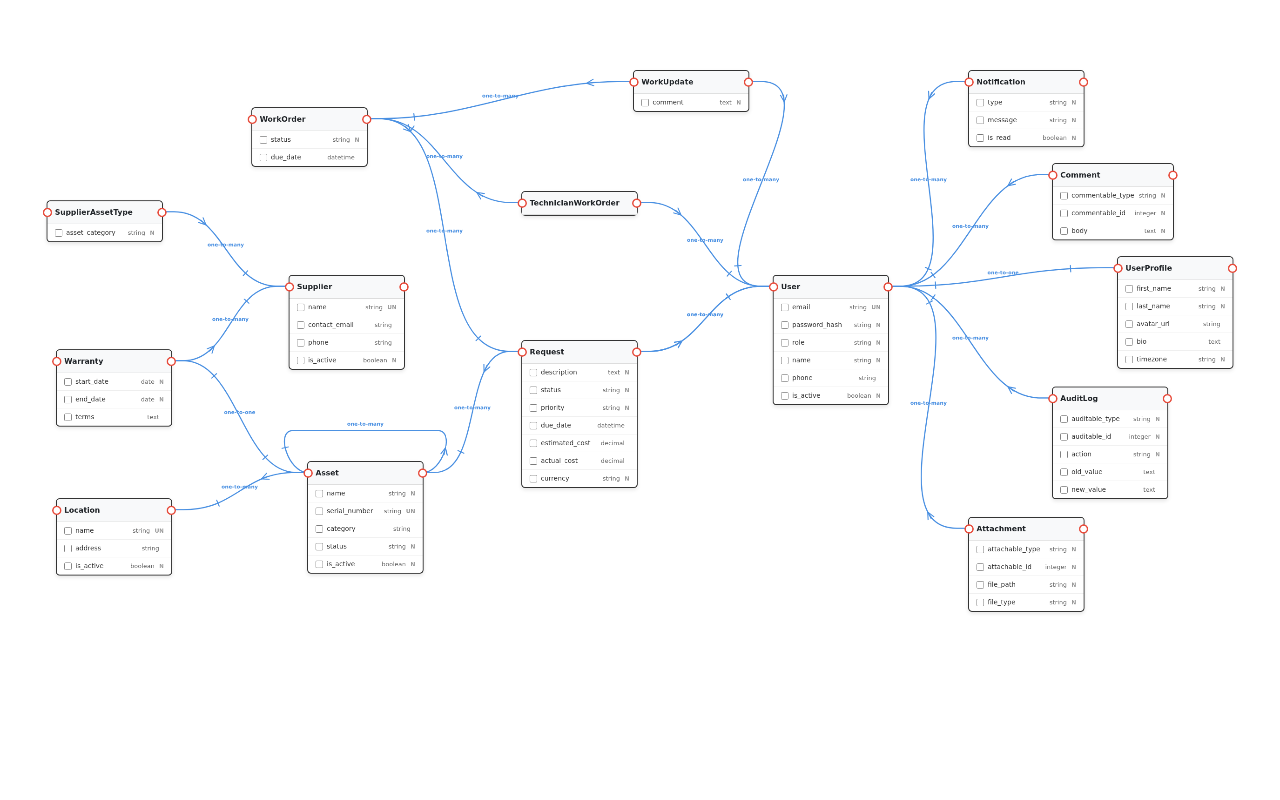
Administrators must be able to create, edit, and deactivate assets and locations. Assets can be linked to a location, have a parent asset (hierarchical), and have a one-to-one warranty record. This maintains the asset inventory and supports hierarchical relationships.
Acceptance criteria:
- Given an administrator on the Assets screen, when they create a new asset with name, serial number, location, and optional parent asset, then the asset is saved and appears in the asset list.
- Given an administrator viewing an asset detail, when they link a warranty record with start date, end date, and supplier, then the warranty is stored as a one-to-one record linked to the asset.
FR-5: Notifications and Escalation
The system must send notifications (in-app and email) for due-date reminders and escalation when a work order exceeds its expected completion date. This ensures timely response and accountability.
Acceptance criteria:
- Given a work order with a due date, when the due date is 24 hours away and the status is not 'Resolved' or 'Closed', then the assigned technician receives an in-app notification and an email reminder.
- Given a work order that is overdue by 48 hours, when the system checks daily, then the supervisor receives an escalation notification with the work order details.
FR-6: Search, Filter, and CSV Import/Export
Users must be able to search and filter requests, assets, and work orders by various criteria (status, priority, date range, keyword). Administrators can import assets via CSV and export any list to CSV. This supports data management and reporting.
Acceptance criteria:
- Given a user on the requests list, when they enter a keyword in the search bar and select a status filter, then the list displays only requests matching both criteria.
- Given an administrator on the Assets screen, when they upload a CSV file with columns name, serial_number, location_name, then the system creates assets and links them to existing locations; if a location name does not exist, the system creates a new location with that name automatically.
FR-7: Basic Cost and Performance Reports
Administrators must be able to view reports showing total maintenance cost per asset, average resolution time, and number of requests by priority. This provides insight into maintenance efficiency and cost tracking.
Acceptance criteria:
- Given an administrator on the Reports screen, when they select an asset and a date range, then the report displays total actual cost, number of work orders, and average resolution time in days.
- Given an administrator on the Reports screen, when they generate a performance report, then the report shows a table of requests grouped by priority with counts and average resolution times.
FR-8: Audit History
All state changes, assignments, and updates on requests and work orders must be recorded in an audit log with timestamp, user, and action. This provides traceability and compliance.
Acceptance criteria:
- Given any status change on a request, when the change is saved, then an audit entry is created with request_id, previous_status, new_status, user_id, and timestamp.
- Given an administrator viewing the audit log for a request, when they filter by date range, then the log displays only entries within that range.
FR-9: Comments on Requests and Work Orders
Users must be able to add comments to requests and work orders to facilitate communication. Comments are visible to all authorized users and are recorded with timestamp and author.
Acceptance criteria:
- Given an authenticated user viewing a request detail, when they enter a comment and submit, then the comment is saved and displayed in the comment thread with the user's name and timestamp.
- Given an authenticated user viewing a work order detail, when they enter a comment and submit, then the comment is saved and displayed in the comment thread with the user's name and timestamp.
FR-10: Many-to-Many Technician Work Order Assignment
Supervisors can assign multiple technicians to a single work order, and a technician can be assigned to multiple work orders. This supports collaborative repairs and flexible scheduling.
Acceptance criteria:
- Given a supervisor assigning a work order, when they select two technicians from the list and confirm, then both technicians are linked to the work order via the TechnicianWorkOrder junction table.
- Given a technician viewing their work orders, when they have been assigned to a work order along with another technician, then the work order appears in both technicians' lists.
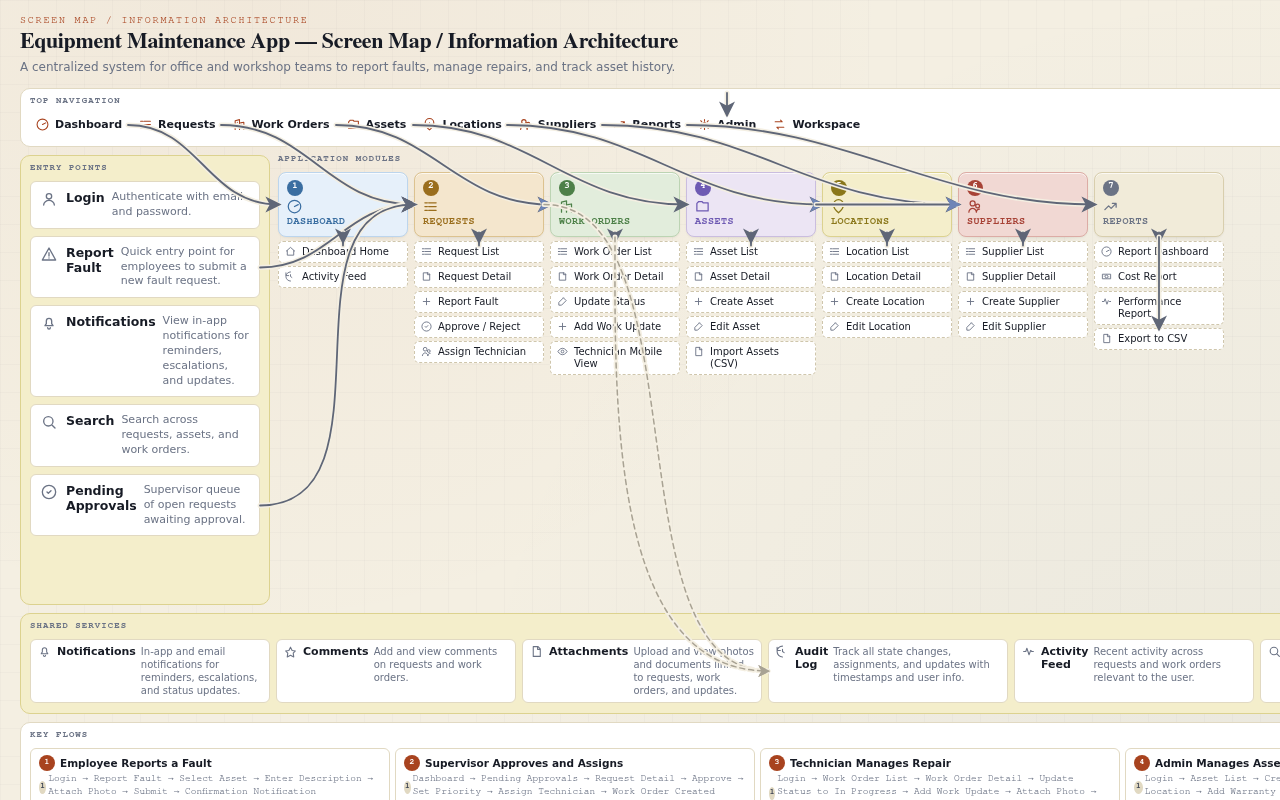
Screen / page inventory
- Dashboard — Role-based overview showing key metrics and pending items for the logged-in user.
- Elements: Summary cards showing counts of open requests, assigned work orders, overdue items (role-specific)., Recent activity feed showing latest updates on relevant requests/work orders.
- Request List and Detail — Searchable, filterable list of fault requests with ability to view details, approve, assign, and update.
- Elements: Filter bar with status, priority, date range, and keyword search., Request detail panel showing description, asset, location, priority, status, assigned technician(s), work updates, attachments, comment thread, and audit log.
- Asset Management — Administrator screen to manage assets, locations, suppliers, and warranty records.
- Elements: Asset list with search and filter by location, category, status., Asset detail/edit form with fields for name, serial number, location, parent asset, warranty record, and linked suppliers.
- Technician Mobile View — Mobile-friendly interface for technicians to view and update their work orders on site.
- Elements: Work order list sorted by priority and due date, with status badges., Work order detail with update status dropdown, comment field, camera/gallery attachment button, and comment thread.
Data model
User
| Field | Type | Notes |
|---|---|---|
id |
integer | Primary key, auto-increment. |
email |
string | Unique, indexed, max 255 chars, used for login. |
password_hash |
string | Bcrypt hash, max 255 chars. |
role |
enum('employee','supervisor','technician','administrator') | ASSUMED: role set based on typical office maintenance app. |
name |
string | Max 100 chars. |
phone |
string | Nullable, max 20 chars. |
is_active |
boolean | Soft-delete flag, default true. |
created_at |
datetime | Auto-set on creation. |
updated_at |
datetime | Auto-updated on modification. |
Location
| Field | Type | Notes |
|---|---|---|
id |
integer | Primary key, auto-increment. |
name |
string | Unique, max 200 chars. |
address |
string | Nullable, max 500 chars. |
is_active |
boolean | Soft-delete flag, default true. |
created_at |
datetime | Auto-set. |
Asset
| Field | Type | Notes |
|---|---|---|
id |
integer | Primary key, auto-increment. |
name |
string | Max 200 chars. |
serial_number |
string | Unique, max 100 chars. |
location_id |
foreign_key->Location | Nullable, indexed. |
parent_asset_id |
foreign_key->Asset | Nullable, self-referential for hierarchical links. |
category |
string | Nullable, max 100 chars, e.g. 'Printer', 'CNC Machine'. |
status |
enum('active','inactive','decommissioned') | ASSUMED: default 'active'. |
is_active |
boolean | Soft-delete flag, default true. |
created_at |
datetime | Auto-set. |
updated_at |
datetime | Auto-updated. |
Warranty
| Field | Type | Notes |
|---|---|---|
id |
integer | Primary key, auto-increment. |
asset_id |
foreign_key->Asset | Unique, one-to-one with Asset. |
supplier_id |
foreign_key->Supplier | Nullable. |
start_date |
date | Not null. |
end_date |
date | Not null, must be after start_date. |
terms |
text | Nullable. |
created_at |
datetime | Auto-set. |
Supplier
| Field | Type | Notes |
|---|---|---|
id |
integer | Primary key, auto-increment. |
name |
string | Unique, max 200 chars. |
contact_email |
string | Nullable, max 255 chars. |
phone |
string | Nullable, max 20 chars. |
is_active |
boolean | Soft-delete flag, default true. |
created_at |
datetime | Auto-set. |
Request
| Field | Type | Notes |
|---|---|---|
id |
integer | Primary key, auto-increment. |
reported_by |
foreign_key->User | Not null, employee who reported. |
asset_id |
foreign_key->Asset | Not null, indexed. |
description |
text | Not null, min 10 chars. |
status |
enum('open','approved','rejected','in_progress','resolved','closed') | ASSUMED: workflow statuses. |
priority |
enum('low','medium','high','critical') | ASSUMED: default 'medium'. |
approved_by |
foreign_key->User | Nullable, supervisor who approved. |
due_date |
datetime | Nullable. |
estimated_cost |
decimal(10,2) | Nullable, in USD (ASSUMED currency). |
actual_cost |
decimal(10,2) | Nullable, in USD. |
currency |
string | Default 'USD', max 3 chars. |
created_at |
datetime | Auto-set. |
updated_at |
datetime | Auto-updated. |
WorkOrder
| Field | Type | Notes |
|---|---|---|
id |
integer | Primary key, auto-increment. |
request_id |
foreign_key->Request | Not null, indexed. |
status |
enum('assigned','in_progress','on_hold','resolved','closed') | ASSUMED: workflow statuses. |
due_date |
datetime | Nullable. |
created_at |
datetime | Auto-set. |
updated_at |
datetime | Auto-updated. |
WorkUpdate
| Field | Type | Notes |
|---|---|---|
id |
integer | Primary key, auto-increment. |
work_order_id |
foreign_key->WorkOrder | Not null, indexed. |
user_id |
foreign_key->User | Not null, who added the update. |
comment |
text | Not null. |
created_at |
datetime | Auto-set. |
Attachment
| Field | Type | Notes |
|---|---|---|
id |
integer | Primary key, auto-increment. |
attachable_type |
string | Polymorphic type, valid values: 'Request', 'WorkOrder', 'WorkUpdate'. |
attachable_id |
integer | Polymorphic ID, indexed with attachable_type. |
file_path |
string | Not null, max 500 chars, path to stored file. |
file_type |
string | MIME type, e.g. 'image/jpeg', 'application/pdf'. |
uploaded_by |
foreign_key->User | Not null. |
created_at |
datetime | Auto-set. |
Comment
| Field | Type | Notes |
|---|---|---|
id |
integer | Primary key, auto-increment. |
commentable_type |
string | Polymorphic type, valid values: 'Request', 'WorkOrder'. |
commentable_id |
integer | Polymorphic ID, indexed with commentable_type. |
user_id |
foreign_key->User | Not null. |
body |
text | Not null. |
created_at |
datetime | Auto-set. |
AuditLog
| Field | Type | Notes |
|---|---|---|
id |
integer | Primary key, auto-increment. |
auditable_type |
string | Polymorphic type, valid values: 'Request', 'WorkOrder', 'Asset', 'User'. |
auditable_id |
integer | Polymorphic ID, indexed with auditable_type. |
user_id |
foreign_key->User | Nullable, who performed the action. |
action |
string | Max 50 chars, e.g. 'status_change', 'assignment', 'update'. |
old_value |
text | Nullable, JSON string of previous state. |
new_value |
text | Nullable, JSON string of new state. |
created_at |
datetime | Auto-set. |
Notification
| Field | Type | Notes |
|---|---|---|
id |
integer | Primary key, auto-increment. |
user_id |
foreign_key->User | Not null, indexed. |
type |
enum('reminder','escalation','status_update','assignment') | ASSUMED: notification types. |
message |
string | Max 500 chars. |
is_read |
boolean | Default false. |
created_at |
datetime | Auto-set. |
SupplierAssetType
| Field | Type | Notes |
|---|---|---|
id |
integer | Primary key, auto-increment. |
supplier_id |
foreign_key->Supplier | Not null, indexed. |
asset_category |
string | Not null, max 100 chars, e.g. 'Printer'. |
TechnicianWorkOrder
| Field | Type | Notes |
|---|---|---|
id |
integer | Primary key, auto-increment. |
technician_id |
foreign_key->User | Not null, indexed. |
work_order_id |
foreign_key->WorkOrder | Not null, indexed. |
Business rules
- A request cannot be assigned to a technician unless its status is 'approved'.
- A work order's due_date must be on or after the request's created_at date.
- When a work order status changes to 'resolved', the related request status must automatically update to 'resolved'.
- An asset's parent_asset_id cannot reference itself (no self-parenting).
- A warranty end_date must be after start_date.
- A technician may be assigned to a maximum of 10 active work orders (status not 'resolved' or 'closed') at any time; the system must warn the supervisor if this limit is exceeded.
Permissions
| Role | Capabilities |
|---|---|
| Employee | create:request; read:own_request; update:own_request_comment; read:asset; read:location |
| Supervisor | read:request; update:request_status; update:request_priority; assign:work_order; read:work_order; read:asset; read:location; read:report |
| Technician | read:assigned_work_order; update:work_order_status; create:work_update; create:attachment; create:comment; read:asset; read:location |
| Administrator | create:asset; read:asset; update:asset; delete:asset; create:location; read:location; update:location; delete:location; create:supplier; read:supplier; update:supplier; delete:supplier; create:user; read:user; update:user; delete:user; import:csv; export:csv; read:report; read:audit_log |
Integrations
- ASSUMED: Email service (SMTP) for sending notifications.
- ASSUMED: File storage service (local disk or S3-compatible) for attachments.
Non-functional requirements
- The system must support at least 100 concurrent users with response times under 2 seconds for list pages.
- All passwords must be hashed using bcrypt with a cost factor of at least 10.
- The mobile interface must be responsive and usable on screens as small as 320px width.
- Audit logs must be retained for at least 1 year (ASSUMED retention period).
Edge cases
- If an employee reports a fault for a decommissioned asset, the system should display a warning but still allow submission with a note that the asset is decommissioned.
- If a technician attempts to update a work order that is already 'closed', the system should reject the update and display an error message.
- If a CSV import contains a location name that does not exist, the system should create a new location with that name automatically.
- If a supervisor tries to assign a request to a technician who is already at maximum capacity (10 active work orders), the system should warn and require confirmation.
Out of scope
- Integration with external ERP or accounting systems.
- Multi-language/localization support beyond English.
- Real-time chat or messaging between users.
- Barcode or QR code scanning for asset identification.
Assumptions & open items
Assumed:
- Role set is limited to Employee, Supervisor, Technician, Administrator.
- Default priority for new requests is 'medium'.
- Request status workflow: open -> approved/rejected -> in_progress -> resolved -> closed.
- Work order status workflow: assigned -> in_progress -> on_hold -> resolved -> closed.
- Currency for cost fields is USD.
- Email service (SMTP) is available for notifications.
- File storage is local disk or S3-compatible.
- Maximum attachment file size is 10 MB.
- Allowed image types for attachments are JPEG and PNG.
- Audit logs are retained for at least 1 year.
- Escalation threshold for overdue work orders is 48 hours.
- Due-date reminder is sent 24 hours before due date.
- Maximum active work orders per technician before warning is 10.
- Asset statuses are 'active', 'inactive', 'decommissioned'.
- Notification types are 'reminder', 'escalation', 'status_update', 'assignment'.
- CSV import for assets expects columns: name, serial_number, location_name.
- The system uses bcrypt with cost factor 10 for password hashing.
- The system supports at least 100 concurrent users.
Coverage notes
- Functional requirements: 10 (with acceptance criteria: 10)
- Open assumptions: 18 (unresolved/conflicted: 0)
- Entities in data model: 14
- Screens: 4, Roles: 4, Journeys: 2